Character set issue with ATEN CS64US KVM

88A4DFBA-D399-4169-AFD0-19DF0C07846B.jpeg


IMG_2874.jpeg


IMG_2875.jpeg


Dear FreeBSD Gurus!

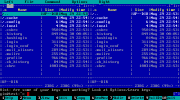
How to fix issue with characters set (if I make a right conclusion), see the picture above.

The monitor are connected trough ATEN KVM CS64US (latest firmware updated).

But in terminal app - no problem:

IMG_2973.jpeg


May be some corrections in loader.conf needed ?
 
Last edited:
No character issues with 4 port ATEN CS84U (just annoying issue with mouse disconnecting when switching ports and needing to restart moused + devd - will post separately once fully diagnosed).

[EDIT] Mouse issue resolved by removing all moused lines from rc.conf
 
Last edited:
I've seen similar garbled output on systems when the terminal can't display UTF-8 characters, for example when syscons(4) is the console driver, which is exactly here the case, taking the command prompts red cursor (visible in the left bottom corner of the image), and *.UTF-8 locale is set, which is the norm of the "default" login class in all currently supported FreeBSD versions:

/etc/login.conf
Code:
default:\
        ...
        :charset=UTF-8:\
        :lang=C.UTF-8:

EDIT

Just remove the backslash from "umask" and comment the last lines in the "default" class in /etc/login.conf
Code:
default:\
        ...
        :umask=022:
#       :charset=UTF-8:\
#       :lang=C.UTF-8:

cap_mkdb /etc/login.conf

Exit logged in user, log in again.

/EDIT

Try setting a different "charset" and "lang" in the users ~/.login_conf, or globally from /etc/login.conf. If from there, don't forget to run cap_mkdb /etc/login.conf to rebuild the database.

List with locale -a all available (non-UTF-8 and UTF-8) locales (those are also found under /usr/share/locale), or specific, for Ukrainian for example locale -a | grep uk_UA .

See also handbook Chapter 25. Localization - i18n/L10n Usage and Setup
 
I've seen similar garbled output on systems when the terminal can't display UTF-8 characters, for example when syscons(4) is the console driver, which is exactly here the case, taking the command prompts red cursor (visible in the left bottom corner of the image), and *.UTF-8 locale is set, which is the norm of the "default" login class in all currently supported FreeBSD versions:

/etc/login.conf
Code:
default:\
        ...
        :charset=UTF-8:\
        :lang=C.UTF-8:

EDIT

Just remove the backslash from "umask" and comment the last lines in the "default" class in /etc/login.conf
Code:
default:\
        ...
        :umask=022:
#       :charset=UTF-8:\
#       :lang=C.UTF-8:

cap_mkdb /etc/login.conf

Exit logged in user, log in again.
Not help
/EDIT

Try setting a different "charset" and "lang" in the users ~/.login_conf, or globally from /etc/login.conf. If from there, don't forget to run cap_mkdb /etc/login.conf to rebuild the database.

List with locale -a all available (non-UTF-8 and UTF-8) locales (those are also found under /usr/share/locale), or specific, for Ukrainian for example locale -a | grep uk_UA .
Trying several times, - not working in my case.
Note, this is FreeBSD 15-CURRENT

Ideally, I need to start btop, and mc file manager. But with both - I have issue…

May be this linked to this old and another one issue?

Thank You for suggesting!
 
Last edited:
I need to start btop, and mc file manager. But with both - I have issue…
Is the system configured to use the syscons(4) driver?

The image in your opening post shows in the bottom, left corner a red block cursor at the "root@beastiebox" prompt. This indicates the use of syscons(4). Is this on 15-CURRENT also the case? sysctl kern.vty will show which driver is used.

If it's syscons(4), this driver doesn't support UTF-8. Without UTF-8 support, neither mc or btop will display correctly.
 
T-Daemon's suggestion is important.

If misc/mc was compiled with ncurses library, try:
c-shells
Code:
setenv NCURSES_NO_UTF8_ACS 1
sh-shells
Code:
NCURSES_NO_UTF8_ACS=1
export NCURSES_NO_UTF8_ACS
If it was compiled (or from packages) with slang library I think the above setting has no effects.
Also set in menu (F9) Options > Display bits... to UTF-8 and check Full 8 bits input checkbox.
 
UPDATE:
In terminal app (all availible emulation types
as xterm, xterm256-color, vt100),- no problem, please see attached picture in head message…
 
kern.vty: sc

Hi Sergei_Shablovsky,

the sc(4) console driver doesn't support UTF-8 (https://wiki.freebsd.org/Newcons#syscons.284.29_Comparison).

Without UTF-8 support, sysutils/btop will not display the TUI correctly. This is clearly stated in the projects Githup repository "Prerequisites" documentation:
Also needs a UTF8 locale and a font that covers:


There is good news about misc/mc. When compiled from ports with NCURSES enabled, it will display the TUI correctly in sc(4). This requires devel/ncurses as run dependency installed.
Rich (BB code):
/usr/ports/misc/mc # make showconfig
===> The following configuration options are available for mc-4.8.32:
...
====> Screen library: you have to select exactly one of them
     SLANG=off: S-Lang console graphics library support
     NCURSES=on: Console (text) interface support


For sysutils/btop, as I see it, run a xterminal in xorg on the local machine (if possible), or ssh(1) from another machine with UFT-8 console support. In this case, misc/mc doesn't need a NCURSES compiled version.


misc/mc compiled with NCURSES=on, running on sc(4).

Note the red block cursor in the bottom, left corner of the image at the command prompt, which indicates the us of sc(4)).

mc-in-sc.png


EDIT: What was the reason again to use sc(4) and not vt(4) ? Was it because of resolution of the integrated Matrox MGA G200E in a Fujitsu mainboard? (Thread change-resolution-to-1600x1200-on-integrated-matrox-mga-g200e-in-d2939-fujitsu-motherboard.82686)
 
Back
Top