is my newly installed release 14.2 functioning?

cat /etc/resolv.conf
cat: /etc/resolv.conf: No such file or directory
It seems you haven't configured the VirtualBox VM's network adapter during installation. Otherwise a /etc/rc.conf "ifconfig" entry would have been created, and /etc/resolv.conf would have been populated with the USB tethered devices router address as the nameserver.

Or did you configure the interface with a static IP address manually?


I found /etc/rc.conf but don't know which editor to use, "nano" is not present
Use ee(1) - easy editor instead.


Familiarize yourself with the FreeBSD handbook. For a FreeBSD newbie it should be the primary source of information how to handle the operating system. You don't need to read the whole handbook to find a specific topic, just search for keywords.

You need an text editor? Look it up in the handbook. The online handbook has a search text box on the top left, above the table of contents. Or use the internet browser search function in the Single HTML page.

The handbook is also available as a 3rd party packages, including other documentation:

misc/freebsd-doc-en, package name "en-freebsd-doc".

Description
Code:
The whole documentation set from the FreeBSD Documentation Project:
Handbook, FAQ, articles and more.

Searching for an text editor in the handbook you will find the 3.10. Text Editors chapter. There are two text editors in base FreeBSD, the aforementioned ee(1) editor, and vi(1), a more sophisticated text editor.

If you have problems understanding the documentation, or a documentation doesn't reflect real world application, just ask.
 
now there sure happened certain achievements: I learned the way of getting out of the read-only system? managed to add a user to wheel group (still "su -" command is pronaounced BAD)
Yet my main concern -- neetwork sees no progress. That's how I followed the Handbook
root@:~sysrc ifconfig em0="127.0.0.1 netmask 255.255.255.0"
root@:~ vi /etc/resolv.config
nameserver 8.8.8.8
nameserver 8.8.4.4
serviceroot@:~ service netif restart && service routing restart
root@:~ping -c2 www.FreeBSD.org
root@:~ ping: cannot resolve FreeBSD.org: Name does not resolve
root@:~ sysrc ifconfig_em0="DHCP"
root@:~ service netif restart
root@:~ dhclient em0
root@:~ping -c2 www.FreeBSD.org
root@:~ ping: cannot resolve FreeBSD.org: Name does not resolve
"...ifconfig: interface wlan0 does not exist"
Which leaves me at a loss. Help if you can
 
now there sure happened certain achievements: I learned the way of getting out of the read-only system? managed to add a user to wheel group (still "su -" command is pronaounced BAD)
Yet my main concern -- neetwork sees no progress. That's how I followed the Handbook
root@:~sysrc ifconfig em0="127.0.0.1 netmask 255.255.255.0"
root@:~ vi /etc/resolv.config
nameserver 8.8.8.8
nameserver 8.8.4.4
serviceroot@:~ service netif restart && service routing restart
root@:~ping -c2 www.FreeBSD.org
root@:~ ping: cannot resolve FreeBSD.org: Name does not resolve
root@:~ sysrc ifconfig_em0="DHCP"
root@:~ service netif restart
root@:~ dhclient em0
root@:~ping -c2 www.FreeBSD.org
root@:~ ping: cannot resolve FreeBSD.org: Name does not resolve
"...ifconfig: interface wlan0 does not exist"
Which leaves me at a loss. Help if you can
To start, comment out the /etc/rc.conf line that mentions the 127.0.0.1 IP address. It does gum up the networking.

After that, reboot the VM and try again.
 
service dhclient restart em0

Assuming em0 is the correct interface, if it's a VM it could be vtnet0. What does ifconfig -l output?
 
root@:~ vi /etc/resolv.config
nameserver 8.8.8.8
nameserver 8.8.4.4
...
root@:~ping -c2 www.FreeBSD.org
root@:~ ping: cannot resolve FreeBSD.org: Name does not resolve
/etc/resolv.config has no effect due to invalid file name. The correct file name is /etc/resolv.conf, not .config.

Also, without a /etc/resolvconf.conf: resolvconf=NO besides /etc/resolv.conf, the nameserver entries you have set manually will be overwritten by resolvconf(8) on system reboot with the hosts ue0 IP address.

root@:~ sysrc ifconfig_em0="DHCP"
...
"...ifconfig: interface wlan0 does not exist"
Why is ifconfig reporting a wlan0 interface in the FreeBSD VM?

Is there a wlan0 entry in /etc/rc.conf, or a manually create interface?
 
Is there a wlan0 entry in /etc/rc.conf, or a manually create interface?
sehrguey-the-2nd ethernet/wired or wireless? how do you intend to connect to the internet via the host? if you are wired, then ifconfig em0="" is correct, but i recommend automatic configuration by setting it to DHCP. But follow the advice offered by SirDice and tell us what you see when you run the suggested command (ifconfig -l, that is, ifconfig+space+hyphen+lowercase letter ell [k-L-mnop]).

VirtualBox is not like FreeBSD. VirtualBox is very easy to click your way to success with a GUI installation. One simply needs to enable the Network Adapter and choose an appropriate attachment, but this needs to be done when the VM is not running.

Please let us know how you intend to connect to the internet on the host, so that someone can advise you how to configure the network in FreeBSD. :)
 
VirtualBox is not like FreeBSD. VirtualBox is very easy to click your way to success with a GUI installation. One simply needs to enable the Network Adapter and choose an appropriate attachment, but this needs to be done when the VM is not running.
there are 7 choices invirtual box to attach this freebsd vm's network to:
1. NAT
2. Bridged Adapter
3. Internal Network
4. Host-only Adapter
5. Generic Driver
6. NAT Network
7. Cloud network [Experimental]
NAT didn't work for me (possibly because of not being properly configured) neither does Bridged Adapter. and yes< I play with GUI when the vm is shut
 
Why is ifconfig reporting a wlan0 interface in the FreeBSD VM?

Is there a wlan0 entry in /etc/rc.conf, or a manually create interface?
after failures at setting network up following the Handbook I went on in its chapter 7 and asked about wlan (after all my PC gets the internet from wifi thru a tethered Android) but no wlan is mentioned in /etc/rc.conf and no tries were made at creating an interface manually
 
Then service dhclient restart em0 will redo the DHCP requests, a service netif restart only works for static addresses on interfaces, not DHCP.
 
there are 7 choices invirtual box to attach this freebsd vm's network to:
1. NAT
2. Bridged Adapter
3. Internal Network
4. Host-only Adapter
5. Generic Driver
6. NAT Network
7. Cloud network [Experimental]
NAT didn't work for me (possibly because of not being properly configured) neither does Bridged Adapter. and yes< I play with GUI when the vm is shut
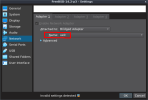
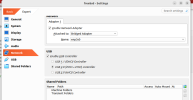
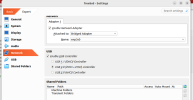
You really need Bridged Adapter, and enable it.

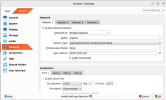
In the settings offered by VirtualBox, that's the stuff you'll need.

Boot the VM with those settings.

Once inside the VM, you'll see that it shows up as em0.

Use DHCP with em0.

Then use the usual tools (ifconfig and ping) to verify that it works.
 
Tested in Android USB tethering mode on a FreeBSD host, VirtualBox FreeBSD guest.

On Ubuntu host, if a firewall is enabled, make sure to let VBox network traffic through.

NAT didn't work for me (possibly because of not being properly configured)
When NAT configured, set in the FreeBSD VM:

/etc/rc.conf
Code:
ifconfig_em0="DHCP"
This will configure the nameserver in /etc/resolv.conf automatically with the Android systems router IP. See example in [1]. Remove /etc/resolvconf.conf if present.

Please note that ping(8) is not supported on VBox NAT configured network adapter!

Try pkg command to bootstrap ports-mgmt/pkg package management tool.


neither does Bridged Adapter.
When configured "Bridged Adapter" ensure the network adapter is set to the hosts "ue0" interface [2], and /etc/rc.conf has ifconfig_em0="DHCP" entry. Remove /etc/resolvconf.conf if present.

Note that ping(8) is supported in this configuration.


and yes< I play with GUI when the vm is shut
VBox network adapters can be configured while the VM is running, no need to shut down.


[1]
The red highlighted is the Android system router IP in my setup. From /var/log/messages on the FreeBSD host (Ubuntu should have a similar log):
Rich (BB code):
May  6 11:47:25 *** kernel: ugen0.3: <SAMSUNG SAMSUNGAndroid> at usbus0
May  6 11:47:25 *** kernel: urndis0 on uhub0
May  6 11:47:25 *** kernel: urndis0: <SAMSUNG SAMSUNGAndroid, class 224/0, rev 2.00/ff.ff, addr 2> on usbus0
May  6 11:47:25 *** kernel: ue0: <USB Ethernet> on urndis0
May  6 11:47:25 *** kernel: ue0: Ethernet address: *****************
May  6 11:47:30 *** dhclient[1867]: New IP Address (ue0): 192.168.42.46
May  6 11:47:30 *** dhclient[1871]: New Subnet Mask (ue0): 255.255.255.0
May  6 11:47:30 *** dhclient[1875]: New Broadcast Address (ue0): 192.168.42.255
May  6 11:47:30 *** dhclient[1879]: New Routers (ue0): 192.168.42.129
The "nameserver" in the VM's /etc/resolv.conf is set to this address.


[2]
vbox-adapter-conf.png
 
sehrguey-the-2nd

I use ethernet em0 wired connection. I use automatic detection of a static IP address. I only need to connect my ethernet cable and FreeBSD does the rest. For further help and steps for wireless, please see the Handbook:

My VirtualBox Network Settings:

Network:
[x] Enable Network Adapter
Attached to: Bridged Adapter
Name: the name of your adapter should show here, auto detected by VirtualBox
TUN/TAP drivers may also appear in the list

Advanced>
Adapter Type: Intel PRO/1000 MT Desktop (8254 OEM)
Promiscuous Mode: Deny
MAC Adress: should be copied from your card
[x] Cable Connected

FreeBSD settings to configure static IP:
/etc/rc.conf
ifconfig_em0="DHCP"

tip: if your network card is not detected/configured, then service dhclient restart em0 is useless.
 
You really need Bridged Adapter, and enable it.

In the settings offered by VirtualBox, that's the stuff you'll need.

Boot the VM with those settings.

Once inside the VM, you'll see that it shows up as em0.

Use DHCP with em0.
Bridged Adapter was set yet in the virtualbox GUI there is no em0 only enp3s0
#ifconfig -l
em0 lo0
#ping yahoo.com
ping: cannot resolve yahoo.com: Name does not resolve
 

Attachments

  • Screenshot from 2025-05-07 09-48-50.png
    Screenshot from 2025-05-07 09-48-50.png
    79.7 KB · Views: 356
service dhclient restart em0

Does that get an IP address? If DHCP doesn't work then you won't have an IP address, and by extension name resolving won't work either. DNS needs a working IP configuration, it doesn't work without it.

When you build a house, you don't start building the roof first, you start with the foundation. Fix IP connectivity first, then worry about name resolving.
 
in NAT configuration there is no em0
"em0" is the network interface name inside the FreeBSD guest VM, no matter to which virtual adapter adapter (NAT, Bridged, or other) the VM is attached to. It doesn't appear in the VM's network settings, only host network interface names are listed.

only
enx428bd204fa80
Bridged Adapter was set yet in the virtualbox GUI there is ... only enp3s0
"enp3s0" must be the ethernet interface name.

"enx428bd204fa80" [1] could be the USB tethering device interface name on the Ubuntu host. If only "enp3s0" is listed in "Bridged Adapter Name" and not "enx428bd204fa80" show us please all network information of the Ubuntu host and FreeBSD guest ( ifconfig). Make sure Android USB tethering is activated on the host before executing ifconfig, and before starting the VM.

Furthermore, show the VM network adapter info as well. On the Ubuntu host:
Code:
% vboxmanage showvminfo <FreeBSD_VM_name> | grep MAC


[1]
composed from "enx<12_digit_MAC_address>"
 
sehrguey-the-2nd

I use ethernet em0 wired connection. I use automatic detection of a static IP address. I only need to connect my ethernet cable and FreeBSD does the rest. For further help and steps for wireless, please see the Handbook:

My VirtualBox Network Settings:

Network:
[x] Enable Network Adapter
Attached to: Bridged Adapter
Name: the name of your adapter should show here, auto detected by VirtualBox
TUN/TAP drivers may also appear in the list

Advanced>
Adapter Type: Intel PRO/1000 MT Desktop (8254 OEM)
Promiscuous Mode: Deny
MAC Adress: should be copied from your card
[x] Cable Connected

FreeBSD settings to configure static IP:
/etc/rc.conf
ifconfig_em0="DHCP"

tip: if your network card is not detected/configured, then service dhclient restart em0 is useless.
same here but I don't know what TUN/TAN drivers are
When you build a house, you don't start building the roof first, you start with the foundation. Fix IP connectivity first
:~# cat /etc/rc.conf
hostname="freebsd"
#ifconfig_em0="192.168.0.150 netmask 255.255.255.0"
ifconfig_em0_ipv6="inet6 accept_rtdv""
sshd_enable="YES"
moused_nondefault_enable="NO"
dumpdev="AUTO"
zfs_enable="YES"
ifconfig_em0="192.168.0.150 netmask 255.255.255.0"
defaultrouter="192.168.1.1"
ifconfig_em0="DHCP"

:~# cat /etc/resolv.conf:
nameserver 8.8.8.8
nameserver 8.8.4.4

:~# service netif restart && service routing restart
:~# ping -c2 www.FreeBSD.org
ping: cannot resolve www.FreeBSD.org: Name does not resolve

and now I have no idea what else IP address can I suggest for my roofless foundation
truly Yours
 

Attachments

  • Screenshot from 2025-05-07 10-14-36.png
    Screenshot from 2025-05-07 10-14-36.png
    107.9 KB · Views: 364
Code:
ifconfig_em0="192.168.0.150 netmask 255.255.255.0"
{...}
ifconfig_em0="DHCP"
Don't define it twice. It's effectively set to DHCP now, not the static address, the second assignment overrules the first.

# service netif restart && service routing restart
Doesn't work for DHCP. Use service dhclient restart em0. You typically get an IP address, subnet mask, gateway address and one or more DNS server addresses from DHCP. Which means you do NOT need to set them yourself.

Use this for static addresses:
Code:
ifconfig_em0="192.168.0.150 netmask 255.255.255.0"
defaultrouter="192.168.1.1"
OR this for dynamic addresses (DHCP):
Code:
ifconfig_em0="DHCP"

Not both.
 
information of the Ubuntu host and FreeBSD guest ( ifconfig). Make sure Android USB tethering is activated on the host before executing ifconfig, and before starting the VM.

Furthermore, show the VM network adapter info as well
Ubuntu host-machine:
:~$ ifconfig
enp3s0: flags=4099<UP,BROADCAST,MULTICAST> mtu 1500
ether f0:79:59:94:bd:d1 txqueuelen 1000 (Ethernet)
RX packets 0 bytes 0 (0.0 B)
RX errors 0 dropped 0 overruns 0 frame 0
TX packets 0 bytes 0 (0.0 B)
TX errors 0 dropped 0 overruns 0 carrier 0 collisions 0

enx428bd204fa80: flags=4163<UP,BROADCAST,RUNNING,MULTICAST> mtu 1500
inet 192.168.42.29 netmask 255.255.255.0 broadcast 192.168.42.255
inet6 fe80::1ec:a41a:dc16:6485 prefixlen 64 scopeid 0x20<link>
ether 42:8b:d2:04:fa:80 txqueuelen 1000 (Ethernet)
RX packets 49859 bytes 40663285 (40.6 MB)
RX errors 2 dropped 0 overruns 0 frame 2
TX packets 40705 bytes 11365760 (11.3 MB)
TX errors 0 dropped 0 overruns 0 carrier 0 collisions 0

lo: flags=73<UP,LOOPBACK,RUNNING> mtu 65536
inet 127.0.0.1 netmask 255.0.0.0
inet6 ::1 prefixlen 128 scopeid 0x10<host>
loop txqueuelen 1000 (Local Loopback)
RX packets 14842 bytes 1330111 (1.3 MB)
RX errors 0 dropped 0 overruns 0 frame 0
TX packets 14842 bytes 1330111 (1.3 MB)
TX errors 0 dropped 0 overruns 0 carrier 0 collisions 0
---------------------------
:~# cat /etc/rc.conf
hostname="freebsd"
#ifconfig_em0="192.168.0.150 netmask 255.255.255.0"
ifconfig_em0_ipv6="inet6 accept_rtdv""
sshd_enable="YES"
moused_nondefault_enable="NO"
dumpdev="AUTO"
zfs_enable="YES"
ifconfig_em0="192.168.0.150 netmask 255.255.255.0"
defaultrouter="192.168.1.1"
ifconfig_em0="DHCP"

:~# cat /etc/resolv.conf:
nameserver 8.8.8.8
nameserver 8.8.4.4

:~# service netif restart && service routing restart
:~# ping -c2 www.FreeBSD.org
ping: cannot resolve www.FreeBSD.org: Name does not resolve

--------------------
the vm ifconfig cannot be copy-pasted because of lacking Extension-packs due to the inet absence,
attempt at a screenshot kicks the ifconfig lines out replacing with a fresh page to login
copying manually seems hopeless because of too many possible typos on the way
--------------------------
:~$ vboxmanage showvminfo freebsd | grep MAC
NIC 1: MAC: 080027CDCA40, Attachment: Bridged Interface 'enp3s0', Cable connected: on, Trace: off (file: none), Type: 82540EM, Reported speed: 0 Mbps, Boot priority: 0, Promisc Policy: deny, Bandwidth group: none
 
Back
Top