I use startx, but your suggestion makes no difference.Is your LXDE started from a display manager that starts consolekit as well?
If manually starting it withstartx, could you please try "exec dbus-launch --exit-with-x11 ck-launch-session startlxde" in your ~/.xinitrc to see if that works?
It looks like I have screwed up something in LXDE as I suddenly get Openbox sessions starting up when pressing UP in ee.
This error occurred on a different laptop I am checking, I just found that this particular error occurs if dbus is not running, Once dbus is enabled this error disappears and I get a full menu when selecting logout. Unfortunately I can't get this working on my other laptop.After making numerous changes to .xinitc I get this variation which reports that an error has occurred but without giving any specifics. Has anyone come across this? My suspicion is that it has something to do with consolekit.
View attachment 27622
D-Bus always works for me. It’s strange that you’re having the issue on a different laptop. How is D-Bus linked to the hardware? Does FreeBSD have UPower? If so, perhaps the problem stems from a different implementation on the second laptop? This might be off-topic, but here is how it all ties together in Alpine Linux + LXQt.Unfortunately I can't get this working on my other laptop.
~ $ pstree | grep dbus | |-{gdbus}
|-at-spi-bus-laun-+-dbus-daemon
| |-{gdbus}
|-at-spi2-registr-+-{gdbus}
|-2*[dbus-daemon]
|-dbus-launch
|-gvfs-mtp-volume-+-{gdbus}
| |-{gdbus}
| | |-{gdbus}
| |-{gdbus}
|-supervise-daemo---polkitd-+-{gdbus}
| | | |-{gdbus}
| | | |-{gdbus}
| | | |-{gdbus}
| | | | |-{gdbus}
| | | |-{gdbus}
| |-{gdbus}
`-upowerd-+-{gdbus} ~ $ env | grep dbusDBUS_SESSION_BUS_ADDRESS=unix:path=/tmp/dbus-BTPTnjAzuF,guid=c710ea2fe8d79192d753fba86acca4a4 $ pstree | grep dbus |--= 02039 messagebus /usr/local/bin/dbus-daemon --system
|--= 02223 hkuser /usr/local/bin/dbus-daemon --syslog --fork --print-pid 5 --print-address 7 --session
| | \--- 02567 hkuser grep dbus
|--- 02222 hkuser dbus-launch --exit-with-x11 ck-launch-session startlxqt`D-Bus always works for me. It’s strange that you’re having the issue on a different laptop. How is D-Bus linked to the hardware? Does FreeBSD have UPower? If so, perhaps the problem stems from a different implementation on the second laptop? This might be off-topic, but here is how it all ties together in Alpine Linux + LXQt.
~ $ pstree | grep dbus
Bash:| |-{gdbus} |-at-spi-bus-laun-+-dbus-daemon | |-{gdbus} |-at-spi2-registr-+-{gdbus} |-2*[dbus-daemon] |-dbus-launch |-gvfs-mtp-volume-+-{gdbus} | |-{gdbus} | | |-{gdbus} | |-{gdbus} |-supervise-daemo---polkitd-+-{gdbus} | | | |-{gdbus} | | | |-{gdbus} | | | |-{gdbus} | | | | |-{gdbus} | | | |-{gdbus} | |-{gdbus} `-upowerd-+-{gdbus}
Check this out:
~ $ env | grep dbus
Code:DBUS_SESSION_BUS_ADDRESS=unix:path=/tmp/dbus-BTPTnjAzuF,guid=c710ea2fe8d79192d753fba86acca4a4
DBUS_SESSION_BUS_ADDRESS=unixD-Bus always works for me. It’s strange that you’re having the issue on a different laptop. How is D-Bus linked to the hardware? Does FreeBSD have UPower? If so, perhaps the problem stems from a different implementation on the second laptop? This might be off-topic, but here is how it all ties together in Alpine Linux + LXQt.
~ $ pstree | grep dbus
Bash:| |-{gdbus} |-at-spi-bus-laun-+-dbus-daemon | |-{gdbus} |-at-spi2-registr-+-{gdbus} |-2*[dbus-daemon] |-dbus-launch |-gvfs-mtp-volume-+-{gdbus} | |-{gdbus} | | |-{gdbus} | |-{gdbus} |-supervise-daemo---polkitd-+-{gdbus} | | | |-{gdbus} | | | |-{gdbus} | | | |-{gdbus} | | | | |-{gdbus} | | | |-{gdbus} | |-{gdbus} `-upowerd-+-{gdbus}
Check this out:
~ $ env | grep dbus
Code:DBUS_SESSION_BUS_ADDRESS=unix:path=/tmp/dbus-BTPTnjAzuF,guid=c710ea2fe8d79192d753fba86acca4a4
 ath=/tmp/dbus-S8VfSA801X,guid=dab5370ebf2d4605c31f89b46acd3697
Don't know. If I recall correctly, I've never tried Openbox.Does Openbox underpin Mate?
My system was working fine previously until I tried to find out why I got the initial freedesktop error.
It sounds like a pkg update must have caused my problem, but it is difficult to pinpoint what happened,
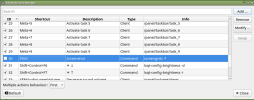
I fixed this problem simply. Yes, when you launch a terminal in X, pressing the up arrow key triggers a screengrab.Can anyone tell me if the action of pressing UP arrow whilst in a terminal under LXDE is defined by
Can anyone tell me if the action of pressing UP arrow whilst in a terminal under LXDE is defined by
/root/.config/openbox/lxde-rc.xml
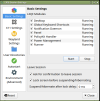
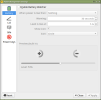
Thanks, but I'm not exactly sure what you have shown me a picture of.I fixed this problem simply. Yes, when you launch a terminal in X, pressing the up arrow key triggers a screengrab.
I have been using LXDE for many years and install it on all my systems.There is a FreeBSD wiki on LXDE
You do need consolekit and to be a member, iirc, the wheel group. Dbus needs to be running system wide.
LXQt Settings -> Shortcut Keys.Thanks, but I'm not exactly sure what you have shown me a picture of.