Solved Touchscreen Xorg - strange behavior

I got cheap 14" touch screen , touch works but not the way as intended.
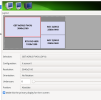
My touch screen acts like whole X Screen 0 and not as a separate for my touch monitor ( shows separate screen, but if i touch my screen and depends where i touch - if i have 2x2 screen setup and i touch top right on my touch - it clicks on my top right monitor )
I dont use Xinerama as i dont know how to use it.
Is there a way for me to make my touch screen act as solo touch screen ?
 

Attachments

  • screens.png
    screens.png
    77.1 KB · Views: 22
Maybe try out xrandr settings... But what do you want the touchscreen to show? Is it a combined desktop where you can move the mouse over different displays?
It's possible to convert raw usb-data from the touchscreen to X screen coordinates and simulate a click on that point or make a program react on it, but it's complicated and hardware-specific. There may be an easier way.
 
Maybe try out xrandr settings... But what do you want the touchscreen to show? Is it a combined desktop where you can move the mouse over different displays?
It's possible to convert raw usb-data from the touchscreen to X screen coordinates and simulate a click on that point or make a program react on it, but it's complicated and hardware-specific. There may be an easier way.
Yes, my 1 screen combines 4 screens for touch only.
I use usb-c for touch, hdmi for display.
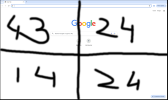
Ive attached my 14 touch screen image how it acts ( when touch function is active and i separated in the way my monitors are set up in nvidia-settings) when i click on something ... if u see, i have chrome open and if i click on Gmail, Images Add shortcut - i would not be able to click on them but my mouse ends up on 24" (top right one ) as if with that corner i control my 24" screen.
Sorry, dont know how to explain in other ways.
 

Attachments

  • 14.png
    14.png
    197.7 KB · Views: 20
I don't understand. You have 5 touchscreens? You have to explain the goal.
i have 1 touch screen, 3 normal screens, but i cant use my touch screen because it acts like a whole 4 screens combined ( on touch functions only )
My screen setup is like this:
43 - 24
14 - 24
Ive attached 2 pictures:
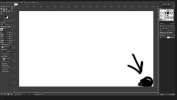
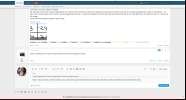
One picture is freebsd forum on 14 inch touch screen , second is 24 inch ( bottom right ) with gimp and arrow pointing to black dot.
If i click on my 14 inch screen POST REPLY ( see picture ) i actually click/end up with my mouse on second pic where is that black dot.
You get the picture ? If no - i cant explain you better.
 

Attachments

  • 24.png
    24.png
    203.8 KB · Views: 18
  • function.png
    function.png
    166.9 KB · Views: 19
The touchscreen must show the entire desktop that the 3 other screens are part of? Not sure if that's possible because a combined desktop of 3 monitors with different resolutions is far from a reasonable rectangle. What should that look like on 14" 4:3?
 
Could you, just for test, try to disable non-touchscreen output, so you can test with just touch screen whether behaviour is normal in that case?
This would help to isolate the problem - with your irregular screen setup things seems to be just weird, but I think I see the issue you are writing about.
 
Could you, just for test, try to disable non-touchscreen output, so you can test with just touch screen whether behaviour is normal in that case?
This would help to isolate the problem - with your irregular screen setup things seems to be just weird, but I think I see the issue you are writing about.
If non--touch screens are disabled , i have no issues with touch. it acts like it should.
 
Also, what does output of command
Code:
xrandr | grep -v ^\
show? (The last character after backslash is a space, so only lines not starting with space are shown).
 
Also, what does output of command
Code:
xrandr | grep -v ^\
show? (The last character after backslash is a space, so only lines not starting with space are shown).

kodasBSD% xrandr | grep -v ^\
Screen 0: minimum 8 x 8, current 6400 x 3360, maximum 32767 x 32767
DP-0 connected primary 3840x2160+0+0 (normal left inverted right x axis y axis) 700mm x 390mm
DP-1 disconnected (normal left inverted right x axis y axis)
DP-2 connected 2560x1440+3840+1440 (normal left inverted right x axis y axis) 526mm x 296mm
DP-3 disconnected (normal left inverted right x axis y axis)
HDMI-0 connected 1920x1200+960+2160 (normal left inverted right x axis y axis) 346mm x 194mm
DP-4 connected 2560x1440+3840+0 (normal left inverted right x axis y axis) 526mm x 296mm
DP-5 disconnected (normal left inverted right x axis y axis)
 
OK, I see - DP-0 is your touch screen, right?
And one more bit of config info, please...
Show us the output of command
Code:
xinput list
Your issue is you need correctly assign the touch area to one output device.
 
OK, I see - DP-0 is your touch screen, right?
And one more bit of config info, please...
Show us the output of command
Code:
xinput list
Your issue is you need correctly assign the touch area to one output device.
No, HDMI is my touch input.
Code:
kodasBSD% xinput list
⎡ Virtual core pointer                          id=2    [master pointer  (3)]
⎜   ↳ Virtual core XTEST pointer                id=4    [slave  pointer  (2)]
⎜   ↳ System mouse                              id=7    [slave  pointer  (2)]
⎜   ↳ Corsair CORSAIR K70 RGB MK.2 Mechanical Gaming Keyboard Consumer Control  id=8[slave  pointer  (2)]
⎜   ↳ Corsair CORSAIR K70 RGB MK.2 Mechanical Gaming Keyboard Mouse     id=9    [slave  pointer  (2)]
⎜   ↳ Razer Razer Basilisk V2 Mouse             id=11   [slave  pointer  (2)]
⎜   ↳ Razer Razer Basilisk V2 Consumer Control  id=12   [slave  pointer  (2)]
⎜   ↳ wch.cn TouchScreen                        id=20   [slave  pointer  (2)]
⎜   ↳ wch.cn TouchScreen Tablet                 id=21   [slave  pointer  (2)]
⎣ Virtual core keyboard                         id=3    [master keyboard (2)]
    ↳ Virtual core XTEST keyboard               id=5    [slave  keyboard (3)]
    ↳ System keyboard multiplexer               id=6    [slave  keyboard (3)]
    ↳ SteelSeries SteelSeries Arctis 7 Consumer Control id=10   [slave  keyboard (3)]
    ↳ Razer Razer Basilisk V2 System Control    id=13   [slave  keyboard (3)]
    ↳ Sleep Button                              id=14   [slave  keyboard (3)]
    ↳ Power Button                              id=15   [slave  keyboard (3)]
    ↳ AT keyboard                               id=16   [slave  keyboard (3)]
    ↳ Corsair CORSAIR K70 RGB MK.2 Mechanical Gaming Keyboard   id=17   [slave  keyboard (3)]
    ↳ Razer Razer Basilisk V2 Keyboard          id=18   [slave  keyboard (3)]
    ↳ Razer Razer Basilisk V2 Keyboard          id=19   [slave  keyboard (3)]
 
OK, I mis-understood what you wrote, sorry.
So, you need to associate 'wch.cn TouchScreen' input with HDMI-0 output. Or maybe 'wch.cn TouchScreen Tablet' should be used for input, I don't know - this one you must just try.
This should be done with
Code:
xinput map-to-output 20 HDMI-0
or
Code:
xinput map-to-output 21 HDMI-0
command.
I can't verify it now, I have no multi-monitor setup with touch screen at the moment, but this is the way I did it in past. I just had only one input device marked as touch screen and two monitors, but the issue was the same.
 
OK, I mis-understood what you wrote, sorry.
So, you need to associate 'wch.cn TouchScreen' input with HDMI-0 output. Or maybe 'wch.cn TouchScreen Tablet' should be used for input, I don't know - this one you must just try.
This should be done with
Code:
xinput map-to-output 20 HDMI-0
or
Code:
xinput map-to-output 21 HDMI-0
command.
I can't verify it now, I have no multi-monitor setup with touch screen at the moment, but this is the way I did it in past. I just had only one input device marked as touch screen and two monitors, but the issue was the same.
Thank You! Now it works as intended.
Ps: This is what i needed to use:
Code:
xinput map-to-output 21 HDMI-0
 
Glad to be able to help.
You can get some more details in 'man xinput' if interested.
Also, you should be able to use 'wch.cn TouchScreen Tablet' (with quotes) instead of 21 in command, I think those numeric ID could change on reboot or with different device setup. I think it is better for scripts, if you decide to automate the thing this way. Number is shorter to write :)
 
Back
Top