
ZFS zfs related kernel panic; stuck in boot loop

My server became unavailable and became stuck in a boot loop when I rebooted. Looks like a kernel panic related to zfs. I'm thinking it may be due to a full disk. Not sure how to resolve. The only error that jumps out is...
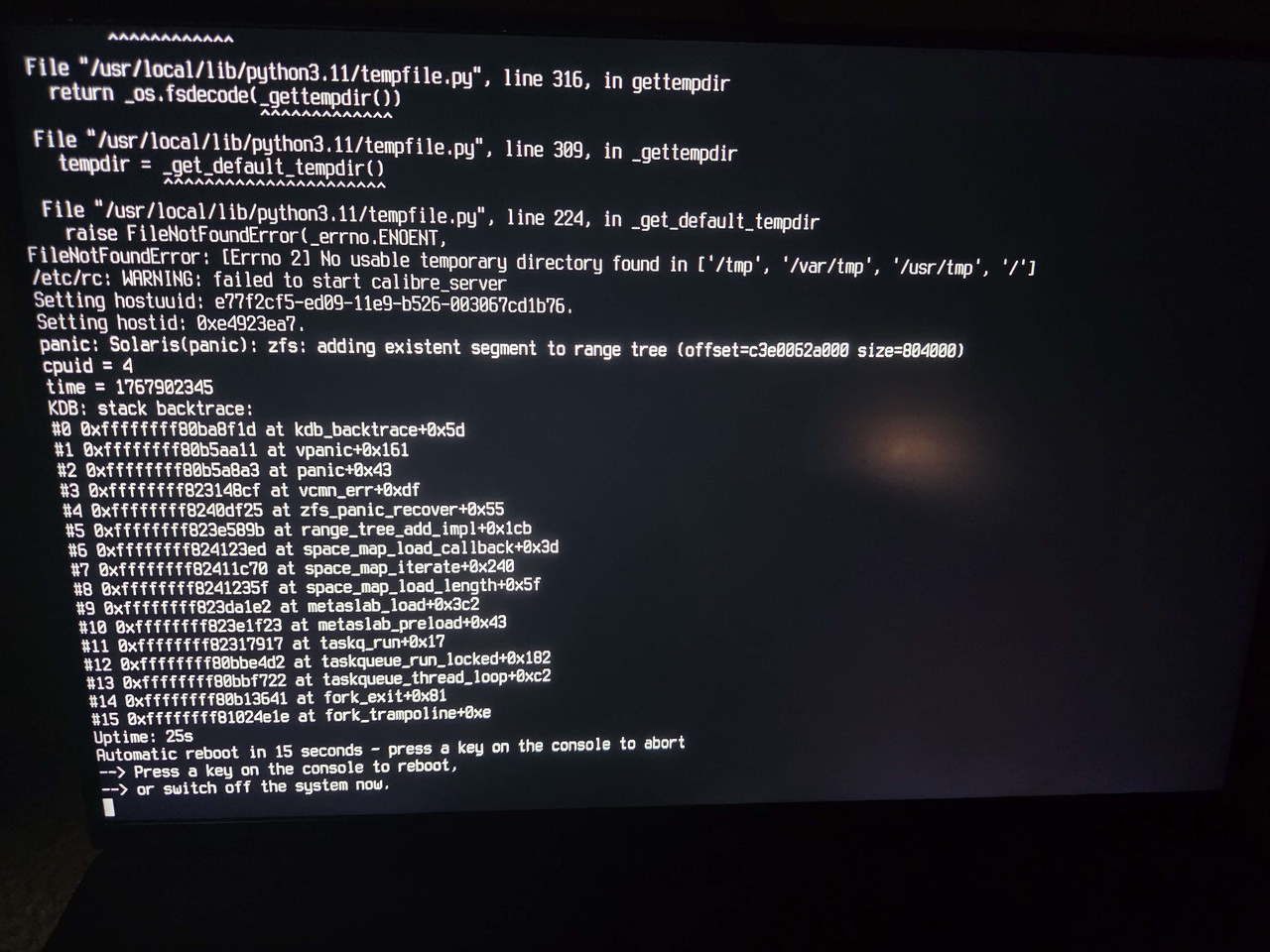
Code:
panic: Solaris(panic): zfs: adding existent segment to range tree

 
I was able to make some progress on this. I used the below links for reference:

The steps I took were:
  1. Boot into single user mode
  2. Attempted to import my zfs pools
    Code:
    zpool import pool
  3. I got the zfs panic when I tried to import the problematic pool. Was able to import the other pools without issue.
  4. I was able to import the pool in read only mode
    Code:
    zpool import -o readonly=on -f pool
  5. Validated that the pool still had space
    Code:
    zfs list -o space
  6. Enabled the vfs recovery option
    Code:
    sysctl vfs.zfs.recover=1
  7. Exported and imported the pool again successfully, but I still got the adding existing segment to range tree warnings.
  8. Following this comment - https://github.com/openzfs/zfs/issues/13483#issuecomment-1205170136 - I used zdb tool to check the zfs meta slabs
    Code:
    zdb -AAA -b pool
    zdb tool aborted when it got to problematic metaslab (metaslab 97).
  9. Unsure of what to do or how to resolve the metaslab issue, I added vfs.zfs.recover=1 to /boot/loader.conf so I could reboot my system again.
My home server is back on and functional again, but I'm not sure what to do next. Is it possible to fix this metaslab issue or should I just replace the drive?
 
google AI,

zpool scrub cannot fix this because it repairs data and metadata blocks, but metaslabs are internal allocation structures that a scrub doesn't "re-write.

You can attempt to import with the recovery flag:
zpool import -F ;pool_name; (Note: This may discard the last few transactions)

Otherwise backup the part where you don't get at the metaslab & dump the pool. :(
 
google AI,

zpool scrub cannot fix this because it repairs data and metadata blocks, but metaslabs are internal allocation structures that a scrub doesn't "re-write.

You can attempt to import with the recovery flag:
zpool import -F ;pool_name; (Note: This may discard the last few transactions)

Otherwise backup the part where you don't get at the metaslab & dump the pool. :(
Thanks. Just not sure whether metaslab issue is because of a faulty drive or just something related to zfs. I'm just going to get another drive to be on the safe side.
 
Back
Top