
ZFS zfs related kernel panic; stuck in boot loop

My server became unavailable and became stuck in a boot loop when I rebooted. Looks like a kernel panic related to zfs. I'm thinking it may be due to a full disk. Not sure how to resolve. The only error that jumps out is...
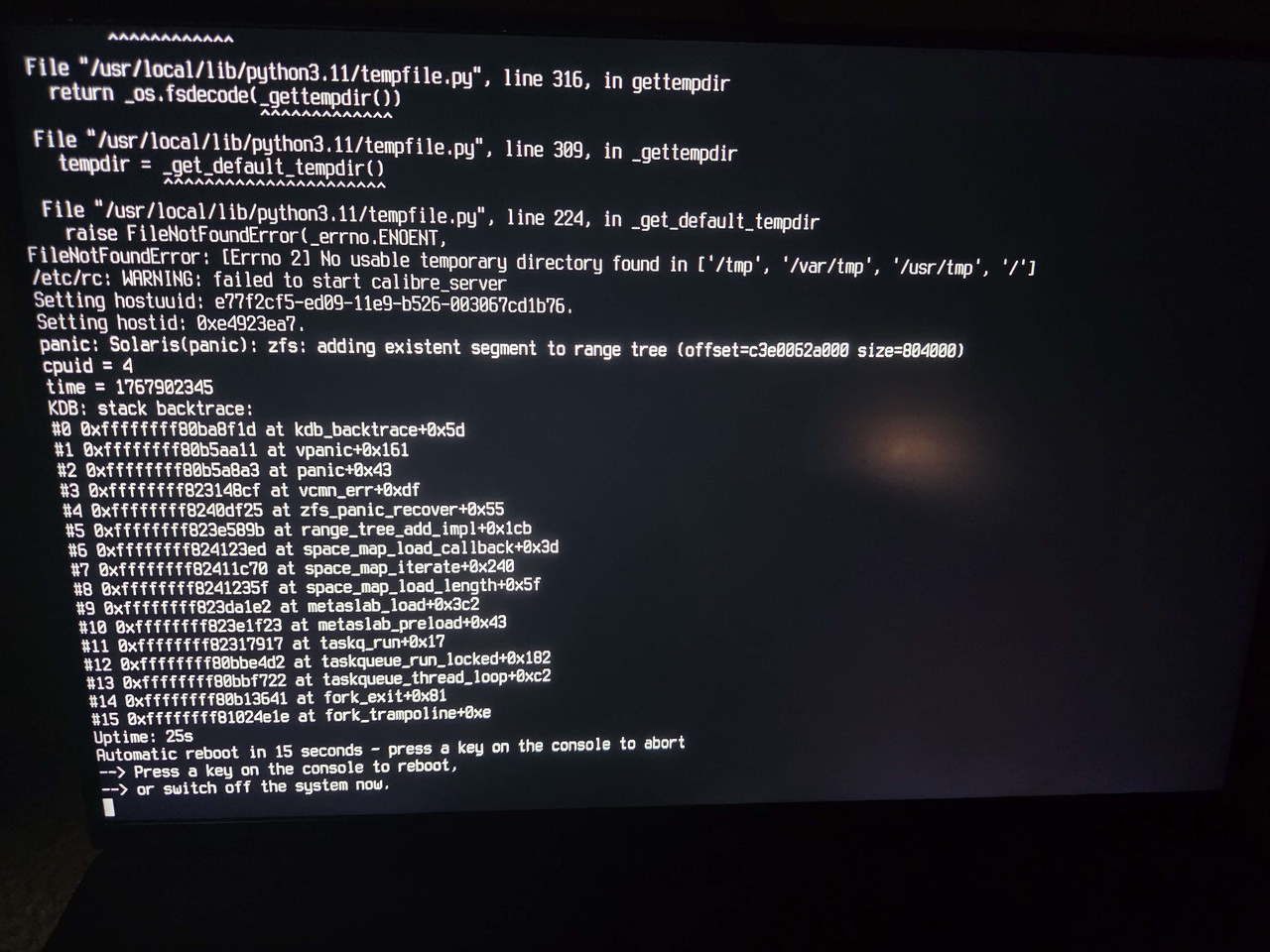
Code:
panic: Solaris(panic): zfs: adding existent segment to range tree

 
I was able to make some progress on this. I used the below links for reference:

The steps I took were:
  1. Boot into single user mode
  2. Attempted to import my zfs pools
    Code:
    zpool import pool
  3. I got the zfs panic when I tried to import the problematic pool. Was able to import the other pools without issue.
  4. I was able to import the pool in read only mode
    Code:
    zpool import -o readonly=on -f pool
  5. Validated that the pool still had space
    Code:
    zfs list -o space
  6. Enabled the vfs recovery option
    Code:
    sysctl vfs.zfs.recover=1
  7. Exported and imported the pool again successfully, but I still got the adding existing segment to range tree warnings.
  8. Following this comment - https://github.com/openzfs/zfs/issues/13483#issuecomment-1205170136 - I used zdb tool to check the zfs meta slabs
    Code:
    zdb -AAA -b pool
    zdb tool aborted when it got to problematic metaslab (metaslab 97).
  9. Unsure of what to do or how to resolve the metaslab issue, I added vfs.zfs.recover=1 to /boot/loader.conf so I could reboot my system again.
My home server is back on and functional again, but I'm not sure what to do next. Is it possible to fix this metaslab issue or should I just replace the drive?
 
google AI,

zpool scrub cannot fix this because it repairs data and metadata blocks, but metaslabs are internal allocation structures that a scrub doesn't "re-write.

You can attempt to import with the recovery flag:
zpool import -F ;pool_name; (Note: This may discard the last few transactions)

Otherwise backup the part where you don't get at the metaslab & dump the pool. :(
 
google AI,

zpool scrub cannot fix this because it repairs data and metadata blocks, but metaslabs are internal allocation structures that a scrub doesn't "re-write.

You can attempt to import with the recovery flag:
zpool import -F ;pool_name; (Note: This may discard the last few transactions)

Otherwise backup the part where you don't get at the metaslab & dump the pool. :(
Thanks. Just not sure whether metaslab issue is because of a faulty drive or just something related to zfs. I'm just going to get another drive to be on the safe side.
 
Is this happening on FBSD 15.0 (openzfs 2.4) ?

I guess you saw this specific comment (from Dec 2025) - https://github.com/openzfs/zfs/issues/13483#issuecomment-3616176362

The guy was able to "fix it" with the following change adding zfs_recover in module/zfs/range_tree.c . On his own account seems to suspect RAM related problems (non-ecc).

Code:
diff --git a/module/zfs/range_tree.c b/module/zfs/range_tree.c
index d73195f1a..3835023f5 100644
--- a/module/zfs/range_tree.c
+++ b/module/zfs/range_tree.c
@@ -531,7 +531,7 @@ zfs_range_tree_remove_impl(zfs_range_tree_t *rt, uint64_t start, uint64_t size,
        }

        if (!(rstart <= start && rend >= end)) {
-               panic("zfs: rt=%s: removing segment "
+               zfs_panic_recover("zfs: rt=%s: removing segment "
                    "(offset=%llx size=%llx) not completely overlapped by "
                    "existing one (offset=%llx size=%llx)",
                    ZFS_RT_NAME(rt),


Could be worth experimenting . Probably does not apply to you... that openzfs issue thread though... anxiety inducing ;)
 
Just to add another datum point, this has hit me on FreeBSD-15.1-RELEASE-p2.

I've found that hitting Esc at the loader prompt, typing set vfs.zfs.recover=1 and then boot works, but I'm going to rebuild the pool as I'm not happy about it.

I was also suspecting memory issues, as I'm getting weird Sig 11s even when I pulled one stick, so I've tried the other one to see what happens. Will update.

Find it unlikely that a few people have the same issue so recently due to bad RAM!
 
hm, wonder if the infestation of slop in software might have something to do with the sudden widespread unreliability of that software. it's probably nothing.
 
hm, wonder if the infestation of slop in software might have something to do with the sudden widespread unreliability of that software. it's probably nothing.
Slop in a OS ZFS integratiion? Not sure but I think it should be optionally compatible with older versions. Upgrading the ZFS kernel code to specific behavior as a "point of no return" is a shortcoming of the system.
 
Slop in a OS ZFS integratiion? Not sure but I think it should be optionally compatible with older versions using conversion. Upgrading the ZFS kernel code to specific behavior as a "point of no return" is a shortcoming of the system.
 
Back
Top