Show Your FreeBSD Workstation (Specs + Screenshot)

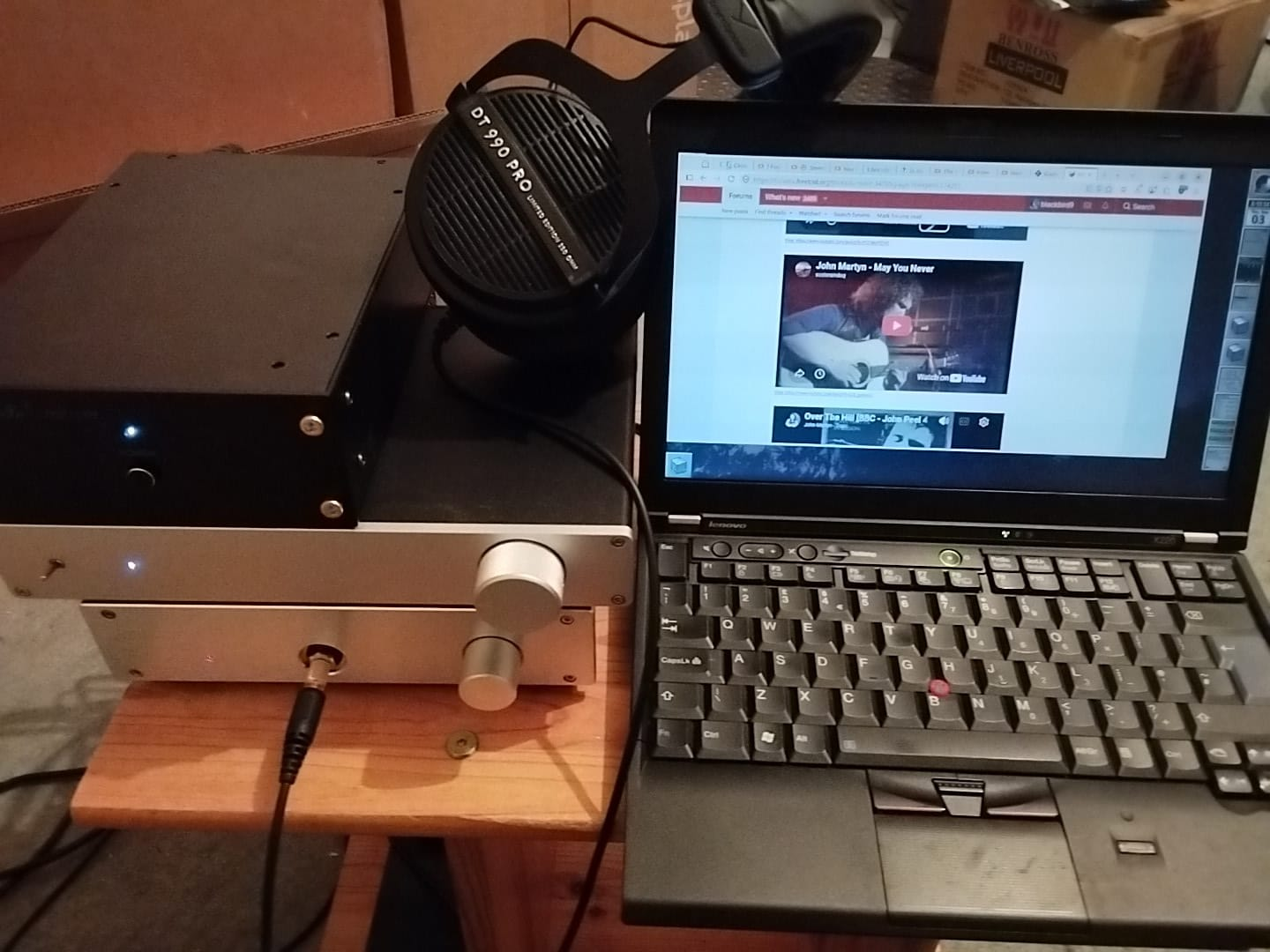
Latest iteration of my freebsd music listening setup.

What you can see, from left to right, is as follows:- audio stack comprising: HD8-A1 headphone amp at the bottom of the stack, then a Mofi C3850 SMT preamp, then on the top a Lite DAC-AH NOS dac (8xTDA1543). Not visible is an SMSL PO100 USB-coax spdif interface, round the back, that provides the USB device interface to FreeBSD. So far I haven't modded the dac-ah, although I've got some components on order. I wrote some more about the DAC-AH in the dacs thread here https://forums.freebsd.org/threads/is-there-any-dac-compatible-with-freebsd.74463/page-5#post-770859 . What I need now is a small stand to hold the audio gear.

Next to the audio stack, my thinkpad X220 running FreeBSD 14.4, X11 and WindowMaker, and Beyerdynamic DT 990 PRO headphones; I actually prefer the sound of the DT990's to my HD6XX's, and they seem to match the HD8-A1 well. FreeBSD and apps like waterfox are configured to run on OSS only, with no other audio servers installed. The system also has mpd, mpv and mpg123 installed for playing music.

I have added the following two settings in /etc/sysctl.conf, as documented in the sound(4) manpage.
# auto-configure default usb soundcard
hw.snd.default_auto=2
# better sound quality
hw.snd.feeder_rate_quality=4
The system otherwise runs with the default OSS configuration, I have not configured bitperfect. 'Everything works'(TM).
1788463129747.png


How does it sound? Very nice. It's starting to get quite good now, I think this is the best one I've built so far. :-)

While I'm here, I'll leave a link to the macro set I wrote, for listening to the lofi music channels https://forums.freebsd.org/threads/useful-scripts.737/page-19#post-773836 .
 
It is simply one config file in the .fvwm folder. See the attached file.
Oh wow, thank you very much, I'm very grateful. It seems that FVWM is very underexposed where it fuels for instance xfce. Should worth the time to make FVWM your real own window manager (just like the doc says).
The thing I do love is the left click menu on the desktop. Very good thing I can't reproduce on xfce!
 
Latest iteration of my freebsd music listening setup.

What you can see, from left to right, is as follows:- audio stack comprising: HD8-A1 headphone amp at the bottom of the stack, then a Mofi C3850 SMT preamp, then on the top a Lite DAC-AH NOS dac (8xTDA1543). Not visible is an SMSL PO100 USB-coax spdif interface, round the back, that provides the USB device interface to FreeBSD. So far I haven't modded the dac-ah, although I've got some components on order. I wrote some more about the DAC-AH in the dacs thread here https://forums.freebsd.org/threads/is-there-any-dac-compatible-with-freebsd.74463/page-5#post-770859 . What I need now is a small stand to hold the audio gear.

Next to the audio stack, my thinkpad X220 running FreeBSD 14.4, X11 and WindowMaker, and Beyerdynamic DT 990 PRO headphones; I actually prefer the sound of the DT990's to my HD6XX's, and they seem to match the HD8-A1 well. FreeBSD and apps like waterfox are configured to run on OSS only, with no other audio servers installed. The system also has mpd, mpv and mpg123 installed for playing music.

I have added the following two settings in /etc/sysctl.conf, as documented in the sound(4) manpage.
# auto-configure default usb soundcard
hw.snd.default_auto=2
# better sound quality
hw.snd.feeder_rate_quality=4
The system otherwise runs with the default OSS configuration, I have not configured bitperfect. 'Everything works'(TM).

View attachment 27180

How does it sound? Very nice. It's starting to get quite good now, I think this is the best one I've built so far. :-)

While I'm here, I'll leave a link to the macro set I wrote, for listening to the lofi music channels https://forums.freebsd.org/threads/useful-scripts.737/page-19#post-773836 .
I have the same DT 990 Pro for years, nice gear. My SSL2+ audio card works out of the box on FreeBSD sadly I don't have anything that replaces Cubase (heavy use of VST whose don't eve nhave a linux version) so I'm stuck on Windows for the music production.
 
It seems that FVWM is very underexposed where it fuels for instance xfce. Should worth the time to make FVWM your real own window manager (just like the doc says).
The thing I do love is the left click menu on the desktop. Very good thing I can't reproduce on xfce!
And middle click menu. All completely free configurable (Keep the restart button; you'll need it everytime when you edited the config. [I have an alias edfvwm which opens my config file directly in vim.])
And don't underestimate the also free configurable keyboard shortcuts. I very barely use any menus at all anymore, but do almost everything with key combos - way quicker than shoving mouse kilometers. :cool:

It was my journey exactly: After LXDE (my first DE when I started on FreeBSD, also recommendable, because anyhow I never became friends with Gnome and always found KDE way too bloated and Windows-like) I switched to Xfce. Used it for quite a while. I was quite happy with it: clearly structured, nice to look at but not too much eyecandy, delivers all a DE needs, but not overloaded, not bloated, not redundant, and easy to configure... nice. After all Xfce is my first recommendation to anyone looking for DE. (or MATE)
But I learned for myself I don't need a DE. I don't want a DE. All I need and want is just a simple WM I can configure the way exactly I want.
This wasn't suddenly clear to me. It was a process.
I realized that I cannot configure certain things with Xfce (or any other DE) the way I want it to be.
For example, I want to have more options about defining the menus the way I like them to be, since there are certain things I never use and don't want to be in my menus but cannot throw out. Or I never needed nor wanted those waste paper baskets ("recycle bin" is the current term) which were unavoidable from way back on my old Amiga 2000 over all Windows and any other DE. They all came with this to me pointless annoying nuisance. If I want to delete a file, I want it to be deleted. I don't want to have a conversation everytime about my intensions, being questioned if I'm aware of what I'm doing, and still the junk occupies space on my drive, fragmenting it. So, always extra clicks to just get rid of a completely pointless empty file created accidently due mistakenly clicked on the wrong icon. But there is no way to get rid of that silly waste bin junk completely from any DE I experienced. Plus all the additional directories a DE can produce in you home - some really trash up your place.
So, every DE has limits, what can be configured.
When you can live with it, OK.
If not...
Eventually I found myself start digging into Xfce's files which are not meant to be edited by the user by default for config purposes, I finally realized: Wrong.

You either pick an existing vessel from the harbor which comes closest to your needs, or you build your own.
But if all you want is to row on a pond to fish you don't pick an aircraft carrier and strip it down to get a simple boat. You pick a simple boat.

Bottom line:
You may pick from the many choices of DE's there are. If you can live with one of those, perfect.
But if there is no DE that satisfies you, because you have clear ideas how your desktop has to look and feel, and you are not willing to compromise, then you better pick one of the even larger amount of choices of WMs, and configure it to become exactly the desktop you want.
Pro: You get exactly what you want, can adapt it anytime exactly to changed needs, and no compromises.
Downside: You need to learn how to configure it, and you need to configure it.
Contra fvwm: IMO maybe not the most trivial to learn config syntax.
Pro fvwm: Not so very hard neither. Many examples and config files by others can be used as templates. Almost anything configurable I can think of.
 
I have the same DT 990 Pro for years, nice gear. My SSL2+ audio card works out of the box on FreeBSD sadly I don't have anything that replaces Cubase (heavy use of VST whose don't eve nhave a linux version) so I'm stuck on Windows for the music production.
Yes the DT 990's are capable of good results, the dac-ah and the amps I'm using are good enough to get good results out of them. Although the dac-ah is flawed as they ship it from the factory, it has to be modded, I discussed that in the forum dacs thread; diyaudio have a lot of information on modding that dac too. It's an old design, but capable of good results, some serious designers like lampizator liked it ( eg see http://lampizator.eu/lampizator/references/AH DAC/AHDAC.html ) . I was also interested in that dac because it uses the same parallel TDA1543 design as border patrol and audio note used in some of their dac designs. Whereas Naim use burr-brown I think. Chord is interesting too with their own gate array design, although I haven't heard their stuff, and of course it costs more; which is fair enough, everyone has to eat.

Right now with the setup I have in the photo, it sounds pretty good, I would say getting up towards real hifi CD-player quality, which is PDG. I've also been quite surprised at how good the yt opus codec is, I've tried comparing flacs to opus encoded files of the same music, and it's pretty hard to tell the difference. Of course what I've done isn't any kind of real high end territory, I was primarily interested in how good I could get it without spending a lot of money. But if you can afford some nice Focal headphones and a high quality dac (maybe a denafrips R2R) and a good amp (lehmann, naim, sugden etc), then it's definitely going to sound better than what I have in that photo.

The freebsd OSS sound layer does a really good job too, I think it has real potential. I've been surprised at how good it sounds, even without enabling bitperfect, after all it's theoretically resampling everything. I need to do some more experiments with bitperfect, I haven't pursued it much so far becuase when I have tried it in the past I found some things work, but other things stop working with bitperfect enabled. Also I haven't gone into DSD and high-res, I don't really feel like paying for DSD streams anyway, if I can avoid it, and I'm not very convinced about whether you would actually hear a difference from the higher sampling rates they use.

It's a shame there isn't more audio production software for freebsd. 'Alien Bob' (Eric Hamleers) has written a good series of articles about constructing a DAW on slackware ( https://blog.slackware.nl/configuring-slackware-for-use-as-a-daw/ and https://blog.slackware.nl/tag/daw/ ); some, perhaps all, of that is likely to be portable to freebsd. I guess companies like Cubase have to make money to survive and are only going to target platforms that they think they will get a large enough number of sales on, to be worth making the investment in product development.
 
Screenshot of my fvwm

I don't know what exactly you mean with "theme".
in your ~/.fvwm/myfvwm.config you add a wallpaper with
Code:
+ I Exec exec fvwm-root -r $HOME/.fvwm/Wallpapers/abstract-orange-6240x1920.png
and change the colors as you like:
Code:
#######
# 3: Colorsets
#
# Colorsets can be used to configure the color of the various
# parts of fvwm such as window decor, menus, modules, etc.
#
# Colorset Convention
#
#   0 - Default
#   1 - Inactive Windows
#   2 - Active Window
#   3 - Inactive Windows Borders
#   4 - Active Windows Borders
#   5 - Menu - Inactive Item
#   6 - Menu - Active Item
#   7 - Menu - Grayed Item
#   8 - Menu - Title
#   9 - Reserved
#  10+ Modules
#      10 - Module Default
#      11 - Module Hilight
#      12 - Module ActiveButton (Mouse Hover)
#      13 - FvwmPager Active Page
#      14 - FvwmIconMan Iconified Button
###########
#Colorset 0  fg #ffffff, bg #473c8b, hi, sh, Plain, NoShape
#Colorset 1  fg #0000ff, bg #8f9fff, hi, sh, Plain, NoShape
#Colorset 2  fg #ffffff, bg #473c8b, hi, sh, Plain, NoShape
#Colorset 3  fg black, bg #4d4d4d, hi #676767, sh #303030, Plain, NoShape
#Colorset 4  fg black, bg #2d2d2d, hi #474747, sh #101010, Plain, NoShape
#Colorset 5  fg #000000, bg #ffffff, hi, sh, Plain, NoShape
#Colorset 6  fg #ffffff, bg #2d2d2d, hi, sh, Plain, NoShape
#Colorset 7  fg grey30, bg #ffffff, hi, sh, Plain, NoShape
#Colorset 8  fg #ffffff, bg #473c8b, hi, sh, Plain, NoShape
#Colorset 10 fg #ffffff, bg #473c8b, hi #aaaaaa, sh #999999, Plain, NoShape
#Colorset 11 fg #ffffff, bg #1a6e99, hi #ffffff, sh #ffffff, Plain, NoShape
#Colorset 12 fg #2d2d2d, bg #ffffff, hi, sh, Plain, NoShape
#Colorset 13 fg #ffffff, bg #006c6c, hi, sh, Plain, NoShape
#Colorset 14 fg #555555, bg #473c8b, hi #aaaaaa, sh #999999, Plain, NoShape
#Colorset 23 Transparent
#
#
Colorset 0  fg #ffffff, bg #EE7600, hi, sh, Plain, NoShape
Colorset 1  fg #000000, bg #663300, hi, sh, Plain, NoShape
Colorset 2  fg #ffffff, bg #FF7F00, hi, sh, Plain, NoShape
Colorset 3  fg black, bg #4d4d4d, hi #676767, sh #303030, Plain, NoShape
Colorset 4  fg black, bg #2d2d2d, hi #474747, sh #101010, Plain, NoShape
Colorset 5  fg #000000, bg #ffffff, hi, sh, Plain, NoShape
Colorset 6  fg #ffffff, bg #2d2d2d, hi, sh, Plain, NoShape
Colorset 7  fg grey30, bg #ffffff, hi, sh, Plain, NoShape
Colorset 8  fg #ffffff, bg #EE7600, hi, sh, Plain, NoShape
Colorset 10 fg #ffffff, bg #CD6600, hi #aaaaaa, sh #999999, Plain, NoShape
Colorset 11 fg #ffffff, bg #FF7F00, hi #ffffff, sh #ffffff, Plain, NoShape
Colorset 12 fg #2d2d2d, bg #ffffff, hi, sh, Plain, NoShape
Colorset 13 fg #ffffff, bg #EE7600, hi, sh, Plain, NoShape
Colorset 14 fg #555500, bg #EE7600, hi #aaaaaa, sh #999999, Plain, NoShape
(use a color table, e.g. this one)
There is also way more you can define/modify yourself, like the window's decorations, or the windows title buttons, see my post #19
but if you want modify more than colors and wall papers better take a look at
fvwm.org
man fvwm(1)
or
archlinux.org/title/FVWM

I wouldn't bother with the arch wiki on this for fvwm information -- fvwm.org has all you need, plus the default config, which we spent a long commenting so that it's useful.
 
Back
Top