Old raspberry pi ( 2011.12 ) modell B

Hi all!

I have an old raspberry pi modell B ( 2011.12 ) and wanted to see if I can install FreeBSD on it with a very lightweight GUI on it. I'm thinking of testing ICEwm. Anyone that has had any success withg that setup? Will it work?

I'm not the best with FreeBSD but I manage to change the language at login and setup the wifi dongle successfully. Also install through the ports. Feeling quite proud actually. Mostly thanks to excellent information found in this forum and also the handbook.

When I went on to try to install a couple of things through pkg then alot of what I needed could not be found. Thing like "icewm", "slim", "xorg" so all of this needed to be installed through ports instead. Perefctly fine by me but it takes alot more time of course.

I've scouted the internet for information and found out that this old unit would work with FreeBSD version 13. So thats what I went with.

So will it work? Anybody got any experience?

I know this will not be the fastest setup (OBVIOIUSLY!). Its just a fun project to be able to learn more about this OS.
 
Ohh forgot to ask!

To update the repository I write:
pkg update -f

but if the actual repository "source" needs to be updated - how do I do that? It seems strange that packages like "xorg" etc. would not be a part of a repository? Or is this done automatically or is there a commandline to have the OS "search" for a newer one?
 
Hi,

Your device RPI1 if I am not mistaken is ARMV6 which falls in support Tier 2 for 13-RELEASE and Tier 3 for 14-RELEASE.
Basically FreeBSD support is divided in 3 categories from fully supported to less supported respectively Tier 1, 2 and 3.
As I understand this, a full support for binary package, via pkg, should be expected only for support Tier1, therefore Tier 2 and 3 aren't as good as Tier1.

If you want to get more details you can read this:

Also take note that 13.5-RELEASE will be End Of Life soon, 30 April 2026.

TBH if you want to run BSD on old devices then NetBSD is probably your best bet, because most ARCH are supported, RPI1 included. Lot of binary packages are available via pkgsrc, cannot tell for sure you'll find all you seek though but it's pretty decent.

I am not a pro, so may be wait for someone who has a different opinion on all of this.
 
TBH if you want to run BSD on old devices then NetBSD is probably your best bet, because most ARCH are supported, RPI1 included. Lot of binary packages are available via pkgsrc, cannot tell for sure you'll find all you seek though but it's pretty decent.
Thank you very much for that. I'll look that up. And also read up on Tier 1,2 and 3 (first time I've heard of it actually).
 
Sad but true. FreeBSD on Raspberry Pi is no fun. :'‑(
Just about anything of that vintage was never fun. There were some projects that you could do with them, but they're slow enough that it's a limited number of projects. I was using one for a while to run Pi-hole. With Linux, I never though about trying any *BSD on one of that vintage.
 
Just about anything of that vintage was never fun.
I have two RPi Zero W (not the Zero 2) in production with Linux = Debian = Raspbian. They work fine for data acquisition and control, and are nearly the same speed as the original model B (0.7 vs 1 GHz), and the same 512 MB RAM. Matter-of-fact, I'm logged into one of them right now, and testing code on it. It's a bit sluggish, but much of that might be explained by the fact that (a) it has an SD card for a disk, and (b) it is about 100 feet away from the house on WiFi.

This class of hardware is not fun for a desktop machine (with GUI), but works just fine as a remote login shell machine.
 
I built a cross building version of Poudriere that built ARMv6 packages on a 4-core 64-bit intel host with QEMU some years go. I ran it for a year or so before giving up on ARMv6. Some packages (not many) just would not build successfully with QEMU and these had to be done on native ARMv6 hardware. In an attempt to speed things up, I made a custom modification to Poudriere to enable those failing packages to be cross-compiled separately on a small Pi 'farm' using distcc for building.

I only had three boards in my Pi farm so performance wasn't that great. I found that a distributed cross-compile over three Pi boards was as quick as building in emulation on the amd64 Poudriere host. If you want to use an old Raspberry Pi with FreeBSD, a cross building amd64/ARMv6 Poudriere system is a rewarding experience using QEMU and faster than building natively on a single ARMv6 Pi.

From memory, getting Poudriere to use distcc to cross-compile and cross-build was a pig. I think I ended up dedicating an intel machine to ARMv6 cross builds so that each Poudriere jail would always run with a dedicated distcc master service. If I had 12 Raspberry Pi in the farm it probably would have worked better with a 4-core Poudriere host, giving each intel core three ARMv6 boards as slaves. The Pi farm was always overburdened and I had no control over which ports, or which parts of those ports got compiled on native ARMv6 hardware.

I abandoned the project during Covid, when I made the decision to use FreeBSD only on i386/amd64 and avoid hardware that used SD Cards/eMMC for storage. It didn't appear to be that useful having a distcc jail for amd64 when you could scale vertically by using a Poudriere host with more CPU cores, or horizontally with more Poudriere hosts.

Surviving web pages that helped me build a cross-building Poudriere, and cross-compiling Poudriere:
(French) https://www.unix-experience.fr/bsd/freebsd/poudriere_cross_compile/
 
Is this space actively developed to run on Raspberry Pi’s. My student club is developing a mesh node project and it would be cool to run FreeBSD in a Raspberry Pi environment.

iirc NetBSD or OpenBSD develop in this space more
 
FreeBSD 13.5 still has about a month left before EOL on Tier 2 for armv6 and armv7, on 14.x EOL id 30 November 2028 for Tier 3 armv6 and Tier 2 armv7. So for these older 32-bit RPi, you still have some time left in support. 64-bit armv8 is Tier 1 so no problems with that if you have newer RPi. When FreeBSD reaches EOL, it is still useable, especially if you have the source code for the kernel, world and ports that you are using. You can always choose to backport security fixes yourself or keep the system isolated.

OpenBSD still supports armv7 and armv8

Does anything ever get left behind on NetBSD? It still has armv6 in Tier 1.
 
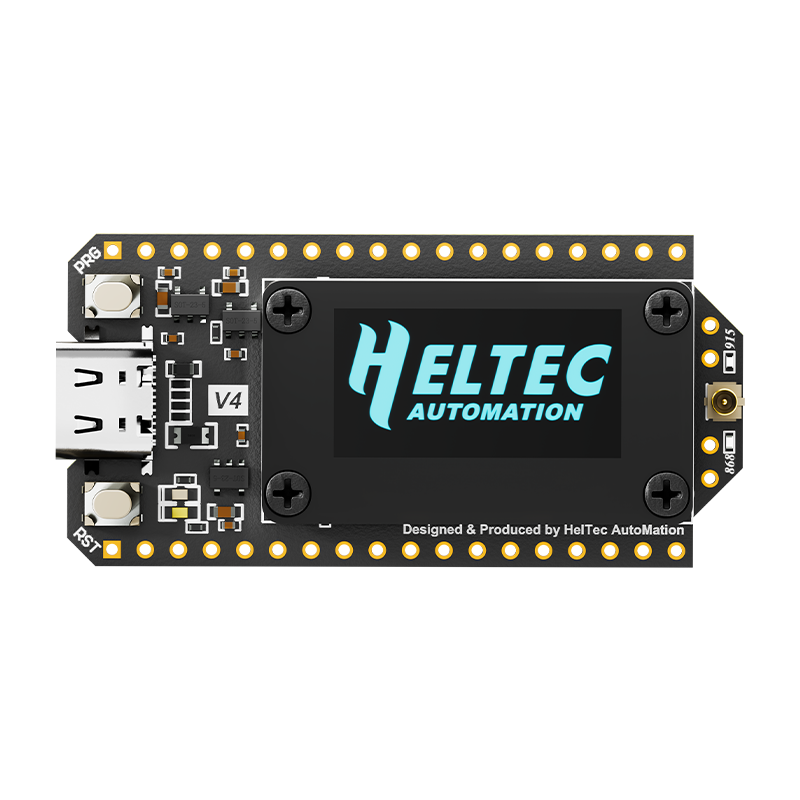
I bought this Heltec V4 and I want to pair it with the RPi 4 for a mesh node project my student club is developing

Heltec V4

RPi 4
 
Using 1 as public display. It runs on 13.1 and only has scfb + sdl 1 for a graphical screen. You can display simple pixel graphics, pictures and svg fonts.
It must be possible to upgrade to a recent release and run a complete X server but it might take time to get it running.
I still need to make time to get it runing with PXE-boot and no SD-card to avoid some maintainance for a broken SD.
 
What about NanoBSD. Is this the embedded programming ecosystem of FreeBSD. I’m unfamiliar with NanoBSD
 
I haven't used NanoBSD for some years, probably FreeBSD 10 or 11. It works very well.

I used it to install 32-bit FreeBSD on eight Dell FX130 thin clients (1gb RAM+1gb storage) for a 12V battery powered cluster project. The regular FreeBSD install grumbled that it needed 4 more megabytes of storage or RAM, I can't remember which it was. NanoBSD enabled me to create a compact custom build for the FX130 that used a custom kernel for the VIA Eden CPU (x86).
 
Back
Top