

Hi gang!
Editorial
When it comes to my FreeBSD servers then I do everything on the command line: X doesn't exist. Not the social media platform, nor the graphical engine. Now, a Unix command line is a very powerful environment no matter what shell you're using. For example, did you know that any standard shell allows you to run tasks in the background and even provides a bit of job control?
Just try it out yourself: run any command and place a & behind its name. The task gets moved onto the background thus allowing you to do "other things":
Although this can be quite useful there are still a few things to keep in mind. As you can see any output still gets send to your terminal, and sometimes that can lead to confusing results. Notice how the first line of the output looks as if it might become a bad shell command? Now, sure: output can be easily redirected using (for example) the > ('stdout') or 2> ('stderr') sequences. But this still leaves us with one major issue: all those sub-tasks are still a direct part of your current shell. And if that shell goes... then so go all its child jobs.
Must be fun: having set up a whole plethora of subtasks, only to find out that you didn't anticipate for your ISP doing some quick maintenance... get ready to start all over again as soon as you can logon again!
Fortunately for us people came up with a solution to this problem: screen and tmux. And I'll start right off the bat: if you're still using Screen, then you're missing out.... big time. I've been using Screen myself for years and I've only picked up on TMux again for a few weeks, but the results I got were already... quite dramatic.
Now, in all fairness (!) this post doesn't take anything away from all the hard work of the Screen project. It's not as if I suddenly became a huge advocate venting against its use, none of that. In fact, let's not forget that without Screen there probably wouldn't be a TMux either... let that sink in for a moment.
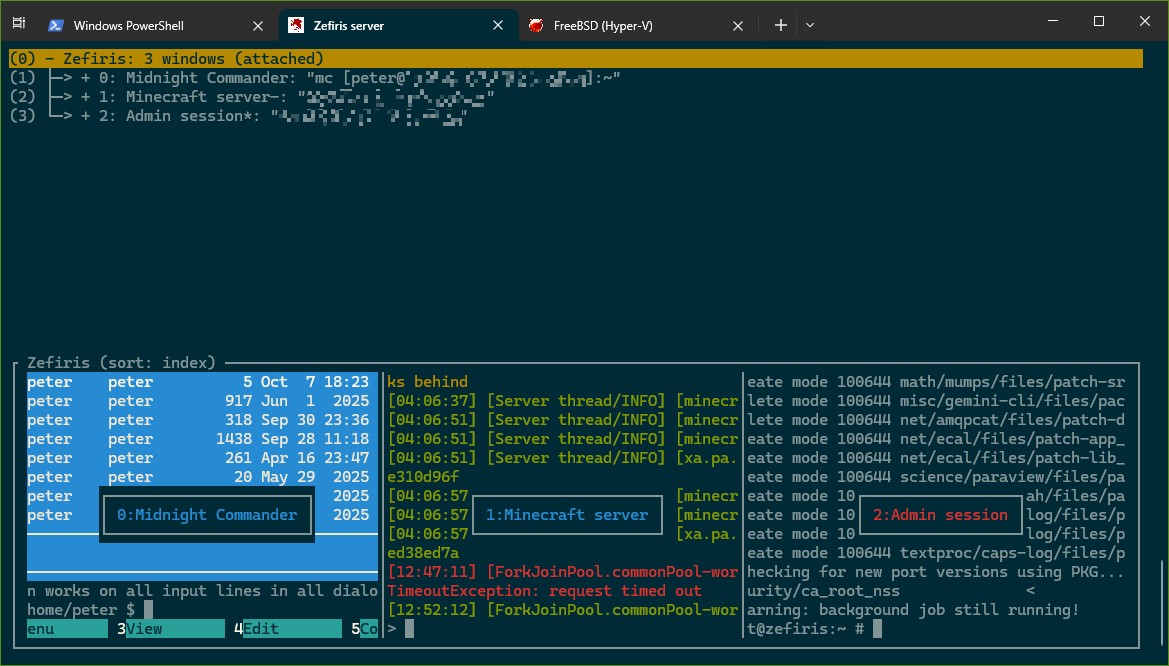
TMux, also known as sysutils/tmux, is a Terminal MUltipleXer, hence its name. And you can see exactly what that means above: it allows you to run multiple - separated - command line instances, all from within one single (tmux) environment. Better yet: this session can also be easily detached after which all these commands will just keep on running, waiting for you to reconnect to the session again later.
So even if my connection to the server would get disrupted by something unforeseen then I won't have to cope with any negative results.
Now, so far I have mentioned nothing which Screen also wouldn't be able to do. But... do you happen to notice something specific above (other than the overview itself)? Everything has a name?! And that name can be easily looked up again later, and even (re-)used:
The moment you start TMux it will do 2 things by default: first it creates a new session, then it'll add ('create') a new window within that session. So far nothing too special, but one of the (many) thing(s) which make TMux stand out is the use of panes: allowing you to divide a window into multiple parts:
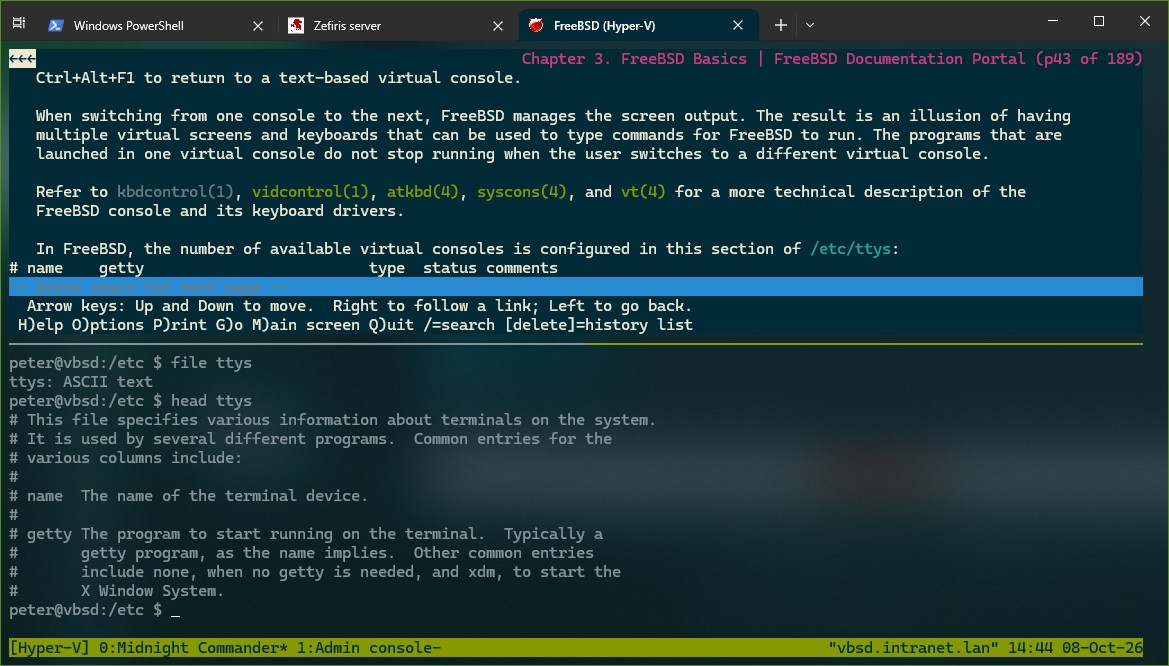
So here I'm reading up on some basics using the FreeBSD handbook, courtesy of www/lynx, but as I was doing that I suddenly realized that I should look into this /etc/ttys thing myself. But because I'm still very new ( ) I simply want to follow some instructions one by one. As you can see: it couldn't be easier... One simple command later and my screen is split in half, thus allowing me to look into 2 things at once.
And as you can in the (now visible) taskbar: without losing access to any of my other windows.
But wait! => there's more!
So, I have 1 session (called 'Hyper-V') and it contains 2 windows (0: 'Midnight Commander' and 1: 'Admin console'). So far, so good.
First: how do you think I got all those names? Simple, I renamed all of this myself thus allowing me to keep track of things (more on that in a moment!).
Now, let's say for the sake of argument that my current study session on /etc/ttys makes me realize that I should edit this file myself. But... not before I verified some of the things I'm currently looking into right now. The only problem: I know myself, and in about 5 minutes I'll probably get distracted with some other cool stuff in the handbook, and I'll forget all about this idea. Maybe I could set something up in advance?
Check THIS out:
See what happened? Instead of 2 windows (0 & 1?) I now have three: ksh has become a thing on ID 2. But that's not all, because I also issued a shell command (
So once I'm done studying the handbook I'll sooner or later notice the new window, and when I switch to it... I'll get my vi session.
But... are you starting to see the pattern here? What do you think ls and lsw were all about? Those were TMux commands as well, only short abbreviations. So ls instead of list-sessions, and lsw instead of list-windows. These commands can be used on the command line (as demonstrated a few times now) but you can also call up a "TMux command line" after which you can enter the command directly into tmux itself.
Fun thing about TMux: (almost) everything is done using commands, including the (un)assignment of keys.
Yet TMux uses ctrl + b by default. Fun fact: it does this out of respect for screen, so that it won't mess things up if you're using TMux from within Screen .
.
But... let's fix this!
Here's the thing about all those cool commands: you can also use these in the TMux configuration files. By default TMux uses 2 config files: /usr/local/etc/tmux.conf as well as ~/.tmux.conf. And as I mentioned earlier: pretty much everything is a command, including the (un)assignment of keys:
But here's the thing about screen: it did more than just that:
...so I made sure to add these assignments as well, and now I feel right at home within TMux.
And as you might recall... new-window (or neww in short) is also a TMux command. And as I mentioned earlier: you can easily use these commands in the TMux config files as well. And most commands support the use of parameters (see tmux(1) for more information on that), like, for example, specifying a name
Which (somewhat) quickly led me to adding this to my ~/.tmux.conf:
Seriously... this caused me quite a few headaches . At first I experimented with using new-window, but as soon as I fired up
Yups, in case you weren't aware: you can actually have multiple sessions using TMux as well. So now I had the session which I wanted to set up, plus the default one... As mentioned, this caused me a bit of headaches but the solution is actually explained in the manual page (but a bit buried). See, the
Attach to what you ask? The session as it gets created in the config file of course! =>
So now, no matter if I log onto my server after a reboot or if I'm reconnecting I can always use
And finally, in case you're wondering about this line: "new-window -k -t0 -n "Midnight Commander" 'mc';" => if you create a new session, even from a config file, then TMux will always (!) automatically create a new window for it.
But as I mentioned earlier: I'd like my first (!) window to be dedicated to the Midnight Commander. So... I told TMux to create a new window, with strings attached: this new window needs to be placed at position 0, and if a window is already present then, well, kill it (hence -k). And of course, once the window is created then
C'mon, isn't TMux just frickin' awesome?!!
And there you have it! Thanks for reading!
Oh, before I forget... one last thing? In case you're not fully convinced yet there's one last detail to keep in mind:
...tmux isn't set setuid root, which can help you to reduce potential security risks.
Editorial
When it comes to my FreeBSD servers then I do everything on the command line: X doesn't exist. Not the social media platform, nor the graphical engine. Now, a Unix command line is a very powerful environment no matter what shell you're using. For example, did you know that any standard shell allows you to run tasks in the background and even provides a bit of job control?
Just try it out yourself: run any command and place a & behind its name. The task gets moved onto the background thus allowing you to do "other things":
Code:
peter@vbsd:/home/peter $ w &
[1] 2431
peter@vbsd:/home/peter $  1:58PM  up 37 mins, 1 user, load averages: 0.21, 0.24, 0.22
USER       TTY      FROM                    LOGIN@  IDLE WHAT
peter      pts/0    plserver10.mshome.net   1:22PM     - -ksh (ksh)

[1] + Done                 w
peter@vbsd:/home/peter $
Although this can be quite useful there are still a few things to keep in mind. As you can see any output still gets send to your terminal, and sometimes that can lead to confusing results. Notice how the first line of the output looks as if it might become a bad shell command? Now, sure: output can be easily redirected using (for example) the > ('stdout') or 2> ('stderr') sequences. But this still leaves us with one major issue: all those sub-tasks are still a direct part of your current shell. And if that shell goes... then so go all its child jobs.
Must be fun: having set up a whole plethora of subtasks, only to find out that you didn't anticipate for your ISP doing some quick maintenance... get ready to start all over again as soon as you can logon again!
Fortunately for us people came up with a solution to this problem: screen and tmux. And I'll start right off the bat: if you're still using Screen, then you're missing out.... big time. I've been using Screen myself for years and I've only picked up on TMux again for a few weeks, but the results I got were already... quite dramatic.
Now, in all fairness (!) this post doesn't take anything away from all the hard work of the Screen project. It's not as if I suddenly became a huge advocate venting against its use, none of that. In fact, let's not forget that without Screen there probably wouldn't be a TMux either... let that sink in for a moment.
Getting started with TMux
TMux, as I'm using it on my Zefiris FreeBSD server...
TMux, also known as sysutils/tmux, is a Terminal MUltipleXer, hence its name. And you can see exactly what that means above: it allows you to run multiple - separated - command line instances, all from within one single (tmux) environment. Better yet: this session can also be easily detached after which all these commands will just keep on running, waiting for you to reconnect to the session again later.
So even if my connection to the server would get disrupted by something unforeseen then I won't have to cope with any negative results.
Now, so far I have mentioned nothing which Screen also wouldn't be able to do. But... do you happen to notice something specific above (other than the overview itself)? Everything has a name?! And that name can be easily looked up again later, and even (re-)used:
Code:
peter@zefiris:/home/peter $ tmux ls
Zefiris: 3 windows (created Thu Oct  8 03:14:32 2026)
peter@zefiris:/home/peter $ tmux lsw
0: Midnight Commander- (1 panes) [126x32] [layout b3fe,126x32,0,0,1] @1
1: Minecraft server* (1 panes) [126x32] [layout b3ff,126x32,0,0,2] @2 (active)
2: Admin session (1 panes) [126x32] [layout b400,126x32,0,0,3] @3
peter@zefiris:/home/peter $
Sessions, windows & panes...
So, how does all of this work? Before we can get more into that we first need to look at what is happening here...The moment you start TMux it will do 2 things by default: first it creates a new session, then it'll add ('create') a new window within that session. So far nothing too special, but one of the (many) thing(s) which make TMux stand out is the use of panes: allowing you to divide a window into multiple parts:
TMux panes: 2 windows for the price of one!
So here I'm reading up on some basics using the FreeBSD handbook, courtesy of www/lynx, but as I was doing that I suddenly realized that I should look into this /etc/ttys thing myself. But because I'm still very new (
) I simply want to follow some instructions one by one. As you can see: it couldn't be easier... One simple command later and my screen is split in half, thus allowing me to look into 2 things at once.And as you can in the (now visible) taskbar: without losing access to any of my other windows.
But wait! => there's more!
TMux commands
First, let's take another look at the above setup, from the command line this time:
Code:
peter@vbsd:/etc $ tmux ls
Hyper-V: 2 windows (created Thu Oct  8 14:37:02 2026) (attached)
peter@vbsd:/etc $ tmux lsw
0: Midnight Commander* (2 panes) [126x31] [layout 3170,126x31,0,0[126x15,0,0,1,126x15,0,16,4]] @1 (active)
1: Admin console- (1 panes) [126x31] [layout afff,126x31,0,0,2] @2
peter@vbsd:/etc $
So, I have 1 session (called 'Hyper-V') and it contains 2 windows (0: 'Midnight Commander' and 1: 'Admin console'). So far, so good.
First: how do you think I got all those names? Simple, I renamed all of this myself thus allowing me to keep track of things (more on that in a moment!).
Now, let's say for the sake of argument that my current study session on /etc/ttys makes me realize that I should edit this file myself. But... not before I verified some of the things I'm currently looking into right now. The only problem: I know myself, and in about 5 minutes I'll probably get distracted with some other cool stuff in the handbook, and I'll forget all about this idea. Maybe I could set something up in advance?
Check THIS out:
Code:
peter@vbsd:/etc $ tmux new-window -d 'vi /etc/ttys'
peter@vbsd:/etc $ tmux lsw
0: Midnight Commander* (2 panes) [126x31] [layout 3170,126x31,0,0[126x15,0,0,1,126x15,0,16,4]] @1 (active)
1: Admin console- (1 panes) [126x31] [layout afff,126x31,0,0,2] @2
2: ksh (1 panes) [126x31] [layout b003,126x31,0,0,6] @5
See what happened? Instead of 2 windows (0 & 1?) I now have three: ksh has become a thing on ID 2. But that's not all, because I also issued a shell command (
vi /etc/ttys?) which also got executed. Ergo: I now got a new window in which I'm currently editing /etc/ttys using vi. Easy! Oh, and in case you're wondering: I used -d as parameter to make sure that my new window got 'detached' instead of immediately switched to.So once I'm done studying the handbook I'll sooner or later notice the new window, and when I switch to it... I'll get my vi session.
But... are you starting to see the pattern here? What do you think ls and lsw were all about? Those were TMux commands as well, only short abbreviations. So ls instead of list-sessions, and lsw instead of list-windows. These commands can be used on the command line (as demonstrated a few times now) but you can also call up a "TMux command line" after which you can enter the command directly into tmux itself.
Fun thing about TMux: (almost) everything is done using commands, including the (un)assignment of keys.
tmux.conf => working out some (more) magic!
First things first... I don't know about you fine folks but despite all these powerful options there's still one thing that screen holds over tmux: it uses control + a by default to make it 'do' stuff. Creating a new window? => ctrl + a, then c. Switching to the previous window? => ctrl + a, then p, and so on. Each to their own (!), but I find that much easier to use.Yet TMux uses ctrl + b by default. Fun fact: it does this out of respect for screen, so that it won't mess things up if you're using TMux from within Screen
.But... let's fix this!
Here's the thing about all those cool commands: you can also use these in the TMux configuration files. By default TMux uses 2 config files: /usr/local/etc/tmux.conf as well as ~/.tmux.conf. And as I mentioned earlier: pretty much everything is a command, including the (un)assignment of keys:
See what I mean? So, what is happening here...tmux.conf said:unbind C-b
set -g prefix C-a
bind C-a send-prefix
- First I'm using unbind (short for unbind-key) to remove the assignment for ctrl + b (so C-b).
- Next I'm setting a global (hence -g) configuration setting called prefix. So I'm telling TMux that C-a (= ctrl +a) should be used to denote incoming commands.
- And finally I'm using bind (short for bind-key) to link the send-prefix command to the C-a (= ctrl +a).
But here's the thing about screen: it did more than just that:
Code:
unbind-key l
bind-key " " next-window
bind-key "p" previous-window
bind-key "a" last-window
...so I made sure to add these assignments as well, and now I feel right at home within TMux.
So about those window names?
So, I use TMux (and Screen before it) in a very specific way... I always have the Midnight Commander open in the first window, followed by my Minecraft server console in next. And the last window is reserved for administrative tasks. I've been working like this for years now.And as you might recall... new-window (or neww in short) is also a TMux command. And as I mentioned earlier: you can easily use these commands in the TMux config files as well. And most commands support the use of parameters (see tmux(1) for more information on that), like, for example, specifying a name
Which (somewhat) quickly led me to adding this to my ~/.tmux.conf:
Code:
new-session -s Zefiris;
new-window -k -t0 -n "Midnight Commander" 'mc';
new-window -c /opt/minecraft -n "Minecraft server";
new-window -n "Admin session" 'su2';
select-window -t1;
Seriously... this caused me quite a few headaches
. At first I experimented with using new-window, but as soon as I fired up tmux afterwards it would start to complain about "no current target", and I'd end up with a default session. That led me to using new-session but after I set this up and used tmux I ended up with this mess:
Code:
peter@vbsd:/home/peter $ tmux ls
1: 1 windows (created Thu Oct  8 16:01:59 2026) (attached)
Hyper-V: 2 windows (created Thu Oct  8 16:01:59 2026)
Yups, in case you weren't aware: you can actually have multiple sessions using TMux as well. So now I had the session which I wanted to set up, plus the default one... As mentioned, this caused me a bit of headaches but the solution is actually explained in the manual page (but a bit buried). See, the
tmux command always creates a new session, and a new session always creates a new window (!), so... why not try to (re)attach?Attach to what you ask? The session as it gets created in the config file of course! =>
tmux attach was the solution to my default session problem.So now, no matter if I log onto my server after a reboot or if I'm reconnecting I can always use
tmux atta after which I'll end up in my default session, names and all. And if I don't get to see a running Minecraft server console I'll know that I'd better quickly start one before I get met with an angry girlfriend And finally, in case you're wondering about this line: "new-window -k -t0 -n "Midnight Commander" 'mc';" => if you create a new session, even from a config file, then TMux will always (!) automatically create a new window for it.
But as I mentioned earlier: I'd like my first (!) window to be dedicated to the Midnight Commander. So... I told TMux to create a new window, with strings attached: this new window needs to be placed at position 0, and if a window is already present then, well, kill it (hence -k). And of course, once the window is created then
mc should be started.C'mon, isn't TMux just frickin' awesome?!!
And there you have it! Thanks for reading!
Oh, before I forget... one last thing? In case you're not fully convinced yet there's one last detail to keep in mind:
Code:
peter@vbsd:/home/peter $ ls -l `which tmux`
-r-xr-xr-x  1 root wheel 1065680 Aug 27 03:15 /usr/local/bin/tmux*
peter@vbsd:/home/peter $ stat `which tmux`
83 9455444 -r-xr-xr-x 1 root wheel 18446744073709551615 1065680 "Oct  8 16:16:36 2026" "Aug 27 03:15:32 2026" "Sep 19 19:49:29 2026" "Aug 27 03:15:32 2026" 32768 2176 0 /usr/local/bin/tmux
peter@vbsd:/home/peter $...tmux isn't set setuid root, which can help you to reduce potential security risks.


