ZFS How to install a ZFS based system using an existing system

Make sure to get the device name right.
Code:
#!/bin/sh
#
# shell script extracted from /var/log/bsdinstall_log
# Creating root pool

# Replace "ada0pX" with actual device name


[/QUOTE]
Can I run this while booted from a different partition on the same disk?
 
It's best to use gpt labels. As bios can rename disks.
Note when not many commands, drop to commandline from install media.
I looked at script of T-Daemon looks good. Just edit specific parts for your specific system , copy to install media & run it from install media.
Just one thing,
Code:
zpool set bootfs=pool dataset
 
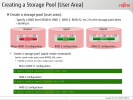
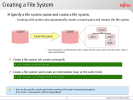
here two slides from a ten years old slide deck. ( Solaris 11 O/S )
 

Attachments

  • ksnip_20260402-142745.png
    ksnip_20260402-142745.png
    205.2 KB · Views: 7
  • ksnip_20260402-142845.png
    ksnip_20260402-142845.png
    167.7 KB · Views: 8
Not directly related but to hardening , AI tells this, can be interesting for install script
Summary Table of ZFS Properties
Dataset Path
exec (noexec)setuid (nosuid)devices (nodev)
/tmpoffoffoff
/var/tmpoffoffoff
/homeon (usually)offoff
/var/logoffoffoff
/var/mailoffoffoff
/booton/offoffoff


My little tuning now,
Code:
zpool history | grep set | grep -v TREETERRA | grep -v mountpoint | grep -v canmount | grep -v listsnap | grep -v ZUSB3
2026-03-29.19:49:55 zpool set bootfs=SSD SSD
2026-03-29.23:03:07 zfs set special_small_blocks=128K SSD
2026-03-30.00:26:11 zpool set autotrim=on SSD
2026-03-31.01:49:26 zfs set special_small_blocks=16K SSD
2026-04-02.14:54:29 zfs set atime=on SSD/var
2026-04-02.14:54:41 zfs set atime=off SSD/var/cache
2026-04-02.14:54:48 zfs set atime=off SSD/var/cache/pkg
2026-04-02.14:54:52 zfs set atime=off SSD/var/db
2026-04-02.14:54:56 zfs set atime=off SSD/var/db/grafana
2026-04-02.14:55:15 zfs set atime=off SSD/var/db/mariadb
2026-04-02.14:55:19 zfs set atime=off SSD/var/db/pkg
2026-04-02.14:55:23 zfs set atime=off SSD/var/db/postgres
2026-04-02.14:55:28 zfs set atime=off SSD/var/db/prometheus
2026-04-02.14:55:57 zfs set atime=off SSD/var/db/influxdb
2026-04-02.15:00:01 zfs set setuid=off SSD/SSD_now/home
2026-04-02.15:00:14 zfs set devices=off SSD/SSD_now/home
2026-04-02.15:00:43 zfs set exec=off SSD/var/log
2026-04-02.15:00:49 zfs set setuid=off SSD/var/log
2026-04-02.15:00:57 zfs set devices=off SSD/var/log
2026-04-02.15:08:00 zfs set atime=off SSD
2026-04-02.15:08:10 zfs set atime=off SSD/usr
 
yes it does , it means "an unused zfs partition".
Code:
gpart add -t freebsd-zfs -a 4K -l "MYZFS" -s 200GB ada0
zpool create MYZPOOL gpt/MYZFS
When booting from my existing FreeBSD partition I assume I need to mount the ZFS partition like so /dev/ada0p8 /mnt then
cd /mnt run this script from there.

Where do I extract kernel.txz and base.txz ? To /mnt ?
 
Things in right order.
- Create partition
- Create zpool
- No need to mount anything
- Check if zpool is imported
--> zpool list -v
- Normally zpool will have automatic moutpoint
---> eg if zpool is BLABLA , root dataset will be on /BLABLA

Copy & etract tgz to those places.
-Verify on this mountpoint
---> /boot/loader.conf
----> /etc/rc.conf
----> /etc/fstab
 
This my dataset layout , not perfect but can give indication,

root@myfreebsd:~ # zfs list | grep SSD | sort | grep -v poudriere | grep -v "@"
Code:
SSD                                           173G   311G   144K  /
SSD/SSD_now                                  39.7G   311G   112K  /SSD
SSD/SSD_now/home                             34.7G   311G    96K  /SSD/home
SSD/SSD_now/home/x                           34.7G   311G  27.9G  /SSD/home/x
SSD/SSD_now/home/x/KEEP                      6.83G   311G  6.83G  /SSD/home/x/KEEP
SSD/SSD_now/KEEP3                            4.94G   311G   124K  /SSD/KEEP3
SSD/SSD_now/KEEP3/linux_home                 4.94G   311G  4.94G  /SSD/KEEP3/linux_home
SSD/SSD_now/ollama                             96K   311G    96K  /SSD/ollama
SSD/SSD_now/root_KEEP                         652K   311G   652K  /SSD/root_KEEP
SSD/SSD_now/usr_local_etc                    5.59M   311G  5.59M  /SSD/usr_local_etc
SSD/SSD_now/usr_local_www                    60.4M   311G  60.4M  /SSD/usr_local_www
SSD/usr                                       130G   311G  1.74G  legacy
SSD/usr/local                                 114G   311G  29.2G  /usr/local
SSD/usr/obj                                  5.30G   311G  5.30G  /usr/obj
SSD/usr/ports                                5.99G   311G  5.99G  /usr/ports
SSD/usr/src                                  3.03G   311G  3.03G  /usr/src
SSD/var                                      3.69G   311G   718M  legacy
SSD/var/cache                                 348K   311G   212K  /var/cache
SSD/var/cache/pkg                             136K   311G   136K  /var/cache/pkg
SSD/var/db                                   2.98G   311G   211M  /var/db
SSD/var/db/grafana                           27.8M   311G  27.8M  /var/db/grafana
SSD/var/db/influxd                            560M   311G   560M  /var/db/influxd
SSD/var/db/mariadb                           3.41M   311G  3.41M  /var/db/mariadb
SSD/var/db/pkg                                151M   311G   151M  /var/db/pkg
SSD/var/db/postgres                           814M   311G   814M  /var/db/postgres
SSD/var/db/prometheus                        1.26G   311G  1.26G  /var/db/prometheus
SSD/var/log                                  5.36M   311G  5.36M  /var/log

Here and there i placed some softlinks.
"/home/x" points to "/SSD/home/x"
I can remove anything from /usr/local. will not lose nothing because i've moved subs etc and www and put softlinks.
Why remove /usr/local. You remove any installed package at once. But "pkg info" is still intact. So you just do "pkg upgrade (-f)"
 
Back
Top