ZFS How to install a ZFS based system using an existing system

It's best to use gpt labels. As bios can rename disks.
Note when not many commands, drop to commandline from install media.
I looked at script of T-Daemon looks good. Just edit specific parts for your specific system , copy to install media & run it from install media.
Just one thing,
Code:
zpool set bootfs=pool dataset
 
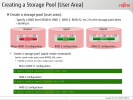
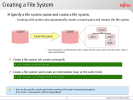
here two slides from a ten years old slide deck. ( Solaris 11 O/S )
 

Attachments

  • ksnip_20260402-142745.png
    ksnip_20260402-142745.png
    205.2 KB · Views: 25
  • ksnip_20260402-142845.png
    ksnip_20260402-142845.png
    167.7 KB · Views: 25
Not directly related but to hardening , AI tells this, can be interesting for install script
Summary Table of ZFS Properties
Dataset Path
exec (noexec)setuid (nosuid)devices (nodev)
/tmpoffoffoff
/var/tmpoffoffoff
/homeon (usually)offoff
/var/logoffoffoff
/var/mailoffoffoff
/booton/offoffoff


My little tuning now,
Code:
zpool history | grep set | grep -v TREETERRA | grep -v mountpoint | grep -v canmount | grep -v listsnap | grep -v ZUSB3
2026-03-29.19:49:55 zpool set bootfs=SSD SSD
2026-03-29.23:03:07 zfs set special_small_blocks=128K SSD
2026-03-30.00:26:11 zpool set autotrim=on SSD
2026-03-31.01:49:26 zfs set special_small_blocks=16K SSD
2026-04-02.14:54:29 zfs set atime=on SSD/var
2026-04-02.14:54:41 zfs set atime=off SSD/var/cache
2026-04-02.14:54:48 zfs set atime=off SSD/var/cache/pkg
2026-04-02.14:54:52 zfs set atime=off SSD/var/db
2026-04-02.14:54:56 zfs set atime=off SSD/var/db/grafana
2026-04-02.14:55:15 zfs set atime=off SSD/var/db/mariadb
2026-04-02.14:55:19 zfs set atime=off SSD/var/db/pkg
2026-04-02.14:55:23 zfs set atime=off SSD/var/db/postgres
2026-04-02.14:55:28 zfs set atime=off SSD/var/db/prometheus
2026-04-02.14:55:57 zfs set atime=off SSD/var/db/influxdb
2026-04-02.15:00:01 zfs set setuid=off SSD/SSD_now/home
2026-04-02.15:00:14 zfs set devices=off SSD/SSD_now/home
2026-04-02.15:00:43 zfs set exec=off SSD/var/log
2026-04-02.15:00:49 zfs set setuid=off SSD/var/log
2026-04-02.15:00:57 zfs set devices=off SSD/var/log
2026-04-02.15:08:00 zfs set atime=off SSD
2026-04-02.15:08:10 zfs set atime=off SSD/usr
 
yes it does , it means "an unused zfs partition".
Code:
gpart add -t freebsd-zfs -a 4K -l "MYZFS" -s 200GB ada0
zpool create MYZPOOL gpt/MYZFS
When booting from my existing FreeBSD partition I assume I need to mount the ZFS partition like so /dev/ada0p8 /mnt then
cd /mnt run this script from there.

Where do I extract kernel.txz and base.txz ? To /mnt ?
 
Things in right order.
- Create partition
- Create zpool
- No need to mount anything
- Check if zpool is imported
--> zpool list -v
- Normally zpool will have automatic moutpoint
---> eg if zpool is BLABLA , root dataset will be on /BLABLA

Copy & etract tgz to those places.
-Verify on this mountpoint
---> /boot/loader.conf
----> /etc/rc.conf
----> /etc/fstab
 
This my dataset layout , not perfect but can give indication,

root@myfreebsd:~ # zfs list | grep SSD | sort | grep -v poudriere | grep -v "@"
Code:
SSD                                           173G   311G   144K  /
SSD/SSD_now                                  39.7G   311G   112K  /SSD
SSD/SSD_now/home                             34.7G   311G    96K  /SSD/home
SSD/SSD_now/home/x                           34.7G   311G  27.9G  /SSD/home/x
SSD/SSD_now/home/x/KEEP                      6.83G   311G  6.83G  /SSD/home/x/KEEP
SSD/SSD_now/KEEP3                            4.94G   311G   124K  /SSD/KEEP3
SSD/SSD_now/KEEP3/linux_home                 4.94G   311G  4.94G  /SSD/KEEP3/linux_home
SSD/SSD_now/ollama                             96K   311G    96K  /SSD/ollama
SSD/SSD_now/root_KEEP                         652K   311G   652K  /SSD/root_KEEP
SSD/SSD_now/usr_local_etc                    5.59M   311G  5.59M  /SSD/usr_local_etc
SSD/SSD_now/usr_local_www                    60.4M   311G  60.4M  /SSD/usr_local_www
SSD/usr                                       130G   311G  1.74G  legacy
SSD/usr/local                                 114G   311G  29.2G  /usr/local
SSD/usr/obj                                  5.30G   311G  5.30G  /usr/obj
SSD/usr/ports                                5.99G   311G  5.99G  /usr/ports
SSD/usr/src                                  3.03G   311G  3.03G  /usr/src
SSD/var                                      3.69G   311G   718M  legacy
SSD/var/cache                                 348K   311G   212K  /var/cache
SSD/var/cache/pkg                             136K   311G   136K  /var/cache/pkg
SSD/var/db                                   2.98G   311G   211M  /var/db
SSD/var/db/grafana                           27.8M   311G  27.8M  /var/db/grafana
SSD/var/db/influxd                            560M   311G   560M  /var/db/influxd
SSD/var/db/mariadb                           3.41M   311G  3.41M  /var/db/mariadb
SSD/var/db/pkg                                151M   311G   151M  /var/db/pkg
SSD/var/db/postgres                           814M   311G   814M  /var/db/postgres
SSD/var/db/prometheus                        1.26G   311G  1.26G  /var/db/prometheus
SSD/var/log                                  5.36M   311G  5.36M  /var/log

Here and there i placed some softlinks.
"/home/x" points to "/SSD/home/x"
I can remove anything from /usr/local. will not lose nothing because i've moved subs etc and www and put softlinks.
Why remove /usr/local. You remove any installed package at once. But "pkg info" is still intact. So you just do "pkg upgrade (-f)"
 
@balanga said
Can I run this [script] while booted from a different partition on the same disk?
Yes, you can.

When booting from my existing FreeBSD partition I assume I need to mount the ZFS partition like so /dev/ada0p8 /mnt then
cd /mnt run this script from there.
The ZFS pool is mounted by the zpool-create(8) altroot property on /mnt, but the root dataset won't be mounted (see "-m none" in the script). It's not possible, the installer media is a read-only file system, no mount point can be created.

Where do I extract kernel.txz and base.txz ? To /mnt ?
You don't need to extract anything.

Boot the installer media (from Ventoy if you like), proceed with the menu-guided installation as usual, choose at the "Select Installation Type" "Distribution Sets" (kernel.txz, base.txz, etc., internet connection needed, they are not included on the *-disc1.iso), or pkgbase "Packages (Tech Preview), at the "Partitioning" menu enter "Shell", eventually edit your partitions, execute the shell script I posted, exit the "Shell". The installation proceeds menu guided, distribution files (or pkgbase packages) are installed, system is configured.

Just check at the end ("Manual Configuration" menu, < Yes >) /boot/loader.conf (for zfs_load=), /etc/fstab (for swap, efi), /etc/sysctl.conf (for vfs.zfs.vdev.min_auto_ashift=12), /etc/rc.conf (for zfs_enable=).

 
- No need to mount anything
...
- Normally zpool will have automatic moutpoint
---> eg if zpool is BLABLA , root dataset will be on /BLABLA
That won't work from a installer media. The installers file system is read-only (by design DVD, CD, or in case of a .img, fstab mounted ro). That means no /BLABLA mount point can be created. The only file system read-write on the installer media are tmpfs /tmp and /var.

The ZFS pool is mounted by the zpool-create(8) altroot property on /mnt, but the root dataset won't be mounted (see "-m none" in the script). It's not possible, the installer media is a read-only file system, no mount point can be created.
 
That won't work from a installer media. The installers file system is read-only (by design DVD, CD, or in case of a .img, fstab mounted ro). That means no /BLABLA mount point can be created. The only file system read-write on the installer media are tmpfs /tmp and /var.
First do "mount -o -u rw / " , everything becomes writable.
this is ufs from installer.
About default zpool imports & mounts , i dont know really.
 
Sorry can not go into details, for me this worked 90% of times.
& No idea what is FreeBS_Install.
Seriously, never mount it "/" , do mount somewhere in "/mnt/xxx", then do chroot..
 
@balanga said

Yes, you can.


The ZFS pool is mounted by the zpool-create(8) altroot property on /mnt, but the root dataset won't be mounted (see "-m none" in the script). It's not possible, the installer media is a read-only file system, no mount point can be created.


You don't need to extract anything.

Boot the installer media (from Ventoy if you like), proceed with the menu-guided installation as usual, choose at the "Select Installation Type" "Distribution Sets" (kernel.txz, base.txz, etc., internet connection needed, they are not included on the *-disc1.iso), or pkgbase "Packages (Tech Preview), at the "Partitioning" menu enter "Shell", eventually edit your partitions, execute the shell script I posted, exit the "Shell". The installation proceeds menu guided, distribution files (or pkgbase packages) are installed, system is configured.

Just check at the end ("Manual Configuration" menu, < Yes >) /boot/loader.conf (for zfs_load=), /etc/fstab (for swap, efi), /etc/sysctl.conf (for vfs.zfs.vdev.min_auto_ashift=12), /etc/rc.conf (for zfs_enable=).
So this script assumes that partitioning has already been done?

It would worth amending this script or creating another one to be run beforehand.

Exactly what would need to be in place before running the script you have provided?
 
So this script assumes that partitioning has already been done?

It would worth amending this script or creating another one to be run beforehand.

Exactly what would need to be in place before running the script you have provided?
You need knowledge of the actual hardware and storage devices on your present machine.
a Specific disk device does not have a pre-determined Device name. The Device name is generated in relation to other Devices in the system.
If we could rely on the fact that everyone would have two SATA HDDs in theri computer the y would be,
/dev/ada0 and /dev/ada1 , but we cant assume that , as soon as you install a M.2-NVME device it needs to attach to another driver
and becomes /dev/nvme0 with /dev/nda0p2 as its partition so a fixed script that is globally usable is not feasible .
 
You need knowledge of the actual hardware and storage devices on your present machine.
a Specific disk device does not have a pre-determined Device name. The Device name is generated in relation to other Devices in the system.
If we could rely on the fact that everyone would have two SATA HDDs in theri computer the y would be,
/dev/ada0 and /dev/ada1 , but we cant assume that , as soon as you install a M.2-NVME device it needs to attach to another driver
and becomes /dev/nvme0 with /dev/nda0p2 as its partition so a fixed script that is globally usable is not feasible .
But a template could be provided with device names commented out.
 
But a template could be provided with device names commented out.
From what I understand, something like this should suffice. Maybe the sizes and sequence should be changed and I'm not whether efi and/or freebsd-boot are required when booting via Ventoy.

sh:
PART='ada0px'

gpart add -t freebsd-zfs  -s 200G $PART
gpart add -t freebsd-boot -s 512K $PART
gpart add -t freebsd-swap -s 4G   $PART
gpart add -t efi          -s 260M $PART
 
So this script assumes that partitioning has already been done?
Yes.

It would worth amending this script or creating another one to be run beforehand.
A partitioning scheme and new partitions creating logic in the script (or separate script) would destroy a existing table.

But feel free to extend the zpool script or create a extra gpart script. Basically the partitioning is as shown in the example down below (based on the bsdinstall(8) scripts). Adapt to your needs, like swap size, freebsd-zfs size, device name.

It does not include exteded pre-check logic as in /usr/libexec/bsdinstall/zfsboot

Exactly what would need to be in place before running the script you have provided?
An existing target partition for the new system (freebsd-zfs). If not existent, a FreeBSD loader (UEFI ESP) or/and boot code (BIOS) populated partition must be created.

Before using the zpool script, see which partition is intended for installation ( gpart show -p <device>), set found device name in script, "zpool create" line (e.g.: ada0p3).


sh:
#!/bin/sh

DISK=<set_device_name>

gpart  destroy -F $DISK

gpart  create -s gpt $DISK
gpart  add -t efi -a 4k -s 260m -l efiboot0 $DISK

# Optional bootcode for BIOS machines:

gpart  add -t freebsd-boot -s 512k -l gptboot0 $DISK
gpart  bootcode -b /boot/pmbr  -p /boot/gptzfsboot -i 2 $DISK

gpart  add -t freebsd-swap -a 1m -s 2G -l swap0 $DISK
gpart  add -t freebsd-zfs - a 1m -l zfs0 $DISK

# create Esp file system, copy FreeBSD loader:

newfs_msdos -c 1 -F 32 /dev/$DISK'p1'
mount_msdosfs /dev/$DISK'p1' /mnt

mkdir -p /mnt/efi/boot
mkdir /mnt/efi/freebsd

cp /boot/loader.efi /mnt/efi/boot/bootx64.efi
cp /boot/loader.efi /mnt/efi/freebsd

umount /mnt

# Eventually create UEFI menu entry

efibootmgr -c -a -L FreeBSD -l $DISK'p1':/efi/freebsd/loader.efi
 
So I need to run a customised version of this script as soon as I drop to the shell in bsdinstall and then the other script.

It's useful to know I can mount my network drive without any problems simply by

mount 192.168.1.1:/ /net

I've also found that the file manager nnn, doesn't work in the shell, although lf does.
 
Yes.


A partitioning scheme and new partitions creating logic in the script (or separate script) would destroy a existing table.

But feel free to extend the zpool script or create a extra gpart script. Basically the partitioning is as shown in the example down below (based on the bsdinstall(8) scripts). Adapt to your needs, like swap size, freebsd-zfs size, device name.

It does not include exteded pre-check logic as in /usr/libexec/bsdinstall/zfsboot


An existing target partition for the new system (freebsd-zfs). If not existent, a FreeBSD loader (UEFI ESP) or/and boot code (BIOS) populated partition must be created.

Before using the zpool script, see which partition is intended for installation ( gpart show -p <device>), set found device name in script, "zpool create" line (e.g.: ada0p3).


sh:
#!/bin/sh

DISK=<set_device_name>

gpart  destroy -F $DISK

gpart  create -s gpt $DISK
gpart  add -t efi -a 4k -s 260m -l efiboot0 $DISK

# Optional bootcode for BIOS machines:

gpart  add -t freebsd-boot -s 512k -l gptboot0 $DISK
gpart  bootcode -b /boot/pmbr  -p /boot/gptzfsboot -i 2 $DISK

gpart  add -t freebsd-swap -a 1m -s 2G -l swap0 $DISK
gpart  add -t freebsd-zfs - a 1m -l zfs0 $DISK

# create Esp file system, copy FreeBSD loader:

newfs_msdos -c 1 -F 32 /dev/$DISK'p1'
mount_msdosfs /dev/$DISK'p1' /mnt

mkdir -p /mnt/efi/boot
mkdir /mnt/efi/freebsd

cp /boot/loader.efi /mnt/efi/boot/bootx64.efi
cp /boot/loader.efi /mnt/efi/freebsd

umount /mnt

# Eventually create UEFI menu entry

efibootmgr -c -a -L FreeBSD -l $DISK'p1':/efi/freebsd/loader.efi
Do I really need an efi partition ? I'm using a very old laptop. The disk already has eight partitions so gpart destroy -F $DISK would not be a good idea.

Where exactly should this bootcode be place ?

gpart bootcode -b /boot/pmbr -p /boot/gptzfsboot -i 2 $DISK

I'm getting thoroughly confused by all this since these instructions don't seem to apply to installing ZFS on a partition where there already are a number of partitions.


gpart bootcode -b /boot/pmbr -p /boot/gptzfsboot -i 2 $DISK
 
It lacks some library when you drop to a shell during bsdinstall when I mount a network share which contains the program. I don't have such an issue with lf.
If there is "space" you can just do "pkg install" using install media and remounting root read-write. Then you get the right libraries.
 
Do I really need an efi partition ? I'm using a very old laptop.
If you mean it's a laptop with BIOS firmware, then you don't need a "efi" partition. You know which firmware is in use by executing sysctl machdep.bootmethod. If it returns BIOS, then you don't need a "efi" partition. If you see UEFI, then you need one.

The disk already has eight partitions so gpart destroy -F $DISK would not be a good idea.
That partition script is good for a empty disk or where you don't have use for the old one.

On a disk where there already are a number of partitions and you want to keep them, then you don't need a partition script. Just choose the partition you want to install the new ZFS system on to, set the partition name in the zpool script.

Where exactly should this bootcode be place ?
Best is you show us the disk partitions where you want the new system installed: gpart show -p <target_disk_name>

Point those partitions out you want to keep and which are expendable, or respectively, you want the new system installed.
 
Back
Top