How to input Japanese using fcitx-mozc? 日本語入力への切り替え出来ず...

Hi, please help.

I am using FreeBSD (actually GhostBSD) with fcitz-mozc installed as the Japanese input method.
It was working perfectly well until a few weeks ago when toggling between English and Japanese on mozc became very difficult. Now, I can toggle mozc to Japanese when using Firefox, Mate terminal, Code - OSS, Jet Brains Pycharm Professional Edition IDE, but when using Konsole, LibreOffice Write/Calc, Kate, and KWrite, I cannot toggle mozc to Japanese (hitting ctrl+space doesn't do anything, neither does the Hankaku/Zenkaku Kanji key).

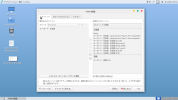
Here's what my fcitx settings panel and my .xprofile file looks. Any help would be appreciated. I've searched all kind of places on the net for possible fixes but so far have nothing to go on. Thanks!

fcitx設定.png


whats in dot xprofile capture.png
 
actually GhostBSD
Not supported here.


(Moved to "Other Window managers", don't really have a proper section for this. "Installing and upgrading" certainly didn't fit the bill)
 
Sounds as if you're using the older fcitx rather than fcitx5. (I think FreeBSD only has mozc with fcitx, and with fcitx5 you have to use anthy)
To quote my own page https://srobb.net/jpninpt.html about FreeBSD and fcitx (as opposed to fcitx5
You can still get fcitx (as opposed to fcitx5) with mozc. If so,the easiest way I've found to configure it is to startx, then run fcitx -d. Stop X, and in your $HOME/.config,there should be an fcitx/profile file. This should have a long list of input managers, and one should be mozc. It will read mozc:False. Changet the False to True, save the file, and start X again. Once again, run fcitx -d, and you should be able to input Japanese. If not, you may be able to get it working with the package zh-fcitx-configtool, but, as I've not needed it, I haven't tried it.
 
Sounds as if you're using the older fcitx rather than fcitx5. (I think FreeBSD only has mozc with fcitx, and with fcitx5 you have to use anthy)
To quote my own page https://srobb.net/jpninpt.html about FreeBSD and fcitx (as opposed to fcitx5
Currently the only way to use mozc with textproc/fcitx5 is to use overlay that Ken DEGUCHI is providing and build locally.
And if toggling Japanese inputs on non-KDE Qt apps works but not for KDE apps, confirm you're on xorg or xlibre and NOT on Wayland.
 
With fcitx5 I'm able to (well, only tested on labwc with featherpad) able to get Japanese input on labwc with featherpad) so I think one might be able to get qt app Japanese on Wayland. I ran a pretty limited test though, just opened featherpad and typed the word 日本語 and quit featherpad but it did work.
 
I just quickly installed a GhostBSD VM to see for myself and yes, it does seem as if it only has fcitx with qt5. Any chance of you trying fcitx5? (For those annoyed about this being GhostBSD, it seems the package sets are the same as regular FreeBSD but I think most of us on this thread are mainly interested in Japanese input). Or do you need the mozc that is only available as a package with fcitx, rather than fcitx5. T-Aoki thanks for the information on mozc with fcitx5, but I'm too lazy, and to be honest, my use of Japanese these days is infrequent, mostly only little greetings to my in-laws and the like.
 
Sounds as if you're using the older fcitx rather than fcitx5. (I think FreeBSD only has mozc with fcitx, and with fcitx5 you have to use anthy)
To quote my own page https://srobb.net/jpninpt.html about FreeBSD and fcitx (as opposed to fcitx5
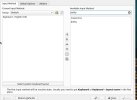
I tried uninstalling ja-fcitx+mozc and installing ja-fcitx5-anthy instead.
ja-fcitx5-anthy.png

but I could not get the IM to toggle over to Anthy even though the Fcitx configuration panel shows Anthy at the top of the Japanese Input Method list, and I tried the Ctrl+Space and the Zenkaku Hankaku keys. I suppose it may be that since the older Fcitx in combination with Mozc works in Firefox and Konsole, that may be the best that I might hope for in GhostBSD. It's a bit unfortunate though that I won't be able to use Kanji in either LibreOffice or Kate...
ja-fcitx5-anthy_in_Fcitx_config.png

I just quickly installed a GhostBSD VM to see for myself and yes, it does seem as if it only has fcitx with qt5. Any chance of you trying fcitx5? (For those annoyed about this being GhostBSD, it seems the package sets are the same as regular FreeBSD but I think most of us on this thread are mainly interested in Japanese input). Or do you need the mozc that is only available as a package with fcitx, rather than fcitx5. T-Aoki thanks for the information on mozc with fcitx5, but I'm too lazy, and to be honest, my use of Japanese these days is infrequent, mostly only little greetings to my in-laws and the like.
 

Attachments

  • ja-fcitx5-anthy_in_Fcitx_config.png
    ja-fcitx5-anthy_in_Fcitx_config.png
    132.3 KB · Views: 21
When I install it, (ja-fcitx5-anthy, running fcitx5-configtool), I have an English language version of what you're showing. I highlight anthy, and click the little < arrow at the top of those symbols in the middle. Anthy then shows up on the left. This is on regular FreeBSD.
 

Attachments

  • fcitx5.jpg
    fcitx5.jpg
    44.2 KB · Views: 17
When I install it, (ja-fcitx5-anthy, running fcitx5-configtool), I have an English language version of what you're showing. I highlight anthy, and click the little < arrow at the top of those symbols in the middle. Anthy then shows up on the left. This is on regular FreeBSD.
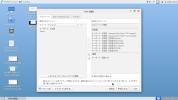
I see! I moved the Anthy over to the left hand side of the fcitx5-configtool too and now I am able to toggle Japanese input method with the hankaku/zenkaku key.
movedanthyoverleftside.png

But... I find on my GhostBSD version 25.02-R14.3p8 installation that toggling the Japanese input method on works in

Firefox,
Mate terminal,
Code - OSS,
Jet Brains Pycharm Professional Edition IDE,

but does not work when using

Konsole,
LibreOffice Write/Calc,
Kate, and
KWrite.

This is the same situation I had when I had fcitx-mozc installed so it seems that perhaps on GhostBSD the apps on which input method toggling does not work have some kind of restriction compared to those where toggling works. Incidentally, are you able to write in Japanese on apps like LibreOffice Write in plain vanilla FreeBSD?
softwarestation_fcitx5.png
 

Attachments

  • movedanthyoverleftside.png
    movedanthyoverleftside.png
    157.3 KB · Views: 15
ChapinTokyo, run fcitx5-diagnose and look at the Qt section.
You may need to set the other environment variables it suggests.
If that does not work, I would remove any settings that Plasma may have set some configuration that's interfering. You may need to clean up any settings from that.
 
ChapinTokyo I only know that in regular FreeBSD, *sometimes* though this hasn't been consistent, I had to change my startx entry from exec openbox (or exec dwm) to exec dbus-launch openbox. (and also being sure to install fcitx5-qt6). But as GhostBSD doesn't use startx, I don't know how you could make that work. Sorry.
 
Incidentally, are you able to write in Japanese on apps like LibreOffice Write in plain vanilla FreeBSD?
Yes, but as mentioned above, I sometimes have to start my window manager with dbus-launch but it's not consistent--that is, sometimes I don't have to do that. The essential thing, again with fcitx5-anthy, is to also have fcitx5-qt6 installed.

I cover it in more detail on my page which I linked above, (but, forum spammer that I am, I'll link again).

 
FYI: What I have in .xinitrc for fcitx5 with mozc (built locally using Ken DEGUCHI's overlay) is as below. (Relevant part only, but intentionally left conditionals to add support and way to select other IMs.)

Code:
## Support arrow keys to work with libinput
export XKB_DEFAULT_RULES=evdev

## Mozc
#
IMEngine=mozc

## fcitx
export XMODIFIERS=@im=fcitx

if [ -z "${XMODIFIERS}" ]
then
    if [ -x /usr/local/bin/fcitx5 ]
    then
        export XMODIFIERS=@im=fcitx
    fi
fi

## Input Method Engine configuration
#
case "${IMEngine}" in
mozc)
    : ${MOZCDIR:="${HOME}/.mozc"}
    if [ -r "{MOZCDIR}/.server.lock" ]; then
        /usr/local/bin/mozc restart
    else
        /usr/local/bin/mozc start    # v2.16.2051.102 and later
    fi
    ;;
esac

case "${XMODIFIERS}" in
@im=fcitx)
    echo '*inputMethod: fcitx' | xrdb -merge
    export GTK_IM_MODULE=fcitx
    export GTK3_IM_MODULE=fcitx
    export QT_IM_MODULE=fcitx
    export GLFW_IM_MODULE=ibus
    export XIM_PROGRAM="fcitx"
    if [ -x /usr/local/bin/fcitx5 ]
    then
      fcitx5 -r -d -s1
    else
      fcitx -r -d -s1
    fi
    ;;
esac
 
Back
Top