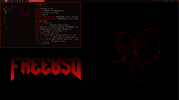
I recently migrated from Slackware to FreeBSD 15.0-RELEASE and ported my full suckless desktop environment. Sharing the process and the gotchas for anyone wanting to run dwm + st + dwmblocks on FreeBSD.
My dotfiles are at https://github.com/cl45h/dotfiles-freebsd
What I'm running
- dwm 6.8 with patches: vanitygaps, status2d, fancybar, swallow, cfacts, scratchpad, movestack, xresources
- st 0.9.3 with patches: HarfBuzz, alpha, scrollback, externalpipe, boxdraw, xresources
- dwmblocks with 4 blocks: volume, clock, internet, cputemp
- picom (pijulius fork) for compositing with animations
- pywal for dynamic color theming
- dunst for notifications
config.mk changes for FreeBSD
The main issue with compiling suckless tools on FreeBSD is the different paths for X11 and libraries. Here's what needs to change from the Linux defaults:
dwm config.mk:
Key differences from Linux:
-
-
-
- The CPPFLAGS need
st config.mk:
Key difference: remove
Compiling
Use
Same for st and dwmblocks.
dwmblocks scripts adapted for FreeBSD
The Linux scripts that read from /proc or /sys won't work on FreeBSD. Here's what I changed:
cputemp — CPU temperature
Linux uses
Requires
internet — network status
Linux reads from /proc/net and /sys/class/net. On FreeBSD, use ifconfig():
volume — PulseAudio volume
This one works the same on both systems if you use PulseAudio:
clock
Replace
picom (pijulius fork with animations)
The x11-wm/picom package doesn't include animations. To get the pijulius fork with animations (zoom, squeeze, slide-up, etc.), compile from source:
Dependencies:
.xinitrc
My ~/.xinitrc:
Packages I installed for the desktop
Gotchas summary
1. Use
2. Remove
3. Add
4. Add
5. Replace /proc and /sys reads with sysctl() and ifconfig() in scripts
6. Replace
7. Replace
8. X11 paths are /usr/local/include and /usr/local/lib, not /usr/include
Hope this helps someone making the switch. Happy to answer questions.
My dotfiles are at https://github.com/cl45h/dotfiles-freebsd
What I'm running
- dwm 6.8 with patches: vanitygaps, status2d, fancybar, swallow, cfacts, scratchpad, movestack, xresources
- st 0.9.3 with patches: HarfBuzz, alpha, scrollback, externalpipe, boxdraw, xresources
- dwmblocks with 4 blocks: volume, clock, internet, cputemp
- picom (pijulius fork) for compositing with animations
- pywal for dynamic color theming
- dunst for notifications
config.mk changes for FreeBSD
The main issue with compiling suckless tools on FreeBSD is the different paths for X11 and libraries. Here's what needs to change from the Linux defaults:
dwm config.mk:
Code:
X11INC = /usr/local/include
X11LIB = /usr/local/lib
FREETYPEINC = /usr/local/include/freetype2

INCS = -I${X11INC} -I${FREETYPEINC} `pkg-config --cflags xmu`
LIBS = -L${X11LIB} -lX11 -lX11-xcb ${XINERAMALIBS} ${FREETYPELIBS} -lxcb-res -lxcb -lXmu -lkvm
Key differences from Linux:
-
-lXmu and pkg-config --cflags xmu are needed for Xresources patch support-
-lkvm is needed for the swallow patch (process lookup via kvm_getprocs() instead of /proc)-
-lxcb-res -lxcb also needed for swallow- The CPPFLAGS need
-D__BSD_VISIBLE=1 for some POSIX functionsst config.mk:
Code:
X11INC = /usr/local/include
X11LIB = /usr/local/lib
LIBS = -L$(X11LIB) -lm -lX11 -lutil -lXft \
       `$(PKG_CONFIG) --libs fontconfig` \
       `$(PKG_CONFIG) --libs freetype2` \
       `$(PKG_CONFIG) --libs harfbuzz`
Key difference: remove
-lrt from LIBS. FreeBSD doesn't have librt — those functions are in libc.Compiling
Use
gmake instead of make on FreeBSD. BSD make has different syntax and will fail on suckless Makefiles:
Code:
cd ~/.local/src/dwm
gmake clean && gmake && doas gmake install
Same for st and dwmblocks.
dwmblocks scripts adapted for FreeBSD
The Linux scripts that read from /proc or /sys won't work on FreeBSD. Here's what I changed:
cputemp — CPU temperature
Linux uses
sensors or reads from /sys/class/thermal. On FreeBSD, use sysctl():
Code:
#!/bin/sh
CPU_TEMP="$(sysctl -n dev.cpu.0.temperature 2>/dev/null | sed 's/C$//' | awk '{printf "%d", $1}')"
printf "🌡 %s°C" "$CPU_TEMP"
Requires
coretemp kernel module loaded. Add to /etc/rc.conf:
Code:
kld_list="coretemp"internet — network status
Linux reads from /proc/net and /sys/class/net. On FreeBSD, use ifconfig():
Code:
#!/bin/sh
# Ethernet
for iface in $(ifconfig -l); do
    case "$iface" in lo*|wlan*|tun*|pflog*) continue ;; esac
    if ifconfig "$iface" 2>/dev/null | grep -q "status: active"; then
        eth="🌐"; break
    fi
done
[ -z "$eth" ] && eth="❎"

# WiFi
if ifconfig wlan0 2>/dev/null | grep -q "status: associated"; then
    ssid=$(ifconfig wlan0 | awk '/ssid/{print $2}')
    wifi="📶 $ssid"
fi

# VPN
vpn=""
ifconfig tun0 >/dev/null 2>&1 && vpn="🔒"

printf "%s %s%s" "$wifi" "$eth" "$vpn"
volume — PulseAudio volume
This one works the same on both systems if you use PulseAudio:
Code:
pactl get-sink-volume @DEFAULT_SINK@ | awk '{print $5}'clock
Replace
setsid -f (Linux-only flag) with setsid ... & for FreeBSD compatibility.picom (pijulius fork with animations)
The x11-wm/picom package doesn't include animations. To get the pijulius fork with animations (zoom, squeeze, slide-up, etc.), compile from source:
Code:
git clone https://github.com/pijulius/picom.git
cd picom
meson setup build
ninja -C build
sudo ninja -C build install
Dependencies:
pkg install meson ninja libev uthash libconfig.xinitrc
My ~/.xinitrc:
Code:
picom &
dwmblocks &
dunst &
xrandr --output DP-0 --left-of DP-2
exec dwm
Packages I installed for the desktop
Code:
pkg install xorg xinit xrandr xclip nsxiv xwallpaper dmenu
pkg install py311-pywal dunst noto-emoji
pkg install pulseaudio cava ranger
Gotchas summary
1. Use
gmake not make2. Remove
-lrt from st (FreeBSD has it in libc)3. Add
-lXmu -lkvm -lxcb -lxcb-res to dwm for swallow + xresources4. Add
-D__BSD_VISIBLE=1 to CPPFLAGS in dwm5. Replace /proc and /sys reads with sysctl() and ifconfig() in scripts
6. Replace
setsid -f with setsid ... &7. Replace
shuf with sort -R (no shuf on base FreeBSD)8. X11 paths are /usr/local/include and /usr/local/lib, not /usr/include
Hope this helps someone making the switch. Happy to answer questions.