ArduPilot SITL on FreeBSD 15.0 – successful build and a question about porting

Hello,

Over the last few days I have been experimenting with building and running ArduPilot on FreeBSD 15.0.

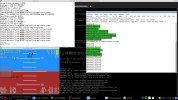
My goal was to see whether ArduPilot SITL (Software-In-The-Loop) could be used as a development and training platform on FreeBSD without relying on Linux.

The result was surprisingly good.

The following components are working:

  • ArduPilot SITL
  • MAVProxy
  • MAVProxy Console
  • MAVProxy Map
  • GUIDED mode
  • STABILIZE mode
  • MAVLink telemetry
  • AP_Bootloader build
  • STM32 flashing via dfu-util

System used:

Code:
FreeBSD 15.0-RELEASE-p5 amd64
clang 19
Python 3.11

Build issues encountered

ArduPilot contains a few Linux-specific assumptions that prevent it from building on FreeBSD out of the box.

1. libraries/AP_HAL_SITL/UART_utils.cpp

Build failed with:

Code:
fatal error: 'asm/termbits.h' file not found

The code uses Linux-specific interfaces:

Code:
#include <asm/ioctls.h>
#include <asm/termbits.h>

struct termios2
TCGETS2
TCSETS2
BOTHER

FreeBSD does not provide these APIs.

I modified the code to use the existing POSIX termios path:

Code:
#include <sys/ioctl.h>
#include <termios.h>

and standard termios functionality instead of Linux-specific termios2.

Example diff:

Code:
-#include <asm/ioctls.h>
-#include <asm/termbits.h>
+#include <sys/ioctl.h>
+#include <termios.h>

2. libraries/AP_Filesystem/AP_Filesystem_posix.cpp

Build failed with:

Code:
fatal error: 'sys/vfs.h' file not found

On FreeBSD I replaced it with:

Code:
#ifdef __FreeBSD__
#include <sys/param.h>
#include <sys/mount.h>
#else
#include <sys/vfs.h>
#endif

Example diff:

Code:
+#ifdef __FreeBSD__
+#include <sys/param.h>
+#include <sys/mount.h>
+#else
 #include <sys/vfs.h>
+#endif

Bootloader build

While building AP_Bootloader I encountered errors such as:

Code:
struct _reent declared inside parameter list

The issue turned out not to be ArduPilot itself, but the ARM toolchain.

The FreeBSD package:

Code:
/usr/local/bin/arm-none-eabi-gcc
and
Code:
export PATH=/usr/local/gcc-arm-embedded-14.2.rel1/bin:$PATH
export MAKE=gmake

was built with:

Code:
--without-headers

and therefore lacks the required newlib headers.

After switching to:

Code:
/usr/local/gcc-arm-embedded-14.2.rel1/bin/arm-none-eabi-gcc

the bootloader built successfully without any source code modifications.

Python dependencies

Installed via pip:

Code:
MAVProxy
pymavlink
dronecan
empy
fastcrc
geocoder
pexpect
pyserial
pynmeagps

Installed via pkg:

Code:
opencv
proj
git 
gmake 
python 
py311-pip 
py311-sqlite3

The MAVProxy map module initially failed because OpenCV was missing:

Code:
ModuleNotFoundError: No module named 'cv2'

After installing OpenCV, the map module loaded successfully.

Result

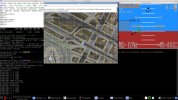
ArduPilot SITL is now running correctly on FreeBSD.

Example commands tested successfully:

Code:
mode guided
arm throttle
takeoff 20
velocity 1 0 0
mode land
link files
Code:
sudo ln -s /usr/local/bin/python3.11 /usr/local/bin/python
sudo ln -s /usr/local/bin/python3.11 /usr/local/bin/python3

MAVProxy Console and Map are both operational.

Question to the FreeBSD community

Would there be any interest in creating a proper FreeBSD port for ArduPilot SITL?

At least for my setup, only two relatively small source code changes were required to get SITL running.

I would be interested in hearing opinions about:

  • Creating a FreeBSD port for ArduPilot SITL
  • Adding official FreeBSD support upstream
  • Maintaining a small FreeBSD compatibility patch set

Perhaps there are already users running ArduPilot or PX4 on FreeBSD who could share their experience.

Thank you.
 

Attachments

  • sitl.jpg
    sitl.jpg
    326.2 KB · Views: 23
  • sitlmap.jpg
    sitlmap.jpg
    329.7 KB · Views: 25
I performed some additional testing after my original post.

Using the same FreeBSD 15.0 setup and the two compatibility patches mentioned above, I was able to build the following ArduPilot vehicle targets successfully:

Code:
./waf plane
./waf rover
./waf sub
./waf heli
./waf blimp

Усі вони були успішно завершені без необхідності будь-яких додаткових змін вихідного коду.
Code:
Tools/autotest/sim_vehicle.py -v Rover --console --map

I also tested an embedded target and successfully built ArduCopter firmware for a SpeedyBee F405 V3 flight controller:

[code]
./waf configure --board speedybeef4v3
./waf copter

Generated files:

Code:
BUILD SUMMARY
Build directory: /home/res2500/code/ardupilot/build/speedybeef4v3
Target          Text (B)  Data (B)  BSS (B)  Total Flash Used (B)  Free Flash (B)  External Flash Used (B)
----------------------------------------------------------------------------------------------------------
bin/arducopter    858612      3060    81320                861672          137748  Not Applicable        

'copter' finished successfully (6m26.456s)
res2500@:~/code/ardupilot $ ll build/speedybeef4v3/bin/
total 3592
drwxr-xr-x   2 res2500 res2500 -     512 12 черв. 17:11 ./
drwxr-xr-x  10 res2500 res2500 -    1024 12 черв. 17:11 ../
-rw-r--r--   1 res2500 res2500 -   13701  5 черв. 20:43 AP_Bootloader.apj
-rwxr-xr-x   1 res2500 res2500 -   13840  5 черв. 20:43 AP_Bootloader.bin*
-rwxr-xr-x   1 res2500 res2500 - 1861168 12 черв. 17:11 arducopter*
-rw-r--r--   1 res2500 res2500 -  785130 12 черв. 17:11 arducopter.apj
-rwxr-xr-x   1 res2500 res2500 -  861676 12 черв. 17:11 arducopter.bin*

Important note regarding the ARM toolchain:

The FreeBSD arm-none-eabi-gcc package was not sufficient for building AP_Bootloader because it was built without the required newlib headers.

I used the ARM GNU Embedded Toolchain instead:

Code:
export PATH=/usr/local/gcc-arm-embedded-14.2.rel1/bin:$PATH
export MAKE=gmake

Verification:

Code:
which arm-none-eabi-gcc
arm-none-eabi-gcc --version

After switching to the ARM GNU Embedded Toolchain, both AP_Bootloader and embedded firmware targets built successfully.

At this point I have successfully tested:

Code:
SITL:
- ArduCopter
- ArduPlane
- Rover
- ArduSub
- Heli
- Blimp

Embedded:
- AP_Bootloader
- SpeedyBee F405 V3 (ArduCopter)

Єдиними змінами вихідного коду, які були потрібні, були два виправлення сумісності з FreeBSD, описані в оригінальному дописі.
Testing is still ongoing. The next step is testing with the QGroundControl ground station.
 
QGroundControl Update

I also spent some time testing QGroundControl on the same FreeBSD 15.0 system.

The build was not completely straightforward. During the process I encountered several FreeBSD-specific issues, including missing dependencies and a few source-level build problems.

Some of the issues included:

Code:
showLinuxErrorDialog()
unused-function warnings treated as errors (-Werror)
missing Python modules (for example defusedxml, jinja2)

After resolving the dependency issues and applying a few local fixes, QGroundControl built successfully.

Version tested:

Code:
QGroundControl v5.0.3-1059-gdc6a04d87

Current status:

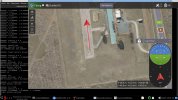
  • Build completed successfully
  • Application starts correctly
  • No immediate crashes observed
  • Successfully connects to ArduPilot SITL
  • MAVLink communication confirmed
  • Basic flight testing performed

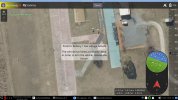
I have attached a screenshot of the running application.

At this stage I have not fully tested all functionality yet.

I am still learning the QGroundControl workflow, configuration options, mission planning tools and flight control interface, so additional testing is required before I can make any claims about full compatibility.

However, based on the current results, QGroundControl appears to be usable on FreeBSD and is able to communicate with ArduPilot SITL.

Together with the previous ArduPilot work, the current FreeBSD setup now includes:

Code:
ArduPilot SITL
MAVProxy
MAVProxy Map
QGroundControl
AP_Bootloader
STM32 DFU flashing

The next steps for me are:

  • More extensive QGroundControl testing
  • Mission planning tests
  • RTL and autonomous mission tests
  • Parameter management
  • Log analysis tools
  • Testing with real flight controllers

For now I can confirm that QGroundControl builds and runs on FreeBSD 15.0, and is capable of connecting to ArduPilot SITL.
 

Attachments

  • QGroundControl.jpg
    QGroundControl.jpg
    308.2 KB · Views: 16
Mission Planner successfully launched on FreeBSD 15.0 with Mono
I tested Mission Planner on FreeBSD 15.0-RELEASE amd64 using Mono.

Environment
Code:
FreeBSD 15.0-RELEASE amd64
Mono 6.8.0.123
LXQt desktop

Mission Planner version
Code:
Mission Planner 1.3.83

Results:
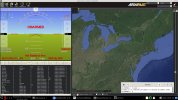
  • Mission Planner starts successfully under Mono.
  • No source code modifications or recompilation of Mission Planner were required.
  • Main window loads correctly.
  • Flight Data and Flight Plan tabs open.
  • Map is displayed and zooming works.
  • Plugins are detected and loaded.
  • The application is usable for basic navigation through the interface.

Mission Planner was launched directly with Mono on FreeBSD, without Wine.

Known issues

  • City names, borders and some map labels are missing.
  • Built-in SITL launch fails with a Process.Start() / Access denied error.
  • Some windows and panels do not resize correctly.
  • GDAL-related warnings are present during startup.
  • Not all functionality has been tested yet.

Not yet tested
  • Real flight controller connection
  • Parameter management
  • Mission upload/download
  • Telemetry operation
  • Log analysis
  • Complete SITL workflow

Additional investigation
During investigation of Mission Planner startup issues, I found that the FreeBSD GDAL port currently disables C# bindings:
Code:
BUILD_CSHARP_BINDINGS
CSHARP_MONO

I enabled these options and successfully built the GDAL C# bindings (gdal_wrap, ogr_wrap, osr_wrap) on FreeBSD.
While testing this, I also found a build issue where CSHARP_PLATFORM was correctly set in CMakeCache.txt, but was not propagated correctly into the Mono compiler command line, resulting in:
Code:
/platform:
instead of a valid target platform value.
After patching the build files, the GDAL C# bindings were successfully built.
Further compatibility testing between the generated GDAL C# bindings and Mission Planner is still required.

Conclusion:
Mission Planner appears to be functional on FreeBSD for at least basic usage through Mono.
More testing is needed, but the current results are promising and show that Mission Planner can run on FreeBSD without Wine.

If anyone else has experience running Mission Planner on FreeBSD, I would be interested in comparing results and testing additional functionality.
 

Attachments

  • mpFreeBSDmono.jpg
    mpFreeBSDmono.jpg
    357.1 KB · Views: 10
Today's Progress Update: SPEDIXF405, QGroundControl and Mission Planner on FreeBSD

Today I focused on testing a real flight controller instead of SITL.

Hardware: SPEDIX F405
Building ArduPilot Firmware
Environment:
Code:
$ export PATH=/usr/local/gcc-arm-embedded-14.2.rel1/bin:$PATH
$ export MAKE=gmake

Firmware build:

Code:
$ ./waf clean
$ ./waf configure --board SPEDIXF405
$ ./waf copter

Generated files:
Code:
build/SPEDIXF405/bin/arducopter.apj
build/SPEDIXF405/bin/arducopter.bin
build/SPEDIXF405/bin/arducopter_with_bl.hex

To generate the with-bootloader image, the Python intelhex module was required:

Code:
$ python3 -m pip install --user intelhex

Building AP_Bootloader

I also built the standalone bootloader:

Code:
$ MAKE=/usr/local/bin/gmake ./waf configure --board SPEDIXF405 --bootloader
$ MAKE=/usr/local/bin/gmake ./waf bootloader

Generated:

Code:
build/SPEDIXF405/bin/AP_Bootloader.bin

One FreeBSD-specific issue was that waf attempted to use BSD make. Switching to GNU make resolved the problem.

Flashing Tests

Initial test:

Code:
$ dfu-util -a 0 -s 0x08000000:leave -D build/SPEDIXF405/bin/AP_Bootloader.bin

This did not produce a usable result.

After reading the SPEDIXF405 documentation, I discovered that the recommended first installation image is:
Code:
Firmware
Firmware for the SPEDIX F405 is available from ArduPilot Firmware Server under the SPEDIXF405 target.

Loading Firmware
To flash firmware initially, connect USB while holding the bootloader button and use DFU to load the with_bl.hex file. Subsequent updates can be applied using .apj files through a ground station.


arducopter_with_bl.hex = AP_Bootloader + ArduCopter firmware

Work build firmware
[код]
$ export PATH=/usr/local/gcc-arm-embedded-14.2.rel1/bin:$PATH
$ export MAKE=gmake
$ ./waf clean
$ ./waf configure --board SPEDIXF405
$ ./waf copter

$ arm-none-eabi-objcopy -I ihex -O binary arducopter_with_bl.hex arducopter_with_bl.bin

$ dfu-util -a 0 -s 0x08000000:leave -D arducopter_with_bl.bin[/code]

The official documentation specifically recommends using the with_bl image for the initial DFU installation.

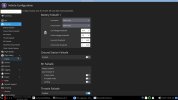
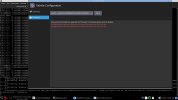
QGroundControl Results

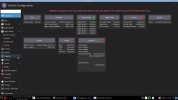
QGroundControl was able to detect the controller:

Code:
Found device: ArduPilot ChibiOS (cuaU0)

This confirms:

  • Firmware build completed successfully
  • ArduPilot bootloader is present
  • USB communication works
  • FreeBSD detects the controller correctly

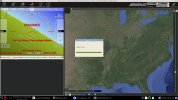
Mission Planner Results

Mission Planner was started under Mono using:

Code:
$ export MONO_IOMAP=drive:case
$ export MONO_WINFORMS_XIM_STYLE=disabled
$ export LANG=C.UTF-8
$ mono MissionPlanner.exe

Results:

  • Mission Planner starts
  • Controller connection successful
  • MAVLink telemetry received
  • HUD updates correctly

Mission Planner is not fully functional yet under Mono:

  • Firmware upload not working
  • File save dialogs not working correctly
  • Some parameter functions incomplete
  • WinForms exceptions observed

However, live telemetry from the flight controller was successfully displayed.

Current Status
Today's successful workflow:
Code:
FreeBSD 15.0 -> ArduPilot Build -> SPEDIXF405 Firmware -> DFU Flashing -> ArduPilot ChibiOS Bootloader -> QGroundControl (Connect USB ) and Mission Planner (Mono) (Connect USB )

At this point I have confirmed:
  • Firmware builds on FreeBSD
  • Bootloader builds on FreeBSD
  • DFU flashing works
  • QGroundControl detects the hardware
  • Mission Planner can communicate with the hardware
  • MAVLink telemetry is working
  • Calibration accelerometer

Further testing is still needed for parameter management, calibration, mission planning and actual flight operation.
 

Attachments

  • qgfly.jpg
    qgfly.jpg
    244.3 KB · Views: 4
  • qgBOOT.jpg
    qgBOOT.jpg
    203.3 KB · Views: 4
  • qgconf.jpg
    qgconf.jpg
    124.2 KB · Views: 4
  • warningAP.jpg
    warningAP.jpg
    162.7 KB · Views: 4
  • MPspedixF405.jpg
    MPspedixF405.jpg
    333.2 KB · Views: 3
Back
Top