
ArduPilot SITL on FreeBSD 15.0 – successful build and a question about porting

```If I understand things correctly DFU flashing is for device firmware then you flash ArduPilot Mission package onto device via GUI tool of QGroundControl? Is that right?```
Yes, dfu-util for flashing, and the ground station QGroundControl for precise settings, modes, motors, and other configurations. For now, QGroundControl needs to be built locally, since the ports don’t yet have the new Qt. To enter DFU mode, you need to press the button and connect the USB power. Then release the button.
Code:
$ arm-none-eabi-objcopy -I ihex -O binary arducopter_with_bl.hex arducopter_with_bl.bin // HEX to BIN

$ dfu-util -a 0 -s 0x08000000:leave -D arducopter_with_bl.bin

$ dfu-util -l // list DFU devices
$ usbconfig
You also need to configure /etc/devrules.conf, and in pwgroup add the user to all required groups.
Code:
# pw groupmod usb -m yourusername
# pw groupmod dialer -m yourusername
# pw groupmod uucp -m yourusername

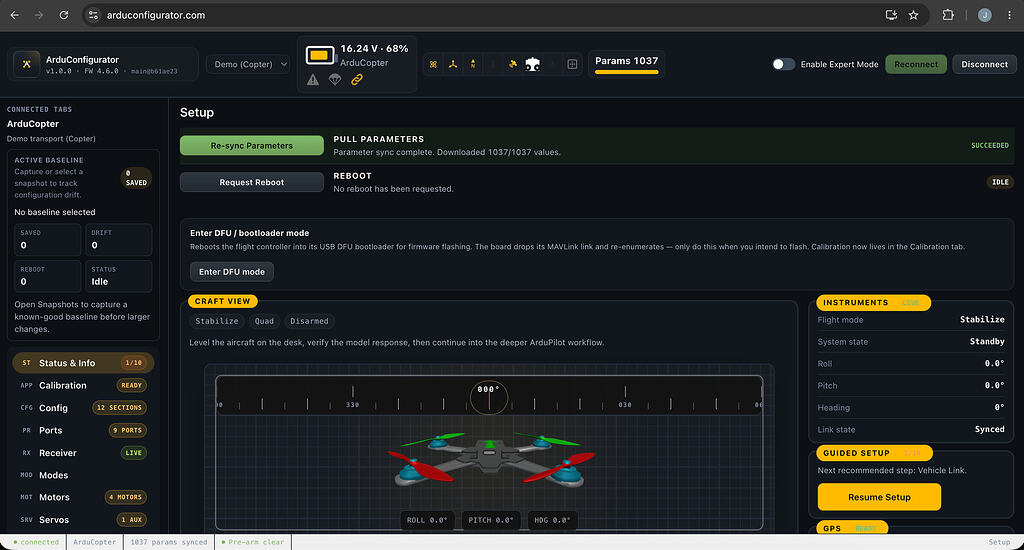
 
If anyone else has experience running Mission Planner on FreeBSD, I would be interested in comparing results and testing additional functionality.
I am just now starting at this point. MissionPlanner.exe

I am looking at the various ArduPilot programs.

I see you used mono6. I had mono5 already installed so I extracted the ZIP to /missionplanner and cd into it and ran mono MissionPlanner.exe

/missionplanner #
mono --version
Code:
Mono JIT compiler version 5.20.1.34 (5.20.1.34 Sat Aug  9 18:37:44 UTC 2025)
Copyright (C) 2002-2014 Novell, Inc, Xamarin Inc and Contributors. www.mono-project.com
    TLS:       
    SIGSEGV:       altstack
    Notification:  kqueue
    Architecture:  amd64
    Disabled:      none
    Misc:          softdebug
    Interpreter:   yes
    LLVM:          supported, not enabled.
    Suspend:       preemptive
    GC:            sgen (concurrent by default)

/missionplanner # mono MissionPlanner.exe
Code:
exception inside UnhandledException handler: (null) assembly:/usr/local/lib/mono/4.5/mscorlib.dll type:TypeInitializationException member:(null)

[ERROR] FATAL UNHANDLED EXCEPTION: System.TypeInitializationException: The type initializer for 'Default' threw an exception. ---> System.TypeInitializationException: The type initializer for 'System.Drawing.KnownColors' threw an exception. ---> System.TypeInitializationException: The type initializer for 'System.Drawing.GDIPlus' threw an exception. ---> System.DllNotFoundException: libgdiplus.so
  at (wrapper managed-to-native) System.Drawing.GDIPlus.GdiplusStartup(ulong&,System.Drawing.GdiplusStartupInput&,System.Drawing.GdiplusStartupOutput&)
  at System.Drawing.GDIPlus..cctor () [0x000b0] in <37be53f22b6241b697226b0128be2a9b>:0
   --- End of inner exception stack trace ---
  at System.Drawing.KnownColors..cctor () [0x0001a] in <37be53f22b6241b697226b0128be2a9b>:0
   --- End of inner exception stack trace ---
  at (wrapper managed-to-native) System.Object.__icall_wrapper_mono_generic_class_init(intptr)
  at System.Drawing.Color.FromKnownColor (System.Drawing.KnownColor color) [0x00007] in <37be53f22b6241b697226b0128be2a9b>:0
  at System.Drawing.Color.get_White () [0x00000] in <37be53f22b6241b697226b0128be2a9b>:0
  at MissionPlanner.Utilities.PointLatLngAlt..ctor () [0x00016] in <c7cb5fd349cd49ffbca279b7c11182d1>:0
  at MissionPlanner.Utilities.PointLatLngAlt..cctor () [0x00000] in <c7cb5fd349cd49ffbca279b7c11182d1>:0
   --- End of inner exception stack trace ---
  at MissionPlanner.Program.Main (System.String[] args) [0x00000] in <b0e70e19ad564dc7bb0b8e33a4ca21c0>:0

Next step I will remove mono5 and try mono6.

I am using graphics/pinta and it is compiled for mono5-20
Code:
Installed packages to be REMOVED:
    gtk-sharp20: 2.12.45_7
    mono-addins: 1.3_5
    mono5.20: 5.20.1.34_4
    pinta: 1.7.1_4

pkg install mono6-8

BINGO ArduPilots Mission Planner on FreeBSD 14.4-RELEASE Desktop XFCE4.
 
Бuild QGC local, no ports

pkg install gstreamer1 gstreamer1-plugins \
gstreamer1-plugins-good gstreamer1-plugins-bad \
gstreamer1-plugins-ugly gstreamer1-libav py312-jinja2-cli

Bash:
mkdir ~/code
cd ~/code/
git clone https://github.com/mavlink/qgroundcontrol.git
cd qgroundcontrol

/usr/local/lib/qt6/bin/qt-cmake \
  -B build \
  -G Ninja \
  -DCMAKE_BUILD_TYPE=Release \
  -DPython3_EXECUTABLE=/usr/local/bin/python3.11 \
  -DGStreamer_ROOT_DIR=/usr/local \
  -DGSTREAMER_LIB_PATH=/usr/local/lib \
  -DGSTREAMER_PLUGIN_PATH=/usr/local/lib/gstreamer-1.0 \
  -DGSTREAMER_INCLUDE_PATH=/usr/local/include/gstreamer-1.0 \
  -DCMAKE_CXX_FLAGS="-Wno-error=unused-function"

cmake --build build
directory Release

MissionPlaaner conect port FC controler ?
 
I plugged in my CoreSolo F405WING via USB-C and I saw a new device in /dev/ttyU0 and lights on the controller.
I set connection config to ttyU0 and tried to connect with Mission Planner.
Timeout.

So I am getting ready to deploy your dfu instructions. The board is useless with INAV to me so I am flashing some other board firmware to it.

SoloGood F405WING seems to be close to these models:

JMEMCU F405WING
LONGBOW F405WING
MATEK F405WING
SPEEDYBEE F405WING

LongBow looks closest connector wise but I saw a weird note:
SERIAL6 -> UART6 (tied to internal wireless module, MAVLink2 telem)

So I am looking at MATKEK or JMEMCU WING firmware. They look closest feature wise. (Barometer wrong)

Let me explore Mission Planner for a while before QGC. I hate mono but it works.

What about ArduDeck? Too new? Still beta.
 
OK after flashing JMEMCU-F405-WING firmware I now have USB communications with the SoloGood F405WING via Mission Planner.

Thanks resora without your detailed flashing instructions I would have never got a chance to try SoloGood board.
That salvaged a nice board with a layout I really prefer...
Usually I would do this in a private mesage but I would like to reward your work with flight controllers. I have several on the way.
Your choice free, JMEMCU F405WING or FlyingRC F4WING MINI MK1
I have them coming from China, so a few weeks out. You are welcome to one of each. I will cover shipping.

My procedure:
pkg install arm-none-eabi-binutils dfu-util
arm-none-eabi-objcopy -I ihex -O binary ardurover_with_bl.hex ardurover_with_bl.bin
dfu-util -a 0 -s 0x08000000:leave -D ardurover_with_bl.bin

Now I have alot of reading to do......
At least I am on the final item now: Configuration
 
але я хотів би винагородити вашу роботу з контролерами польоту.
все добре, мені теж допомагали люди на freebsd
 
I see you are offering hardware. I am willing to chip in too. I have several packages with Flight Controllers arriving next week.

Maybe I will offer to solder them up too just in case ports person needs it. I am going to solder some up some of mine this weekend.

Sending out an SOS. Please any port committers help the ArduPilot port land. This is quality software.
I could not believe MissionPlanner runs so well with mono on FreeBSD.

I will test the port work myself this weekend. Let me know if you want me to test with Poudriere. Isn't there Port Lint too for testing needed?
 
I saw you had added a program later called arduconfigurator. I did not have time to ask you about it but I did run across reference to it. Nice Feature.

I am working on getting my rover configured but I can't help but to notice that my Laptop Fan is running hard. Normally quiet.
Looking at top the process of mono-sgen is consuming 80% across eight cores.
Have you noticed that? Rebooted and still persists. Not a big deal but that is a good deal of resources. Using i5-9400H.

Having problems calibrating ESC. Normal or Brushed-BiDir are the settings I am testing.
Getting further along and everything went south. Deleting MissionPlanner and starting over with latest version.
It feels so dirty using mono and it really worked well for a while.

I need to test your port work now and leave positive comments on PR.
Thanks so much.
 
please local build QGC, install depends

sudo pkg install gstreamer1 gstreamer1-plugins \
gstreamer1-plugins-good gstreamer1-plugins-bad \
gstreamer1-plugins-ugly gstreamer1-libav py312-jinja2-cli

build QGC:

mkdir ~/code
cd ~/code/
git clone https://github.com/mavlink/qgroundcontrol.git
cd qgroundcontrol

/usr/local/lib/qt6/bin/qt-cmake \
-B build \
-G Ninja \
-DCMAKE_BUILD_TYPE=Release \
-DPython3_EXECUTABLE=/usr/local/bin/python3.11 \
-DGStreamer_ROOT_DIR=/usr/local \
-DGSTREAMER_LIB_PATH=/usr/local/lib \
-DGSTREAMER_PLUGIN_PATH=/usr/local/lib/gstreamer-1.0 \
-DGSTREAMER_INCLUDE_PATH=/usr/local/include/gstreamer-1.0 \
-DCMAKE_CXX_FLAGS="-Wno-error=unused-function"

cmake --build build

cd code/qgroundcontrol/build/Release/
./QGroundControl

Try QGC; I explained why I can't create a port.

Click the three dots and extract directly into the archive, as indicated: /usr/ports/science/ardupilot-configurator

Maybe it was a single-core load? Yes, I often see high RAM and CPU usage during builds—I even close my browser.
 
Back
Top