Linuxulator + MasterPDF + VNC

Hi guys,

this is a bit tricky, I am trying to run MasterPDF through Linuxulator, the issue I guess is that I am working from a VNC connection:

Code:
./Master_PDF_Editor_5.9.94-x86_64.AppImage
qt.qpa.plugin: Could not find the Qt platform plugin "xcb" in ""
This application failed to start because no Qt platform plugin could be initialized. Reinstalling the application may fix this problem.

Available platform plugins are: eglfs, linuxfb, minimal, minimalegl, offscreen, vnc, xcb.

I tried with:
Code:
$ export QT_QPA_PLATFORM=vnc
$ ./Master_PDF_Editor_5.9.94-x86_64.AppImage
qt.qpa.plugin: Could not load the Qt platform plugin "vnc" in "" even though it was found.
This application failed to start because no Qt platform plugin could be initialized. Reinstalling the application may fix this problem.

Available platform plugins are: eglfs, linuxfb, minimal, minimalegl, offscreen, vnc, xcb.


All the dependencies are installed:

Code:
Master_PDF_Editor_5.9.94-x86_64.AppImage
config.sh
fonts
lang
libQt5Concurrent.so.5
libQt5Core.so.5
libQt5Gui.so.5
libQt5Network.so.5
libQt5PrintSupport.so.5
libQt5Qml.so.5
libQt5Svg.so.5
libQt5Widgets.so.5
libQt5Xml.so.5
libcrypto.so.1.1
libdouble-conversion.so.3
libmd4c.so.0
libpkcs11-helper.so.1
libsane.so.1
libssl.so.1.1
libusb-1.0.so.0
libxcb-util.so.1
license_en.txt
masterpdfeditor5
masterpdfeditor5.core
masterpdfeditor5.desktop
masterpdfeditor5.png
misc
stamps
templates
usr

Anyway perhaps I am doing something unfeasible, I can't tell you.

Thanks... 🙏
 
I made some progress but still same outcome.

I extracted those missing plugins:

Code:
├── Master_PDF_Editor_5.9.94-x86_64.AppImage
├── libs
│   ├── libQt5Concurrent.so.5
│   ├── libQt5Core.so.5
│   ├── libQt5EglFSDeviceIntegration.so.5
│   ├── libQt5EglFsKmsSupport.so.5
│   ├── libQt5Gui.so.5
│   ├── libQt5Network.so.5
│   ├── libQt5PrintSupport.so.5
│   ├── libQt5Qml.so.5
│   ├── libQt5Svg.so.5
│   ├── libQt5Widgets.so.5
│   ├── libQt5X11Extras.so.5
│   ├── libQt5XcbQpa.so.5
│   ├── libQt5Xml.so.5
│   ├── libcrypto.so.1.1
│   ├── libdouble-conversion.so.3
│   ├── libmd4c.so.0
│   ├── libpkcs11-helper.so.1
│   ├── libsane.so.1
│   ├── libssl.so.1.1
│   ├── libusb-1.0.so.0
│   ├── libxcb-util.so.1
│   └── plugins
│       ├── libcomposeplatforminputcontextplugin.so
│       ├── libibusplatforminputcontextplugin.so
│       ├── libqeglfs-emu-integration.so
│       ├── libqeglfs-kms-egldevice-integration.so
│       ├── libqeglfs-kms-integration.so
│       ├── libqeglfs-x11-integration.so
│       ├── libqeglfs.so
│       ├── libqevdevkeyboardplugin.so
│       ├── libqevdevmouseplugin.so
│       ├── libqevdevtabletplugin.so
│       ├── libqevdevtouchplugin.so
│       ├── libqgif.so
│       ├── libqico.so
│       ├── libqjpeg.so
│       ├── libqlibinputplugin.so
│       ├── libqlinuxfb.so
│       ├── libqminimal.so
│       ├── libqminimalegl.so
│       ├── libqoffscreen.so
│       ├── libqtuiotouchplugin.so
│       ├── libqvnc.so
│       ├── libqxcb-egl-integration.so
│       ├── libqxcb-glx-integration.so
│       └── libqxcb.so
├── license_en.txt
├── masterpdfeditor5
├── masterpdfeditor5.core
├── masterpdfeditor5.desktop
├── masterpdfeditor5.png

Set the environment variables:

Code:
$ export LD_LIBRARY_PATH=/home/freezr/bin/master-pdf-editor-5/libs
$ export QT_QPA_PLATFORM_PLUGIN_PATH=/home/freezr/bin/master-pdf-editor-5/libs/plugins
$ export QT_QPA_PLATFORM=xcb
$ ./Master_PDF_Editor_5.9.94-x86_64.AppImage
qt.qpa.plugin: Could not load the Qt platform plugin "xcb" in "/home/freezr/bin/master-pdf-editor-5/libs/plugins" even though it was found.
This application failed to start because no Qt platform plugin could be initialized. Reinstalling the application may fix this problem.

Available platform plugins are: eglfs (from /home/freezr/bin/master-pdf-editor-5/libs/plugins), linuxfb (from /home/freezr/bin/master-pdf-editor-5/libs/plugins), minimal (from /home/freezr/bin/master-pdf-editor-5/libs/plugins), minimalegl (from /home/freezr/bin/master-pdf-editor-5/libs/plugins), offscreen (from /home/freezr/bin/master-pdf-editor-5/libs/plugins), vnc (from /home/freezr/bin/master-pdf-editor-5/libs/plugins), xcb (from /home/freezr/bin/master-pdf-editor-5/libs/plugins), eglfs, linuxfb, minimal, minimalegl, offscreen, vnc, xcb.

Abort trap (core dumped)

What else can I try? 🤷‍♂️
 
It could be that both the xcb and vnc plugin are failing in the same way. Likely it is a dynamic library dependency.

I suggest using ldd (or objdump -x <lib> | grep NEEDED) to list the dependencies for both of those plugins and see whats missing (perhaps its as simple as adding another LD_LIBRARY_PATH).

Note: You possibly have to use a Linux build of the ldd program. However, it is better than the objdump tool for this task because its recursive.
 
It could be that both the xcb and vnc plugin are failing in the same way. Likely it is a dynamic library dependency.

I suggest using ldd (or objdump -x <lib> | grep NEEDED) to list the dependencies for both of those plugins and see whats missing (perhaps its as simple as adding another LD_LIBRARY_PATH).

Note: You possibly have to use a Linux build of the ldd program. However, it is better than the objdump tool for this task because its recursive.

I tried with enabling the debug and I opened a can of worms:

Code:
export QT_DEBUG_PLUGINS=1

./masterpdf5.appimage
[...]
Got keys from plugin meta data ("xcb")
Cannot load library /home/freezr/bin/master-pdf-editor-5/libs/plugins/libqoffscreen.so: (/lib64/libm.so.6: version `GLIBC_2.38' not found (required by /tmp/.mount_MasterwPeseh/lib/libxml2.so.2))
QLibraryPrivate::loadPlugin failed on "/home/freezr/bin/master-pdf-editor-5/libs/plugins/libqoffscreen.so" : "Cannot load library /home/freezr/bin/master-pdf-editor-5/libs/plugins/libqoffscreen.so: (/lib64/libm.so.6: version `GLIBC_2.38' not found (required by /tmp/.mount_MasterwPeseh/lib/libxml2.so.2))"
Cannot load library /tmp/.mount_MasterwPeseh/platforms/libqoffscreen.so: (/lib64/libm.so.6: version `GLIBC_2.38' not found (required by /tmp/.mount_MasterwPeseh/lib/libxml2.so.2))
QLibraryPrivate::loadPlugin failed on "/tmp/.mount_MasterwPeseh/platforms/libqoffscreen.so" : "Cannot load library /tmp/.mount_MasterwPeseh/platforms/libqoffscreen.so: (/lib64/libm.so.6: version `GLIBC_2.38' not found (required by /tmp/.mount_MasterwPeseh/lib/libxml2.so.2))"
qt.qpa.plugin: Could not load the Qt platform plugin "offscreen" in "/home/freezr/bin/master-pdf-editor-5/libs/plugins" even though it was found.
This application failed to start because no Qt platform plugin could be initialized. Reinstalling the application may fix this problem.

Available platform plugins are: eglfs (from /home/freezr/bin/master-pdf-editor-5/libs/plugins), linuxfb (from /home/freezr/bin/master-pdf-editor-5/libs/plugins), minimal (from /home/freezr/bin/master-pdf-editor-5/libs/plugins), minimalegl (from /home/freezr/bin/master-pdf-editor-5/libs/plugins), offscreen (from /home/freezr/bin/master-pdf-editor-5/libs/plugins), vnc (from /home/freezr/bin/master-pdf-editor-5/libs/plugins), xcb (from /home/freezr/bin/master-pdf-editor-5/libs/plugins), eglfs, linuxfb, minimal, minimalegl, offscreen, vnc, xcb.

I don't believe that is really feasible.

I'll try with a Virtual Machine...
 
Code:
/lib64/libm.so.6: version `GLIBC_2.38' not found

Hmm, this means that the libc (glibc) provided by your Linux environment is not compatible. Does the app image you extracted provide its own? Perhaps you can use that instead.
 
Code:
/lib64/libm.so.6: version `GLIBC_2.38' not found

Hmm, this means that the libc (glibc) provided by your Linux environment is not compatible. Does the app image you extracted provide its own? Perhaps you can use that instead.

I didn't copy all the errors only the tail...

I decided to go virtual, but now I am struggling with bhyve... 😂😩
 
If you find a solution to installing Master_PDF_Editor post it here. I use it on Linux, To put FreeBSD on bare metal, I would want to add it also.
 
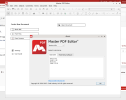
I use Master PDF Editor on FreeBSD 15.0 through linuxulator (debian install) . Works perfectly, see attached.
 

Attachments

  • Screenshot_251228_0616.png
    Screenshot_251228_0616.png
    75.7 KB · Views: 28
I use Master PDF Editor on FreeBSD 15.0 through linuxulator (debian install) . Works perfectly, see attached.

Can you explain your method?
I am not very expert with Linuxulator so I used the binary version and the appimage unsuccessfully... 😩
 
The Manual, when in doubt always start there to build fundamentals https://docs.freebsd.org/en/books/handbook/linuxemu/

Stick to debs or rpms. Forget about appimage/flatpaks/snaps.

For my compat linuxulator environment I went with bookworm. It's sufficient for the handful of apps I want. Also I think there is/was a bug in debotsrap wrt trixie, but did not bother with it...

Excerpt from my labwc menu file to get an idea how to launch the apps:

Code:
<item label="🌐  Signal">
    <action name="Execute" command="/compat/debian/opt/Signal/signal-desktop --no-sandbox --password-store=kwallet6" />
 </item>
 <item label="🗨️  MS Teams">
    <action name="Execute" command="xdg-open .local/share/applications/chrome-ompifgpmddkgmclendfeacglnodjjndh-Default.desktop" />
 </item>
  <item label="🗨️  Discord">
      <action name="Execute" command="/compat/debian/usr/bin/discord --no-sandbox" />
  </item>
 <item label="📡  Remote Client">
    <action name="Execute"><execute>env WINE_VK_VULKAN_ONLY=1 wine64 Downloads/rustdesk-1.4.3-x86_64.exe</execute></action>
 </item>
 <item label="✍  Simple Editor">
      <action name="Execute" command="env GDK_BACKEND=x11 leafpad" />
 </item>
 <item label="✍  MasterPDF-Editor">
      <action name="Execute"><execute>/compat/debian/opt/master-pdf-editor-5/masterpdfeditor5</execute></action>
 </item>

Other example: https://unixdigest.com/tutorials/ho...bsd-using-the-linux-binary-compatibility.html
 
Back
Top