FreeBSD website redesign...

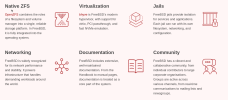
Omg, a whole bunch of things are not clickable. Like those giant snippets taking 1/3 of the front page...including Community:

Screenshot_20260518_094902.png

I like the airy feel, but I also prefer dashboard-like UX design elements, especially for technology websites. One word I am looking for is Portal - I would want a portal.
 
Why is the top of the page wasted on advertising copy explaining how great FreeBSD is? Is this some sort of advertising? Who is the target audience of the ads?

Why is there both a hamburger menu (at the top right) and a bottom set of links that go mostly to the same content?

Why is there only a download link to version 15? Version 14 continues to be supported and downloadable. Matter-of-fact, I happen to think that for many users and applications, older and more stable versions are a better choice. Why would I run 14.4 if 14.3 does everything I need? And 15.x is right out. The old information about currently supported versions and legacy versions is buried behind a link, it used to be at the top.

Why is "About" the first thing (in both the hamburger menu and the links at the bottom)? The important thing is the product, the downloadable installers and code. Not introduction, features, stuff the foundation does, and disclaimers.

It seems to me that the foundation ... the less said here the better.
 
It was clear that a new design eventually must come: The other pages including the forums already have been updated to the new design, so of course also the homepage eventually also have to be.
Today the most important thing above all even functionality and quality is, it must look modern and cool, which today means: Fisher-Price like foolproof to distinguish structure: very large, simple and sterile, lots of space wasted, useful information removed, toy gadgets and useless info bloated and added redundantly.

But comparing to what was presented app. 2 years(?) ago as the new design which they asked feedback for, this is a good compromise: It "only" needs 3 pages to present everything (the old one needed 1.3), while the first sketch needed >8 or even more, a real mousewheel killer, also known as bogroll design.
You don't question but just gotta do what everybody else does, no matter how useless or stupid that is. Which to me proves that many webpage designers know how to program a page but not how to design a user friendly page. Of course not. The designers works for their clients, not for the users of a page. Neither of them are using the page themselves. They only need to fulfill what they believe the users may like by looking at other pages designed the same way. The least page designers are capable to follow the most exemplary lead page design there is, looking at it themselves many times every day: www.google.com - one (1) page following the principle "perfection is not reached when you cannot add anything anymore, but when there is nothing left you can remove."

Well at least it tries to come as close to the original one as possible, since what again they copied from the first sketch they presented: attracting newcomers is more important than to inform the established community. The latter ones have to scroll down, drop the too bloated self advertisment garbage to get to information.
Plus like the handbook after its last major design update the homepage now also does not work anymore correctly on 90° turned to portrait monitors, only on landscape, while even bogroll designs are predestinated for portrait...As I said: Looks are more important than functionality, and they know what's currently modern and looks cool, but have no idea of what an actual good design was.
*sigh* The days of Luigi Colani are over, who got his products cool looks as byproducts from well considered and tested functionality, not by just copying cool looks.

 
Trying to look at it as someone unfamiliar with FreeBSD, I'd say, ok, you can get to the handbook pretty quickly, there's a section on basics, available with a click from the front page, the FAQ is available from the front page. It doesn't make me say WOW, but it seems adequate. For people familiar with FreeBSD, it's still easy to find the handbook, downloads. Forums are a bit more hidden, but take no more effort than scrolling down a bit, which also gives links to irc and mailing lists. I'm not a designer, but if, say, I went to the home page from curiosity after seeing it on distrowatch, it seems ok to me.
 
They must be tweaking it still.
Earlier this morning they had something across the top that was like the old site with drop down menus. But now it's gone.
 
Where is the bit where it tells you which are the release versions and upcoming versions? That was the most important part of the front page, for me.
Me, too. It's still there, but not reachable anymore by one click from the mainpage. Now you need to search for it. I needed three minutes to find it.
 
Top menu, "Get FreeBSD" -> "Release information". For the current releases.
Top menu, "Get FreeBSD" -> "Release engineering". For the upcoming release schedules, older releases, etc.
 
how does it compare to yours?
Dear John,
That's a fair question, but, at the same time, I would compare it to one belonging to a "competitor," for instance: https://linuxmint.com/. Actually, Linux Mint rolled out their current website design a few years ago (2021 it seems).
complete nonsense useless opinion
This is very rude and totally unnecessary. Besides, especially in the off-topic forum, digressing is allowed and common.
 
Read well the title of the post please...
complete nonsense useless opinion
I had no idea that opinion is useless (my bad). I will inform "open source" to ignore the need to 'put up' -- but retain 'or shut up' -- right away!

I did, and I moved on to the "Made with love by the FreeBSD Community" portion (I'm working on my suggestions as we speak).
 
Dear John,
That's a fair question, but, at the same time, I would compare it to one belonging to a "competitor," for instance: https://linuxmint.com/. Actually, Linux Mint rolled out their current website design a few years ago (2021 it seems).

This is very rude and totally unnecessary. Besides, especially in the off-topic forum, digressing is allowed and common.
The "tiles" on their webpage are not linked to anything either. Not that my first reaction would be one to "do the same as everyone else" but I was working on a suggestion to make the tiles on ours links but now I'm rethinking that thought. ...hummm *pause*
Thanks.
 
I dislike that as well. It seems a common trend, though. The "middle" solution is to do as in the first two tiles in the FreeBSD home (Native FZS and Virtualization) and have a key word of the text made a link.
We're on the same train of thought! :) I' sort of paused the title/link idea and moved on to a description. I noticed that FreeBSD doesn't have a short description about it. The closest we have is: [ https://www.freebsd.org/features/ ]

Just to get you caught up to my thoughts: My initial thought was to link to sections of the handbook (-e.g., Jails --> chapter 17 of handbook) but I was thinking about the problems associated with an update to either breaking functionality). The example you linked to sort of gave me pause and gave me "confirmation" there is something to think about more here.
 
As I said: Looks are more important than functionality, and they know what's currently modern and looks cool, but have no idea of what an actual good design was.
*sigh* The days of Luigi Colani are over, who got his products cool looks as byproducts from well considered and tested functionality, not by just copying cool looks.
Anyone doing product or website design might want to think about such things as the "Design hierarchy of needs" -- sort of like Maslow's Hierarchy of needs, where the lowers needs must be satisfied first (physical: food etc.) before the higher ones, ending with the highest: self actualization. For design, the order of needs goes from functionality, reliability, usability, proficiency, to the last, creativity.
 
Back
Top