bootable hard drive cloner

I'm looking for a hard drive cloner that produces a bootable clone of a BSD system.

I have both software hard drive cloners and a hardware device that'll clone any running Windows system hard drive over to a new/blank hard drive (i.e., old style SATA drives). Once the cloning process completes, I can remove the original drive from hardware cloner (or PC case if using a software cloner), remove/replace the original system drive with the new cloned drive, power-up system and it boots into Windows right where it left off.

But, for some reason, these same cloners can't produce a bootable FreeBSD system drive clone. The data from the source drive is there on the clone, but the clone's never bootable. Upon startup, the system always reports missing OS. So, obviously, there's something in (the boot sector?) of a FreeBSD system drive that is not getting copied from the source to the destination drive during the cloning, as is the case with Windows system drives.

Anyone know of a software or hardware cloner that'll produce a bootable clone of a running FreeBSD system hard drive?
 
Thanks, but I need to be able to run the cloner unattended and when the system's not running.

And I should probably clarify my needs/reasoning: I'm a senior and I don't trust my command-line accuracy. I've twice fouled-up backups with dd - once somehow got the drives mixed-up and deleted the source; and once mistyped a command and spent hours trying to figure out why some of the data didn't end up on the clone. Also, there've been cases where files were locked and/or in use and ended up missing or corrupt.

An offline cloning process is fool-proof for old(er) nits like me.
 
Cron root and man dd
Search good command on Web (samples)
I think I've got pretty good command-line for dd (dd if=/dev/source_disk of=/dev/target_disk bs=1M conv=sync), but, as I mentioned above, I'm looking for a more fool-proof option that easier for me to handle and that can be run via hardware or offline and/or without a command-line (i.e., via a Windows gui).

"A man's got to know his limitations." —Harry Calahan
 
Are you using identical devices?
No, generally, the destination drive is same type, but larger.

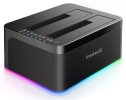
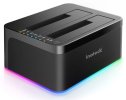
I'm looking for something like this Inateck HDD Cloner, but that is able to actually produce a bootable FreeBSD drive (the Inateck doesn't)..
 

Attachments

  • inateck hdd cloner.jpg
    inateck hdd cloner.jpg
    36.3 KB · Views: 19
Thanks, but I need to be able to run the cloner unattended and when the system's not running.

And I should probably clarify my needs/reasoning: I'm a senior and I don't trust my command-line accuracy. I've twice fouled-up backups with dd - once somehow got the drives mixed-up and deleted the source; and once mistyped a command and spent hours trying to figure out why some of the data didn't end up on the clone. Also, there've been cases where files were locked and/or in use and ended up missing or corrupt.

An offline cloning process is fool-proof for old(er) nits like me.
What errors do you get when using dd?

Is this a FreeBSD version? I'm guessing that there are differences between different dd's.
 
I think I've got pretty good command-line for dd (dd if=/dev/source_disk of=/dev/target_disk bs=1M conv=sync), but, as I mentioned above, I'm looking for a more fool-proof option that easier for me to handle and that can be run via hardware or offline and/or without a command-line (i.e., via a Windows gui).

"A man's got to know his limitations." —Harry Calahan
UFS or ZFS ? into hard drive ?
 
There are external SSD storage which do automatic copy pressing a button.
Foolproof & Windows GUI in one line. Lol. dd is foolproof.
Advantage of dd is that modern storage became so fast that nothing takes much time anymore. I write 5 GB USB 3.0 images in less than 2 minutes.
But CLI dd still has the risk of a disk error or power loss. You have to start over again if that happens. I don't know if it already exists but it could use some kind of shell that acts on such problems and still continues the process later if possible.
 
What errors do you get when using dd?
Is this a FreeBSD version? I'm guessing that there are differences between different dd's.
I wasn't getting errors, just unusable clones. Again, I'm looking for an offline hardware option - preferably like the Inateck indicated above where I can insert the source and destination drives, press go and have a bootable clone within a couple of hours - that requires no command-line input. Thanks.
 

Attachments

  • inateck hdd cloner.jpg
    inateck hdd cloner.jpg
    36.3 KB · Views: 8
What I don't grasp why it must be some extra HW, while with any computer having some BSD or Linux installed you already have the perfect cloning device: dd, as the others already said, produces perfect 1:1 clones - clonezilla or gparted basically don't do something else but (kind of) dd, and any special cloning hardware ain't nothing but an embedded system (BSD/Linux, if even) running dd or the likewise wrapper you find on clonezilla or gparted...)
Cloning a disk just takes its time, not matter what. I did it hundreds of times.
The difference in energy consumption will be not really significant. In fact an OS with a modern, efficient PSU putting the not needed parts of the system into sleep while running dd may use less energy than some wall cube powering the extra HW.

But maybe there is some missing basic understanding, how cloning actually works:
If the drive you wanna clone comes with a MBR partition scheme, then the size of the drive you clone to doesn't matter, as long as it's >= the source drive.
But if the drive is GPT partition scheme, which is more to be expected if the drive ain't "ancient", the physical size needs to have the exact same number of size to the dot. If not, the data is still fully 1:1 available on the clone. Nothing lost. You can clone it back 1:1 to the old source drive anytime, but the clone will not be bootable, since the second GPT block does not fit exactly on the drive where it belongs.
So, bottom line:
You either need to use a storage drive exactly the same size for to be the clone like the source one, best was an identical drive ("Drivefab HDD 42XL" to "Drivefab HDD 42XL") or you don't really clone, but copy in a way, which can also be done.
 
Back
Top