What's the problem? The fact that it generates aEmacs seems to have a problem with BACKSPACE
C-h? Which starts the Emacs help system instead of deleting a character?Yes, becauseDo other programs also generate C-h when hitting BACKSPACE?
C-h generates an ASCII control character with a value of decimal 8 called BS (BACKSPACE). However, Emacs overrides this by using C-h as a keybinding to access the help system using the letter 'h' as a mnemonic for help. To return the BACKSPACE key to it's original functionality of deleting characters rather than starting the help system follow one of the instructions in the following link.Well, that depends on what you want to happen. In Emacs My BACKSPACE key performs a DEL operation and C-h brings up the help system, which works for me. I'm using vanilla Emacs and don't seem to have changed this setting explicitly, so I'm assuming that it's the default. If you're using Doom Emacs then you may need to set or override a setting somewhere.Is there a generally accepted solution?

Emacs seems to have a problem with BACKSPACE, at least in my installation. Do other programs also generate C-h when hitting BACKSPACE and is there a generally accepted solution since I've come across several.
Well, that depends on what you want to happen.
So isn't it the matter with emacs key bindings?I just want BACKSPACE to act the same everywhere. ie move the cursor one space to the left and delete the character under the cursor.
I suspect balanga is talking about the [backspace] key on the right of the [+] key.I think using Ctrl-H (also known as ^H) to anything other than BS is abuse.
root@W520:~ $ stty all
speed 9600 baud; 64 rows; 266 columns;
lflags: icanon isig iexten echo echoe -echok echoke -echonl echoctl
-echoprt -altwerase -noflsh -tostop -flusho -pendin -nokerninfo
-extproc
iflags: -istrip icrnl -inlcr -igncr ixon -ixoff ixany imaxbel -ignbrk
brkint -inpck -ignpar -parmrk iutf8
oflags: opost onlcr -ocrnl tab0 -onocr -onlret
cflags: cread cs8 -parenb -parodd hupcl -clocal -cstopb -crtscts -dsrflow
-dtrflow -mdmbuf rtsdtr
discard dsusp eof eol eol2 erase erase2 intr kill
^O ^Y ^D <undef> <undef> ^? ^H ^C ^U
lnext min quit reprint start status stop susp time
^V 1 ^\ ^R ^Q ^T ^S ^Z 0
werase
^W
# Fix home/del for mobaxterm
bind ^[[5~ ed-move-to-beg
bind ^[[6~ ed-move-to-end
I suspect balanga is talking about the [backspace] key on the right of the [+] key.
What does "stty all" report for erase? If you want ^?, try "stty erase ^?". If you want ^H, try "stty ^H". Put whichever you want in your .zlogin (if running zsh, equivalent in other shells).
root@W520:~ # stty all
speed 9600 baud; 63 rows; 265 columns;
lflags: icanon isig iexten echo echoe -echok echoke -echonl echoctl
-echoprt -altwerase -noflsh -tostop -flusho -pendin -nokerninfo
-extproc
iflags: -istrip icrnl -inlcr -igncr ixon -ixoff ixany imaxbel -ignbrk
brkint -inpck -ignpar -parmrk iutf8
oflags: opost onlcr -ocrnl tab0 -onocr -onlret
cflags: cread cs8 -parenb -parodd hupcl -clocal -cstopb -crtscts -dsrflow
-dtrflow -mdmbuf rtsdtr
discard dsusp eof eol eol2 erase erase2 intr kill
^O ^Y ^D <undef> <undef> ^? ^H ^C ^U
lnext min quit reprint start status stop susp time
^V 1 ^\ ^R ^Q ^T ^S ^Z 0
werase
^W
"\e[3~": delete-char
"\C-h": backward-delete-char
I have a DELETE key which perfoms a DEL operation.What's the problem? The fact that it generates aC-h? Which starts the Emacs help system instead of deleting a character?
Yes, becauseC-hgenerates an ASCII control character with a value of decimal 8 called BS (BACKSPACE). However, Emacs overrides this by usingC-has a keybinding to access the help system using the letter 'h' as a mnemonic for help. To return the BACKSPACE key to it's original functionality of deleting characters rather than starting the help system follow one of the instructions in the following link.
Well, that depends on what you want to happen. In Emacs My BACKSPACE key performs a DEL operation and C-h brings up the help system, which works for me. I'm using vanilla Emacs and don't seem to have changed this setting explicitly, so I'm assuming that it's the default. If you're using Doom Emacs then you may need to set or override a setting somewhere.
Did any of the methods in the link from my previous post not help?I want the BACKSPACE key to move the cursor one space to the left and delete the character under the cursor the same way it works in virtually every other program.
~/.emacs.d/init.elI want the BACKSPACE key to move the cursor one space to the left and delete the character under the cursor the same way it works in virtually every other program.
(when window-system
  (load-library "term/bobcat")
(terminal-init-bobcat))Try addingI want the BACKSPACE key to move the cursor one space to the left and delete the character under the cursor
(normal-erase-is-backspace-mode 1) to your init.el file and then restart Emacs. Doing this means that you may lose the ability to use the C-h key sequence to bring up the Emacs help system. If so, you can always rebind the help system to another key sequence like C-x h instead.What this does is simply move the cursor one space to the left. It does not delete the character that was under the cursor.Try adding(normal-erase-is-backspace-mode 1)to your init.el file and then restart Emacs. Doing this means that you may lose the ability to use theC-hkey sequence to bring up the Emacs help system. If so, you can always rebind the help system to another key sequence likeC-x hinstead.
page is wrong!It worked for me. Please take a look at this page which hopefully explains it more clearly. Don't forget that you're also running Doom Emacs and not vanilla Emacs like I am. That may have some bearing on whether it works or not.
Every keyboard has a large key, usually labeled BACKSPACE
Are you running in text mode or under X in an Xterm or some other terminal emulator. Tmux might also play a factor AFAIK.It works fine with me when using spacemacs and that I am in insert mode.

The backspace is typically at the top right hand corner of the "main" section of a keyboard, above the <Enter> key (but you might have a backslash/pipe key in between; depends on a horizontal or vertical <enter> key).All my computers have Delete key, and often just beneath it is what most people refer to as a Backspace key which is not labelled as such but has an X inside a container.
Have you already solved this?
My ThinkPad W520 just hangs when I turn it on after displaying the initial screen.
Same with my ThinkPad X61,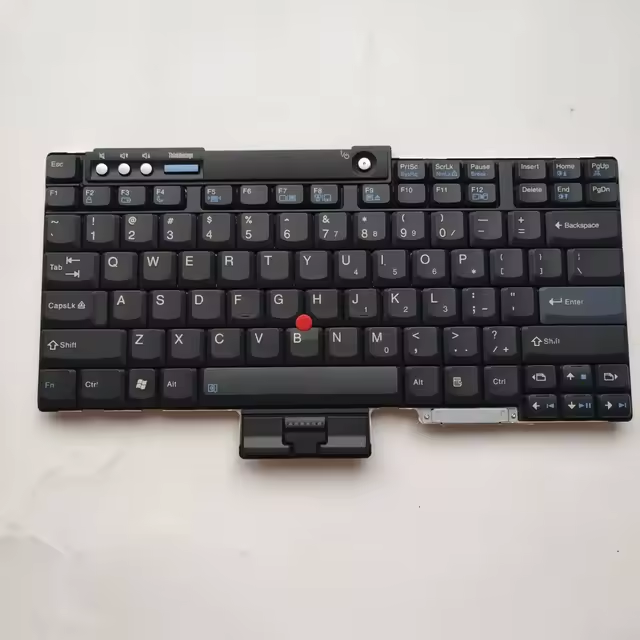
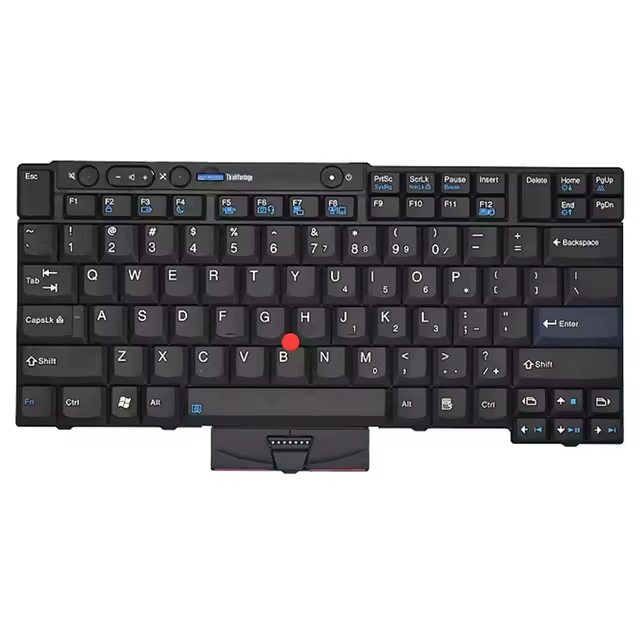
It sometimes has this glyph: https://codepoints.net/U+232B?lang=enBackspace key which is not labelled as such but has an X inside a container.
I am running the wayland flavor directly as a gui app on Wayland.Are you running in text mode or under X in an Xterm or some other terminal emulator. Tmux might also play a factor AFAIK.


