ZFS ZFS drive not booting after (ZFS auto) new install

Hi,

Since a new upgrade of my pc I've not been able to boot from ZFS if installed with the default ZFS (auto) option from the FreeBSD installer.
The Bios / Firmware does not see the boot drive(s). Tried this with a single disk (Stripe) and with a dual disk (mirror).

So far I've not found anyone else with this problem.

When I go to the shell from the FreeBSD installer and manually create the ZFS mirror the system will boot as normal.
My best guess is that this problem comes from the hardware (firmware?) and not the software.

The boot disks are sata0 and sata1 and have not tried NVMe yet as I don't have an empty disk to try right now.

Mainboard: SuperMicro X12SPA-TF
CPU: Xeon 8347c
Memory: 16x 32GB Reg. EEC DDR4-3200
Disks: 2x Samsung EVO 870 1TB (Boot disks)

Did anyone else came across this problem? Is there a simpler way of setting up the ZFS other then doing it via the shell option in the installer?

Regards,
Leon Merts
 
I did not expect this to be a FreeBSD issue.
But there must be a difference between the ZFS (auto) setup from the installer and doing it manually.

On any other system I don't have this problem. Just on this one.

For the ZFS setup I followed the "Installing FreeBSD Root on ZFS using GPT" from wiki FreeBSD.

zroot/usr/home was changed to zroot/home
"ln -s /usr/home /mnt/home" was changed to "ln -s /home /mnt/home"

Regards,
Leon Merts
 
But there must be a difference between the ZFS (auto) setup from the installer and doing it manually.
I can assure you that is not the case. There is no difference. It also has no effect on what the BIOS detects or not.

What might be different is installing it with a BIOS or UEFI boot, or both. I would recommend picking both boot options in the installer. This will create a efi partition for UEFI boot and a freebsd-boot partition for BIOS/CSM boot.
 
The Bios / Firmware does not see the boot drive(s).
If you make the installation with the default FreeBSD installer and jump to the command line just after (without rebooting), you mean you don't see anything with gpart show? Or is it just that the system doesn't boot and the disks aren't displayed in the boot menu selection of the BIOS?
 
I don't have time this evening but will try this tomorrow and post the outcome.
I have tried all the different UEFI options but not the option with BIOS + UEFI

The UEFI option was set in the firmware to get video output from the video card. Otherwise I get the video output through the IPMI VGA output.
If it still won't work I will change the firmware option to UEFI + legacy and try again.

Thanks in advance.

Regards,
Leon Merts
 
If you make the installation with the default FreeBSD installer and jump to the command line just after (without rebooting), you mean you don't see anything with gpart show? Or is it just that the system doesn't boot and the disks aren't displayed in the boot menu selection of the BIOS?
The second part. The disks aren't displayed in the boot menu or boot selection in the firmware.
The system boots directly into the UEFI shell.
 
Hum... The installer copies the loader into the efi partition at /efi/freebsd/loader.efi. It uses
efibootmgr to select this one for booting in the UEFI vars. This is a difference with your manual installation.

But, if I read correctly the script bootconfig, it copies also this loader in /efi/boot/bootx64.efi if this file doesn't already exist. This is what you do manually. bootx64.efi is the default file your UEFI firmware is looking for.

So, it should boot anyway (even if efibootmgr failed to set the suited efi var).
 
If you make the installation with the default FreeBSD installer and jump to the command line just after (without rebooting), you mean you don't see anything with gpart show? Or is it just that the system doesn't boot and the disks aren't displayed in the boot menu selection of the BIOS?
Took me a little longer as I thought I had some spare drives but had to order new ones.

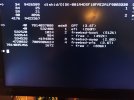
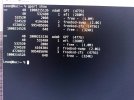
*screenshots* gpart show on pc that does not boot from ZFS and gpart show on NUC that boots from ZFS.
The freebsd-boot partition is the only difference.
I have tried all the different UEFI options plus the BIOS + UEFI. The result is always the same, unless I do the partitioning manually.
 

Attachments

  • PC.jpg
    PC.jpg
    937.7 KB · Views: 600
  • NUC.jpg
    NUC.jpg
    1.7 MB · Views: 611
So, after the default installation, drop to a command line and give the results of:
sysctl machdep.bootmethod
if the answer is UEFI, type also:
# efibootmgr -v
Normally, your ESP should by mounted on /boot/efi. Use mount if it is not the case. Then:
ls -l /boot/efi/efi/boot
ls -l /boot/efi/efi/freebsd
 
Leon, in your initial post you mention that you upgraded your PC. What did you change?
Also, you mention two disks of 1TB each while your photo shows only one disk of about 3.6TB. What's the truth?
When manually installing FreeBSD and booting works what commands do you use?
 
Leon, in your initial post you mention that you upgraded your PC. What did you change?
Also, you mention two disks of 1TB each while your photo shows only one disk of about 3.6TB. What's the truth?
When manually installing FreeBSD and booting works what commands do you use?
Hi Jordan,

The 3.6TB is a new drive that I used to do a new install and show what gpart listed.
The 1TB drives are my normal boot drives (mirror). They come from the previous PC build but contain a new install of FreeBSD

I used this for manually installing FreeBSD.

Before the ZFS (auto) part go to the shell and:

gpart create -s gpt ada0

gpart add -a 4k -s 260M -t efi ada0
newfs_msdos -F 32 -c 1 /dev/ada0p1
mount -t msdosfs -o longnames /dev/ada0p1 /mnt
mkdir -p /mnt/EFI/BOOT
cp /boot/loader.efi /mnt/EFI/BOOT/BOOTX64.efi
umount /mnt

gpart add -a 1m -t freebsd-zfs -l disk0 ada0 (I did not create the swap partition)

The above for both ada0 and ada1

mount -t tmpfs tmpfs /mnt

zpool create -o altroot=/mnt zroot mirror ada0p2 ada1p2

zfs set compress=on zroot

zfs create -o mountpoint=none zroot/ROOT
zfs create -o mountpoint=none zroot/ROOT/default
mount -t zfs zroot/ROOT/default /mnt

zfs create -o mountpoint=/tmp -o exec=on -o setuid=off zroot/tmp
zfs create -o canmount=off -o mountpoint=/usr zroot/usr
zfs create zroot/home
zfs create -o exec=off -o setuid=off zroot/usr/src
zfs create zroot/usr/obj
zfs create -o mountpoint=/usr/ports -o setuid=off zroot/usr/ports
zfs create -o exec=off -o setuid=off zroot/usr/ports/distfiles
zfs create -o exec=off -o setuid=off zroot/usr/ports/packages
zfs create -o canmount=off -o mountpoint=/var zroot/var
zfs create -o exec=off -o setuid=off zroot/var/audit
zfs create -o exec=off -o setuid=off zroot/var/crash
zfs create -o exec=off -o setuid=off zroot/var/log
zfs create -o atime=on -o exec=off -o setuid=off zroot/var/mail
zfs create -o exec=on -o setuid=off zroot/var/tmp

ln -s /home /mnt/home
chmod 1777 /mnt/var/tmp
chmod 1777 /mnt/tmp

zpool set bootfs=zroot/ROOT/default zroot

Then 'exit' so the installer continues.

After install go the shell and add:

sysrc zfs_enable="YES"
echo 'zfs_load="YES"' >> /boot/loader.conf

After this the system will boot from ZFS.
 
  1. Tell us which version of FreeBSD you are testing with
  2. Check for available firmware updates for your PC and install the newest firmware which you are able to find
  3. Take one of the 1TB drives, disconnect all other drives, and install FreeBSD with automatic partitioning ("Auto (ZFS)"). When the installer asks you, choose UEFI+BIOS for booting.
  4. Configure the firmware for UEFI booting only and try to boot. Report what happened.
  5. Configure the firmware for BIOS booting only and try to boot. Report what happened.
  6. Another thing to try after the boot attempts above: Boot from installation medium and from the loader menu escape to the loader prompt. Then execute the commands set currdev=zfs:zroot/ROOT/default: and boot.
If UEFI booting fails, boot from installation medium and show us the output of efibootmgr -v.

If everything fails, preserve the output of gpart show and byte-for-byte copies of the efi partition and the very first sector of the disk. Those can be compared to the same when installing manually. The goal is, after all, to find the differences between manual and automatic installation.
 
  1. Tell us which version of FreeBSD you are testing with
  2. Check for available firmware updates for your PC and install the newest firmware which you are able to find
  3. Take one of the 1TB drives, disconnect all other drives, and install FreeBSD with automatic partitioning ("Auto (ZFS)"). When the installer asks you, choose UEFI+BIOS for booting.
  4. Configure the firmware for UEFI booting only and try to boot. Report what happened.
  5. Configure the firmware for BIOS booting only and try to boot. Report what happened.
  6. Another thing to try after the boot attempts above: Boot from installation medium and from the loader menu escape to the loader prompt. Then execute the commands set currdev=zfs:zroot/ROOT/default: and boot.
If UEFI booting fails, boot from installation medium and show us the output of efibootmgr -v.

If everything fails, preserve the output of gpart show and byte-for-byte copies of the efi partition and the very first sector of the disk. Those can be compared to the same when installing manually. The goal is, after all, to find the differences between manual and automatic installation.
Hi Jordan,

1. FreeBSD 14.2
2. Bios and ipmi firmware are the newest
3. 1TB partitioned with ("Auto ZFS") choosing UEFI + BIOS
4. Boots into UEFI Shell
5. Boots but AST2500 (ipmi) is primary video (This is not what I want)
6. This didn't change anything.

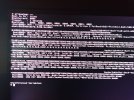
efibootmgr -v in screenshot.

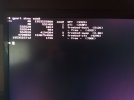
gpart show is in second screenshot.

With ("Auto ZFS") choosing UEFI it is the same but without the freebsd-boot partition. This does not boot either.
 

Attachments

  • IMG_20250108_144709_076.jpg
    IMG_20250108_144709_076.jpg
    1.9 MB · Views: 489
  • IMG_20250108_145525_520.jpg
    IMG_20250108_145525_520.jpg
    1.3 MB · Views: 575
Boot order is set to 000E then 0002. 000E is a USB stick, 0002 is the UEFI shell.

Code:
     The efibootmgr program can be used to create new EFI boot variables.  The
     following command may be used to create a new boot method, using the EFI
     partition mounted under /boot/efi, mark the method active, using the
     given loader and label the method "FreeBSD-11":

           efibootmgr -a -c -l /boot/efi/EFI/freebsd/loader.efi -L FreeBSD-11
Example at the bottom of efibootmgr(8).
 
Boot order is set to 000E then 0002. 000E is a USB stick, 0002 is the UEFI shell.

Code:
     The efibootmgr program can be used to create new EFI boot variables.  The
     following command may be used to create a new boot method, using the EFI
     partition mounted under /boot/efi, mark the method active, using the
     given loader and label the method "FreeBSD-11":

           efibootmgr -a -c -l /boot/efi/EFI/freebsd/loader.efi -L FreeBSD-11
Example at the bottom of efibootmgr(8).
Thanks! This works!

Now I can do the "Auto ZFS" installation and create the EFI boot variable afterwards.
Saves me doing the partitioning manually.
 
Back
Top