
What is the name of this image glitch and is it fixable: Intel GPU + X?

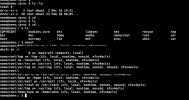
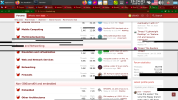
A glitch like the one in the screenshot occurs very frequently and irregularly. I don't even know how to "classify" it. Is it a GPU, monitor, or X issue? These black stripes, squares, and rectangles can "jump" across the panel, desktop, etc.
This can be temporarily resolved by exiting X. Sometimes (for a short time) minimizing the Firefox browser to a smaller window helps. However, the problem persists even in the terminal under X (see screenshot).
 

Attachments

  • 2026-02-28_08-00.png
    2026-02-28_08-00.png
    104.7 KB · Views: 112
  • 2026-02-25_19-24.png
    2026-02-25_19-24.png
    384.1 KB · Views: 118
A glitch like the one in the screenshot occurs very frequently and irregularly. I don't even know how to "classify" it. Is it a GPU, monitor, or X issue? These black stripes, squares, and rectangles can "jump" across the panel, desktop, etc.
This can be temporarily resolved by exiting X. Sometimes (for a short time) minimizing the Firefox browser to a smaller window helps. However, the problem persists even in the terminal under X (see screenshot).
Do you have anything in the logs?
 
I don't know. This command and similar ones don't show anything significant during the distortion phase:
$ cat /var/log/messages | grep drm
This kind of screen garbage doesn't appear in Windows 11 or the latest Alpine Linux. Only on FreeBSD.
 
I don't know. This command and similar ones don't show anything significant during the distortion phase:
$ cat /var/log/messages | grep drm
This kind of screen garbage doesn't appear in Windows 11 or the latest Alpine Linux. Only on FreeBSD.
and /var/log/messages/Xorg0.log? Maybe is something here relatid on gpu.
 
$ cat /var/log/Xorg.0.log | grep EE
Code:
    (WW) warning, (EE) error, (NI) not implemented, (??) unknown.
[   350.188] (EE) Failed to load module "intel" (module does not exist, 0)
[   350.798] (II) Initializing extension MIT-SCREEN-SAVER
[   763.926] (EE) event5  - HS6209 A4tech 2.4G Wireless Device Mouse: client bug: event processing lagging behind by 30ms, your system is too slow
[  2919.686] (EE) event5  - HS6209 A4tech 2.4G Wireless Device Mouse: client bug: event processing lagging behind by 81ms, your system is too slow
$ cat /var/log/Xorg.0.log | grep intel
Code:
[   350.188] (==) Matched intel as autoconfigured driver 0
[   350.188] (II) LoadModule: "intel"
[   350.188] (WW) Warning, couldn't open module intel
[   350.188] (EE) Failed to load module "intel" (module does not exist, 0)
$ cat /var/log/Xorg.0.log | grep Intel
Code:
[   350.666] (II) modeset(0): glamor X acceleration enabled on Mesa Intel(R) HD Graphics 2000 (SNB GT1)
 
Seems SandyBridge issue.
 
$ pciconf -lv | grep -B3 display
Code:
vgapci0@pci0:0:2:0:    class=0x030000 rev=0x09 hdr=0x00 vendor=0x8086 device=0x0102 subvendor=0x8086 subdevice=0x2010
    vendor     = 'Intel Corporation'
    device     = '2nd Generation Core Processor Family Integrated Graphics Controller'
    class      = display
$ pkg info | grep drm
Code:
drm-66-kmod-6.6.25.1500068_8   Direct Rendering Manager GPU drivers
libdrm-2.4.131,1               Direct Rendering Manager library and headers
I created a section as described here. I'll try to track it down and report back with the results. Thanks everyone!
https://forums.freebsd.org/threads/random-pixel-glitches.100879/post-733415
 
It didn't help. X didn't load at all.
/etc/X11/xorg.conf.d/20-intel.conf:
Code:
Section "Device"
    Identifier     "Card0"
    Driver         "intel"
    Option         "DRI" "3"
    Option         "AccelMethod" "glamor"
    Option         "TearFree" "true"
EndSection
 
The intel driver is should not be used. Remove it (the package) and use modesetting instead.
I don't think so.
Sandybridge is old enough that the Intel drivers work.
Note that SNA cannot be used for AccelMethod in modesetting.
Edit: Isn't modesetting only recommended for IvyBridge and later?
 
In fact you could remove the entire 20-intel.conf file. X.Org is pretty good at automatic configuring. And i think it's really necessary to remove the intel driver package altogether, so it does not get picked up automatically.
 
I don't know. This command and similar ones don't show anything significant during the distortion phase:
$ cat /var/log/messages | grep drm
This kind of screen garbage doesn't appear in Windows 11 or the latest Alpine Linux. Only on FreeBSD.

Off-topic: if you still "cat file | grep something" you are wasting precious CPU cycles for fork/exec (and get awarded a UUOC :) ), when any grep would take a file name as argument. You can even place the redirection first, as in < /var/log/messages grep drm
 
Back
Top