
What is the name of this image glitch and is it fixable: Intel GPU + X?

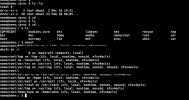
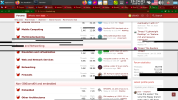
A glitch like the one in the screenshot occurs very frequently and irregularly. I don't even know how to "classify" it. Is it a GPU, monitor, or X issue? These black stripes, squares, and rectangles can "jump" across the panel, desktop, etc.
This can be temporarily resolved by exiting X. Sometimes (for a short time) minimizing the Firefox browser to a smaller window helps. However, the problem persists even in the terminal under X (see screenshot).
 

Attachments

  • 2026-02-28_08-00.png
    2026-02-28_08-00.png
    104.7 KB · Views: 84
  • 2026-02-25_19-24.png
    2026-02-25_19-24.png
    384.1 KB · Views: 89
A glitch like the one in the screenshot occurs very frequently and irregularly. I don't even know how to "classify" it. Is it a GPU, monitor, or X issue? These black stripes, squares, and rectangles can "jump" across the panel, desktop, etc.
This can be temporarily resolved by exiting X. Sometimes (for a short time) minimizing the Firefox browser to a smaller window helps. However, the problem persists even in the terminal under X (see screenshot).
Do you have anything in the logs?
 
I don't know. This command and similar ones don't show anything significant during the distortion phase:
$ cat /var/log/messages | grep drm
This kind of screen garbage doesn't appear in Windows 11 or the latest Alpine Linux. Only on FreeBSD.
 
I don't know. This command and similar ones don't show anything significant during the distortion phase:
$ cat /var/log/messages | grep drm
This kind of screen garbage doesn't appear in Windows 11 or the latest Alpine Linux. Only on FreeBSD.
and /var/log/messages/Xorg0.log? Maybe is something here relatid on gpu.
 
$ cat /var/log/Xorg.0.log | grep EE
Code:
    (WW) warning, (EE) error, (NI) not implemented, (??) unknown.
[   350.188] (EE) Failed to load module "intel" (module does not exist, 0)
[   350.798] (II) Initializing extension MIT-SCREEN-SAVER
[   763.926] (EE) event5  - HS6209 A4tech 2.4G Wireless Device Mouse: client bug: event processing lagging behind by 30ms, your system is too slow
[  2919.686] (EE) event5  - HS6209 A4tech 2.4G Wireless Device Mouse: client bug: event processing lagging behind by 81ms, your system is too slow
$ cat /var/log/Xorg.0.log | grep intel
Code:
[   350.188] (==) Matched intel as autoconfigured driver 0
[   350.188] (II) LoadModule: "intel"
[   350.188] (WW) Warning, couldn't open module intel
[   350.188] (EE) Failed to load module "intel" (module does not exist, 0)
$ cat /var/log/Xorg.0.log | grep Intel
Code:
[   350.666] (II) modeset(0): glamor X acceleration enabled on Mesa Intel(R) HD Graphics 2000 (SNB GT1)
 
Seems SandyBridge issue.
 
$ pciconf -lv | grep -B3 display
Code:
vgapci0@pci0:0:2:0:    class=0x030000 rev=0x09 hdr=0x00 vendor=0x8086 device=0x0102 subvendor=0x8086 subdevice=0x2010
    vendor     = 'Intel Corporation'
    device     = '2nd Generation Core Processor Family Integrated Graphics Controller'
    class      = display
$ pkg info | grep drm
Code:
drm-66-kmod-6.6.25.1500068_8   Direct Rendering Manager GPU drivers
libdrm-2.4.131,1               Direct Rendering Manager library and headers
I created a section as described here. I'll try to track it down and report back with the results. Thanks everyone!
https://forums.freebsd.org/threads/random-pixel-glitches.100879/post-733415
 
It didn't help. X didn't load at all.
/etc/X11/xorg.conf.d/20-intel.conf:
Code:
Section "Device"
    Identifier     "Card0"
    Driver         "intel"
    Option         "DRI" "3"
    Option         "AccelMethod" "glamor"
    Option         "TearFree" "true"
EndSection
 
In fact you could remove the entire 20-intel.conf file. X.Org is pretty good at automatic configuring. And i think it's really necessary to remove the intel driver package altogether, so it does not get picked up automatically.
 
I don't know. This command and similar ones don't show anything significant during the distortion phase:
$ cat /var/log/messages | grep drm
This kind of screen garbage doesn't appear in Windows 11 or the latest Alpine Linux. Only on FreeBSD.

Off-topic: if you still "cat file | grep something" you are wasting precious CPU cycles for fork/exec (and get awarded a UUOC :) ), when any grep would take a file name as argument. You can even place the redirection first, as in < /var/log/messages grep drm
 
Back
Top