What Do You Use FreeBSD For?

My daily driver is Firefox, Office, Gimp/Photoshop on nVidia 4060ti.

I’m just getting started with MX Linux XFCE as an out of the box install.

Don’t need or care about Wayland and all the endless video and other problems I see reported here. At my late stage in life i just want something that works without tinkering with it.

My general impression is FBSD isn’t foremost a GUI desktop but instead a foremost cmd system with a GUI add on that requires tinkering. Perhaps this is mistaken or not but I shy away from FBSD as a GUI desktop because I don’t want the hassle of tinkering and compiling.
There's front-end and back-end for application. Advantage of front-emd is that you can also use it to run 20 terminals while compiling on desktop #2. Common users have no idea so who cares?
 
My general impression is FBSD isn’t foremost a GUI desktop but instead a foremost cmd system with a GUI add on that requires tinkering.

Apart from the tinkering part, it is.
But that's not FreeBSD. That's Unix. And all unix[like] including all Linux, are the same in that point. You only may get a different impression, when you pick some turn-key OS that autoinstalls a DE.

On Unix the main UI is the terminal, the shell. Anything else is optional.

FreeBSD is a multipurpose OS, which means, it tries to serve different kinds of computers and purposes. While a single user desktop computer with a DE is just one possible purpose. To respect different kinds of purposes, it comes only with what's needed for all purposes, and the ability to easily add all the optional packages needed to fulfill a certain purpose.
A turn-key OS, like many Linux distros also like some BSD derivates, does it otherwise. It serves a single purpose, only: A single-user desktop on a x86-machine, fully autoinstalling with a GUI.
This may suggests, the TUI (terminal) was optional, but in fact it's not. It's still the same principal: The terminal is the core main UI in all unix[like], and a GUI is an extra toppiece placed upon it. It's just the user is passed by most of the shell stuff and set infront of a GUI directly. There is no GUI-only OS. Windows tried, but failed, because there are always things sooner or later you need some kind of a CLI for. And better a real shell in the first place, than that thing what Windows provides.
But FreeBSD does it not much otherwise. The only difference is, you need an extra step each to get a machine for a certain purpose, like a single-user desktop. If you wanna GUI, tell it to install X.org. Then it detects the hardware, installs the right drivers, and X.org. If you are not satisfied with twm, which comes with X.Org, but want another WM or even DE, tell it which one to install, and it installs it for you. Then pick the software packages you want to have, and tell it to install them.
No rocketscience, just a couple of more steps, that's all.

Serving one purpose only is the requirement for fully automating the installation process - to spare the user the strenuous effort of deciding which software to use, pick and install it by himself.
The price you pay for that, apart from getting a single-user desktop machine, only, is you don't get your individually tailored machine. You get a pre-picked and preset DE, everything already designed in advance, pre-picked software packages, pre-configured look-and-feel, etc. For that, you also have to compromise even more: If you wanna use a certain distro, you have to live with the DE it comes with. Or you want a certain DE, you can only pick from the few systems that delivers that. You have to live what others picked. If that's okay for you, and for the most it is, then it's fine. Problem solved. But if not, e.g. you try to use another DE/WM instead of the default one, in most cases the tinkering starts, real tinkering. Because your are going to mess with a system that's not intended for this. At the latest you run into lots of trouble, when there is an update. Because many turn-key OSs are not capable to deal with their users modifying core fundamentals about it by themselves. That contradicts the core idea of a turn-key OS.

Perhaps this is mistaken or not but I shy away from FBSD as a GUI desktop because I don’t want the hassle of tinkering and compiling.

Understandable. If you're not one of the masochists I mentioned in my last post above, nobody wants to tinker.

About the compiling part I also have two experiences:
Linux - I hardly got something compiled successfully on any Linux distribution I ever used at all. All I always only got have been zillions of error messages and abortions, mostly because of missing dependencies. Trying to build those first produced even more of the same mess. It was like the Hydra from greek mythology: Each head cut off produces even more heads to be cut off. THAT was tinkering to me. Tinkering without seeing an end of the tunnel. Very unsatisfying.
I will never forget my first compilation experience I had on FreeBSD: I compiled X.org, a pretty large one. Compilation took a while. It always does. That's why there are already compiled binary packages to be used directly. Can't remember, was on my old machine almost ten years ago. Three or four hours the compilation took. But it went through. Compilation finished. No abortion. Working executables produced directly at the very first time. I was flabbergasted. I always presupposed that to be as the normal case, but I never experienced it. I directly also compiled a new kernel. Completely pointless for my case back then. I simply wanted to see if it also worked. It did. To me that was crucial to decide for FreeBSD: It works.

The point ain't compilation time. The point is, if the compilation runs abortion-less through, or need additional tinkering. When FreeBSD version and the port tree are congruent, matching, then all port's compilations run through. And that's exactly one of the essential core ideas of FreeBSD: To provide a congruent, matching set of system and ports. That's what you get, when you use RELEASE.
But you don't have to compile anything at all. Just stick to packages. When you don't do no modifications but simply compile the default you get the same result as with the packages anyway. So compilation is only needed when you modify something with a package, or for a very few exceptions (see the forums). But they are not the default, and anyway no big deal at all whatsover. Just do make install clean BATCH=yes (maybe without the 'clean') and just let it run! If your versions match, it will run through, and being installed - everything fully automated working.

Don't become panicky by all the troubles you read here. Trust the Handbook. Apart from some people here doing special things, sometimes even real freaky stuff, there is lots of experimenting with development versions et al going on.
Most of the issues posted here are caused by simply just don't read the Handbook, or failed experiments, fumbling, tinkering with CURRENT instead of just using RELEASE, mixing ports and packages of different versions, getting sources from elsewhere than just simply using the ports, or doing some things they got by some AI chatbot, not knowing shit what exactly they are doing... fatfingering causes troubles, of course.
Just read and stick to the Handbook, and FreeBSD runs fine.

Very seldom there are real issues caused by flaws of the system. And if, then when a new major version is fresh out. Just stick to your old version - it's supported for at least three more months. Why the hurry? - and see how things work out.
I'm still running 14.4. It still is supported. Why shall I upgrade now? Because there is a new version? It will gives me the same service as I have now: It runs my Apps. So, why? For what? Security? 14.4 still is supported, so it provides the same safety as 15.1.
I see myself as a user, not a developer. My primary target is not to run the most recent version, but to have the most stable, reliably working machine with the least tinkering. And that's exactly what I have.
I also see all the troubles with 15 here. Most are caused by not reading the announcements, nor the according documentation. I will upgrade, when 14 is EOL. That will be at the end of this year, in four months at the earlist. Enough time for me to figure out, how I do the upgrade, what will come, and what needs to be done, if something goes wrong. I'm pretty sure I will not run into neither surprises, nor tinkering. :cool:


My tip was:
Do a clean, new installation of a RELEASE, then just do what's in the Handbook, only:
pkg install drm-kmod for Intel and AMD GPU, or
pkg install nvidia-drm-kmod for NVIDIA
pkg install xorg
add your user to the video group, so not only root is allowed to have access to that resource
pkg install xfce xfce-4.20_2 Meta-port for the Xfce Desktop Environment
And for the rest, like get your user have access to USB flashdrives, also stick to the Handbook.

I bet you have a up and running XFCE on FreeBSD within less than 2 hours, and no tinkering.

 
Last edited:
I used versions 13 and 14, all the way up to version 15. Then I realized that version 15 was rather experimental. It couldn't handle the challenges I faced at work. I'm skipping the entire 15 branch. I'm currently using Alpine Linux as my primary work system.
 
My introduction to FreeBSD took place in July 2003. I even thought about making it my main system, but gradually I began to feel the lack of hardware drivers and I abandoned this idea. Although I've been writing code all my life, I don't like programming and digging into the depths of the OS is not for me. FreeBSD has always been a very stable and fault-tolerant system that could not be installed on most laptops in the store range. Then there was a long period when I watched FreeBSD from afar, then I played with the 32-bit version on an ancient laptop that I accidentally got. Then I had fun asking stupid questions on the Internet to respected people from FreeBSD Foundation.
And recently I got a relatively ancient laptop again, and I decided to install FreeBSD. To my surprise, the system identified all the hardware. I wanted to take my words all back.
In the three days that I've been playing with the OS, the impressions are ambivalent. I changed three DE's, it was very fast and relaxed.
I'm used to making do with a minimum of programs, so I found everything I needed for myself. However, most browsers are still extremely clumsy and this is frustrating.
It looks like my moment has come to return to FreeBSD.
 
I’m simple in my old age.
Perfectly happy with FBSD 12 on my NAS and Win7 on my desktop.

Firefox refuses to keep a current version running on Win7 and the banks and brokerages won’t talk to a down level Firefox…

TurboTax demands Win11 only, as does ON1 and Quickbooks. I fled Win11 and only use it for TurboTax once a year on a win11 vm.

I abandoned my paid ON1 for GIMP which does not engage in this foolishness. IMO these vendors are bribed to require Win11 because there is no valid tech reason to require it. I refuse to play.

I am perfectly happy to stay down level if it satisfies my work flow. I’d go back to Win7 right now but for lack of Firefox support which I need for my work flow.
 
NAS only. FBSD v12 and ZFS2.
DNSMask worked well in a FBSD VM under ESXi but I already have DNS in my Windows 2012 Server, so not needed.

I looked into GhostBSD and MidnightBSD as turnkey desktop solutions.

I run an nVidia 4060ti dual monitor config for GIMP, ShotCut, OBS and NVENC for video ripping and transcoding.

My limited amount of digging tells me to stick with MX Linux for my work flow.
 
I started using FreeBSD around 2014 or so. I presently have a MacBook Air running Sequoia MacOS 15.7.8 here in the home office which I used for email, web browsing and ssh into my FreeBSD machines.

The FreeBSD machines here serve as a gateway with firewall, DHCP server, DNS server, internal web server. Running in jails I have an internal email server and a web server for external access. One machine has a raid2-z ZFS filesystem, for general storage and backups, including the Macs. I am just now getting a VM machine for Kali Linux installed for some upcoming class work. Use emacs for programming, nroff documentation, VHDL coding. Gtkwave allows me to view the VHDL simulations. Some custom programming to control a GPIB bus for automating test instruments. Probably some other uses which I don't recall at the moment.

The FreeBSD machines here are headless, everything is by CLI. For the graphic applications I run ssh -X on a Quartz terminal here on the Mac. Some day I may put together a FreeBSD with graphics, but that is not needed yet.

At ${WORK} I last used Windows in 1992, wrote a kernel level device driver. I have two Windows machines here, neither has been powered up in at least six years. Some small computers here run Debian -- an SDR and a Raspberry Pi.

I haven't had a Linux machine for years now, and I am getting reminders presently with the Kali on bhyve setup as to why I don't care for Linux. For example, the "Network Manager" dropped the ipv4 DHCP address overnight on its own, and now the VM has only a ipv6 address. It reminds me of the line in Blazing Saddles - "Badges?!? We don't need no stinkn' badges" And I can manage my network just fine without a network manager.

So old age does have its privileges!
 
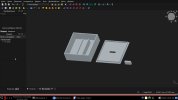
I made a cover for an arduino project on FreCAD.
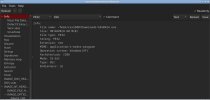
reverse engineering, radare2, ghidra ...
Web serfing, GAmes: assaultcube, fceux ( difficult childhood, eight-bit toys )
etc
 

Attachments

  • fca.jpg
    fca.jpg
    112.1 KB · Views: 19
  • re.jpg
    re.jpg
    62.2 KB · Views: 18
Been using FreeBSD since beginning 2000s or thereabouts.

I've used it professionally for small things like Intranet servers and network traffic analysis but mostly I have used it for my home network.

DHCP, DNS, webserver, logitechmediaserver (have a squeezebox and a squeezebox touch), samba filesharing, network traffic analysis (ELK, Grafana), filtering bridge, backup via rsync to a couple of old FreeNAS. Until this year I had a couple of old GhostBSD laptops for webserver and general development. Those are now migrated to FreeBSD with KDE/Plasma/Wayland.

This year I started to migrate my audio/guitar recording to FreeBSD as seen in this thread and I have also attempted in a very feeble way to port a few applications to the FreeBSD ports tree although no port reviewer has found the time to completely review any of these. (If you are a port reviewer they are at these links - entropypianotuner, rakarrackplus-lv2, british-treble-booster-lv2).

Oh, and I had the honor of being a small part of a kernel patch to make an Roland UA-33 USB audio device work as well.

I'd say I use FreeBSD for almost everything. There's still a few things I need to migrate to FreeBSD to be able to say that I use it for everything.

/grandpa
 
How about yourself? What do you use FreeBSD for?
  • Programming C/C++, Java, Python, Go and many other languages
  • Internet (think email, web browsing, listening to podcasts, feeds, chat, "social networking")
  • Music, Audio books, other video/audio content
  • Graphical content - think render/edit/etc PDFs, JPEGs, (all other formats), printing, etc
  • Play games with Wine and Proton-Wine
  • Networking
  • FreeBSD is a very well designed operating system - the operating system is very well segmented between Unix kernel, the base system and user land.
  • FreeBSD system admin tasks are extremely easy.
  • ZFS is an amazing file system, and there is NOTHING wrong with UFS file systems... I use UFS file systems as well.
  • Tons of other stuff...
Truth is --> There is absolutely nothing wrong with old and/or new open source software. Open source software works, and it works very well. If you want to pay a lot of money for the same or similar software, get a Mac or Microsoft Windows.

If you want to see/read some examples of what Open Source packages FreeBSD users are using - see the FreeBSD Forum Post here (Link FreeBSD Forum): List your suite of desktop apps!
 
I've noticed that long-time FreeBSD users tend to use Slackware Linux when they really need Linux on bare metal. That's exactly what I do. And I've always sympathized with users who voluntarily use Kali Linux.
The Kali use is for a class I am about to take -- it is what they want to use. I have never tried Slackware, but have had most of my experience with Debian Linux. I'll keep Slackware in mind should I want to try another one.
 
I use FreeBSD for daily driving. KDE functions very well as a Windows replacement - without the annoyances that make Windows intolerable. I can make a pretty long list of those.

FreeBSD does have its downsides, like shipping with very minimal out-of-the-box configs, and users are expected to be at least OK with spending a lot of time setting it up to their liking, and just as importantly, to kind of know what they're doing, and what they are in for. But even those downsides are hotly debated on these Forums.

And 'Daily Driving' I mean stuff like banking, online research for real-life info, shopping, email, and all kinds of stuff that is easily done in a web browser anyway. But if I want to do stuff like torrents, editing sound/video/images, compiling in all kinds of languages, watch my collection of movies, or even mess around with GPU programming or virtualization - I just see FreeBSD as a better option than anything else.

I've found topics that look pretty interesting to learn about - like honeypots. People who are actually fairly knowledgeable on that topic are generally pretty reluctant to spread information about that on the Internet, and with good reason - everybody knows that it can be disastrous in the wrong hands. One reason I like FreeBSD - the Ports Collection actually does include the toolset, I have the option to compile it, sink my time into it, and learn it - without the need to set up a whole separate OS just for that. With Windows, if I go hunting for that kind of toolset, I'll end up in the proverbial digital ditch, and end up spending too much time just getting back on my feet.

:oops: You are taking a hackers class? Wow! I wasn't aware such officially exist.
Please, don't hack my machines!
I think the technical name is pen (penetration) testing. And it's usually the kind of stuff you only find out about if you're actually studying to be a security specialist. Although, most of them turn out to be simply managers for a dog-and-pony show. Actual penetration testing is a bit like hiring someone with guns and wire cutters, just to see if your barbed wire fence will deter a random joe from entering the property. Mess it up - and you're the one in a lot of trouble.
 
Firefox on ‘nix can always run the current FF version.

This cannot be done on older windows versions and many banks, etc, won’t connect to a down level FF.
 
The Kali use is for a class I am about to take -- it is what they want to use. I have never tried Slackware, but have had most of my experience with Debian Linux. I'll keep Slackware in mind should I want to try another one.
Oh yeah, I forgot. Kali Linux is used in all the courses on network security.
 
Ours are round, and salty. Once that red box is opened, there's no turning back, and no hiding place...
1786478203666.png


Goes well with a few slices of this. Trust me on this...
1786478947564.png
 
Back
Top