
Solved Wacom Intuos pen tablet disconnects on boot after shutdown

Hi,
My Wacom Intuos CTL-4100 pen tablet is recognized and works well on FreeBSD 14. However, I've encountered an issue where the tablet fails to function after the computer has been shut down and then turned back on.

Here's how I installed the tablet:

sh:
# pkg install -y webcamd
# pw groupmod webcamd -m myusername
# sysrc webcamd_enable="YES"
# sysrc kld_list+="cuse"
# pkg install -y libwacom xf86-input-wacom
# reboot

After reboot, the dmesg shows this, and the tablet works fine:

sh:
$ dmesg | grep "Wacom"
ugen0.4: <Wacom Co.,Ltd. Intuos S> at usbus0

After every reboot, the device functions perfectly fine, and the same dmesg:

sh:
$ dmesg | grep "Wacom"
ugen0.4: <Wacom Co.,Ltd. Intuos S> at usbus0

However, when I power on the computer after a shutdown, the dmesg output changes, and the tablet no longer functions:

sh:
$ dmesg | grep "Wacom"
ugen0.4: <Wacom Co.,Ltd. Intuos S> at usbus0
ugen0.4: <Wacom Co.,Ltd. Intuos S> at usbus0 (disconnected)
ugen0.4: <Wacom Co.,Ltd. Intuos S> at usbus0

Notice how the tablet disconnects at one point and reconnects at the next step, but that disconnection causes my Wacom tablet to freeze up.

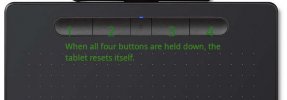
To get things working again until I shut down my laptop, I need to perform a hard reset on the Wacom tablet by pressing four buttons on it. After that, everything works properly. Restarting the computer following this hard reset is fine, and no matter how many times I restart, I always get a dmesg with no disconnection. However, the problem returns after the next shutdown, causing the tablet to freeze up again.

Has anyone encountered a similar issue? I would appreciate any suggestions.

I tried changing webcamd_enable from YES to NO in rc.conf to see what happens. I noticed that when webcamd is not enabled, the tablet remains constantly powered on, even though it doesn't work. However, I see that the LED is lit, which means it hasn't completely crashed. At this stage, I could say that the issue might be with webcamd, as it behaves strangely after a shutdown, but I might be wrong.
 

Attachments

  • wacom.jpg
    wacom.jpg
    16.8 KB · Views: 514
This is what happens after shutdown (when tablet freezes):

Code:
ugen0.4: <Wacom Co.,Ltd. Intuos S> at usbus0 (disconnected)
ugen0.4: <Wacom Co.,Ltd. Intuos S> at usbus0
uhid2 on uhub3
uhid2: <Wacom Co.,Ltd. Intuos S, class 0/0, rev 2.00/1.11, addr 6> on usbus0

After resetting the tablet, everything starts functioning again:

Code:
ugen0.4: <Wacom Co.,Ltd. Intuos S> at usbus0 (disconnected)
uhid2: at uhub3, port 3, addr 6 (disconnected)
uhid2: detached
ugen0.4: <Wacom Co.,Ltd. Intuos S> at usbus0

The difference is that after resetting the tablet, the uhid2 gets detached and ugen0.4 takes the tablet instead of uhid2.

I tried adding a quirk in /boot/loader.conf to prevent uhid attaching:

Code:
usb_quirk_load="YES"
hw.usb.quirk.0="0x056a 0x0374 0 0xffff UQ_HID_IGNORE"

but still the same issue.

The tablet is connected to a USB hub, however, the issue persists even when it's not connected to a USB hub or when using different USB ports.
 
zoltan, 'just wanted to thank you for this thread.

I bought a Wacom Intuos Small (Amazon link), and your steps worked perfectly for me.

I'll be using it for drawing quick diagrams for presentations, mostly in GIMP and a little in xfig. The results so far are a mixed bag; my drawings don't really look any nicer than they did with a regular mouse. But I'll keep fiddling around.
 
Hello, the tablet works well on FreeBSD, but if you unplug it from the USB port and plug it back in, you have to do a hard reset on the tablet to make it work again. There's some kind of hotplug issue related to X11 or the webcamd driver. I haven't been able to figure it out and eventually gave up trying, but aside from that, it works perfectly fine. I use the graphics/xournalpp app for sketches and drawings.
 
For anyone wishing to experiment or use drawing / pen tablets, the libwacom port will install the necessary data files for currently known PenTablet models in /usr/local/share/libwacom
So check that directory before buying a tablet. I expect the wacom_drv.so will work with most, if not all penTablets provided there's a valid data file for them, unfortunately the values seem to vary wildly between models; so having one of the specific models listed is likely important if you want an easy install.
 
Returning to the original post of this thread, I would like to recap:

I have a Wacom Intuos Small CTL 4100, which is the wired version of the tablet.

Here’s what’s happening:

  • webcamd is enabled in rc.conf, and the tablet works fine.
  • However, after shutting down and starting the computer again, the tablet no longer works.
  • To get it working again, I need to perform a hard reset using the Express keys (by holding down the buttons on the tablet). After that, the tablet works fine until the next full system shutdown. Then I need to repeat the hard reset.
Recently, I discovered that this issue is actually a bug in the Wacom tablet firmware.

The tablet has two modes: Android mode (or low-power mode) and desktop mode. This is because the tablet can also connect to Android phones. When in Android mode, it takes on the vendor ID 2d1f, and the LED indicator on the tablet is dim.

When I perform a hard reset, the tablet switches back to desktop mode (full-power mode), takes the vendor ID 056a, and the LED indicator becomes bright. In this mode, the tablet works as expected.

After a complete system shutdown, the problem seems to be that the Wacom tablet mistakenly recognizes FreeBSD as an Android device, which prevents it from reinitializing correctly.

From the Wacom website:

The third generation Wacom Intuos received a firmware update to enable Android support. This support was added using the generic HID driver in Android (Android doesn't usually ship with the Wacom driver). This update sees the firmware now "detecting" if it is connected to an Android system. If the tablet thinks it is connected to an Android system, it will show the system a 2d1f Vendor ID (VID), and thus libwacom (and the Control Center) will not recognize the tablet. Unfortunately this detection mechanism will in some cases identify a Linux system as an Android one. To manually put the tablet back into its original mode (056a VID), hold down buttons 1 & 4 for N number of seconds.

In Linux, this problem has been fixed in fwupd 1.6.2 and later so the tablet is detected correctly:

https://github.com/fwupd/fwupd/releases/tag/1.6.2

However, on FreeBSD, I don't have fwupd. What I need to do is somehow prevent the tablet from switching to Android mode (vendor ID 2d1f).

Is there any way to block this switch, perhaps by preventing the system from recognizing or accepting that vendor ID during the intialization process when freebsd boots?

Android mode (The Wacom tablet mistakenly detects FreeBSD as an Android device):

Code:
$ usbconfig
ugen0.5: <Wacom Co.,Ltd. Intuos S> at usbus0, cfg=0 md=HOST spd=FULL (12Mbps) pwr=ON (500mA)

Desktop mode (after performing a hard reset by holding down the Express Buttons on the tablet):

Code:
$ usbconfig
ugen0.5: <CTL-4100 [Intuos (S)] Wacom Co., Ltd> at usbus0, cfg=0 md=HOST spd=FULL (12Mbps) pwr=ON (500mA)

Notice the difference between "Wacom Co.,Ltd. Intuos S" and "CTL-4100 [Intuos (S)] Wacom Co., Ltd".

Based on the default /usr/local/etc/devd/webcamd.conf file, it appears that webcamd is trying to link the tablet to the correct vendor ID (0x056a / wacom desktop-mode), but something interferes during the process, causing the tablet to mistake FreeBSD for Android:

Code:
# Generic USB input devices.
notify 100 {
    match "system"        "USB";
    match "subsystem"    "INTERFACE";
    match "type"        "ATTACH";
    match "intclass"    "0x03";
#
# Limit HID device attach to Wacom Devices
# else webcamd might attach to your keyboard
# and mouse
#
    match "vendor"        "0x056a";
    action "/usr/local/etc/rc.d/webcamd start $cdev $interface 2>/dev/null";
};

It would be so great if Hans Petter were still with us, he could have solved this problem. For now, I don't know what to.
 
I deleted the "webcamd.conf" file, so all the USB rules have been removed. I restarted the computer, and now there are no more issues. However, I still need to manually attach the Wacom tablet to webcamd.

Code:
doas webcamd -i 0 -d ugen0.5 -B -U webcamd -G webcamd

I'm getting closer to a solution. Now I need to dissect the "webcamd.conf" file to determine why the Wacom tablet thinks FreeBSD is an Android device. As I mentioned earlier, if Hans were still alive, he would have been a great help, may God rest his soul.
 
The solution is to edit the /usr/local/etc/devd/webcamd.conf file:

Replace this:

Code:
# Generic USB input devices.
notify 100 {
    match "system"        "USB";
    match "subsystem"    "INTERFACE";
    match "type"        "ATTACH";
    match "intclass"    "0x03";
#
# Limit HID device attach to Wacom Devices
# else webcamd might attach to your keyboard
# and mouse
#
    match "vendor"        "0x056a";
    action "/usr/local/etc/rc.d/webcamd start $cdev $interface 2>/dev/null";
};

with this:

Code:
# Generic USB input devices.
notify 100 {
    match "system"        "USB";
    match "subsystem"    "INTERFACE";
    match "type"        "ATTACH";
    match "intclass"    "0x03";
#
# Limit HID device attach to Wacom Devices
# else webcamd might attach to your keyboard
# and mouse
#
    match "vendor"        "0x056a";
    action "/usr/local/etc/rc.d/webcamd restart $cdev -H 2>/dev/null";    # <----- use this
};

From now on, your Wacom tablet will power up after any reboot or shutdown.

Enable scrolling:

Code:
# Set the lower button on the stylus to perform pan scrolling (for browsing the web with the tablet)
xsetwacom --set "Wacom Intuos S Pen stylus" "Button" "2" "pan"

# Set the scrolling speed
xsetwacom --set "Wacom Intuos S Pen stylus" "PanScrollThreshold" "200"
 
Back
Top