First of all, I would like to point out that VIA keyboards (specifically Keychron Q1-Q3) work fine in FreeBSD if you follow the instructions described here:
Secondly, it turns out that FreeBSD users should not feel even a shadow of an inferiority complex because of configuring VIA keyboards using a web interface or an installed application. The thing is, I was unable to configure Keychron q3 via the web interface neither in modern Ubuntu 24.04, nor in Debian 12.9 (these were the most relevant Live USBs today). Moreover, the website simply did not open. In addition, I was unable to install the application (it simply did not start).
So far, the only way to correctly configure these keyboards is to use Windows (sorry for mentioning these three distributions here).
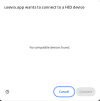
However, there is hope to configure the keyboard via the VIA interface in FreeBSD. When I go to the website, I click the "Authorize device" button, but unfortunately my HID device is not detected (see screenshot).
Does anyone know how to show this web app the path to my device?
Code:
pkg install uhidd
uhidd -D /dev/ugen0.4
usbconfig -d 0.4 add_quirk UQ_KBD_BOOTPROTO
Secondly, it turns out that FreeBSD users should not feel even a shadow of an inferiority complex because of configuring VIA keyboards using a web interface or an installed application. The thing is, I was unable to configure Keychron q3 via the web interface neither in modern Ubuntu 24.04, nor in Debian 12.9 (these were the most relevant Live USBs today). Moreover, the website simply did not open. In addition, I was unable to install the application (it simply did not start).
So far, the only way to correctly configure these keyboards is to use Windows (sorry for mentioning these three distributions here).
However, there is hope to configure the keyboard via the VIA interface in FreeBSD. When I go to the website, I click the "Authorize device" button, but unfortunately my HID device is not detected (see screenshot).
Does anyone know how to show this web app the path to my device?