
Question about `pkg upgrade`

Hello!
The result of `pkg upgrade` in 15.1 ↓
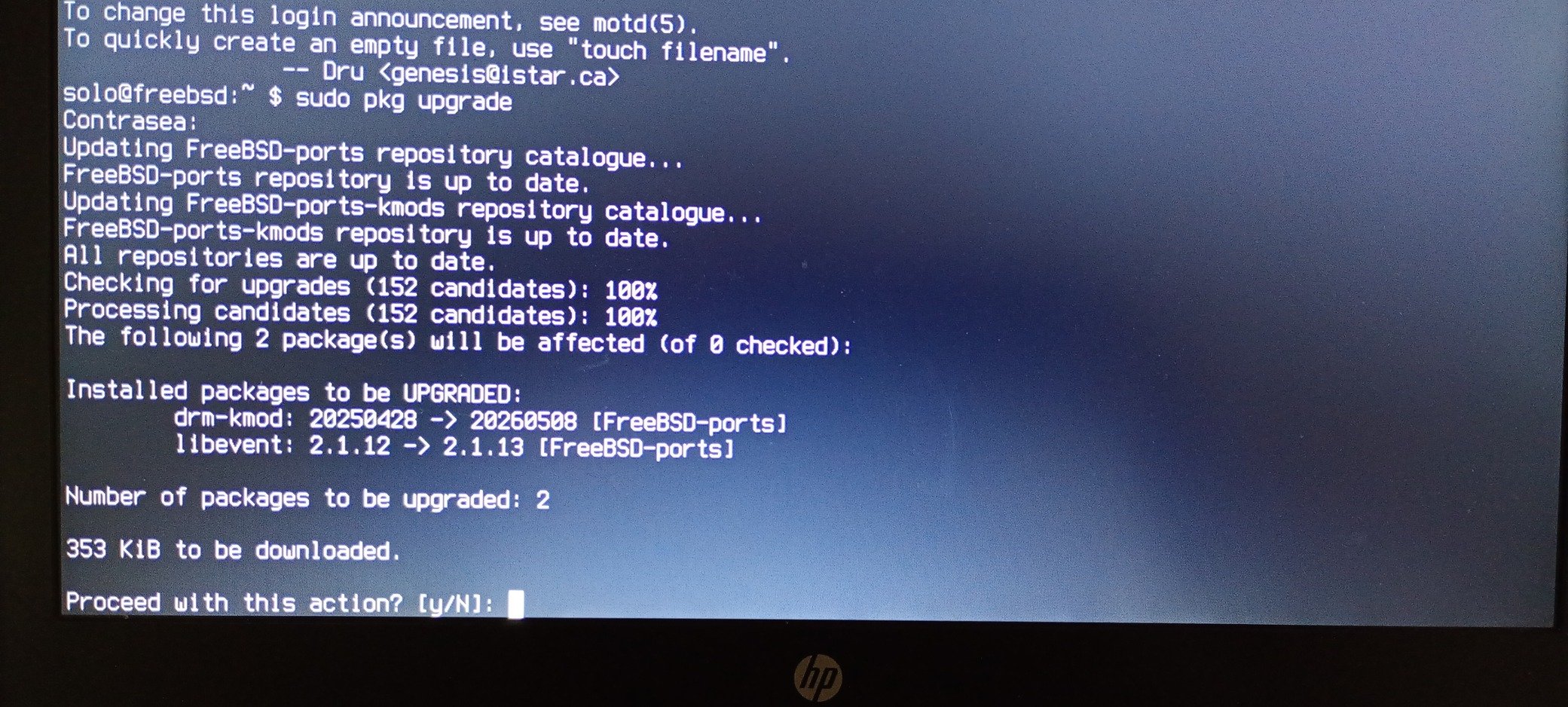
IMG_20260705_214132791_MFNR(1).jpg


Code:
solo@freebsd:~ $ uname -aU
FreeBSD freebsd 15.1-RELEASE-p1 FreeBSD 15.1-RELEASE-p1 #0 -dirty: Tue Jun 30 03:16:39 UTC 2026     root@amd64-builder.daemonology.net:/usr/obj/usr/src/amd64.amd64/sys/GENERIC amd64 1501000
I carried out the upgrade and when I restarted, I got the following message:
Code:
solo@freebsd:~ $ sudo pkg version -v | grep drm
Contraseña:
drm-66-kmod-6.6.25.1501000_8       =   up-to-date with port
drm-kmod-20260508                  >   succeeds port (port has 20250428)
libdrm-2.4.131,1                   =   up-to-date with port

The question arising from all this is:
In that case, should I recompile the port or leave it as it is ?
Code:
drm-kmod-20260508                  >   succeeds port (port has 20250428)

Everything’s working fine; I’m just asking because I’ve had problems with DRM in the past – that’s the only reason.

Thank you!
 
What does pkg repos show?
Code:
solo@freebsd:~ $ pkg repos
FreeBSD-ports: {
    url             : "pkg+https://pkg.FreeBSD.org/FreeBSD:15:amd64/quarterly",
    enabled         : yes,
    priority        : 0,
    mirror_type     : "SRV",
    signature_type  : "FINGERPRINTS",
    fingerprints    : "/usr/share/keys/pkg"
  }
FreeBSD-ports-kmods: {
    url             : "pkg+https://pkg.FreeBSD.org/FreeBSD:15:amd64/kmods_quarterly_1",
    enabled         : yes,
    priority        : 0,
    mirror_type     : "SRV",
    signature_type  : "FINGERPRINTS",
    fingerprints    : "/usr/share/keys/pkg"
  }
FreeBSD-base: {
    url             : "pkg+https://pkg.FreeBSD.org/FreeBSD:15:amd64/base_release_1",
    enabled         : no,
    priority        : 0,
    mirror_type     : "SRV",
    signature_type  : "FINGERPRINTS",
    fingerprints    : "/usr/share/keys/pkgbase-15"
  }
solo@freebsd:~ $
 
Was afraid you may have mixed quarterly and latest on FreeBSD-ports and FreeBSD-ports-kmods, but this looks in order.

Then I'm guessing you have a ports tree checked out? Note the behaviour of pkg-version(8) if you don't explicitly state what to compare against:
Code:
The  database of	available packages and versions	to compare against the
       installed packages may be chosen	by specifying one of -P, -R or	-I  or
       by  setting  VERSION_SOURCE  in pkg.conf(5).  If	not specified then the
       ports index file	will be	used if	it exists (-I).	 Otherwise,  should  a
       ports  tree  exist that will be used to compare versions	(-P).  Failing
       either of those two choices, the	 repository  catalogue	will  be  used
       (-R).

You should probably add a -R to explicitly make the comparison with the FreeBSD repositories.
 
Code:
solo@freebsd:~ $ sudo pkg version -v -R | grep drm
Contraseña:
drm-66-kmod-6.6.25.1501000_8       >   succeeds remote (remote has 6.6.25.1500068_10)
drm-kmod-20260508                  =   up-to-date with remote
libdrm-2.4.131,1                   =   up-to-date with remote
solo@freebsd:~ $ sudo pkg version -R | grep drm
drm-66-kmod-6.6.25.1501000_8       >
drm-kmod-20260508                  =
libdrm-2.4.131,1                   =
solo@freebsd:~ $
 
I'm not too worried about graphics/drm-kmod because it's a meta-port, it doesn't have anything of itself, it only depends on other packages.

But this one's odd:
Code:
drm-66-kmod-6.6.25.1501000_8       >   succeeds remote (remote has 6.6.25.1500068_10)

One reason I can think off, perhaps graphics/drm-66-kmod failed to build for some reason in the FreeBSD-ports-kmods repository, then the version in the FreeBSD-ports repository would be the only existing package, which would indeed be the wrong version. You can tell where it came from by the ${OSVERSION} in the version string. Packages in the FreeBSD-ports repository are still being built for 15.0.
 
But this one's odd:
Code:
drm-66-kmod-6.6.25.1501000_8       >   succeeds remote (remote has 6.6.25.1500068_10)

One reason I can think off, perhaps graphics/drm-66-kmod failed to build for some reason in the FreeBSD-ports-kmods repository, then the version in the FreeBSD-ports repository would be the only existing package, which would indeed be the wrong version. You can tell where it came from by the ${OSVERSION} in the version string. Packages in the FreeBSD-ports repository are still being built for 15.0.
It’s true, it’s not 1501000, so shall I leave it as it is for the time being?
 
Thanks. I missed the 1501 to 1500 (maybe bolding it would have helped me).
For the record on my 15.1 system, pkg upgrade -n does not show any drm packages that need to be updated.
Perhaps the logic on pkg upgrade is different than pkg version.
 
Thanks. I missed the 1501 to 1500 (maybe bolding it would have helped me).
For the record on my 15.1 system, pkg upgrade -n does not show any drm packages that need to be updated.
Perhaps the logic on pkg upgrade is different than pkg version.
Code:
solo@freebsd:~ $ sudo pkg upgrade -n
Contraseña:
Updating FreeBSD-ports repository catalogue...
FreeBSD-ports repository is up to date.
Updating FreeBSD-ports-kmods repository catalogue...
FreeBSD-ports-kmods repository is up to date.
All repositories are up to date.
Updating database digests format: 100%
Checking for upgrades (151 candidates): 100%
Processing candidates (151 candidates): 100%
Checking integrity... done (0 conflicting)
Your packages are up to date.
 
  • Like
Reactions: mer
It’s true, it’s not 1501000, so shall I leave it as it is for the time being?
You have a 15.1 system, the DRM driver should have a 1501000 in it's version string. You have that version installed. So just leave it for the time being.

pkg-upgrade(8) isn't going to touch it, it would be downgrading (it definitely never does that) the package.
 
One final test you could do; pkg version -r FreeBSD-ports-kmods -vRx drm

That's probably going to show graphics/drm-66-kmod as being "orphaned" (?). That would confirm the package disappeared in the FreeBSD-ports-kmods repository.
 
One final test you could do; pkg version -r FreeBSD-ports-kmods -vRx drm

That's probably going to show graphics/drm-66-kmod as being "orphaned" (?). That would confirm the package disappeared in the FreeBSD-ports-kmods repository.
Code:
solo@freebsd:~ $ pkg version -r FreeBSD-ports-kmods -vRx drm
drm-66-kmod-6.6.25.1501000_8       =   up-to-date with remote
drm-kmod-20260508                  ?   orphaned: graphics/drm-kmod
libdrm-2.4.131,1                   ?   orphaned: graphics/libdrm
solo@freebsd:~ $
 
Ah, it's not drm-66-kmod that's missing, it's drm-kmod that's missing in FreeBSD-ports-kmods.
 
judd you can remove drm-kmod and just install drm-66-kmod (or drm-612-kmod) plus the gpu-firmware-kmod package (or the packages that provide the firmware for your GPU).

The advantage of the meta package is that it pulls a versioned drm package and the entire gpu-firmware package which is good from the perspective "I have no ideia what gpu firmware I need". Although fwget tries to address this last bit.
 
It turns out that the only thing I installed was the drm-kmod port, and when I checked, I found that drm-66-kmod was also installed... as I said, something I didn't do, that's why I made the post.
 
judd you can remove drm-kmod and just install drm-66-kmod (or drm-612-kmod) plus the gpu-firmware-kmod package (or the packages that provide the firmware for your GPU).

The advantage of the meta package is that it pulls a versioned drm package and the entire gpu-firmware package which is good from the perspective "I have no ideia what gpu firmware I need". Although fwget tries to address this last bit.
I could do it as you say, although everything is working fine... for now. Thanks anyway for your help!
 
Hello!
The result of `pkg upgrade` in 15.1 ↓
View attachment 26707

Code:
solo@freebsd:~ $ uname -aU
FreeBSD freebsd 15.1-RELEASE-p1 FreeBSD 15.1-RELEASE-p1 #0 -dirty: Tue Jun 30 03:16:39 UTC 2026     root@amd64-builder.daemonology.net:/usr/obj/usr/src/amd64.amd64/sys/GENERIC amd64 1501000
I carried out the upgrade and when I restarted, I got the following message:
Code:
solo@freebsd:~ $ sudo pkg version -v | grep drm
Contraseña:
drm-66-kmod-6.6.25.1501000_8       =   up-to-date with port
drm-kmod-20260508                  >   succeeds port (port has 20250428)
libdrm-2.4.131,1                   =   up-to-date with port

The question arising from all this is:
In that case, should I recompile the port or leave it as it is ?
Code:
drm-kmod-20260508                  >   succeeds port (port has 20250428)

Everything’s working fine; I’m just asking because I’ve had problems with DRM in the past – that’s the only reason.

Thank you!
I forgot to mention that I only installed the *drm-kmod* port, and when checking with pkg version I find that drm-66-kmod is also installed, which action I did not perform.
 
Back
Top