Programming ARM microcontrollers under FreeBSD

I'm evaluating FreeBSD 15.1 as a platform for embedded development on ARM microcontrollers.
So far, I can build firmware using both the clang version in base and the gcc-arm-embedded port. And that's all...
Here are the issues I ran into:
  • Most DAPLink adapters are not recognized by FreeBSD, despite working fine on Linux. I get a "umodem0: Can't setup transfer" error in dmesg and FreeBSD detaches the adapter.
  • DAPLink adapters that are recognized by the kernel are not seen by user land tools. Running "minicom -b 115200 -D /dev/ttyU0" shows a ever empty screen. PyOCD waits indefinitely for a probe.
  • I have tried with a JLink v12, but PyOCD couldn't detect it either. Maybe that's a PyOCD thing, but it is supposed to work on FreeBSD.
  • All my STLink clones are recognized by the kernel. When using them with OpenOCD, I can flash the small amount of MCU it supports, but verification fails and the reset command is not supported. After flashing, I have to disconnect the STLink adapter and reconnect it for the MCU to execute the new firmware. I've tried both the openocd and openocd-devel ports with the same result.
Permissions and ownership are correctly set under /dev, I have added the corresponding rules.
I must miss something - or several things, but I have no idea what...
 
I have such a programmer WeAct Mini Debugger DAPLink-APM32 STLink V2.1
daplinkstm.jpg

Code:
$ pyocd list
  #   Probe/Board             Unique ID                                          Target 
-----------------------------------------------------------------------------------------
  0   Arm DAPLink CMSIS-DAP   00000080002000354e0000014e57504*********************   n/a

I'll try to connect to the chip now.
maybe you need to configure USB and user rights?
 
The permissions are configured, here's my /etc/devfs.rules:
Code:
[localrules=22]
add path 'ada*' mode 0660 group operator
add path 'da*' mode 0660 group operator
add path 'mmcsd*' mode 0660 group operator
add path 'acd*' mode 0660 group operator
add path 'cd*' mode 0660 group operator
add path 'pass*' mode 0660 group operator
add path 'xpt*' mode 0660 group operator
add path 'usbctl' mode 0660 group operator
add path 'usb' mode 0770 group operator
add path 'usb/*' mode 0660 group operator
add path 'lpt*' mode 0660 group operator
add path 'ulpt*' mode 0660 group operator
add path 'unlpt*' mode 0660 group operator
add path 'uscan*' mode 0660 group operator
add path 'ugen*' mode 0660 group operator
add path 'ttyU*' mode 0660 group operator

Out of curiosity, how did you install PyOCD?
 
All my STLink clones are recognized by the kernel. When using them with OpenOCD, I can flash the small amount of MCU it supports, but verification fails and the reset command is not supported. After flashing, I have to disconnect the STLink adapter and reconnect it for the MCU to execute the new firmware. I've tried both the openocd and openocd-devel ports with the same result.
devel/openocd maintainer here - can you reproduce that with a different SWD/JTAG adapter too?
 
Out of curiosity, how did you install PyOCD?

Code:
# pkg search pyocd
py312-pyocd-0.36.0             Python based tool for programming and debugging Arm Cortex-M uC
py312-pyocd-pemicro-1.1.5      Simple PyOCD debug probe plugin for PEMicro debug probes
root@# pkg install -y py312-pyocd-0.36.0

my log stm32g030f6p6, chip with protection, so don't worry about reading errors
Code:
openocd \
>   -f interface/cmsis-dap.cfg \
>   -f target/stm32g0x.cfg \
>   -c "transport select swd" \
>   -c "adapter speed 100" \
>   -c "init; reset halt; dump_image stm32g030_dump.bin 0x08000000 0x8000; reset run; exit"
Open On-Chip Debugger 0.12.0
Licensed under GNU GPL v2
For bug reports, read
        http://openocd.org/doc/doxygen/bugs.html
Info : auto-selecting first available session transport "swd". To override use 'transport select <transport>'.
Warn : Transport "swd" was already selected
swd
adapter speed: 100 kHz

Info : Using CMSIS-DAPv2 interface with VID:PID=0x0d28:0x0204, serial=00000080002000354e0000014e57504ba5a5a5a597969908
Error: CMSIS-DAP command CMD_INFO failed.

res2500@res:~ $ openocd \
>   -f interface/cmsis-dap.cfg \
>   -f target/stm32g0x.cfg \
>   -c "init; reset halt; stm32g0x option_read; exit"
Open On-Chip Debugger 0.12.0
Licensed under GNU GPL v2
For bug reports, read
        http://openocd.org/doc/doxygen/bugs.html
Info : auto-selecting first available session transport "swd". To override use 'transport select <transport>'.
Info : Using CMSIS-DAPv2 interface with VID:PID=0x0d28:0x0204, serial=00000080002000354e0000014e57504ba5a5a5a597969908
Info : CMSIS-DAP: SWD supported
Info : CMSIS-DAP: SWO-UART supported
Info : CMSIS-DAP: Atomic commands supported
Info : CMSIS-DAP: Test domain timer supported
Info : CMSIS-DAP: FW Version = 2.1.0
Info : CMSIS-DAP: Serial# = 00000080002000354e0000014e57504ba5a5a5a597969908
Info : CMSIS-DAP: Interface Initialised (SWD)
Info : SWCLK/TCK = 1 SWDIO/TMS = 1 TDI = 0 TDO = 0 nTRST = 0 nRESET = 1
Info : CMSIS-DAP: Interface ready
Info : clock speed 2000 kHz
Info : SWD DPIDR 0x0bc11477
Info : [stm32g0x.cpu] Cortex-M0+ r0p1 processor detected
Info : [stm32g0x.cpu] target has 4 breakpoints, 2 watchpoints
Info : starting gdb server for stm32g0x.cpu on 3333
Info : Listening on port 3333 for gdb connections
[stm32g0x.cpu] halted due to debug-request, current mode: Handler HardFault
xPSR: 0xf1000003 pc: 0xfffffffe msp: 00000000
  stm32l4x option_read bank_id reg_offset
 
Permissions and ownership are correctly set under /dev, I have added the corresponding rules.
And you have checked them also?
ls -l /dev/cuaU0 /dev/ttyU0 shows the correct ownership, group and permissions?
I ask, because some people forget to check.
 
Code:
kldload ucom
kldload umodem


pw groupmod wheel -m $user_name
pw groupmod operator -m $user_name
pw groupmod dialer -m $user_name
pw groupmod video -m $user_name
pw groupmod webcamd -m $user_name
pw groupmod network -m $user_name
pw groupmod audio -m $user_name
pw groupmod realtime -m $user_name
pw groupmod operator -m $user_name

install uarduno
 
Typical permission issue, the /dev/ttyU* devices get created with root:wheel and 600 permissions. Traditionally 'dialer' is a common group for TTY or serial devices. root:dialer and 660 are good permissions (and add your user to the dialer group).
 
I'm sharing my advice because you said you are "evaluating".

while it may be an interesting academic exercise my advice is DONT. FreeBSD really needs to be run on a real CPU with an MMU. There are several better ways to program microcontrollers: 1) bare metal, 2) one of the free MCU RTOS out there like freeRTOS, 3) a commercially supported microkernel environment. Please don't tell me you want to host a complete POSIX workstation on a 32bit MCU?
 
Kent I think you misunderstood him, it's a FreeBSD development environment for some MCU.

I have Cortex-M7 board that is recognized as serial device and with the user in dialer group the tools can normally access it.
 
Kent I think you misunderstood him, it's a FreeBSD development environment for some MCU.

I have Cortex-M7 board that is recognized as serial device and with the user in dialer group the tools can normally access it.
UR right! Sorry! my bad...

FWIW, I have been using the CubeMX stuff for a few years to program STM32 MCUs, but under linux. I use the flash programmer and the chip configurator, but do NOT use their eclipse environment for development. My boards also have a USB to SWD bridge so the STM tools can link with the target without going through openOCD...thank god.
 
devel/openocd maintainer here - can you reproduce that with a different SWD/JTAG adapter too?
I get the same error using a DAPLink and an STLink v2.1 adapter:
Code:
/usr/local/bin/openocd -s /home/projects/mbdd/share/openocd/ -f interface/cmsis-dap.cfg -f target/gd32e23x.cfg -c "program build/blinky.elf verify reset shutdown"
Open On-Chip Debugger 0.12.0
Licensed under GNU GPL v2
For bug reports, read
    http://openocd.org/doc/doxygen/bugs.html
Info : auto-selecting first available session transport "swd". To override use 'transport select <transport>'.
Info : CMSIS-DAP: SWD supported
Info : CMSIS-DAP: JTAG supported
Info : CMSIS-DAP: Atomic commands supported
Info : CMSIS-DAP: Test domain timer supported
Info : CMSIS-DAP: FW Version = 0255
Info : CMSIS-DAP: Serial# = 070000811a5a5bb50000000001f5b0fea5a5a5a597969908
Info : CMSIS-DAP: Interface Initialised (SWD)
Info : SWCLK/TCK = 1 SWDIO/TMS = 1 TDI = 1 TDO = 1 nTRST = 0 nRESET = 1
Info : CMSIS-DAP: Interface ready
Info : clock speed 1000 kHz
Info : SWD DPIDR 0x0bf11477
Info : [gd32e23x.cpu] Cortex-M23 r1p0 processor detected
Info : [gd32e23x.cpu] target has 4 breakpoints, 2 watchpoints
Info : starting gdb server for gd32e23x.cpu on 3333
Info : Listening on port 3333 for gdb connections
[gd32e23x.cpu] halted due to debug-request, current mode: Thread
xPSR: 0x01000000 pc: 0x080007ac msp: 0x20000de0
** Programming Started **
Error: Invalid command argument
embedded:startup.tcl:1516: Error: ** Programming Failed **
in procedure 'program'
in procedure 'program_error' called at file "embedded:startup.tcl", line 1581
at file "embedded:startup.tcl", line 1516
*** Error code 1

Stop.
 
Typical permission issue, the /dev/ttyU* devices get created with root:wheel and 600 permissions. Traditionally 'dialer' is a common group for TTY or serial devices. root:dialer and 660 are good permissions (and add your user to the dialer group).
For some reason, it now works.
All good! :)
 
ls -l /usr/local/share/openocd/scripts/target/gd32e23x.cfg
tets no -s

/usr/local/bin/openocd -f interface/cmsis-dap.cfg -f target/gd32e23x.cfg -c "adapter speed 100" -c "program build/blinky.elf verify reset shutdown"
 
print
Code:
usbconfig
dmesg | tail -50
add # /boot/loader.conf
Code:
ucom_load="YES"user
umodem_load="YES"

my devfs.rules
Code:
cat /etc/devfs.rules 
[devfsrules_$USER=10]
# Serial port (USB-UART, COM)
add path 'ttyu*'  mode 0660 group dialer
add path 'cuau*'  mode 0660 group dialer
add path 'ttyU*'  mode 0660 group dialer
add path 'cuaU*'  mode 0660 group dialer

# USB "raw" devices (programers and dev boards)
add path 'ugen*'  mode 0660 group dialer
add path 'usb/*'  mode 0660 group dialer
add path 'usb'   mode 0770 group dialer
$USER - you name USER
 
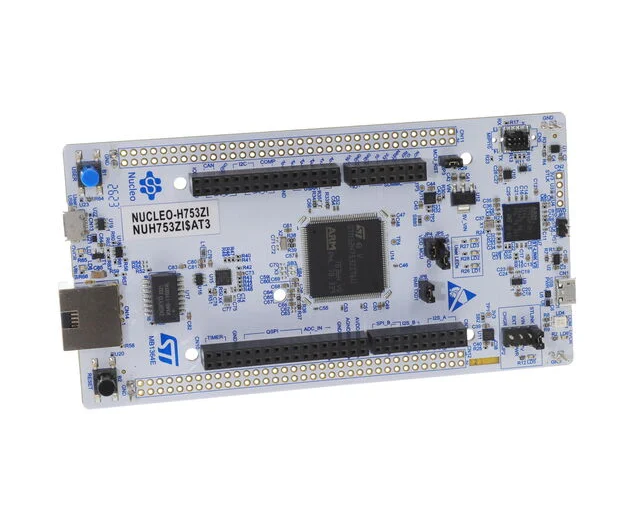
OK I got my Nucleo-144 with F753 board to learn about development for STM32.

Can I get a quick gist of how things work. Is it like Arduino where you create a 'sketch' and flash it to the board?

With STM32 what is the workflow at the most basic level?? Can you flash C programs to it and run them with scripts? What to use for bootloader?

I am aware of CubeIDE but I would like to checkout the simple tools. Can you write C code for controller and compile for arm32?
On-Chip-Debugger for testing the program?

Please show me the way..
 

So the objective is running C applications on RTOS.
 
Never developed with STM32 but if it is like all other arm embedded, you grab the ARM toolchain from here.

Then the programmer software is often OpenOCD as the generic solution (There is also STLink provided by the vendor specific to STM32 but may not be ported to FreeBSD yet).

Quite where we get the linker scripts from, I am not sure, other than extracting from the upstream IDE package or grab them from some random guys GitHub (alternative). I guess it could be made manually from the hardware specs, or validated in the case of grabbing them from the GitHubs.

There is a decent looking guide here.
 
On FreeBSD, you can use the gcc-arm-embedded package to compile your application, it includes GCC 14.2 + binutils 2.43.1 + newlib (libc for embedded).

For flashing and debugging, I strongly recommend PyOCD (py312-pyocd package), which uses Keil (ARM's official IDE) Device Family Packs to implement the flashing, but your chip is probably already supported by the built-in PyOCD drivers. PyOCD works with JLink, DAPLink, and ST-Link debug probes, and your Nucleo board probably already includes an on-board ST-Link, so you're good.

Then, you need to check out your chip's SDK from GitHub.

Finally, you need the data sheet and technical reference manual of the chip opened in a document viewer, as well as the schematic of the Nucleo board.

Now, you've got everything you need and you can focus on blinking your first LED from the command line. :)
 
Oh, and mind ST provides 2 SDK for their chips, LL and HAL, and you have to make a choice as to what you'll begin with.
ST push HAL as much as they can, but LL is much simpler and more straightforward as it doesn't involve hidden callback magic.
 
Back
Top