PAGER=most

Just don't change the ROOT account shell or pager. When you upgrade your system any major update will break the userland apps and for example if you change the root's shell to bash or something else and this shell doesn't work with the new kernel before you have a chance to upgrade the userland apps you will need to use /rescue tools. Same is valid for the PAGER and EDITOR as they are used to display and edit the merge information during major upgrade.
 
I'm talking about the root user for regular users it doesn't matter. No the ~/.profile or any user configuration are not changed during the upgrade.
 
  • Like
Reactions: mer
As long as you don't upgrade packages to a newer version than your base system is that breakage shouldn't happen. Often.
 
Just don't change the ROOT account shell or pager. When you upgrade your system any major update will break the userland apps and for example if you change the root's shell to bash or something else and this shell doesn't work with the new kernel before you have a chance to upgrade the userland apps you will need to use /rescue tools. Same is valid for the PAGER and EDITOR as they are used to display and edit the merge information during major upgrade.
This could be good... But is very cumbersome.

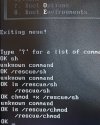
First: you don't have cd command to change into /rescue toolset (why?)

Second: Yep... You can +kldload+... load ZFS... But zpool not work as expected

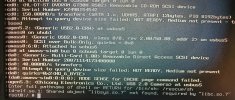
Third: the man page of rescue says to boot single and, at prompt, instead /bin/sh use /rescue/sh but it cannot be started if your libsys.so.7 isn't available. (The problem I'm struggling to solve)

Someone can tell me where I can get a good tutorial or give directions how to use it effectively?
 

Attachments

  • IMG_20260316_140310473_HDR~2.jpg
    IMG_20260316_140310473_HDR~2.jpg
    1.8 MB · Views: 21
I know you are not a bot. The anti bot check doesn't resolve the correct web preview of the pages in the forum. That's why the links are replaced.
 
The upgrade is not my real problem. For sure there is a bug on those scripts.The other machine I've upgraded worked fine. But first I've upgrade from 14.1 to14.2 and to 14.3 and finally 15.0. Today I was experimenting and found this libsys issue. No problem... But rollback did'nt worked, and I decided to figure out if I can solve it using only the /rescue toolkit. So the real proble, sprung up over my face: I really don't know how to use rescue tools.
So I wanna give a try, for sake of my skills improvimg, how to master this toolkit is my real problem!
 
Let me try another way...
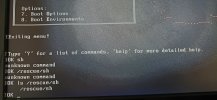
Now I booted and choose option 3 (escape to loader prompt).
And...
The /rescue/sh is there. but I can't start it.
So, how could I do it?
 

Attachments

  • IMG_20260316_144600957_HDR~2.jpg
    IMG_20260316_144600957_HDR~2.jpg
    1.6 MB · Views: 14
This is loader prompt, it's used to load kernel, kernel modules and set up the loader parameters before the boot. You have no work there unless you want to exclude some kernel module from autoload or specify different kernel to boot from.

After you boot into Single user mode and load the default /bin/sh or /rescue/sh then you can use the statically linked binaries which doesn't required shared libs from the /rescue to set up your network like /rescue/dhclient , scan the disk for errors with fsck or fetch the base.txz and extract the libsys.so.7.

Anyway it's much easier to make a installation USB flash, boot from it and copy the libsys.so.7 into your hard disk instead of using the /rescue tools.

Here's some examples how to do this using the /rescue tools to fetch the base.txz installation and extract it.
 
This is loader prompt, it's used to load kernel, kernel modules ...
Yeap, and it is very well explained here (Chap. 15).
After you boot into Single user mode and load the default /bin/sh or /rescue/sh ...
It's usually work and the single boot is intended for this purpose, but - it surprise me - when - in single user - the system still complained that lack of libsys.so.7 as I showed here.
Anyway it's *much easier* to make a installation USB flash, boot from it and copy the libsys.so.7 into your hard disk instead of using the /rescue tools.
Yes and I guess it is. And even easier was to decline to recover and reinstall... But I'm not in old way anymore. Try to surpass the difficult and earn knowledge is actually my biz.
Here's some examples how to do this using the /rescue tools to fetch the base.txz installation and extract it.
Thanks indeed for the link. There are some recipes there that I'd like to taste.

By the way, I deserved some time this morning to dig a little bit more in this "rescue" tool, and I'm using this problem I'm facing (not a real and mission-critical) to simulate one real (not to real on these IA era) and I have just one (software) defective thumb drive and other with FreeBSD installation. No disks, internet available, and just too thumb drives....

In the real life, I have a thumb drive - Lexar 128GB Usb 3.0 - that I've upgraded successfully yesterday to 15.0, with zfs, and I can boot from it everywhere (every machine I mean). It's useful to my embedded toys.

This (software) fault thumb drive - a SanDisk 128Gb USB 2.0 - is my first prototype that I couldn't upgrade as my Lexar.

I know and tested mfsbsd but it is not my intention to have a recovery or jump start tool. I want a real and useful, fluid system. Slow, I know, but reliable. I'm not in a hurry and not in a pinch. Just learning and I couldn't find some very good tutorial about those boot things. I'm stitching parts and mounting one for me, once at all, understand those hocus-pocus booting.

See... In the past - long time ago - It arose for me in every machine I met - msx, vax/vms, at, 286, 386, solaris, minix .... - It was always the same bet: restore, boot it, cross-fingers and forget the issue about. But, when it cracked, the same old ghost start to haunt me again: you do not understand this. Actually you don't know - truly - how it works, but in fact, you think you know how do it work and guess you will always can put it back to work with some pragmatic steps learned from some tuts around. The boss whip was crackling on my back... Not this time, pal! I'm too old to be in a hurry.
 
The current more command uses the same binary as less, although its operation is different.
Code:
The more(1) command has been replaced by less(1), although it can still
be run as more(1).
 
The current more command uses the same binary as less, although its operation is different.
Code:
The more(1) command has been replaced by less(1), although it can still
be run as more(1).
Very interesting.... Release 4.0 !

Quite a while ago.

Strange to see Last modified on: February 21, 2021 by Danilo G. Baio at the bottom.
 
Back
Top