
nvidia and GeForce 3060 on FreeBSD 14.4 - not a happy experience

In my continuing adventures (see here and here) to get my workstation working at an acceptable level with FreeBSD 14.x, I took out the Sapphire Radeon R7 240 4G DDR3 graphics card, an put in a MSI GeForce RTX 3060 Ventus 2X 12G OC instead.
It shows up like this in pciconf -lv output
Code:
vgapci0@pci0:7:0:0: class=0x030000 rev=0xa1 hdr=0x00 vendor=0x10de device=0x2504 subvendor=0x1462 subdevice=0x397d
    vendor     = 'NVIDIA Corporation'
    device     = 'GA106 [GeForce RTX 3060 Lite Hash Rate]'
    class      = display
    subclass   = VGA
before replacing the graphics card I had installed the necessary nvidia packages, from /var/log/messages
Code:
Aug  5 19:27:08 kg-core2 pkg[55814]: egl-wayland-1.1.21 installed
Aug  5 19:27:08 kg-core2 pkg[55814]: egl-wayland2-1.0.1 installed
Aug  5 19:27:08 kg-core2 pkg[55814]: egl-x11-1.0.5 installed
Aug  5 19:27:09 kg-core2 pkg[55814]: nvidia-kmod-595.84.1404000 installed
Aug  5 19:27:10 kg-core2 pkg[55814]: nvidia-driver-595.84 installed
Aug  5 19:27:10 kg-core2 pkg[55814]: nvidia-drm-61-kmod-595.84.1404000_1 installed
and configured kld_list like this
Code:
root@kg-core2:~ # sysrc kld_list
kld_list: nvidia-modeset nvidia-drm
and added this to /boot/loader.conf:
Code:
root@kg-core2:~ # cat /boot/loader.conf
hw.nvidiadrm.modeset=1
Upon boot, the console is garbled / unreadable, so I have to login blind, and type startxfce4 --with-ck-launch blind. I can live with that.
Once Xorg has started, glxinfo reports
Code:
tingo@kg-core2:~ $ glxinfo -B
name of display: :0.0
display: :0  screen: 0
direct rendering: Yes
Memory info (GL_NVX_gpu_memory_info):
    Dedicated video memory: 12288 MB
    Total available memory: 12288 MB
    Currently available dedicated video memory: 464 MB
OpenGL vendor string: NVIDIA Corporation
OpenGL renderer string: NVIDIA GeForce RTX 3060/PCIe/SSE2
OpenGL core profile version string: 4.6.0 NVIDIA 595.84
OpenGL core profile shading language version string: 4.60 NVIDIA
OpenGL core profile context flags: (none)
OpenGL core profile profile mask: core profile

OpenGL version string: 4.6.0 NVIDIA 595.84
OpenGL shading language version string: 4.60 NVIDIA
OpenGL context flags: (none)
OpenGL profile mask: (none)

OpenGL ES profile version string: OpenGL ES 3.2 NVIDIA 595.84
OpenGL ES profile shading language version string: OpenGL ES GLSL ES 3.20

and most operations (switching windows using Alt-Tab, switching workspaces, etc) are fast enough.
However, when switching between firefox windows I experience a horrible lag. For a simple Alt-Tab it is two seconds or more, in some cases it is in the order of minutes before the new window becomes usable.

There most be something I've done wrong, it is not supposed to be like this for a relatively modern graphics card with 12G memory?
 
oh, nvidia-smi reports like this
Code:
tingo@kg-core2:~ $ nvidia-smi
Thu Aug  6 22:31:08 2026      
+-----------------------------------------------------------------------------------------+
| NVIDIA-SMI 595.84                 Driver Version: 595.84         CUDA Version: N/A      |
+-----------------------------------------+------------------------+----------------------+
| GPU  Name                 Persistence-M | Bus-Id          Disp.A | Volatile Uncorr. ECC |
| Fan  Temp   Perf          Pwr:Usage/Cap |           Memory-Usage | GPU-Util  Compute M. |
|                                         |                        |               MIG M. |
|=========================================+========================+======================|
|   0  NVIDIA GeForce RTX 3060        Off |   00000000:07:00.0  On |                  N/A |
| 35%   53C    P5             20W /  170W |   11492MiB /  12288MiB |     31%      Default |
|                                         |                        |                  N/A |
+-----------------------------------------+------------------------+----------------------+

+-----------------------------------------------------------------------------------------+
| Processes:                                                                              |
|  GPU   GI   CI              PID   Type   Process name                        GPU Memory |
|        ID   ID                                                               Usage      |
|=========================================================================================|
|  No running processes found                                                             |
+-----------------------------------------------------------------------------------------+
 
Or maybe firefox needed about 2 days to get all windows properly updated? It works smooth as butter now.
 
Is your monitor directly connected to your MSI GeForce RTX 3060 Ventus 2X 12G OC?
If not, possibly your iGPU could doing something harm.

And mis-match between what loader / kernel think and actual BIOS / UEFI firmware configuration could cause garbled screen. In this case, specifying different resolution that your monitor supports in /boot/loader.conf could help.

And for firefox, possibly setting both
  • browser.tabs.hoverPreview.enabled
  • browser.tabs.hoverPreview.showThumbnails
to false via about:config could help. I have these to avoid crashes / freezes caused by firefox, but if I recall correctly, switching tabs were slow before I've flipped these. Related post of mine here.
 
Monitor directly connect yes
Code:
tingo@kg-core2:~ $ xrandr
Screen 0: minimum 8 x 8, current 1920 x 1200, maximum 32767 x 32767
HDMI-0 disconnected (normal left inverted right x axis y axis)
DP-0 connected 1920x1200+0+0 (normal left inverted right x axis y axis) 518mm x 324mm
   1920x1200     59.95*+
   1920x1080     60.00    59.94    50.00  
   1680x1050     59.95  
   1600x1200     60.00  
   1440x900      59.89  
   1280x1024     75.02    60.02  
   1280x960      60.00  
   1280x800      59.81  
   1280x720      60.00    59.94    50.00  
   1152x864      75.00  
   1024x768      75.03    70.07    60.00  
   800x600       75.00    72.19    60.32    56.25  
   720x576       50.00  
   720x480       59.94  
   640x480       75.00    72.81    59.94  
DP-1 disconnected (normal left inverted right x axis y axis)
DP-2 disconnected (normal left inverted right x axis y axis)
DP-3 disconnected (normal left inverted right x axis y axis)
DP-4 disconnected (normal left inverted right x axis y axis)
DP-5 disconnected (normal left inverted right x axis y axis)
IGPU - the machine doesn't have one, there is only the one graphics card.
Code:
root@kg-core2:~ # pciconf -lv | grep -A 4 vga
vgapci0@pci0:7:0:0:    class=0x030000 rev=0xa1 hdr=0x00 vendor=0x10de device=0x2504 subvendor=0x1462 subdevice=0x397d
    vendor     = 'NVIDIA Corporation'
    device     = 'GA106 [GeForce RTX 3060 Lite Hash Rate]'
    class      = display
    subclass   = VGA
firefox - nothing changed, this exact configuration (windows, tabs and all) worked before I swapped graphics cards.
 
I upgraded firefox to latest from packages (I'm on quarterly)
Code:
Aug  8 14:27:31 kg-core2 pkg[52590]: firefox upgraded: 153.0.1,2 -> 153.0.3,2
and it started like normal, all windows usable after a few minutes (I have a serious amount of windows)
Code:
root@kg-core2:~ # pgrep -lf firefox | wc -l
     158
(not sure that processes corresponds 1 - 1 to number of windows).
So maybe this "first time problem" was a fluke. We shall see.
 
As you've noted Xfce4 is working, NVIDIA drivers (nvidia-drm.ko, nvidia-modeset.ko, nvidia.ko and libraries for X11) should be working fine.
What mis-behaving should be in-base vt or sc driver.

How do you boot? UEFI? Or legacy BIOS?
And if you're booting via legacy BIOS, what sysctl -n kern.vty shows?

If you're booting from UEFI, sc driver is unrelated (UEFI without CSM doesn't have emulated text VRAMs that sc mandatorily require). And as none of NVIDIA driver kmods provide drmfb, vt should defaulted to efifb.
In this case, in near the top of dmesg, something like
Code:
VT(efifb): resolution 1920x1080
should be seen.
If your monitor dislikes the auto-detected resolution, overriding it with efi_max_resolution variable with any of the resolution lower than it and included in xrandr reported as available (in your post #5) could help.
In my case, as I have 4k screen but 4k is too high for 16x16 fonts, I have
Code:
efi_max_resolution="1920x1080"
in my /boot/loader.conf. But no worries. Once I start Mate DE on xorg, NVIDIA drivers automatically set 4k and back to 1920x1080 when switching to vty (including exiting from Mate DE), and go back to 4k on switching to vty8 with Alt+F9.

In case you're booting via legacy BIOS and using vt, try vbe_max_resolution variable instead.

If neither works, try kern.vt.fb.default_mode variable instead. This alone may need framebuffer depth, so the value to be set would be something like "1920*1080x32".

In case you're using sc, sorry, I've almost forgotton about it. Maybe somehow configure with characters per line and number of lines instead of pixel resolution.
 
UEFI boot.
dmesg shows VT as
Code:
root@kg-core2:~ # dmesg | grep VT
VT(vga): resolution 640x480
vtvga0: <VT VGA driver>
VT(vga): resolution 640x480
vtvga0: <VT VGA driver>
No, my monitor is ok with the resolution (the info panel shows it is detected correctly).
Also, the console is still garbled after I exit Xorg too.
 
The firefox problem is persistent; after the machine is booted and / or Xorg is started for the first time firefox misbehaves (is slow sluggish after switching windows with alt-tab) for several hours.
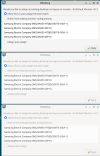
There are other strange things too. If the monitor has been off (via power button or DPMS), I often get these
Screenshot_2026-08-11_17-15-53_xfdesktop_x_3.png
always three of them (I have arranged them here). As soon as I click "OK" on the active one, it goes away but creates a core dump
Code:
tingo@kg-core2:~ $ gdb /usr/local/bin/xfdesktop ./xfdesktop.core 
GNU gdb (GDB) 15.1 [GDB v15.1 for FreeBSD]
Copyright (C) 2024 Free Software Foundation, Inc.
License GPLv3+: GNU GPL version 3 or later <http://gnu.org/licenses/gpl.html>
This is free software: you are free to change and redistribute it.
There is NO WARRANTY, to the extent permitted by law.
Type "show copying" and "show warranty" for details.
This GDB was configured as "x86_64-portbld-freebsd14.4".
Type "show configuration" for configuration details.
For bug reporting instructions, please see:
<https://www.gnu.org/software/gdb/bugs/>.
Find the GDB manual and other documentation resources online at:
    <http://www.gnu.org/software/gdb/documentation/>.

For help, type "help".
Type "apropos word" to search for commands related to "word"...
Reading symbols from /usr/local/bin/xfdesktop...
(No debugging symbols found in /usr/local/bin/xfdesktop)
[New LWP 120897]
[New LWP 670207]
[New LWP 670208]
[New LWP 670209]
[New LWP 670210]
[New LWP 670211]
[New LWP 670242]
[New LWP 670243]
[New LWP 670244]
[New LWP 670245]
[New LWP 670246]
[New LWP 670247]
[New LWP 670248]
[New LWP 670249]
[New LWP 670250]
[New LWP 670251]
--Type <RET> for more, q to quit, c to continue without paging--
[New LWP 670252]
[New LWP 670253]
Core was generated by `xfdesktop --display :0.0 --sm-client-id 2bbb8637c-8532-11f1-828c-b42e991fc5a7'.
Program terminated with signal SIGSEGV, Segmentation fault.
Address not mapped to object.
#0  0x0000000831466084 in g_type_check_instance_is_a () from /usr/local/lib/libgobject-2.0.so.0
[Current thread is 1 (LWP 120897)]
(gdb) bt
#0  0x0000000831466084 in g_type_check_instance_is_a () at /usr/local/lib/libgobject-2.0.so.0
#1  0x0000000000241106 in xfce_desktop_get_monitor ()
#2  0x0000000000266541 in ??? ()
#3  0x00000008329fc075 in ??? () at /usr/local/lib/libglib-2.0.so.0
#4  0x00000008329fc958 in ??? () at /usr/local/lib/libglib-2.0.so.0
#5  0x0000000000260406 in ??? ()
#6  0x0000000000258fc3 in xfdesktop_icon_view_manager_desktop_added ()
#7  0x0000000000244fca in ??? ()
#8  0x0000000831443013 in g_closure_invoke () at /usr/local/lib/libgobject-2.0.so.0
#9  0x000000083145e219 in ??? () at /usr/local/lib/libgobject-2.0.so.0
#10 0x000000083145cdf8 in ??? () at /usr/local/lib/libgobject-2.0.so.0
#11 0x000000083145d720 in g_signal_emit_by_name () at /usr/local/lib/libgobject-2.0.so.0
#12 0x00000008224a1e20 in ??? () at /usr/local/lib/libxfce4windowing-0.so.0
#13 0x00000008224a8060 in ??? () at /usr/local/lib/libxfce4windowing-0.so.0
#14 0x00000008224a85c0 in ??? () at /usr/local/lib/libxfce4windowing-0.so.0
#15 0x0000000832a10f05 in ??? () at /usr/local/lib/libglib-2.0.so.0
#16 0x0000000832a11396 in ??? () at /usr/local/lib/libglib-2.0.so.0
#17 0x0000000832a116b9 in g_main_loop_run () at /usr/local/lib/libglib-2.0.so.0
#18 0x000000082ca29545 in gtk_dialog_run () at /usr/local/lib/libgtk-3.so.0
#19 0x0000000000260322 in ??? ()
#20 0x0000000000258fc3 in xfdesktop_icon_view_manager_desktop_added ()
#21 0x0000000000244fca in ??? ()
#22 0x0000000831442fdf in g_closure_invoke () at /usr/local/lib/libgobject-2.0.so.0
#23 0x000000083145e219 in ??? () at /usr/local/lib/libgobject-2.0.so.0
#24 0x000000083145cdf8 in ??? () at /usr/local/lib/libgobject-2.0.so.0
#25 0x000000083145d720 in g_signal_emit_by_name () at /usr/local/lib/libgobject-2.0.so.0
#26 0x00000008224a1e20 in ??? () at /usr/local/lib/libxfce4windowing-0.so.0
#27 0x00000008224a8060 in ??? () at /usr/local/lib/libxfce4windowing-0.so.0
#28 0x00000008224a85c0 in ??? () at /usr/local/lib/libxfce4windowing-0.so.0
#29 0x0000000832a10f05 in ??? () at /usr/local/lib/libglib-2.0.so.0
#30 0x0000000832a11396 in ??? () at /usr/local/lib/libglib-2.0.so.0
#31 0x0000000832a11436 in g_main_context_iteration () at /usr/local/lib/libglib-2.0.so.0
#32 0x00000008306448fd in g_application_run () at /usr/local/lib/libgio-2.0.so.0
--Type <RET> for more, q to quit, c to continue without paging--
#33 0x000000000024087b in main ()
(gdb)
 
I have the same RTX 3060 card on FreeBSD 14.4-RELEASE-p6 and it gets 2560x1440 resolution with no issues. Reading through this and your previous threads, I can identify only three things I seem to have done differently from you:

1) More nvidia packages:
Code:
[ICODE][I]pkg info|grep nvidia[/I][/ICODE]
[ICODE]linux-nvidia-libs-595.58.03    NVIDIA graphics libraries and programs (Linux)[/ICODE]
[ICODE]nvidia-driver-595.58.03_2      NVIDIA graphics driver userland[/ICODE]
[ICODE]nvidia-drm-61-kmod-595.58.03.1403000 NVIDIA DRM Kernel Module[/ICODE]
[ICODE]nvidia-drm-kmod-595.58.03      NVIDIA DRM kernel module[/ICODE]
[ICODE]nvidia-kmod-595.58.03.1404000  NVIDIA graphics driver kernel module[/ICODE]
[ICODE]nvidia-settings-595.58.03      Display Control Panel for NVIDIA graphics[/ICODE]
[ICODE]nvidia-xconfig-595.58.03       NVIDIA graphics X configuration utility[/ICODE]
2) Used nvidia-xconfig to generate a xorg.conf, which is placed in /usr/local/etc/X11/xorg.conf.d
Code:
[I][ICODE]cat xorg.conf [/ICODE][/I]
[ICODE]# nvidia-xconfig: X configuration file generated by nvidia-xconfig[/ICODE]
[ICODE]# nvidia-xconfig:  version 470.86[/ICODE]
[ICODE][/ICODE]
[ICODE]Section "ServerLayout"[/ICODE]
[ICODE]    Identifier     "Layout0"[/ICODE]
[ICODE]    Screen      0  "Screen0"[/ICODE]
[ICODE]    InputDevice    "Keyboard0" "CoreKeyboard"[/ICODE]
[ICODE]    InputDevice    "Mouse0" "CorePointer"[/ICODE]
[ICODE]EndSection[/ICODE]
[ICODE][/ICODE]
[ICODE]Section "Files"[/ICODE]
[ICODE]EndSection[/ICODE]
[ICODE][/ICODE]
[ICODE]Section "InputDevice"[/ICODE]
[ICODE]    # generated from default[/ICODE]
[ICODE]    Identifier     "Mouse0"[/ICODE]
[ICODE]    Driver         "mouse"[/ICODE]
[ICODE]    Option         "Protocol" "auto"[/ICODE]
[ICODE]    Option         "Device" "/dev/sysmouse"[/ICODE]
[ICODE]    Option         "Emulate3Buttons" "no"[/ICODE]
[ICODE]    Option         "ZAxisMapping" "4 5"[/ICODE]
[ICODE]EndSection[/ICODE]
[ICODE][/ICODE]
[ICODE]Section "InputDevice"[/ICODE]
[ICODE]    # generated from default[/ICODE]
[ICODE]    Identifier     "Keyboard0"[/ICODE]
[ICODE]    Driver         "keyboard"[/ICODE]
[ICODE]EndSection[/ICODE]
[ICODE][/ICODE]
[ICODE]Section "Monitor"[/ICODE]
[ICODE]    Identifier     "Monitor0"[/ICODE]
[ICODE]    VendorName     "Unknown"[/ICODE]
[ICODE]    ModelName      "Unknown"[/ICODE]
[ICODE]    Option         "DPMS"[/ICODE]
[ICODE]EndSection[/ICODE]
[ICODE][/ICODE]
[ICODE]Section "Device"[/ICODE]
[ICODE]    Identifier     "Device0"[/ICODE]
[ICODE]    Driver         "nvidia"[/ICODE]
[ICODE]    VendorName     "NVIDIA Corporation"[/ICODE]
[ICODE]EndSection[/ICODE]
[ICODE][/ICODE]
[ICODE]Section "Screen"[/ICODE]
[ICODE]    Identifier     "Screen0"[/ICODE]
[ICODE]    Device         "Device0"[/ICODE]
[ICODE]    Monitor        "Monitor0"[/ICODE]
[ICODE]    DefaultDepth    24[/ICODE]
[ICODE]    SubSection     "Display"[/ICODE]
[ICODE]        Depth       24[/ICODE]
[ICODE]    EndSubSection[/ICODE]
[ICODE]EndSection[/ICODE]
3) Set these in /boot/loader.conf:
Code:
[ICODE][I]cat /boot/loader.conf[/I][/ICODE]
[ICODE][B]<snip irrelevant lines>[/B][/ICODE]
[ICODE]# change console text size at boot[/ICODE]
[ICODE]efi_max_resolution="1920x1080"[/ICODE]
[ICODE]# Modesetting must be enabled to use nvidia-drm.ko for graphics. This must be set before loading nvidia-drm.ko[/ICODE]
[ICODE]hw.nvidiadrm.modeset=1[/ICODE]
I compared the output of my nvidia-smi to yours, and your GPU seems to be working considerably harder than mine:
Code:
[ICODE][I]nvidia-smi[/I][/ICODE]
[ICODE]Tue Aug 11 18:55:04 2026       [/ICODE]
[ICODE]+-----------------------------------------------------------------------------------------+[/ICODE]
[ICODE]| NVIDIA-SMI 595.58.03              Driver Version: 595.58.03      CUDA Version: N/A      |[/ICODE]
[ICODE]+-----------------------------------------+------------------------+----------------------+[/ICODE]
[ICODE]| GPU  Name                 Persistence-M | Bus-Id          Disp.A | Volatile Uncorr. ECC |[/ICODE]
[ICODE]| Fan  Temp   Perf          Pwr:Usage/Cap |           Memory-Usage | GPU-Util  Compute M. |[/ICODE]
[ICODE]|                                         |                        |               MIG M. |[/ICODE]
[ICODE]|=========================================+========================+======================|[/ICODE]
[ICODE]|   0  NVIDIA GeForce RTX 3060        Off |   00000000:07:00.0  On |                  N/A |[/ICODE]
[ICODE]|  0%   44C    P8              8W /  170W |    1122MiB /  12288MiB |      0%      Default |[/ICODE]
[ICODE]|                                         |                        |                  N/A |[/ICODE]
[ICODE]+-----------------------------------------+------------------------+----------------------+[/ICODE]
Unfortunately I have no advice or suggestions, just data points from a system where RTX 3060 is working.
 
UEFI boot.
dmesg shows VT as
Code:
root@kg-core2:~ # dmesg | grep VT
VT(vga): resolution 640x480
vtvga0: <VT VGA driver>
VT(vga): resolution 640x480
vtvga0: <VT VGA driver>
No, my monitor is ok with the resolution (the info panel shows it is detected correctly).
Also, the console is still garbled after I exit Xorg too.
This would be the issue.

On UEFI boots, this should be VT(efifb) at least for first appeared one.
Not sure why efifb is NOT detected and used. But it shouldn't happen.
Now I come to suspect your UEFI firmware is not sanely exposing gop infromations to kernel. Or are you booting with legacy BIOS mode using CSM? In this case, it can happen. But in this case, it should work sanely.

If you're NOT using CSM and booting with normal UEFI mode, once this happenes, VGA hardware support in vt driver should attempt to write to VGA text / graphics VRAMs which both are nonexisitent on pure UEFI boots. Not to EFI framebuffer that UEFI firmware prepares.

Possibly it could become VT(drmfb) after any of i915kms.ko, amdgpu.ko or radeonkms.ko from graphics/drm-*-kmod is successfully loaded and initialized for iGPUs, but the first appeared one should be before they are loaded. But none of NVIDIA GPU kmods switches it to drmfb at least for now.
 
The firefox problem is persistent; after the machine is booted and / or Xorg is started for the first time firefox misbehaves (is slow sluggish after switching windows with alt-tab) for several hours.
There are other strange things too. If the monitor has been off (via power button or DPMS), I often get these
View attachment 26959
always three of them (I have arranged them here). As soon as I click "OK" on the active one, it goes away but creates a core dump
Code:
tingo@kg-core2:~ $ gdb /usr/local/bin/xfdesktop ./xfdesktop.core
GNU gdb (GDB) 15.1 [GDB v15.1 for FreeBSD]
Copyright (C) 2024 Free Software Foundation, Inc.
License GPLv3+: GNU GPL version 3 or later <http://gnu.org/licenses/gpl.html>
This is free software: you are free to change and redistribute it.
There is NO WARRANTY, to the extent permitted by law.
Type "show copying" and "show warranty" for details.
This GDB was configured as "x86_64-portbld-freebsd14.4".
Type "show configuration" for configuration details.
For bug reporting instructions, please see:
<https://www.gnu.org/software/gdb/bugs/>.
Find the GDB manual and other documentation resources online at:
    <http://www.gnu.org/software/gdb/documentation/>.

For help, type "help".
Type "apropos word" to search for commands related to "word"...
Reading symbols from /usr/local/bin/xfdesktop...
(No debugging symbols found in /usr/local/bin/xfdesktop)
[New LWP 120897]
[New LWP 670207]
[New LWP 670208]
[New LWP 670209]
[New LWP 670210]
[New LWP 670211]
[New LWP 670242]
[New LWP 670243]
[New LWP 670244]
[New LWP 670245]
[New LWP 670246]
[New LWP 670247]
[New LWP 670248]
[New LWP 670249]
[New LWP 670250]
[New LWP 670251]
--Type <RET> for more, q to quit, c to continue without paging--
[New LWP 670252]
[New LWP 670253]
Core was generated by `xfdesktop --display :0.0 --sm-client-id 2bbb8637c-8532-11f1-828c-b42e991fc5a7'.
Program terminated with signal SIGSEGV, Segmentation fault.
Address not mapped to object.
#0  0x0000000831466084 in g_type_check_instance_is_a () from /usr/local/lib/libgobject-2.0.so.0
[Current thread is 1 (LWP 120897)]
(gdb) bt
#0  0x0000000831466084 in g_type_check_instance_is_a () at /usr/local/lib/libgobject-2.0.so.0
#1  0x0000000000241106 in xfce_desktop_get_monitor ()
#2  0x0000000000266541 in ??? ()
#3  0x00000008329fc075 in ??? () at /usr/local/lib/libglib-2.0.so.0
#4  0x00000008329fc958 in ??? () at /usr/local/lib/libglib-2.0.so.0
#5  0x0000000000260406 in ??? ()
#6  0x0000000000258fc3 in xfdesktop_icon_view_manager_desktop_added ()
#7  0x0000000000244fca in ??? ()
#8  0x0000000831443013 in g_closure_invoke () at /usr/local/lib/libgobject-2.0.so.0
#9  0x000000083145e219 in ??? () at /usr/local/lib/libgobject-2.0.so.0
#10 0x000000083145cdf8 in ??? () at /usr/local/lib/libgobject-2.0.so.0
#11 0x000000083145d720 in g_signal_emit_by_name () at /usr/local/lib/libgobject-2.0.so.0
#12 0x00000008224a1e20 in ??? () at /usr/local/lib/libxfce4windowing-0.so.0
#13 0x00000008224a8060 in ??? () at /usr/local/lib/libxfce4windowing-0.so.0
#14 0x00000008224a85c0 in ??? () at /usr/local/lib/libxfce4windowing-0.so.0
#15 0x0000000832a10f05 in ??? () at /usr/local/lib/libglib-2.0.so.0
#16 0x0000000832a11396 in ??? () at /usr/local/lib/libglib-2.0.so.0
#17 0x0000000832a116b9 in g_main_loop_run () at /usr/local/lib/libglib-2.0.so.0
#18 0x000000082ca29545 in gtk_dialog_run () at /usr/local/lib/libgtk-3.so.0
#19 0x0000000000260322 in ??? ()
#20 0x0000000000258fc3 in xfdesktop_icon_view_manager_desktop_added ()
#21 0x0000000000244fca in ??? ()
#22 0x0000000831442fdf in g_closure_invoke () at /usr/local/lib/libgobject-2.0.so.0
#23 0x000000083145e219 in ??? () at /usr/local/lib/libgobject-2.0.so.0
#24 0x000000083145cdf8 in ??? () at /usr/local/lib/libgobject-2.0.so.0
#25 0x000000083145d720 in g_signal_emit_by_name () at /usr/local/lib/libgobject-2.0.so.0
#26 0x00000008224a1e20 in ??? () at /usr/local/lib/libxfce4windowing-0.so.0
#27 0x00000008224a8060 in ??? () at /usr/local/lib/libxfce4windowing-0.so.0
#28 0x00000008224a85c0 in ??? () at /usr/local/lib/libxfce4windowing-0.so.0
#29 0x0000000832a10f05 in ??? () at /usr/local/lib/libglib-2.0.so.0
#30 0x0000000832a11396 in ??? () at /usr/local/lib/libglib-2.0.so.0
#31 0x0000000832a11436 in g_main_context_iteration () at /usr/local/lib/libglib-2.0.so.0
#32 0x00000008306448fd in g_application_run () at /usr/local/lib/libgio-2.0.so.0
--Type <RET> for more, q to quit, c to continue without paging--
#33 0x000000000024087b in main ()
(gdb)
If I recall correctly, the behavior may depend on window manager.

I've never experienced this behavior on Mate (using x11-wm/marco) nor Compiz. I'm currently running Compiz on Mate, RTX A400 is connected to JAPANNEXT JN-IPS2380UHDR-C65W-HSP via DisplayPort and tried power cycle of my monitor, without issue.

On the other hand, I've experienced reordering the icons on Windows by power cycle of the DP-connected monitor used at $work. Not experienced on HDMI, DVI nor analog VGA connections.

And the crash seems to be memory management issue in xfdesktop.
 
Back
Top