No route to host

Hello:

I just updated to 13.2 to install Samba.
I did it yesterday, Samba worked perfectly and I was able to connect to the network and share files with Windows with another computer.
But today, I don't understand why, I am not able to connect to the network.
If I ping the router it tells me No route to host.
Adding the IP of the router and an IP address for my computer to rc.conf only gives me Network is down.

Any clue on how to fix this problem?

Thank you!
 
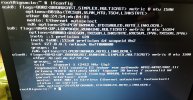
This is what ifconfig tells me if I leave in rc.conf ifconfig_wlan0="WPA DHCP"
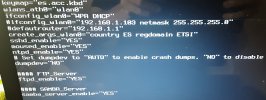
I also upload rc.conf
 

Attachments

  • 20230915_130236.jpg
    20230915_130236.jpg
    1.2 MB · Views: 620
  • 20230915_131256.jpg
    20230915_131256.jpg
    592 KB · Views: 623
"no carrier", so your wireless connection isn't associated. Try running wpa_supplicant(8) with debug turned on to see what might be going wrong.

wpa_supplicant -d -c /etc/wpa_supplicant.conf
 
It tells me:
wpa_supplicant v2.10
Successfully initialized wpa_suplicant

And then manualinformation about the software.

After that I have restarted the netif service and done another ping to the router and again it returned:
No route to host.
 
Hi,
May be you could try to uncomment the line defaultrouter in your rc.conf file, then restart the netif and routing services.
 
Hi,
May be you could try to uncomment the line defaultrouter in your rc.conf file, then restart the netif and routing services.
I just wanted to comment on that, it seems that the configuration of the wlan0 interface is commented in rc.conf.

screenProblem

If your wpa_supplicant session was successful, you should be able to assign an address to your interface manually or via dhclient(8) if you have a dhcp server enabled.

In any case, see if there is a route:

netstat -rn4

or if not configured, assign an address to your interface and a route manually:

ifconfig wlan0 inet 192.168.1.103 netmask 255.255.255.0 up
route add default 192.168.1.1


Regards.
 
Thanks for your help!
With netstat -rn4 I only get the localhost.
If I uncomment the defaultrouter line in my rc.conf file,
I only get Network is down instead of No route to host from the ping command.
 
With netstat -rn4 I only get the localhost.
If I uncomment the defaultrouter line in my rc.conf file,
I only get Network is down instead of No route to host from the ping command.
Stop focusing on that gateway. You're looking a few steps too far ahead. If the wireless interface isn't associated with the access point, there is no ethernet traffic possible. Check that first, then check the routes.
 
Back
Top