
Monitors not found on dual graphics card installation

Hi,

I'm very new to FreeBSD. I've managed to get KDE Plasma running on my system, but it is only diplaying on one of my screens,and not at the correct resolution.

I have two nvidia graphics cards that the system can see, and are shown on the NVidia X server settings, but I can't seem to configure the monitors. I tried creating an X configuration file, but this stopped x from working at all.

Xrandr doesn't show much, as per the attached file.

Some text that may be relevant from my xorg0 log is included here, but I'm not really sure what's relevant.

Any suggestions would be welcome.

Code:
24.822] (==) Log file: "/var/log/Xorg.0.log", Time: Wed Oct 23 13:45:47 2024
[    24.880] (==) Using system config directory "/usr/local/share/X11/xorg.conf.d"
[    24.923] (==) No Layout section.  Using the first Screen section.
[    24.923] (==) No screen section available. Using defaults.
[    24.923] (**) |-->Screen "Default Screen Section" (0)
[    24.923] (**) |   |-->Monitor "<default monitor>"
[    24.923] (==) No monitor specified for screen "Default Screen Section".
        Using a default monitor configuration.
[    24.923] (**) Allowing byte-swapped clients
[    24.923] (==) Automatically adding devices
[    24.923] (==) Automatically enabling devices
[    24.923] (==) Automatically adding GPU devices
[    24.923] (==) Automatically binding GPU devices
[    24.923] (==) Max clients allowed: 256, resource mask: 0x1fffff
[    25.052] (==) FontPath set to:
        /usr/local/share/fonts/misc/,
        /usr/local/share/fonts/TTF/,
        /usr/local/share/fonts/OTF/,
        /usr/local/share/fonts/Type1/,
        /usr/local/share/fonts/100dpi/,
        /usr/local/share/fonts/75dpi/,
        catalogue:/usr/local/etc/X11/fontpath.d
[    25.052] (==) ModulePath set to "/usr/local/lib/xorg/modules"
[    25.052] (II) The server relies on udev to provide the list of input devices.
        If no devices become available, reconfigure udev or disable AutoAddDevices.
[    25.052] (II) Module ABI versions:
[    25.052]    X.Org ANSI C Emulation: 0.4
[    25.052]    X.Org Video Driver: 25.2
[    25.052]    X.Org XInput driver : 24.4
[    25.052]    X.Org Server Extension : 10.0
[    25.060] (!!) More than one possible primary device found
[    25.060] (--) PCI: (3@0:0:0) 10de:13ba:103c:1097 rev 162, Mem @ 0xf2000000/16777216, 0xd0000000/268435456,
 0xe0000000/33554432, I/O @ 0x00008000/128, BIOS @ 0x????????/65536
[    25.060] (--) PCI: (4@0:0:0) 10de:1d01:1462:8122 rev 161, Mem @ 0xf0000000/16777216, 0xb0000000/268435456,
 0xc0000000/33554432, I/O @ 0x00007000/128, BIOS @ 0x????????/65536
[    25.060] (II) LoadModule: "glx"
[    25.061] (II) Loading /usr/local/lib/xorg/modules/extensions/libglx.so
[    25.208] (II) Module glx: vendor="X.Org Foundation"
[    25.208]    compiled for 1.21.1.13, module version = 1.0.0
[    25.208]    ABI class: X.Org Server Extension, version 10.0
[    25.208] (==) Matched modesetting as autoconfigured driver 0
[    25.208] (==) Matched scfb as autoconfigured driver 1
[    25.208] (==) Matched vesa as autoconfigured driver 2
[    25.208] (==) Assigned the driver to the xf86ConfigLayout
[    25.208] (II) LoadModule: "modesetting"
[    25.252] (II) Loading /usr/local/lib/xorg/modules/drivers/modesetting_drv.so
[    25.285] (II) Module modesetting: vendor="X.Org Foundation"
[    25.285]    compiled for 1.21.1.13, module version = 1.21.1
[    25.285]    Module class: X.Org Video Driver
[    25.285]    ABI class: X.Org Video Driver, version 25.2
[    25.285] (II) LoadModule: "scfb"
[    25.286] (II) Loading /usr/local/lib/xorg/modules/drivers/scfb_drv.so
[    25.286] (II) Module scfb: vendor="X.Org Foundation"
[    25.286]    compiled for 1.21.1.13, module version = 0.0.5
[    25.286]    ABI class: X.Org Video Driver, version 25.2
[    25.286] (II) LoadModule: "vesa"
[    25.286] (II) Loading /usr/local/lib/xorg/modules/drivers/vesa_drv.so
[    25.295] (II) Module vesa: vendor="X.Org Foundation"
[    25.295]    compiled for 1.21.1.13, module version = 2.5.0
[    25.295]    Module class: X.Org Video Driver
[    25.295]    ABI class: X.Org Video Driver, version 25.2
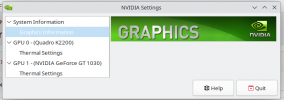
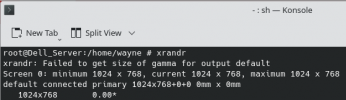
 

Attachments

  • Screenshot_20241023_142506.png
    Screenshot_20241023_142506.png
    58.4 KB · Views: 404
  • Screenshot_20241023_142810.png
    Screenshot_20241023_142810.png
    19.4 KB · Views: 370
KDE Plasma running on my system, but it is only diplaying on one of my screens,and not at the correct resolution.
Are you using the plasma wayland session or the x11 session? I think the wayland session has limited screen resolutions.
 
Are you using the plasma wayland session or the x11 session? I think the wayland session has limited screen resolutions.
Thanks for the response. I think it was an X11 session. I didn't have an option to change it when starting X. It's moot now because I tried to reinstall BSD and I can't get startx to work at all now. I'm goingn to give Ghost BSD a try and if that doesn't work will go back to Linux.
 
Thanks for the response. I think it was an X11 session. I didn't have an option to change it when starting X. It's moot now because I tried to reinstall BSD and I can't get startx to work at all now. I'm goingn to give Ghost BSD a try and if that doesn't work will go back to Linux.
You have multiple gpu`s , do you have integrated gpu ? make sure you set BusID , example below for my gpu.
Code:
Section "Device"
    Identifier     "Device0"
    Driver         "nvidia"
    VendorName     "NVIDIA Corporation"
    BoardName      "NVIDIA TITAN V JHH Special Edition"
    BusID       "PCI:2:0:0"
EndSection

Also you Xorg.log looks like incomplete ... ? should be more info why xorg can not be launched.
Your nvidia-settings clearly shows you missing things.
How did you enable the nVIDIA diriver in /etc/rc.conf? kld_list="nvidia" or kld_list="nvidia-modeset"? i had to enable like this kld_list="nvidia-modeset" otherwise startx hung up. but you havce to test by your needs.
also what version of nvidia-drivers ? tried other version ? which ones you installed ?
 
Thanks for the reply. I had two cards installed, both nvidia. I added Linux, linux64 nvidia and nvidia-modeset to the kld_list as per robonuggie tutorial on YouTube:
View: https://youtu.be/bQKaNbarQKI?si=5CegfMBeBPo0-ceh

I've tried the drivers listed in the handbook starting at 550 and working back to 304 I tried removing one graphics card and that was the point I couldn't get X11 to run at all. Prior to that it was running on one screen only. I haven't included the full log because I do know how to copy the whole thing onto here.

I'm wondering if I would be better off trying to install X11 from ports
 
The latest version (550) should support both the Quadro K2200 and GT 1030.


You probably need to create a /usr/local/etc/X11/xorg.conf.d/nvidia-driver.conf that adds both cards, each one should have a BusID or else X is going to complain about not being able to tell which is which. Auto-detection of the NVidia driver has never worked, so you'll need to tell it to load the nvidia driver specifically.

Something like:
Code:
Section "Device"
    Identifier     "Device0"
    Driver         "nvidia"
    BusID       "PCI:3:0:0"
EndSection

Section "Device"
    Identifier     "Device1"
    Driver         "nvidia"
    BusID       "PCI:4:0:0"
EndSection
I added Linux, linux64 nvidia and nvidia-modeset to the kld_list
Only nvidia-modeset should be needed. Linux/Linux64 aren't required. The "Linux" compatibility in the driver is to allow Linux applications running on the Linux Compatibility layer to use the card. It's not required for the driver itself to function, that seems to be a common misconception.


I'm wondering if I would be better off trying to install X11 from ports
X itself has nothing to do with the problem. It's simply a configuration issue. Rebuilding X11 from ports will change absolutely nothing.
 
SirDice, this not related to the problem discussed here, but the example in the Handbook for multiple video cards (with an intel and nvidia card) uses the same identifier "Card0" for both cards. I tried this on a machine with an intel and nvidia card and it did not work. In your example above, each card has a different identifier. Is the example in the Handbook correct? Thanks.
 
SirDice, this not related to the problem discussed here, but the example in the Handbook for multiple video cards (with an intel and nvidia card) uses the same identifier "Card0" for both cards. I tried this on a machine with an intel and nvidia card and it did not work. In your example above, each card has a different identifier. Is the example in the Handbook correct? Thanks.
I suspect it's because of the way Optimus works, it's probably treated as a 'single' video card. But I have zero to none experience with Optimus graphics, I've only ever used multiple, separate, cards.
 
  • Thanks
Reactions: drr
SirDice, this not related to the problem discussed here, but the example in the Handbook for multiple video cards (with an intel and nvidia card) uses the same identifier "Card0" for both cards. I tried this on a machine with an intel and nvidia card and it did not work. In your example above, each card has a different identifier. Is the example in the Handbook correct? Thanks.
drr I had previously tried the example you quoted, and that didn't work for me either, even when I tried 'Card0' and 'Card1'. The other thing that is different in Sir Dice's settings is that PCI in the bus address is upper case. I don't know if that is relevant or not. I suspect the text in the handbook should be Card0 & Card1
 
  • Like
Reactions: drr
The other thing that is different in Sir Dice's settings is that PCI in the bus address is upper case.
That shouldn't matter. Your two cards are on separate busses; 3:0:0 and 4:0:0, thus two devices. Whereas the example in the handbook uses the same device (0:2) with different functions (i.e. a multi-function device); 0:2:0 and 0:2:1.

Code:
           •   pcidomain:bus:device:function
           •   pcibus:device:function
           •   pcibus:device
 
SirDice, this not related to the problem discussed here, but the example in the Handbook for multiple video cards (with an intel and nvidia card) uses the same identifier "Card0" for both cards. I tried this on a machine with an intel and nvidia card and it did not work. In your example above, each card has a different identifier. Is the example in the Handbook correct? Thanks.
I think not, xorg.conf(5)
Code:
DEVICE SECTION
       The config file may have	multiple Device	sections.  There  must	be  at
       least one, for the video	card being used.

       Device sections have the	following format:

	   Section "Device"
	       Identifier "name"
	       Driver	  "driver"
	       entries
	       ...
	   EndSection

       The  Identifier and Driver entries are required in all Device sections.
       All other entries are optional.

       The Identifier entry specifies the unique name for  this	 graphics  de-
       vice.
The Identifier with the "unique name" is there because it can then be referred to by that name in other Xorg Sections*, when more elaborate Xorg configurations are specified. As such it is better to use a unique "name" for every Identifier. That said you probably won't get into trouble when this particular "name" is not being referenced anywhere else in active Xorg conf files.

* the graphics device, as mentioned in the last line of the man page quote, does not refer to the physical device (i.e. the physical graphics card) but the (by software) addressable device.
 
Last edited:
Back
Top
