bhyve Is it possible to expand volumes inside FreeBSD guest VM without reboot?

Our organization is running FreeBSD 13 and 14 as guests VM's both under bhyve and also AWS. Despite lots of trying, it seems like detecting expanded drives (nvme emulation) requires a reboot. Am I missing something?

I recently expanded the drive of a Ubuntu Linux guest machine, where FreeBSD was the host using bhyve. I simply expanded the host's drive file using truncate. Immediately inside the guest, the larger disk could be seen with lsblk, and then utilized with zpool online.

It'd sure be swell if FreeBSD as guest and host (using bhyve) could support expansion in this same elegant manner. I found an older post on stackexchange that suggested there is a disconnect between the nvmecontrol and gpart layer, but I'm not sure if that would still apply.

I've already experimented a good deal with forced rescan of devices inside the guest, devctl etc., with no luck. It seems like it could be within reach. nvmecontrol devlist shows the new size, but I haven't been able to grow into it without a reboot.
 
I don't think that geom is provisioned for resizing out of the blue at all. I find it interesting that nvmecontrol can see the new size, good find. I'll put it on the TODO to snoop a little.
 
I haven't tried this myself, so YMMV, on the off chance that it's not out of date or wrong, the handbook does talk about this and explicitly notes how to do it without unmounting. I can't even find information on the -e switch, so this may very well be wrong, and definitely try this this on any VM that you haven't got good backups of.
Code:
# zpool online -e zroot /dev/ada0p2

The one obvious potential issue there is that the disk space might need to already exist,the handbook was not clear about that detail.
 
If I'm understanding it correctly, FreeBSD 15 works like Linux according to this:


It says: "Add support for dynamically resizing NVMe namespaces. The nvd(4) and nda(4) drivers now notify geom of sizes changes in real time. 86d3ec359a56 (Sponsored by Netflix)"

That "86d3ec359a56" is:

https://cgit.freebsd.org/src/commit/?id=86d3ec359a56
 
If I'm understanding it correctly, FreeBSD 15 works like Linux according to this:


It says: "Add support for dynamically resizing NVMe namespaces. The nvd(4) and nda(4) drivers now notify geom of sizes changes in real time. 86d3ec359a56 (Sponsored by Netflix)"

That "86d3ec359a56" is:

https://cgit.freebsd.org/src/commit/?id=86d3ec359a56

That explains why nvmecontrol can see the new size. But I don't think that GEOM has to pick that up.
 
To bad the guests are not running FreeBSD 15.0.

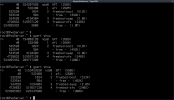
Just tested in a 15.0-RELEASE bhyve(8) guest (on a 15.0 host). A increase in disk size (truncate(1)), while the vm is running, is picked up immediately:

gpart.png

Chris I. , FreeBSD developers familiar with the issue are on the FreeBSD mailing lists, perhaps ask on freebsd-questions@ or freebsd-current@ if there is a workaround on the 13, 14 branches.
 
It's working great in v15. Fantastic!

The magic seems to be with the nvme client drivers in 15-RELEASE VMs. I did my tests under a v14 host and it still works fine. I also tested with older ahci-hd emulation and a reboot is still required to detect changes in that situation. That is fine with me, as nvme is what we have been using recently.

Here is a playbook that should help people, like me, that are periodically expanding VM storage for various client/projects and want the minimal amount of disruption.

Assumptions: Examples are for a v14 churchers/vm-bhyve style host, using a single spare file backed virtual disk, delivered through nvme emulation. Our example vm is called 'lewis'. In this example, I'm enlarging the disk by 1GB. If your configuration is a little different, the process should still be similar.

Dynamic online expansion of a typical ufs FreeBSD 15 client

On host: BACKUP YOUR SYSTEM

On guest: Examine current status of drive space and partitions, confirm mount is 'ufs'
Code:
$ sudo nvmecontrol devlist
$ gpart show
$ gpart show -l
$ mount
$ df -h /

On host: Find drive file, expand it
Code:
$ cd /zroot/vm-bhyve/lewis
$ sudo truncate -s +1G disk0.img

On guest: Check for detection and utilize space
Code:
$ gpart show
$ sudo gpart resize -i 4 nda0
$ gpart show
$ sudo growfs /
$ df -h /

Dynamic online expansion of a typical zfs FreeBSD 15 client

On host: BACKUP YOUR SYSTEM

On guest: Examine current status of drive space and partitions, confirm mount is 'zfs'
Code:
$ sudo nvmecontrol devlist
$ zpool list
$ zpool status
$ gpart show
$ mount
$ df -h /

On host: Find drive file, expand it
Code:
$ cd /zroot/vm-bhyve/lewis
$ sudo truncate -s +1G disk0.img

On guest: Check for detection and utilize space
Code:
$ gpart show
$ sudo gpart resize -i 4 nda0
$ gpart show
$ sudo zpool online -e zroot nda0p4
$ zpool list
$ df -h /

Note: If you have a setup where the entire device, such as nda0, is the direct vdev of your zpool, then there is no partition manipulation required. Jump straight to the zpool adjustment, sudo zpool online -e zroot nda0

Note: The handbook talks about needing to recover a corrupted gpt partition when the underlying device was expanded. This new nvme feature does that automatically, so the free space is one step closer to use.
 
Back
Top