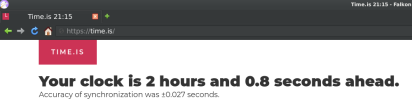
You could try disabling javascript in your browser settings. There are also extensions in firefox to block javascript on specific domains.It's Falkon. It's the same on Firefox.
How do they read the time? Is Falkon's telemetry so advanced?

Thank you. I just don't want the site to read my PC's time in any way. I went to the site to check the time, not to sync with the site... How do they see my PC's clock? What channel do they use to read the information? How do I close that channel? JavaScript simply disables the site's functionality.You could try disabling javascript in your browser settings. There are also extensions in firefox to block javascript on specific domains.
Thank you. Oh, and one more thing: the Tor browser, like LibreWolf, also leaks time.Your location (and ultimately the timezone) is identified from the machines IP address. Try www/tor-browser or a proxy server to circumvent your IP address.
$ doas whois time.isnserver: A.NIC.IS 185.93.156.10 2001:67c:6c:56:0:0:0:10
nserver: B.NIC.IS 185.93.156.154 2001:67c:6c:f056:0:0:0:154
nserver: C.NIC.IS 2001:500:14:6116:ad:0:0:1 204.61.216.116
nserver: D.NIC.IS 194.146.106.58 2001:67c:1010:14:0:0:0:53
nserver: E.NIC.IS 194.0.25.41 2001:678:20:0:0:0:0:41
ds-rdata: 46824 13 2 4a7ccf6f00d17b918a24a12e6e4f114899e423ea4abb9cf7519be81fa226e79bBy using JS (javascript) in your browser. There's https://time.is/js/t2025-10-05.js which doesHow do they read the time? Is Falkon's telemetry so advanced?
getTime() and other get*() functions to get the system time.executing the "date" command on your machine gives "access" to your clock.

I don't disagree; is there something in the browser itself that has the ability to do "date"? Like how the WebRTC bits can have access to your hardware (camera/mic) (yes I realize the browser asks for permission) maybe something during application startup it reads date. Most browsers when you exit save some sort of session data/update profile (maybe timestamped) so perhaps exposed websites?By using JS (javascript) in your browser. There's https://time.is/js/t2025-10-05.js which doesgetTime()and other get*() functions to get the system time.
You'd be royally "fragged" if your browser could execute date command.
/etc/localtimeI'm fairly confident to say: not without sandbox escape.I don't disagree; is there something in the browser itself that has the ability to do "date"?
Browser code explicitly provides a way to access it. Higher level (OS) allows user running browser to access HW..).Like how the WebRTC bits can have access to your hardware (camera/mic


 gomakethings.com
Unfortunately, it didn't work. Oh well, whatever.Action: Go to about:config, search for privacy.resistFingerprinting, and set it to true.
Thanks. I've decided to stop visiting similar sites. Throw this one away.By using JS (javascript) in your browser. There's https://time.is/js/t2025-10-05.js which doesgetTime()and other get*() functions to get the system time.
Note this JS is running in your local browser. There's nothing sinister going on here.Thanks. I've decided to stop visiting similar sites. Throw this one away.
I have that happen briefly daily with a router restart scriptThis is sort of related, SirDice Crivens @GodsOfFreeBSD @GodAlmighty. You will be terrified one day. You will suddenly lose internet connectivity. Everything will seem normal, the ethernet will be up and connected, but you will all of a sudden not have connectivity. You'll pull your hair out, and you'll still be connected but without connectivity.
 (I gotta time it better with 2 routers; my laptop's on the one that takes longer)
Firefox taking long to start is my first clue (unable to resolve DNS with DoT); the 2nd is Firefox telling me the SSL on a page won't load because of the dateAnd you will blame it on the universe, on FreeBSD, on hackers, on hardware, and you will lose a lot of time troubleshooting. But it's your date being off by 1 digit. And FreeBSD will do nothing to ward that off.
If you are running at kern.securelevel above 0, ntpd is limited at changing clock to maximum one second at a time (for obvious security purposes), so it won't correct when CMOS clock so drastically off.wouldn't one of the ntpd options at install-time cover incorrect time/date at boot?