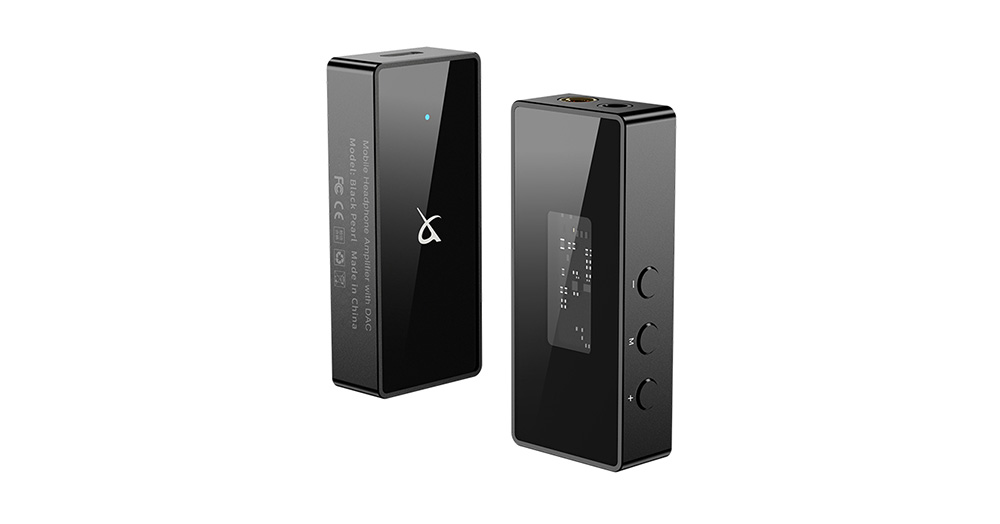
Has anyone tried a CX31993 USB DAC with FreeBSD?

Not an Apple developer so this might be stupid question, but iPad apps cannot generically access USB, only through class-compliant abstraction?

Yes. The specific issue is that Apple doesn't allow you to load drivers on iOS/iPadOS/TvOS.

This could be used as a good marketing gizmo for FreeBSD audio peripherals. "If it works on iPad, it works for us".

That is the case. But you can't rule out that there are devices which were made to work on iOS by try-n-error and aren't quite clicking with FreeBSD. Never seen one, though.
 
I would say specific issue would be lack of libusb since it looks like it could've ran on jailbroken devices at least 5 years ago judging by posts.

So yeah the general issue is Apple doesn't allow drivers, kernel or userland of this type which forces apps to use class compliant access to USB audio hardware. Now there may be tricks possible especially through umidi and sysex messages that hardware and iPad app understand, and our ecosystem doesn't.

I don't think this is a problem tho, that communication is plain and can be sniffed and reproduced, if the device really needs to be initialized by proprietary protocol running over the wire in standard format.

Therefore I will be using this 'iPad compatibility' in advocating FreeBSD audio for sure :)

Sound Devices' MixPre 1 is such an example that is registering as class compliant but useless since by default nothing is routed.

Could 'replay attack' be used to initiate the device maybe?
 
Could 'replay attack' be used to initiate the device maybe?

Yes, I had the same thought. I have a full USB trace of WIndows XP initializing the MixPre 1 (they never even released software for 64 bit Windows).

But it had too much hair for a quick hack to make it work. For starters it seemed to have a complicated handshake to download a firmware blob.
 
Yeah such things can get elaborate. I guess if there is a will there is a way, and that could start happening for any contemporary devices if FreeBSD audio starts gaining users on grounds of its merit. Also having any kind of Linux code for said device could help - even inside a proprietary application.
 
It's kind of a shame that setting hw.snd.default_auto to 1 didn't appear to work for me. It's supposed to assign hw.snd.default_unit to the most recently plugged in device, but it didn't seem to do anything, and I had to assign it manually each time I plugged one in. Is that any kind of known issue? it's only a small thing but it would be nice if it was automatic.
 
For USB sound devices I use a small script that sets up all sysctls and the default device and gets called by devd.

E.g.:
/usr/local/etc/devd/smsl.conf
Code:
notify 100 {
    match "system"        "USB";
    match "subsystem"    "INTERFACE";
    match "type"        "ATTACH";

    match "vendor"        "0x152a";
    match "product"        "0x85dd";

    action "/usr/local/etc/devd/smsl_setsysctls.sh";
};

notify 100 {
    match "system"        "USB";
    match "subsystem"    "INTERFACE";
    match "type"        "DETACH";

    match "vendor"        "0x152a";
    match "product"        "0x85dd";

    action "/usr/local/etc/devd/defaultpcm.sh";
};
/usr/local/etc/devd/smsl_setsysctls.sh
Code:
#!/bin/sh

uaudionum=`sysctl dev.uaudio | grep "SMSL USB AUDIO" | cut -d'.' -f3`

pcmnum=`sysctl dev.pcm | grep uaudio$uaudionum | cut -d'.' -f3`

#sysctl dev.pcm.$pcmnum.play.vchanformat=s32le:2.0
#sysctl dev.pcm.$pcmnum.play.vchanrate=192000
sysctl dev.pcm.$pcmnum.play.vchanmode=adaptive
# bitperfect requires vchans to be disabled to work properly
sysctl dev.pcm.$pcmnum.play.vchans=0
sysctl dev.pcm.$pcmnum.bitperfect=1

hw.snd.feeder_rate_quality=4

mixer -d $pcmnum
mixer -f /dev/mixer$pcmnum vol=1 pcm=0.9

sysctl hw.snd.default_unit=$pcmnum

the 'defaultpcm.sh' simply sets hw.snd.default_unit to the onboard sound just to get everything back to a 'known state'. I don't use the onboard device at all, and the USB DAC/AMP is always connected, so I could as well just omit the DETACH rule.
 
I've just been trying out the JM20 on a T490 thinkpad. It sounds much better than the T490's motherboard DAC, which is a realtek ALC257. In fact the X201/X220 conexant chip sounds quite a lot better than the T490 mobo chip too, which is kind of surprising. Anyway the JM20 is a good upgrade for the T490, especially at the price I paid.

Just going by the particular chip might not be the whole story either, the circuit implementation that has been used also matters. The classic example was the NAD3020 which used bog-standard 2N3055 power transistors yet got real hifi performance out of them. The realtek chip.in my mini pc sounds excellent, for example. All you can really do is listen to devices and find one you like.
 
I finally found out that the secret to getting auto configuration of a usb dac when you plug it in and pull it out is to set hw.snd.default_auto=2. It is actually documented in the "sound" manpage. If you set this in /etc/sysctl.conf, you no longer need to manually assign the default_unit after plugging a usb dac in. it works very well. This doesn't set bitperfect up though, for that you need sko's devd script posted above.
 
Last edited:
I've been trying various headphones with the JM20. Sennheiser HD560S work really well with this cheap usb dac, imho. Sounds really good with mpd+thinkpad+freebsd 14.4, and that's just with 41k/16bit audio, and not bothering with bitperfect. Nice budget system. Fantastic sound quality for the money you've paid... if I think back to what hifi kit used to cost. I recommend this combo.

Hint - audio/mixertui is a nice front end to freebsd's oss mixer; hardwire pcm to 100% and then vary volume with master. Or for windowmaker people, you can use wmix.


Yes, your $4000 Focal's probably do sound better, but this isn't bad for the money. There is actually some genuine bass extension, without sounding woolly or booming, which is always difficult to achieve in headphones. Would probably be better with an offboard headphone amp/psu, but I can't be bothered with all the cabling on a laptop.

BTW... I haven't heard any problems with clicks, pops, fade, etc that other people mentioned. It works really well.
BTW.2 I should probably have added... I'm just using pure oss. No pulse, pipe, jack, or anything else.
 
Last edited:
One more useful tip on the JM20, about how to use the output amplifier headphone impedance matching, gleaned from the discussion after the ASR review.

Quote:-

"If you plug in your headphones before you power up the JM20, then the dongle will measure the headphone impedance on startup and limit output voltage accordingly:
This effectively prevents clipping and is what JCally base their output power specs on (0.95Vrms @32Ω =28mW per channel, same as the US Apple dongle).

You can bypass this impedance sense auto gain mechanism (which Amir likely did by accident) by powering up the JM20 with a high impedance load or an open headphone plug (e.g. headphone adapter), then connecting your actual headphone load.

That way, you can get about twice the output power or +25% perceived volume at 32Ω."

I find there is plenty enough power to drive the H560S if you plug the headphones into the JM20 before plugging the JM20 into the computer, in other words, when the impedance matching is in operation, which gives the best performance without clipping; especially after setting the pcm volume level to 100% with 'mixer' or 'mixertui'.
 
There is a spec sheet on the JM20 series usb dacs here. https://manuals.plus/ae/1005002272265385

I have ordered a JM20 MAX to try, out of curiosity. It uses the same CS43131 dac chip as the JM20, but adds a dual audio opamp output buffer for more drive power, and can support higher impedance headphones up to 600 ohms, The output buffer is from the beijing company sgmicro, there is a data sheet here: https://www.sg-micro.com/rect/assets/e637497c-405d-45a6-88dd-21c16c22188f/SGM8262-2.pdf . It's another rail-to-rail design, like the TS924 used in the Canford headphone amp.
 
Last edited:
I set this up today, using the JM20 with freebsd 14.4R running the windowmaker desktop. I have mpd configured according to the forum howto here:-


and there is a dockapp frontend to mpd called wmpdart here
that I have compiled and installed in the dock.
I am using ncmpc to configure music for mpd itself.

The two dockapps used to control audio are shown below, namely wmix at the top to control mixer volume and wmpdart below to control music playback. Wmpdart displays a scrolling banner giving the name of the currently playing track, and allows me to start and stop playback, and to switch to the next or previous track in the playlist. Unfortunately mpd seems to ignore volume change requests from wmpdart (and also from ncmpc), but wmix allows me to change volume directly by controlling the underlying mixer. Maybe some time I'll get round to debugging why mpd is ignoring the volume change requests, I noticed there were some bug reports on github saying this is a known problem with mpd. I did have a quick look at the wmpdart source and it does look like it's calling the right api's to send the volume change requests to mpd.

wm-mpd-setup1.jpg


So after configuring the playlist with ncmpc, I can close ncmpc and control mpd with the dockapps alone. It all seems to be stable, nothing has crashed so far(!), and sound quality is excellent. :)
 
There is a site here that provides tests to recreate the CS43131 audible clicks error, that was mentioned earlier in this thread.

The error occurs when running the chip in power-saving mode, which switches the output amp into class-H, which is a voltage-adaptive mode; the clicks are an artefact of the class H output amp, if my reading of the test site page is correct. If the chip is run without power saving enabled, the amp runs in class AB which does not suffer from the clicks problem. Unfortunately the default is to run the chip in class H; to make it run in class AB you have to send a configuration command to it. Of course they want to reduce power consumption because these dongles are typically used with smartphones and they want to drain the phone's battery as little as possible, so defaulting to class H is a sensible choice. How the JM20 is configured internally is of course opaque, nothing is documented. Perhaps it is possible to query the chip configuration through the driver.

I listened carefully to all the click test samples through the JM20, and I could not hear any clicks at all. So either they have correctly set it up in class AB, or they are doing something else to mask the clicks, like a filter... or Cirrus has already fixed the problem in the generation of the chip that is in my device. That's assuming there is actually a genuine CS43131 in the case and not some other chip. The whole device only cost me 15 pounds including delivery from shenzhen, so fingers crossed. I couldn't hear any clicks at all, anyhow; there was no sign of this error in my sample of the JM20.

My JM20 sounds very good, so I think there is a reasonable chance it does have a genuine CS43131 inside, or if it's a copy, it's a good one. The audible quality is noticably superior to the other two cheap dongles I tested. So I think there's a pretty good chance that I got the same chip in mine that ASR got when they tested a JM20 for their review, and they got some excellent results. Of course I don't have the proper test equipment to check it properly, I'm just going by how it sounds.
 
Received my JM20-MAX from Shenzhen.
1774542202026.png


The MAX definitely has more output drive power than the standard JM20. They both use the same Cirrus 43131 dac chip. Driving the HD650's was no problem. Nice sound quality, as with the JM20. The additional audio opamp output stage in the MAX seems pretty transparent. Perhaps bass is a bit better than the JM20, but the differences were small, apart from more power and being able to drive better qualiy higher impedance headphones.

I paid 22 GBP for this one, so it cost a bit more than my JM20. But I noticed the JM20 itself has gone up to around 19 GBP (I paid 15 a few months ago), so the MAX is not much of a jump from the JM20. I bought both of them from aliexpress.

I would say either of these dongles (JM20 and JM20-MAX) will give you a nice budget sound system, when coupled with some reasonable headphones. For the pocket-money price the sound quality is excellent, and they both work very well with freebsd. Tested on thinkpad X220 running FreeBSD 14.4-RELEASE, using oss and mpd.

ASR has a review here:-

The other two usb dacs I bought - CX31993 and NICE-HCK - also worked fine with freebsd; but my concern with those was the fragility of the silver connecting cable between the plug and the floating socket, especially in the case of the CX31993, where the cable looks really quite fragile. Whereas on the JM20(-MAX) the cable is thicker and more robust, so there's a better chance it's going to last a while. And the JM20 definitely had higher output power than the other two, wth the JM20-MAX being higher power still. So overall the JM20/JM20-MAX wins this comparison test. Which one to get really depends on the headphones, for higher impedance headphones, choose the MAX, but apart from the higher output power of the max, they both sounded about the same. Perhaps the MAX gets a little bit warmer than the base JM20 too, although it didn't get near hot to touch; there's no heatsink on these things of course, apart ftom the metal plug. I do like the sound of the base JM20 plus HD560S combination.

 
Photo shows thinkpad X220 running FreeBSD 14.4-RELEASE, JM20-MAX and Sennheiser HD6XX (aka HD650) headphones. Music playback is via mpd, controlled via the dockapps (wmpdart and wmix) to the center right of the browser.
1774544603360.png


Interestingly this one comes up under the JCALLY name, unlike the first one I bought.

$ cat /dev/sndstat
Installed devices:
pcm0: <Conexant CX20590 (Analog 2.0+HP/2.0)> (play/rec)
pcm1: <Intel Cougar Point (HDMI/DP 8ch)> (play)
pcm2: <Intel Cougar Point (HDMI/DP 8ch)> (play)
pcm3: <Intel Cougar Point (HDMI/DP 8ch)> (play)
pcm4: <JCALLY Company CS43131+SGM8262 HIFI Audio> (play) default
No devices installed from userspace.
 
I found a fix for mpd ignoring volume change requests from ncmpc/wmpdart too. You just need to restart mpd after plugging the DAC in, then volume change requests from ncmpc and other mpd clients work. There's obviously a bug somewhere in the software. This happened with all the dacs I tried, so its not a fault in the dac itself. Of course mpd could be restarted automatically on plug in, using a devd script.
 
One more little experiment. I tried the CX31993 dac, but using an external headphone amp... in this case my Firestone Class A amp. So put the output of the dac into the headphone amp input, and listen using the HD6XX's (see photos). Resulting sound quality is very good, a big step up from the CX31993 standalone. It's nice having an analog volume control too. I tried the JM20 in the same configuration, but the output level from the dac was too high, I had to turn the volume on the amp right down to minimum, so the CX31993 is a better choice. From reading comments on ASR, I believe the CX31993 is a 1V output dac and the JM20 is a 2V output device. The CX31993 I used is a GraveAudio DA06, which is the base model without the additional AD MAX97220 output stage. The part of the system you can't see in the photo is the high quality analog power supply for the headphone amp - no switchmode psu.

This is a nice configuration as the CX31993 is currently extremely cheap online, and using an external amp gets the most out of the dac, I bought another one for under 5 GBP last week, its hard to imagine they can get much cheaper, perhaps that is a dumping price point. So if you have one of these cheap dac's... try pairing it with an external headphone amp, and you might be surprised at how good the results are. The CX31993 is capable of good results despite its low price.

If anyone is wondering about my headphone stand... it's a repurposed homemade vernier height guage... 😁

1774984464695.png

1774984491400.png


Now I've got a huge backlog of posts to go and listen to on the music thread.. :-)
 
It seems conexant went under a few years ago. They must have sold the IP for the dacs to someone, because those chips are still being made; it says synaptics bought them, so perhaps they own the IP. Conexant appears to have started as a spin-off from rockwell.

So, perhaps the CX31993 is actually made by synaptics?
There is a linux driver: https://linux-hardware.org/?id=usb:06cb-1595 - they say the vendor is synaptics. Synaptics seems to be pretty shy about releasing a datasheet for that chip.

A similar module here https://detail.1688.com/offer/669283092131.html and a DIY build here showing how these dongles are made: https://post.smzdm.com/p/allrpe5p/

/dev/sndstat lists my one as a TTGK: "pcm4: <TTGK Technology Co.,Ltd CX31993 384Khz HIFI AUDIO>"
so perhaps it's build around this or a similar module, the company makes many different modules...
 
Back
Top