
Hang on boot, 12.4, not 12.1

Really banging my head against the wall with this one... I have a Supermicro X10DRH-iT and it was neglected for some time and was running I think 12.0 or 12.1 without any real issues. I upgraded to 12.4 and my memory is a bit fuzzy at this point (it was months ago), but I think it did boot OK. Some time later I got some SMART alerts that a drive was failing. Since that time, the server has rebooted for no obvious reason (not at console, so no idea if it was a panic or not), but I thought perhaps the bad drive was tickling some kind of undiscovered bug or something. Each time it rebooted on its own, the last thing in the log would be that particular drive timing out, resetting, and then timing out again.

Now when it rebooted, it appeared to hang. I would get this far in the boot process (BTX loader, then a list of BIOS drives):
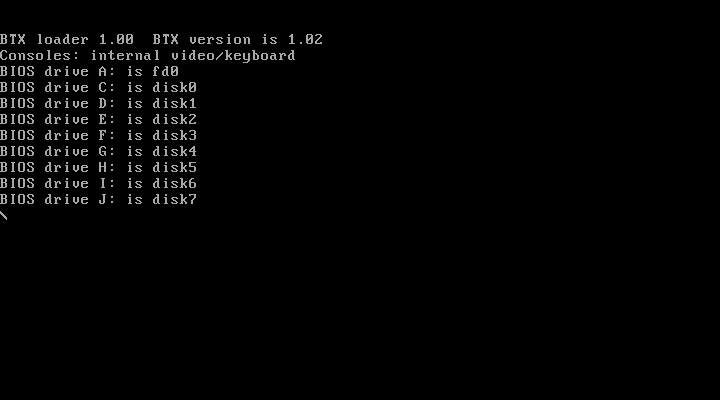
iKVM_capture-8.jpg


And if I waited for a few hours, I'd start seeing this (same, but then a "ZFS: can't find vdev details"):
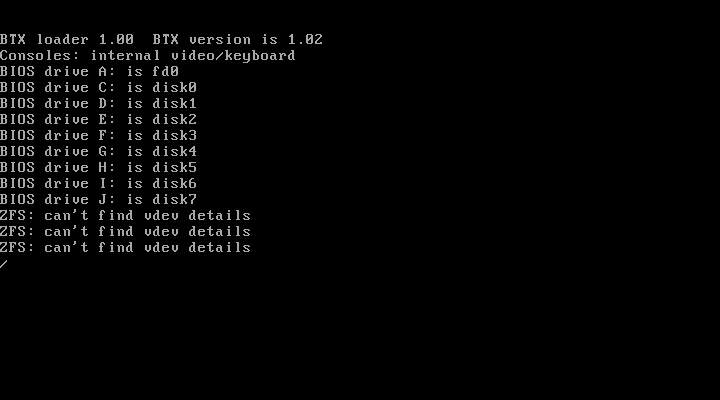
iKVM_capture-9.jpg


Now if this sits for like 4 hours, it does eventually boot. But 4 hours is a really long time. :)

So I thought perhaps something in the loader is "tasting" all the disks for zfs stuff and it's getting lost on the bad drive. So I had someone pull the two spinny drives that were getting a bit long in the tooth and were not currently in use anyhow for anything critical. Same result - a hang then if you wait long enough, it boots.

Today I was poking in the BIOS and noticed a boot device I didn't recognize - looked closer and it turns out we'd plugged in a USB-SATA bridge and an old drive ("Drive A" above, seen as a floppy?), likely for some kind of recovery. I thought "ah ha!" this must be what's hanging the loader, even if I boot the drive seems a mess - has a partition on it, but can't mount it, can't fsck, etc. On top of that, it was showing some timeouts/resets.

So we just pulled that drive out and... same thing, hangs forever.

Internally I have two decent, small Intel SSDs with gmirror as my boot drives. Then 4 enterprise Intel SSDs for the main storage (these are zfs, two mirrors), and two WD 6TBs also in a zfs mirror as scratch space and temp backup area.

What could be going on here?

I tried booting a 12.4 DVD and got the same results. I tried booting a 12.1 DVD and no issues AT ALL. Bug? Incompatibility? I updated the BIOS to Supermicro's latest last night, no improvement.

I can order new hardware if needed, but this is the first time I've seen anything like this and I have a TON of supermicro under my belt.

Is there any chance my (now odd) combo of UFS boot drives and ZFS pools on the remaining drives is a problem?

Looking at the mainboard health logs, no issues there aside from one entry about the (now gone) drive that had SMART errors.
 
Some additional info: 12.2 ISO boots fine as well, 12.3 and 12.4 do not.

I also got this little gem from the 12.2 boot, perhaps it's helpful. That "hdpool" no longer exists, FWIW.
 

Attachments

  • iKVM_capture-16.jpg
    iKVM_capture-16.jpg
    110.7 KB · Views: 182
Looks like your array is broken for whatever reason, have to tried unhooking all drives to see if it still boots very slowly?
In general I'd recommend that you flash to the newest BIOS anyway and try to boot something recent like 13.2-RELEASE or 14-CURRENT
While 12.4 is supported it's that last release before EoL so you're likely to get better support moving to something more "current".
 
diizzy - I'm also chatting in IRC about this - I've confirmed 13.2 boots OK, mulling over some options.

But I do feel like the loader complaining about the pool 'hdpool' missing is part of the problem. That pool was on two HDDs that are no longer installed in the system. I don't see any clear way to make FreeBSD recognize they are no longer there.
 
The thing I'm really curious about at this point is where is the loader finding out about a pool that does not exist anymore (the one named "hdpool" in the above screenshots)??

The two drives that made up "hdpool" are gone, not even in the server anymore.

I boot off UFS, found a /boot/zfs/zpool.cache on that drive and moved it out of the way, still loader is looking for "hdpool".

I also did a "zdb -l /dev/ada2p1 | grep hdpool" on all 4 drives that make up the other pool ("ssdpool") and no reference there.

Where is it finding this? Absolutely bizarro.
 
look at cache files
/boot/zfs/zpool.cache
/etc/zfs/zpool.cache
Already checked, /boot/zfs/zpool.cache existed and had "hdpool" in it, but that has been removed and the loader still prints the message about "hdpool" being unavailable.
 
Oh, also when booted into the Live CD, "zpool import" shows "hdpool" as well, but of course does not allow an import since it doesn't actually exist.

I just don't get how I can get the system to forget this pool exists. Nothing in zdb, nothing in the cache files, the drives it lived on are not in the system anymore.

iKVM_capture-21.jpg
 
Maybe similar to this?

Looking at the ZFS labels with zdb -l helped me troubleshoot a similar ZFS problem.
 
Maybe similar to this?

Looking at the ZFS labels with zdb -l helped me troubleshoot a similar ZFS problem.

I have poked around on the drives that are part of the other pool with "zdb -l", but I've not yet looked at the UFS drives. Interesting...

I also did find something which seems to be a partial fix - my "ssdpool" had a small extra partition on each drive. I thought nothing of this since "zdb -l" wasn't showing anything when I pointed it at those partitions. However, I've been misreading the message about "hdpool" in the "zpool import" command. I read it as "hdpool FAULTED corrupted data logs". That is not correct. It saying "hdpool FAULTED corrupted data", and "logs" is on the next line not due to line-wrapping, but to tell me there's a zfs log device. And those lived on "ssdpool". I did a "gpart delete -i 2 adaX" on each drive that's part of "ssdpool" and now "zpool import" is no longer showing "hdpool".

Boot still hangs on anything older than 13.1 or newer than 12.2, but I guess I have a little more data.

Part of my concern is this machine has a twin and I do not want to repeat this when I upgrade that thing (which has an identical disk layout).
 
OK, about to just install 13.2 on here and hope that all goes well. Also a little additional summary for anyone finding this later.

Lots of red herrings here - with each one I was sure addressing it would resolve my issue:
  • Bad internal hard drive, part of a mirrored pair in their own zfs pool, bad enough SMART is throwing warnings, BIOS is relaying SMART warnings on boot. Based on some past loader bugs/issues, seemed plausible a pool in a partially broken state could cause issues, or the drive itself was so far gone it was responding oddly to probes from the loader. Drive was pulled, boot problem continued.
  • Even with both internal hard drives physically removed, 12.2 and 13.x boot loaders were still grumbling about the hard drive pool "hdpool" having missing members. This was possibly due to those drives using small partitions on some of the SSD drives as log devices to speed them up. Cleared this by removing the extra partitions being used for L2ARC. Boot problem continued.
  • I'd somehow not noticed it, but at some point someone had plugged in a USB HD enclosure as part of some data restoration effort. I somehow kept missing it in dmesg but it did stick out in the BIOS. Again, plenty of old/weird bugs in bugzilla regarding the loader and random USB devices leading to issues booting. Had someone visit the colo and unplug, boot issue persisted.
Seeing as the issue only pops up on a few specific releases, I'll likely not be able to find a root cause, but at this point if I had to guess, I'd go with:
  • A bug in the loader, triggered by something unusual in my ZFS setup
  • Hardware (please, no)
  • A bug in the loader, triggered somehow by my odd(?) gmirror/UFS boot drive plus multiple ZFS pools on other sets of drives setup
  • BIOS issue with this board/chipset
I also found that while I thought this was all happening in the second stage loader (the one that resides on the freebsd-boot partition type), it's actually happening in the third stage loader ("/boot/loader"). That's the biggest, and most complex of the three loader stages. I believe I proved this one out by simply copying a 13.2 "/boot/loader" onto the hosts boot drive. Boots with no issue when I do that, so I feel like that's another thing that's been narrowed down. Since 13.x releases are OpenZFS, I suspect there's no developer buy-in here to really troubleshoot code that's going out of support at the end of the year, but I'd be happy to answer any questions/provide data to anyone curious.

Also is there anything for browsing/diffing the FreeBSD source online that's like some of the older svn tools? I was having no luck finding an easy way to say, diff everything in /usr/src/stand/libsa from 12.4 to 13.0 or 12.2 to 12.3 to see if anything could point me in a direction as to what fixed or broke things.
 
Also is there anything for browsing/diffing the FreeBSD source online that's like some of the older svn tools? I was having no luck finding an easy way to say, diff everything in /usr/src/stand/libsa from 12.4 to 13.0 or 12.2 to 12.3 to see if anything could point me in a direction as to what fixed or broke things.
Maybe git-bisect?
 
OK, about to just install 13.2 on here and hope that all goes well. Also a little additional summary for anyone finding this later.

Lots of red herrings here - with each one I was sure addressing it would resolve my issue:

Probably another red herring but I think I should mention, since you had your problem with the 12.4 DVD, another possibly related issue which caused both of my thinkpads to fail to boot from that DVD dd'd to an USB stick.

Note: not ZFS but BIOS boot, MBR scheme, UFS slices - and in my case, 12.3 was ok.

Bug 254490 - REGRESSION: Hybrid disc1.iso fails to boot from USB on BIOS/Legacy ThinkPads and other systems

cheers, Ian

PS see last comment there for my particular issue.
 
Probably another red herring but I think I should mention, since you had your problem with the 12.4 DVD, another possibly related issue which caused both of my thinkpads to fail to boot from that DVD dd'd to an USB stick.
Thanks! In my case the host was already running 12.4 (it came there via 12.2, skipping 12.3) and 12.4 via the DVD image or just the install on my boot drive was failing the same way. And just slapping /boot/loader from 13.2 on there "fixes" it. Probably lots of weird edge cases still lurking in this stuff, so much hardware, so much variety.
 
Back
Top