gmirror broken after upgrade

Hello.

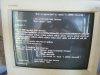
I have upgraded a friend's machine running gmirror from 8.0 to 8.1 successfully, but trying to upgrade to 10-RELEASE. I think there may be a hardware issue as halfway though downloading the patches to upgrade the server froze (num/caps key lit but keyboard dead) so the only cause of action was to cut the power. Ever since when trying to boot it appears gmirror is broken. I can't remember the exact error as I didn't have a camera at the time but the error is somewhere along the lines of
Code:
Mounting from ufs:/dev/mirror/gm0s1a failed with error 19.

Loader variables:
Code:
  vfs.root.mountfrom=ufs:/dev/mirror/gm0s1a
  vfs.root.mountfrom.options=rw

Manual root filesystem specification:
Code:
  <fstype>:<device> [options]
      Mount <device> using filesystem <fstype>
      and with the specified (optional) option list.

    eg. ufs:/dev/da0s1a
        zfs:tank
        cd9660:/dev/acd0 ro
          (which is equivalent to: mount -t cd9660 -o ro /dev/acd0 /)

  ?               List valid disk boot devices
  .               Yield 1 second (for background tasks)
  <empty line>    Abort manual input

I removed one of the disks and tried it in a caddy, MacOS wont touch it, Ubuntu will but says it';s in read only mode. Okay, so I read the everything at root but again /usr/ seems to be empty.

I'm not too worried about the OS as I can redo that but over a TB of data appears to be gone. x( Any ideas?
 
It's very likely that the mirror was originally done with the incorrect instructions from the old version of the handbook and now with the stricter partition integrity checking in newer versions of FreeBSD the partition table is rejected by the kernel. Drop to the loader prompt at the FreeBSD boot menu and type these lines. The mirror should come up fine if my guess is correct:

Code:
set kern.geom.part.check_integrity=0
boot

If it works with that setting, make a backup immediately and redo the mirror with the updated instructions:

http://www.freebsd.org/doc/en_US.ISO8859-1/books/handbook/geom-mirror.html.
 
Hi there,

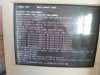
I have managed to bring the machine home, the error I am getting is;

Code:
ROOT MOUNT ERROR:
If you have invalid mount options, reboot, and first try the following at the
loader prompt:

set vfs.root.mountfrom.options=rw

and the remove invalid mount options from /etc/fstab/.

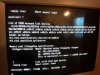
I have attached a screenshot of the error and a second with a list of valid boot devices. Your help would be appreciated.
 

Attachments

  • 20140514_174849_resized.jpg
    20140514_174849_resized.jpg
    965.6 KB · Views: 838
  • 20140514_184639_resized_1.jpg
    20140514_184639_resized_1.jpg
    958.1 KB · Views: 813
The ar0* devices are created by the graid(8) device that is a software raid driver for various BIOS-assisted "FakeRAID" systems. The disks probably have some leftover metadata for such RAID systems and the newer versions of FreeBSD have this graid(8) driver built-in in the GENERIC kernel and it's probing for the metadata at boot up. Try turning off the autodetection of the metadata by typing these lines at the loader prompt:

Code:
set kern.geom.raid.enable=0
boot

If that makes the system work you can make the setting permanent in /boot/loader.conf like this:

Code:
kern.geom.raid.enable=0

Also, if that setting makes the system work you don't have to reinstall anything.
 
Thanks. I've tried
Code:
kern.geom.raid.enable=0
which was accepted, however the boot command wasn't, so I performed a shutdown -r now. I'm still no further, however I am able to mount with ufs:/dev/ad0s1f which brings up a prompt which allows me to browse the root.

See attachment.
 

Attachments

  • 20140514_195817_resized.jpg
    20140514_195817_resized.jpg
    963.7 KB · Views: 557
amtrakuk said:
Thanks. I've tried
Code:
kern.geom.raid.enable=0
which was accepted, however the boot command wasn't, so I performed a shutdown -r now. I'm still no further, however I am able to mount with ufs:/dev/ad0s1f which brings up a prompt which allows me to browse the root.

See attachment.

By boot command I mean dropping to the loader prompt by selecting "Escape to the loader prompt" before the kernel starts to load and then typing those lines at the prompt, did you do that?
 
amtrakuk said:
No, I did that after mounting the partition. Shall I try now?

Yes, that's what I meant all along. Chances are that it just works after you disable the metadata probing with the loader variable.
 
Hi. I dropped out the OK prompt and entered

Code:
set kern.geom.raid.enable=0
boot

This time it accepted both commands and resumed booting but still failed to mount the RAID as before.
 
Try it with this combination:

Code:
set kern.geom.part.check_integrity=0
set kern.geom.raid.enable=0
load geom_mirror
boot

I added the geom_mirror line because I can't remember if gmirror(8) is part of the GENERIC kernel.
 
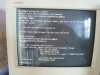
I tried to pause the screen to take a screenshot during boot. There is a message when it looks like it is trying to probe the discs, "Labels do no match?" Also at the prompt there is a strange code which has started to appear. I have attached a screenshot of the available devices and the code.
 

Attachments

  • 20140514_210000_resized.jpg
    20140514_210000_resized.jpg
    1.1 MB · Views: 803
I'm sorry I should have read your original post more thorougly first. You're still on FreeBSD 8.1 and I was assuming you had already managed to install the new 10.0 kernel. I'd suggest that you find another disk and install a fresh FreeBSD 10 on it. Connect one of the disks from the mirror to the system and you should be able to recover the files from it.

I also recommend testing the hardware for faulty memory/CPU overheating/voltage problems. That NMI message is a sign that something isn't right in the hardware.
 
Thanks for your time and effort. I tried putting the drive in a caddy and connecting it to a Ubuntu box, it was able to read it but only at the top level. Everything else is empty. Do you know if re-mounting it on another FreeBSD build allow the files to be accessible?
 
It looks like the system is split into multiple partitions, you'll have to mount the other partitions as well to recover all the data. Under the old MBR+bsdlabel system the standard partitions are usually ad0s1a (assuming ad0 is the first HD) for the root filesystem, ad0s1b for swap, ad0s1d for /var and ad0s1e for /tmp or something like that, I can't remember the exact details any more.
 
Quick note to say thanks for your help in trying to get the mirror repaired. In the end I found the user area on "Partition F" and so in the progress of backing up before rebuild.

Thanks again
 
Back
Top