Can't boot after 10.1 update

I recently installed FreeBSD 10.1 on my MacBook Air from a memstick img, and all was working great until I ran a freebsd-update fetch, freebsd-update install. Now I cannot boot into FreeBSD at all, as it seems to start the loader but then complains it cannot find the kernel.

This is an EFI system, where I have installed the Refind boot manager, and have copied the FreeBSD /boot/boot1.efi file into my main ESP partition (1st partition - MSDOS type), which I also use for booting Windows and Arch. I have a single UFS partition on which I have been running FreeBSD.

Refind seems to be working fine locating and running boot1.efi, and then that seems to be starting loader.efi, but then it throws the error "can't find kernel" and I'm left at the loader prompt. I have tried issuing the following command, but the system hangs;

$ boot kernel.old

Also tried booting from the USB stick I originally installed from, but I think the loader on the stick locates my main UFS partition and then runs into the same problem. :-(

Any help on how to recover my FreeBSD install would be appreciated!

Thanks,
James
 
This is not going to be much of the help now but in the future if you use PC-BSD/TrueOS installer you would end up with boot partition and kernel on ZFS. Just do TrueOS if you don't want PC-BSD clutter and add window manager of your choice. Then you could use another kick ass feature TrueOS people stole from Solaris. beadm to boot in any of previous kernels.

Code:
[root@backup1] ~# beadm list
BE  Active Mountpoint  Space Created
beforeUpdate-2014-11-18_20-06-14  -  -  63.8M 2014-11-18 15:06
beforeUpdate-2014-11-20_20-47-20  -  -  25.4M 2014-11-20 15:47
beforeUpdate-2014-11-20_20-47-52  -  -  25.4M 2014-11-20 15:47
beforeUpdate-2015-01-28_00-03-50  -  -  110.5M 2015-01-27 19:03
10.1-RELEASE-up-20150128_002109  -  -  80.8M 2015-01-27 19:05
10.1-RELEASE-p24-up-20150615_211707 NR  /  2.4G 2015-06-15 21:14
 
Also tried booting from the USB stick I originally installed from, but I think the loader on the stick locates my main UFS partition and then runs into the same problem. :-(
Having just looked at the source code for the first stage UEFI boot loader for
Thread failed-to-add-external-hard-disk-with-freebsd-10-1.52024, I suspect you are correct; your partitions on your hard drive are being checked for a UFS filesystem before the USB stick which is preventing you from booting to the installation media.

What I am about to suggest will not solve your issue, but might at least let you boot to the FreeBSD installation media to start investigating. It is also not without risk, so make sure you have a back up.

For the UEFI boot loader to ignore the UFS filesystem on your hard disk you need to invalidate the filesystem :( which means overwriting the first superblock with garbage. According to my copy of File System Forensic Analysis by Brian Carrier, the first superblock starts 1024 bytes into the partition and is 1024 bytes long, though I have not looked through the FreeBSD source code to verify. I therefore suggest backing up the first 2KB, overwriting them and then restoring them once you have booted to FreeBSD installation media:
  • Boot to a working OS (Still have OS X installed?)
  • Use an equivalent to dd(1) to copy the first 2KB of data at the start of your FreeBSD UFS partition somewhere safe and somewhere you can read once you have booted to the FreeBSD installation media.
  • Use an equivalent to dd(1) to write zeros to the first 2KB of the FreeBSD UFS partition.
  • Reboot to the FreeBSD UEFI image on the USB stick you mentioned you had; hopefully with your UFS partition unrecognisable this will allow you to boot to the installation media and select "Live CD".
  • From the FreeBSD live CD, use dd(1) to restore the 2KB of data you overwrote at the start of your FreeBSD UFS partition. Triple check that you are writing to the correct partition so you don't break another OS!
  • Mount your FreeBSD UFS partition and start troubleshooting. You should be able to chroot(8) into your installed system and at least install a working kernel to which you can boot.
If something goes wrong with the restoration of the 2KB at the start of the UFS partition, you should be able to recover the superblock from one of the built-in copies using fsck(8). I found a Solaris article on restoring a bad UFS superblock that you may be able to adapt for use with FreeBSD, but hopefully this won't be necessary.
 
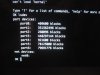
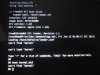
Update: Here is the error when my machine tries to boot into the FreeBSD partition;

IMG_0067.JPG

All I did was go from the original 10.1 Release to p12, so I'm perplexed as to why even the kernel.old won't boot anymore, what would cause this? Was there something I did incorrectly in the setup of my FreeBSD install or when I executed the update?

@asteriskRoss: Thank you for the suggestion, I hadn't thought of invalidating my UFS partition, although I think i'll use that as a last resort if I still can't figure out how to force the loader to boot the kernel from the SD Card... :)

Thanks,
James
 
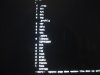
  1. lsdev
IMG_0068.JPG
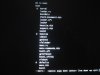
  1. ls
IMG_0069.JPG
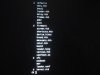
  1. ls boot
IMG_0070.JPG
IMG_0071.JPG

Sorry for having to upload as images, but I haven't got a better way of capturing the output!

Part6 is my FreeBSD UFS Partition, the others are for EFI, MacOS, Windows (+ reserved + recovery), Arch, and finally FreeBSD.

Thanks,
James
 
Back
Top