
Booting the img stick

Hello, I'm a long term Linux user (like from 93), but researching my options as I'm feeling like leaving my current distro of 2-3 years residence, which is an Arch-based distro, and was wanting to install and test a FreeBSD option for my use case. I've previously done so, though it *may* have been with a different motherboard and in the 14.x era.
I've tested FreeBSD,Open, and Dragonfly and gotten basically the same failure to successfully boot with each, so apparently something on my end isn't working correctly and I'm really not familiar enough with BSD boot that anything is currently meaningful to me (so it may be obvious). I also tested the 14.4 and the 16.0 release.
I've tried safe boot and ahci off options and nothing really has changed.
I will attach a photo of a boot screen for perusal. Any suggestions are welcome and thank you.
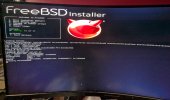
 

Attachments

  • PXL_20260627_181259828.jpg
    PXL_20260627_181259828.jpg
    1.5 MB · Views: 45
Updated: Tried two different thumb drives (one usb 2.0 and one 3.2). Tried roughly equal times using Ventoy or dd'd images. Nothing changes no matter what I do, I never get beyond that screen. Verbose booting (boot -v) produces no further output.
Possible useful hardware information:
CPU: AMD Ryzen 7 7700X
MB: Gigabyte B650 EAGLE AX
GPU: AMD Radeon RX 7600
 
I haven't actually ran SHA checking on the images (yes, I thought about it), but since I've downloaded about 7 or 8 image files, is it likely they're all corrupt (I believe in Linux in which I regularly try out distros, i've seen a corrupt file about twice over at least 40 downloads).
Oh, and my CSM is always disabled. I also booted a couple of Linux images last night to validate hardware and BIOS. I'm just not sure why this motherboard (my old asrock one failed last year) is allergic to *BSD, it was a surprise, since I'd booted with the other MB in the past.
Regarding the 16 image, a drowning man will try anything :0
 
Does it not work with the chipset USB (i.e., not the ones on the back panel) either?

Code:
CPU:
- 2 x USB 3.2 Gen 2 Type-A ports (red) on the back panel
- 1 x USB Type-C port on the back panel, with USB 3.2 Gen 1 support
CPU+USB 2.0 Hub:
- 4 x USB 2.0/1.1 ports on the back panel
Chipset:
- 2 x USB 3.2 Gen 1 ports available through the internal USB header
- 1 x USB Type-C port with USB 3.2 Gen 1 support, available through the internal USB header
- 4 x USB 2.0/1.1 ports (2 ports on the back panel, 2 ports available through the internal USB header)
Chipset+USB 2.0 Hub:
- 4 x USB 2.0/1.1 ports available through the internal USB headers
 
My USB 2 I've been using (the one with the dd images) in on the top of the case, the Ventoy usb-c 3.2 is on the back side. I haven't physically moved the drives, but I can. Give me a few to verify that nothing changes (I'll eat my candy bar wrapper if it does..and yes I have seen stranger things work, so not discounting).
Edit: Validated, nothing changed. Which was expected because Linux distros worked fine with the other physical arrangement.
 
I've tried neither of those...so we're onto fresh ground. Back in a bit as soon as I've given them a spin :)
Edit: No change, reverting BIOS settings after testing.
Single-user does nothing different for me. Option 3 works, but umm, yeah, I guess I knew that, I went there to try some settings and boot -v before. That's about the only menu item to does anything semi-useful for me at present :0
 
Hello, I'm a long term Linux user (like from 93), but researching my options as I'm feeling like leaving my current distro of 2-3 years residence, which is an Arch-based distro, and was wanting to install and test a FreeBSD option for my use case. I've previously done so, though it *may* have been with a different motherboard and in the 14.x era.
I've tested FreeBSD,Open, and Dragonfly and gotten basically the same failure to successfully boot with each, so apparently something on my end isn't working correctly and I'm really not familiar enough with BSD boot that anything is currently meaningful to me (so it may be obvious). I also tested the 14.4 and the 16.0 release.
I've tried safe boot and ahci off options and nothing really has changed.
I will attach a photo of a boot screen for perusal. Any suggestions are welcome and thank you.

When I select verbose option (on a VM) I see this on the serial console:

Loading kernel...
/boot/kernel/kernel text=0x188c70 text=0xde25ec text=0x44cf2e data=0x180+0xe80 data=0x198f60+0x8670a0 0x8+0x196938+0x8+0x1bb288-
Loading configured modules...
/boot/entropy size=0x1000
/etc/hostid size=0x25
/boot/kernel/zfs.ko size 0x628350 at 0x2554000
staging 0x74000000 (not copying) tramp 0x7d474000 PT4 0x7d46b000
Start @ 0xffffffff80389000 ...
Loading splash ok
EFI framebuffer information:
addr, size 0xc0000000, 0x1000000
dimensions 1024 x 768
stride 1024
masks 0x00ff0000, 0x0000ff00, 0x000000ff, 0xff000000
---<<BOOT>>---
APIC: Using the MADT enumerator.
Your screen seems to stop right before "---<<BOOT>>---". May be try using the safe mode? Type 7 to the main bootup menu and then I think it is choice 2 on the option screen.
 
When I select verbose option (on a VM) I see this on the serial console:


Your screen seems to stop right before "---<<BOOT>>---". May be try using the safe mode? Type 7 to the main bootup menu and then I think it is choice 2 on the option screen.
I've tried safe mode as I said in the original post, and nothing different happens :(
Yes, this seems very odd to me and I totally wasn't expecting this, when I chose to trial FreeBSD as a daily driver.
 
this seems very odd to me
I'm sure it's odd to all of us including those like me who run Gigabyte motherboards. Some of the devs will come here soon with more advice though Sundays are often a light day for them.
You can also try the mailing lists and other sources shown on the FreeBSD main site at the top under "Community".
 
I would yank the GPU to see if it boots up. I assume the Radeon RX7600 is a card? Have you checked the motherboard video jacks to make sure its really not running but using MoBo video??
 
dbarron
Have you tried booting on GhostBSD live and see if the installer finds it?
Yep, GhostBSD has been tried.
I really don't like to pull cards, too much chance of bending/breaking/etc (in the past). And darn GPUs are too expensive to risk.
I haven't tried (yet) the secure boot off...I don't think...I was staring at it when I was in the BIOS earlier, I'll try it in just a bit. (edit: Secure Boot was a nested menu, it was already off, I probably should have known I'd have Linux issues if it wasn't...but it's been oh 1.5 or 2 years).
No, is 15.0 more likely to work than 14.4 and 15.1?
 
This post seems to also talk about disabling secure boot:
 
Well, due to life (and schedules), I won't be able to read/try much of anything for at least a day or two, with the weekend gone now, but I'm still interested, if anyone has any suggestions to try to get past whatever is my blocker.
 
Well, due to life (and schedules), I won't be able to read/try much of anything for at least a day or two, with the weekend gone now, but I'm still interested, if anyone has any suggestions to try to get past whatever is my blocker.
Is it specifically FreeBSD which you having problems with. If so I would definitely try with the FreeBSD ISO on a Ventoy stick.

That might get you further. Also it might be worth trying an mfsBSD ISO.
 
Is it specifically FreeBSD which you having problems with. If so I would definitely try with the FreeBSD ISO on a Ventoy stick.

That might get you further. Also it might be worth trying an mfsBSD ISO.
I did and have, as previously explained. Unless you are differentiating from the memstick image vs the DVD iso for FreeBSD.
mfsBSD?
 
Back
Top