
yes, install xfce4-volumed-pulse and xfce4-pulseaudio-plugin, it allows switching record/playback devices
I'm not aware of a utility which configures OSS per application/process from a per user global configuration. Perhaps some DEs (KDE, Gnome, etc.), I don't know, I don't use those, but many audio, audio/video, graphical and non-graphical (TUI) media/audio player (if not all, web browser also), can choose the output audio device. The configuration can be made dynamically, during playback, or per configuration (file) statically.I have 2 audio outputs. 1st is headphone , 2nd is graphic card's hdmi output/connection to TV. I'm currently using linux and from audio/volume control I can select the audio output per application. is there any way to do the same with oss/freebsd ?
Did you try virtual_oss + an appmixer ?however, I dont want to install pulseaudio and I would like to accomplish this with OSS as backend. if anyone can help I really would appreciate it.
Hello there.
I'm not aware of a utility which configures OSS per application/process from a per user global configuration. Perhaps some DEs (KDE, Gnome, etc.), I don't know, I don't use those, but many audio, audio/video, graphical and non-graphical (TUI) media/audio player (if not all, web browser also), can choose the output audio device. The configuration can be made dynamically, during playback, or per configuration (file) statically.
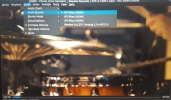
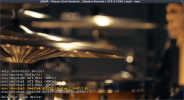
Here as example multimedia/vlc and multimedia/mpv:
View attachment 21881 View attachment 21882
VLC (first image) plays sound through HDMI, MPV through default sound device (hw.snd.default_unit: 3), speaker and headphones (Analog 2.0+HP/2.0) at the same time.
TUI audio player:
audio/cmus - mixer.oss.channel, mixer.oss.device
multimedia/musikcube - output driver, output device
See also "Sound" wiki, and "virtual_oss"), and https://vermaden.wordpress.com/2024/01/13/freebsd-desktop-part-29-configuration-audio-improvements

I looked at that thread, however I couldnt find/see/understand how to seperately redirect/configure programs/applications to a audio output. whatever it is , it seems the answer lies within: mixer(3), sound(4), sysctl(8), virtual_oss(8) .Did you try virtual_oss + an appmixer ?
See this thread.
According to some users it is possible to achieve what you want with virtual_oss + the appmixer you can get from that thread.
for some reason; i believe, pulseaudio, consoled, polkitd, etc is not meant to be in a bsd system. I would really like to do it with oss , if possible. thanksLinux does that via pulseaudio, not their low level API (ALSA). You can also use pulseaudio in FreeBSD.
 www.freshports.org
 github.com
Then another question.
Do you want to use both the headphones and the HDMI output simultaneously ?
If not, you could create aliases in your shell config file (.bashrc, .zshrc, etc...).
I for example had a very similar problem, and I would not say I solved it, but this workaround works very well.
Some applications however allow you to set the audio output device in their config files.
I do not have virtual_oss, but each time I want to switch devices for particular applications, I use my aliases:
switch-to-tv-sound-device, switch-to-headphones-sound-device.
In my .zshrc I have:
alias switch-to-monitor-sound-device="sysctl hw.snd.default_unit=%d" (your headphones our HDMI number device, inspect the output of cat /dev/sndstat for the number).
alias switch-to-headphone-sound-device="sysctl hw.snd.default_unit=%d"
After I have done the switch, I just reload the app, and that is it.


