

Since converting my router over to FreeBSD, I've been running into a fun (FSVO: fun) challenge with ARP entries on it with respect to one of my servers. I've used Graffle to chicken-scratch a little diagram as seen here:
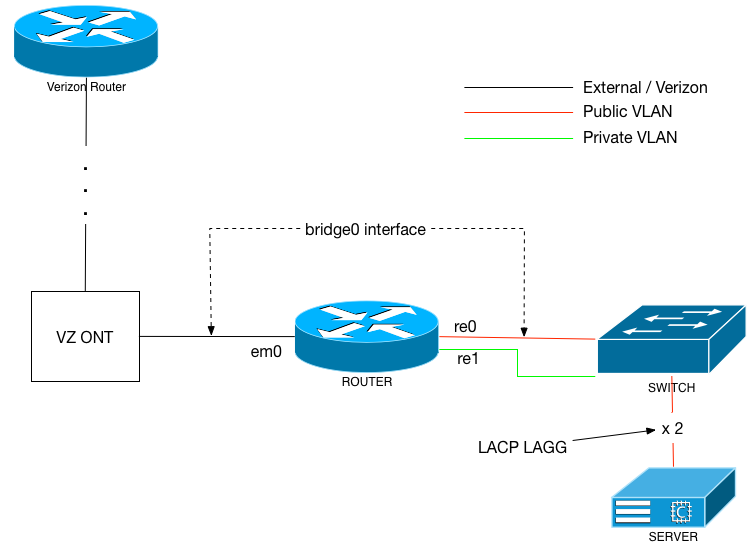
The Verizon router is a Juniper of some variety; I only know that via it's MAC address. The ONT is connected to one of my router's 3 Ethernet interfaces. Per the diagram, my router is then connected via 2 GigE interfaces to my managed switch, each connection to a different VLAN. Also connected to that switch: a FreeBSD server that has a 2xGigE LACP LAGG.
Because of Verizon's stupidity when it comes to business class IP addressing, my public VLAN (noted with the red line) and the Verizon external network (black line) are actually the same broadcast domain. Which means the router is actually bridging between interfaces em0 and re0. And it has an IP address on that bridge interface with a default route pointing to VZ's Juniper.
The server in question also has a bunch of jails on it, which are each taking up an IP address on that same public VLAN. The VLAN is a /24, even though I only own 13 (not 14... idiots!) IP addresses on it.
That's the set up. Now the problem: the router invariable decides the MAC addresses of the server and the jails on it belong to the Verizon router, not the LAGG interface on the server. And I can't quite figure out why. When that happens, I have a lot of difficulty getting to my public-facing jails and server from the private VLAN (noted with the green line).
My work-around for the time being is to set a series of static ARP entries on the router. For each IP address on that server, set the ARP to the LAGG's MAC.
Of note, there are other devices in that same public (red) VLAN. Such as a Windows PC. The ARP entry on the router for the Windows box stays latched to the Windows' MAC address. It just seems to be the FreeBSD server with the LAGG int that has the problems.
Lots of words, but I figured verbosity would help. Any ideas?
The Verizon router is a Juniper of some variety; I only know that via it's MAC address. The ONT is connected to one of my router's 3 Ethernet interfaces. Per the diagram, my router is then connected via 2 GigE interfaces to my managed switch, each connection to a different VLAN. Also connected to that switch: a FreeBSD server that has a 2xGigE LACP LAGG.
Because of Verizon's stupidity when it comes to business class IP addressing, my public VLAN (noted with the red line) and the Verizon external network (black line) are actually the same broadcast domain. Which means the router is actually bridging between interfaces em0 and re0. And it has an IP address on that bridge interface with a default route pointing to VZ's Juniper.
The server in question also has a bunch of jails on it, which are each taking up an IP address on that same public VLAN. The VLAN is a /24, even though I only own 13 (not 14... idiots!) IP addresses on it.
That's the set up. Now the problem: the router invariable decides the MAC addresses of the server and the jails on it belong to the Verizon router, not the LAGG interface on the server. And I can't quite figure out why. When that happens, I have a lot of difficulty getting to my public-facing jails and server from the private VLAN (noted with the green line).
My work-around for the time being is to set a series of static ARP entries on the router. For each IP address on that server, set the ARP to the LAGG's MAC.
Of note, there are other devices in that same public (red) VLAN. Such as a Windows PC. The ARP entry on the router for the Windows box stays latched to the Windows' MAC address. It just seems to be the FreeBSD server with the LAGG int that has the problems.
Lots of words, but I figured verbosity would help. Any ideas?