
Any recommendation on hardware serving two people as a desktop client

cracauer@ tanis
Do you have experience of RAM failing or having transient errors on your personal systems or is this better safe than sorry?
I've never knowingly had RAM failures on non-ECC, so I wonder how much of a difference it would make in my setup. I wonder if I've actually been having memory errors and nothing detected it.
Yes, at work failing memory is something which is happening and can`t be under estimated. Pulling a file from an online storage which had been affected by failing memory is a very unpleasant experience, because you do pull that file because it`s an emergency situation, you need that file and then you realize it had been corrupted and you can`t use. Because I have strict archive policy, I was able to restore the file from tape as well, so in the end not a bad day at all. You don`t have to have ECC everywhere, but I would argue the case that it`s a personal choice. We are living in a digital age, and all you got to your name is digital data, so I want those data to be protected at all causes. I think of ECC memory as an insurance I will be happy to never see it in action.
 
I do not have an answer for your question.

But if you'd like a quick chuckle, here are some interesting two-person terminals that some AI came up with when someone asked for an image of an early IBM System/360 installation. (No System/360 installation ever looked anything like this. The AI is hallucinating.)


fake-ibm-360.jpg
 
I do not have an answer for your question.

But if you'd like a quick chuckle, here are some interesting two-person terminals that some AI came up with when someone asked for an image of an early IBM System/360 installation. (No System/360 installation ever looked anything like this. The AI is hallucinating.)


View attachment 25501
That's a strange picture.... scary...
What's with all the cables down the sides of the units near the back, did the real thing ever look like that?
 
at least 3x USB ports for each user, so minimum would be 6x USB ports to start with
I'd avoid Ryzen 400-500 series (I had issues X470 PCVR and heard of other's having similar 500). Ryzen CPU and chipset USB would randomly disconnect Rift CV1 sensors or the HMD, but luckily my X470 board also had a separate ASMedia controller and 2 ports (I had 2 sensors on Ryzen CPU, and 1 sensor and HMD on ASMedia).

I saw either a BIOS update or Quest 2 update also make the Ryzen-controlled USB-C port on that X470 board not deliver power (couldn't charge the HMD while wired PCVR); a C-to-A adapter in the ASMedia port worked around that :p


AMD GPUs seem more unstable with bad RAM and/or its settings (6600 XT would crash DX12/VK randomly too-high RAM hz but not DX11; RTX 3060 was fine with everything and made me think the high-Hz was stable :p)

I also had multiple overnight memtest86+ report nothing while HCI's test from Windows found errors (same X470 computer I found all that above on)
 
ECC for a home machine, used mainly for browsing, emails etc seems like an overkill. RAM is also very expensive right now.
You will also be hard pressed to find a quiet machine with 64GB-128GB of RAM driving 3-4 displays.

One suggestion is to have *3* machines :-) One ZFS fileserver and two netbooted + NFS mounted compuers as "terminals", each with 2 screens. Put ECC on the fileserver and keep it away in a closet or something to muffle any fan noise.

 
You will also be hard pressed to find a quiet machine with 64GB-128GB of RAM driving 3-4 displays.
I thought about having a server in a basement and Sunshine/Moonlight with mini PCs :p

Not sure how multi-head would work, but a quick idea is either 1 host GPU that can present itself as a single GPU to VMs with passthrough (like 5 VMs would see a single GPU by theirselves but all using the single host GPU), or separate GPUs per head (maybe something like Intel GVT could be used for light loads/non-gaming for less real GPUs)

The experience is like Teamviewer/remote control, but Sunshine/Moonlight use GPU encoding and is designed for low-latency gaming (general desktop looks good and low latency like it's bare-metal); iirc it's based on NVIDIA tech but Sun/Moon also support AMD/Intel encoders.
 
Just as an FYI. Right now there's an absolute flood of used business systems and the like on eBay right now that might be worth considering. I picked one up to run Linux on for use with Crashplan, but the prices right now are massively depressed if a used system would be acceptable.

If this is just a project of sorts, then carry on, but otherwise, it might be easier just to get a second system and be done with it. Or one of them could be used as a dumb client and just use it to run a VNC or RDP connection to the other.
 
One caution about used systems from eBay...for a while, I was buying Checkpoint 4600 devices from eBay to run the OPNsense firewall on. They were not very expensive, and they had eight Ethernet ports built in. I got three of them, and all of them had power supply failures. I got a replacement power supply for one of them, and it failed within a week. I looked at the end-of-life date on the Checkpoint website, and the Checkpoint 4600 was several years past its end-of-life date. So I am thinking maybe the end-of-life was set just before the point where a lot of them started failing.

In any case, I would try to get fairly new equipment from eBay.
 
One caution about used systems from eBay...for a while, I was buying Checkpoint 4600 devices from eBay to run the OPNsense firewall on. They were not very expensive, and they had eight Ethernet ports built in. I got three of them, and all of them had power supply failures. I got a replacement power supply for one of them, and it failed within a week. I looked at the end-of-life date on the Checkpoint website, and the Checkpoint 4600 was several years past its end-of-life date. So I am thinking maybe the end-of-life was set just before the point where a lot of them started failing.

In any case, I would try to get fairly new equipment from eBay.
That's always a consideration, it may not be the right way to go for the OP, but right now I'm seeing a ripple effect on a lot of systems, some of which might be appropriate. Certainly, some caution is always a good idea with respect to used systems, especially online.
 
That's always a consideration, it may not be the right way to go for the OP, but right now I'm seeing a ripple effect on a lot of systems, some of which might be appropriate. Certainly, some caution is always a good idea with respect to used systems, especially online.
That's a good point. However, I've had lots of good experiences with ex-corporate desktop PC's, dell/HP/lenovo from ebay, which tend to have pretty good build quality in general. I've never had a power supply fail for example. Like you I used to worry about this and used to buy a spare box of the same type as a donor system, to scavange if something like a power supply or motherboard failed... when you are picking up the complete system unit for something like 30 GBP, it's a no-brainer provided you have somewhere to store the thing. But in the event I never needed to scavange any spares, I have had ebay buys of that type run for years despite being perhaps 10 years old when I bought them. Of course I always clean the thing carefully (vacuum thoroughly inside) and do simple things like renew the heatsink compound which always helps. Used corporate lenovo boxes in particular have served me well over the years, although sometimes the bios can be a hassle, but that's a different issue from hardware.
 
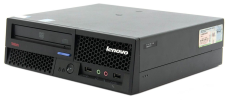
The only lenovo box I didn't like much was one of their very small tiny pc things with an i7 in it. The airflow was so constricted, the thing was constantly sitting at high temperatures with the fan on. The ones I like are the full size desktop boxes or the desk-side towers, like the M58 size like this photo. HP and Dell make some similar nice boxes too. Really any premium brand ex-corporate disposal machine like that has a good chance of working well for years, at least, that has been my experience. And you can always buy a second one (even without RAM or CPU) for peanuts to scavange for parts if anything does go wrong. You probably want something a bit more recent than an M58 nowadays, depending on what you want to do with it of course.
 

Attachments

  • 1772268995533.png
    1772268995533.png
    439.5 KB · Views: 5
I guess there's one other thing to watch for... if you get something like the M58 form factor, be aware that it only takes a low profile graphics card, if you want to upgrade the graphics. If you want to put a meaty graphics card in, it's better to get the full size tower type machine. And you will only get a small number of pci-e slots in the desktop box, if that is a factor. I always use the intel integrated graphics anyway, because it's usually a doddle to set up the drivers, though I guess it's kind of lowest common denominator, it's not really for gaming or perhaps doing a lot of video editing.
 
I'd just get 2 independent tiny formfactor clients - something in the ballpark of an intel N200 or N300 'NUC' mini PC (since the real NUCs are dead, just go for anything in that formfactor except ASUS and AssRock, as they are overpriced crap...).

As others have mentioned: at those requirements a single system would be *a lot* more expensive and troublesome to set up than just 2 cheap individual systems. Those N200 systems sip power at single-digit numbers at the load you've described.
Agree with this. Power is (very) expensive, here at least, and the E-core N100/200/300 chips are much more power efficient than older hardware. The money you save on power bills pays for the machines over a small number of years, compared to say the power used by a maxed out i7 machine from a few CPU generations ago. I've used N100's, the power consumption at idle is around 10W (according to my cheapo power meter), for the whole machine, which is pretty crazy if you think of a 10W light bulb. The latest generation of intel E-core chips are the ones to get for low power, so as he says, N100/N200/300. N100 is usually the most cost-effective. You only really want something more powerful with a P-core processor if you're doing work that needs real cpu horsepower... like compiling a large codebase or running device emulators or lots of VMs etc. Or maybe graphics intensive work like video editing. Aliexpress is your friend for buying these mini-pc boxes, it's a real shame there aren't more western manufacturers of them. The E-core chips really do change the calculation for a lot of home PC use cases. I almost always use mini-pc's of this type nowadays for home (apart than laptops).

I think AMD also make low-power processors that are used in mini-pc's, but I have no experience of using them.
 
There is a good overview comparison here of the N100/N200/N300 cpus.
Of course it all depends what you want to do with the system. Just remember these are not high-performance CPU's, but they will save you money on power bills.

Intel themselves have a comparison chart here https://www.intel.com/content/www/us/en/support/articles/000100305/processors.html
One limitation of all these chips is that they all max out at 16GB RAM supported. Which may be an important limitation, given the amount of memory browsers and some other software gobbles up nowadays.
It's disappointing that none support 32GB or 64GB. Of course Intel want to sell you an updated cpu in a couple of years time...
 
Back
Top