

Somewhat awkwardly, I'm getting unexpected behavior leading to failures during 15.1-Release installation using memstick.img.
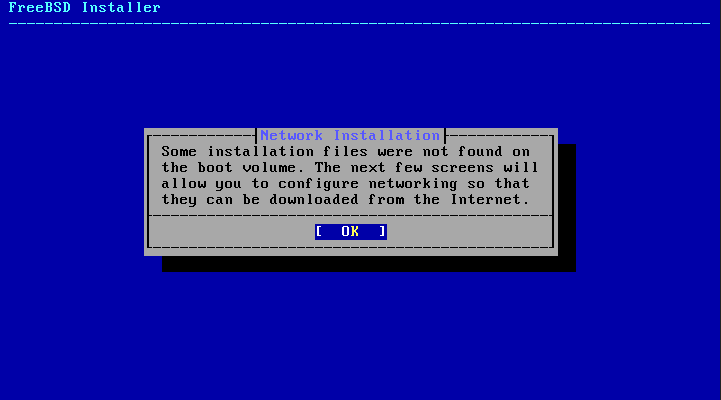
This message conflicts with FreeBSD Handbook as detailed in Section 2.3.1:
-memstick.img: This file contains all of the files needed to install FreeBSD, its source, and the Ports Collection.
My installation choices were (what I thought to be) fairly direct. The only default options altered were:
1) Unchecking lib32
2) Selecting Distribution Sets.
Handbook Section 2.5.5 details the exact screen I'm seeing.
The menu shown in Installing from the Network only appears when installing from a -bootonly.iso or -mini-memstick.img, as this installation media does not hold copies of the installation files.
Unfortunately, I reach this screen each time I attempt installation using memstick.img (this fault is unavoidably repeatable).
UPDATE: During the first several installation attempts, I was selecting the first of two Thunderbolt Ethernet Adapters to establish connectivity because installation at this point required it and choosing to use the defaults when selecting it (which I thought were okay; but turned out to be not okay) and the resulting communications failures led to failed installations requiring that I power down and begin installation from scratch.
On my last attempt, I selected the second Thunderbolt adapter and installation then proceeded by grabbing whatever needed to be grabbed via the internet to the point where I finally reached the set password screen for the first time; however I note the issues because this behavior is unexpected and contrary to documentation.
Also, upon any installation hiccup (that is, choosing to go back to any previous menu), it should be noted that the installer loses the Internal M.2 drive (the drive will no longer show up in scans or on menus) and thus the installation must be terminated and the system must be rebooted to begin anew (going all the way back to the first screen will not resolve the problem!). In several cases, the same issue of missing hardware arose regarding the two Thunderbolt 3 Ethernet adapters, where they no longer appeared on selection menus and a cold restart was required.
(edited to remove superfluous)
This message conflicts with FreeBSD Handbook as detailed in Section 2.3.1:
-memstick.img: This file contains all of the files needed to install FreeBSD, its source, and the Ports Collection.
My installation choices were (what I thought to be) fairly direct. The only default options altered were:
1) Unchecking lib32
2) Selecting Distribution Sets.
Handbook Section 2.5.5 details the exact screen I'm seeing.
The menu shown in Installing from the Network only appears when installing from a -bootonly.iso or -mini-memstick.img, as this installation media does not hold copies of the installation files.
Unfortunately, I reach this screen each time I attempt installation using memstick.img (this fault is unavoidably repeatable).
UPDATE: During the first several installation attempts, I was selecting the first of two Thunderbolt Ethernet Adapters to establish connectivity because installation at this point required it and choosing to use the defaults when selecting it (which I thought were okay; but turned out to be not okay) and the resulting communications failures led to failed installations requiring that I power down and begin installation from scratch.
On my last attempt, I selected the second Thunderbolt adapter and installation then proceeded by grabbing whatever needed to be grabbed via the internet to the point where I finally reached the set password screen for the first time; however I note the issues because this behavior is unexpected and contrary to documentation.
Also, upon any installation hiccup (that is, choosing to go back to any previous menu), it should be noted that the installer loses the Internal M.2 drive (the drive will no longer show up in scans or on menus) and thus the installation must be terminated and the system must be rebooted to begin anew (going all the way back to the first screen will not resolve the problem!). In several cases, the same issue of missing hardware arose regarding the two Thunderbolt 3 Ethernet adapters, where they no longer appeared on selection menus and a cold restart was required.
(edited to remove superfluous)