Hi all!
On FreeBSD 14.3-RELEASE is used the following for a "semi-automated" installation that worked perfectly:
1.) Boot from ISO
2.) Choose "Shell" on the "Welcome" message box
3.) # dhclient em0
4.) # fetch --output=/tmp/unattended.conf http://192.168.1.2:80/unattended.conf
5.) # bsdinstall script /tmp/unattended.conf
The content of unattended.conf is:
# cat /tmp/unattended.conf
PARTITIONS=DEFAULT
DISTRIBUTIONS="base.txz kernel.txz"
#!/bin/sh
sysrc ifconfig_DEFAULT=DHCP
sysrc sshd_enable=YES
sed -i '' 's/#PermitRootLogin no/PermitRootLogin yes/g' /etc/ssh/sshd_config
echo "change-this" | pw usermod root -h 0
reboot
#
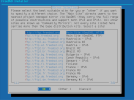
When I do the same in 15.0-RELEASE the "Mirror Selection" dialog is shown (see attached screenshot) and "halts" there.
I have to mention that I do not have internet access when I run the installation
Thats why I use the "FreeBSD-15.0-RELEASE-arm64-aarch64-disc1.iso" ISO file for installation.
Do I need to change my unattended.conf and set additional env vars?
Thanks for your support,
Timo.
On FreeBSD 14.3-RELEASE is used the following for a "semi-automated" installation that worked perfectly:
1.) Boot from ISO
2.) Choose "Shell" on the "Welcome" message box
3.) # dhclient em0
4.) # fetch --output=/tmp/unattended.conf http://192.168.1.2:80/unattended.conf
5.) # bsdinstall script /tmp/unattended.conf
The content of unattended.conf is:
# cat /tmp/unattended.conf
PARTITIONS=DEFAULT
DISTRIBUTIONS="base.txz kernel.txz"
#!/bin/sh
sysrc ifconfig_DEFAULT=DHCP
sysrc sshd_enable=YES
sed -i '' 's/#PermitRootLogin no/PermitRootLogin yes/g' /etc/ssh/sshd_config
echo "change-this" | pw usermod root -h 0
reboot
#
When I do the same in 15.0-RELEASE the "Mirror Selection" dialog is shown (see attached screenshot) and "halts" there.
I have to mention that I do not have internet access when I run the installation
Thats why I use the "FreeBSD-15.0-RELEASE-arm64-aarch64-disc1.iso" ISO file for installation.
Do I need to change my unattended.conf and set additional env vars?
Thanks for your support,
Timo.