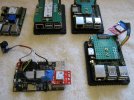
ARM Board Recommendations.

Ugh 'Listing all supported devices on all CPUs and boards is impractical here,' well, I mean, that's kind of what's necessary given that ARM doesn't have ACPI?
 
I like the Rockchip brand.
We have good support for RK3399 as seen on the Wiki for RockPro64
But sound chip unsupported. No audio output for me. DRM driver needs much patching to get working. SCFB is capable.
So not an ideal media player.

What do you expect from your ARM64 board? There is alot of broken-ness on aarch64 that you do not find on X86 platforms.
The mainstream image files for RockPro64 work great and I would recommend that board for a starter. Its bigger than any Pi board but it works.

HDMI working or not. That one is a big question mark on other RK3399 platforms. I have Rock Pi4SE but I use RockPi4 firmware because HDMI works.
Basically any RK3399 CPU has the same layout. Some boards may or may not breakout these CPU features.


I find myself stripping Armbian U-Boot for boards we do not support. Most of that is because the companies never upstreamed their work to master U-Boot.
Instead they use stinky old U-Boot trees that are hard to replicate.

I recently fell back to these boards I tossed aside to try and get them working on FreeBSD with a linux uboot:

TinkerBoard2--No Ethernet. Put Atheros in M.2 slot and used Wifi. Wish I got a Tinkerboard2S. Adds eMMC.

ROC-PC-PRO aka StationP1 Pro. This is OEM box SceenCloudOS. Nobody has support for ROC-PC-PRO including Armbian. Must use ROCK-PC-PLUS images.

Neither working with HDMI for me. So partially succeeded. Flaws with both. Many hours trying different DTB files.
That is a problem for boards without a DEFCONFIG file in U-Boot configs.
You must scape and plunder other u-boots from anywhere versus build your own..
I would love to try a Arm64 commercial touchscreen but where do you get firmware? Generic U-boot for rk3399 are very stripped out.
Will the screen component be MIPI or eDP or LVDS?? Will it just work?

UART-to-USB cable is usually needed to kickstart everything on ARM. You want a quality one that does 1500000 baud. FTDI are my choice.
Real Time Clock is something you may want to look for. Many have the battery connector without battery. Some have no RTC at all..

I would not dismiss the ROCK64. There is an official image for it and it works. I like the removable eMMC on these.
RK3328 is not very powerful but what are you using it for? A small webserver on it works fine for me. Lackluster eMMC speeds.
The ReconSentinel appliance has a ROCK64 inside and you get a 2 line LCD that Andriy wrote a driver for. You see them new on ebay for ~$40
The HDMI seems finicky for me. Some monitors work some don't. RTC does not work. I still like it.

I also have NanoPC-T4 with RK3399 and they have the best setup for NVMe in my opinion. No clunky adapters just a 80mm M.2 slot on the bottom.
Can't remember if HDMI worked on it. I can check if interested.

These are all older boards. RK3399 is old.
But it is what we support the best. There are ARMv7 boards but those are nearing EOL. I would not recommend them without a reason.
Beaglebone has various complex I/O interfaces unfound anywhere. That would be an exception.

Rockchip has many newer chips. RK3566 and RK3568. Then came RK3588. I am sure there are newer ones I am missing...
I found them mostly experimental.

 
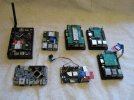
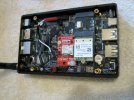
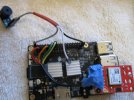
Here are some pictures of my current work.
 

Attachments

  • fleet.JPG
    fleet.JPG
    1.2 MB · Views: 57
  • roc-pc-pro.JPG
    roc-pc-pro.JPG
    1.1 MB · Views: 58
  • rock64.JPG
    rock64.JPG
    1,000.7 KB · Views: 59
  • rock4se.JPG
    rock4se.JPG
    1.1 MB · Views: 59
What do you expect from your ARM64 board? There is alot of broken-ness on aarch64 that you do not find on X86 platforms.
The mainstream image files for RockPro64 work great and I would recommend that board for a starter. Its bigger than any Pi board but it works.
I would like it to run astro/opencpn on a reasonable-size monitor (say 27") and maybe support remote X forwarding or XRDP or something like that.
 
I am using astro/foxtrotgps and x-forwarding that on some boards. Lowered ssh encryption level to improve display speed.
Contemplating building a WAP with the Atheros instead of client mode..18650 Battery Box in the works.

I bought a bunch of M.2 -M key to A/E key adapters for Wireless instead of NVMe in the slot. Prototyped in the ROC-PC-PRO pictured.
Run OS from eMMC instead.

For a tracker device I used astro/gpxloggerd on the ROCK64 and used eMMC for OS and microSD for the GPS logfile.
I want to preserve MMC. Removable storage with log is useful. nox11 versions on this arrangement.
 
The ROC-PC-PRO works great remotely over SSH. Ethernet works.

Unfortunately nothing I have tried will make all the USB ports work in FreeBSD.
OpenElec firmware makes some USB devices work but not keyboards.
Mass storage does work on the OpenElec u-boot on the two USB3 ports.
Most u-boot firmware I get nothing on USB ports.

I got these ScreenCloud OS boxes for $15 each X 5 .... If I could just get a u-boot to build for the StationP1-PRO.
I suspect I will be building a u-boot board profile for it before its all over.
Tried patching the ROC-PC profile in U-Boot. I really need to create a whole new board DEFCONFIG profile via a ports makepatch process.


On ROC-PC-PRO it actually has working power button and will turn off and button will restart it.
On ARM that is pretty spotty. A working power button. The LED's also seem to work right. Red to Blue on kernel boot.
If I had a good U-Boot config for this board I would say buy one. U-Boot needs a config for that board.
Armbian u-boot is not cutting it. HDMI but no keyboard.

Building U-Boot for the ROC-PC-PRO (using the PLUS defconfig) the u-boot board config file uses the wrong SPI Flash Type.
So I had to manually add XMC branded model to the board config. Ugliness. I hate patching. New board config file needed.

CONFIG_SPI_FLASH_XMC=y
 
I think an objective answer for your question is this:

pkg search u-boot

Code:
u-boot-a13-olinuxino-2025.10   Cross-build das u-boot for model a13-olinuxino
u-boot-a64-olinuxino-2025.10   Cross-build das u-boot for model a64-olinuxino
u-boot-bananapi-2025.10        Cross-build das u-boot for model bananapi
u-boot-bananapi-r2-pro-2025.10_1 Cross-build das u-boot for model bananapi-r2-pro
u-boot-bananapim2-2025.10      Cross-build das u-boot for model bananapim2
u-boot-beaglebone-2025.10      Cross-build das u-boot for model beaglebone
u-boot-bhyve-arm64-2024.07     Cross-build das u-boot for model bhyve-arm64
u-boot-bhyve-riscv-2024.10     Cross-build das u-boot for model bhyve-riscv
u-boot-chip-2025.10            Cross-build das u-boot for model chip
u-boot-clearfog-2025.10        Cross-build das u-boot for model clearfog
u-boot-cubieboard-2025.10      Cross-build das u-boot for model cubieboard
u-boot-cubieboard2-2025.10     Cross-build das u-boot for model cubieboard2
u-boot-cubox-hummingboard-2025.10 Cross-build das u-boot for model cubox-hummingboard
u-boot-firefly-rk3399-2025.10  Cross-build das u-boot for model firefly-rk3399
u-boot-imx-serial-loader-2017.01 Load u-boot via USB or UART on i.MX5, i.MX6, i.MX7, and Vybrid
u-boot-nanopi-neo2-2025.10     Cross-build das u-boot for model nanopi-neo2
u-boot-nanopi-r2s-2025.10      Cross-build das u-boot for model nanopi-r2s
u-boot-nanopi-r4s-2025.10      Cross-build das u-boot for model nanopi-r4s
u-boot-nanopi-r5s-2025.10_1    Cross-build das u-boot for model nanopi-r5s
u-boot-nanopi-r6s-2025.10      Cross-build das u-boot for model nanopi-r6s
u-boot-nanopi_a64-2025.10      Cross-build das u-boot for model nanopi_a64
u-boot-nanopi_m1plus-2025.10   Cross-build das u-boot for model nanopi_m1plus
u-boot-nanopi_neo-2025.10      Cross-build das u-boot for model nanopi_neo
u-boot-nanopi_neo_air-2025.10  Cross-build das u-boot for model nanopi_neo_air
u-boot-olimex-a20-som-evb-2025.10 Cross-build das u-boot for model olimex-a20-som-evb
u-boot-olinuxino-lime-2025.10  Cross-build das u-boot for model olinuxino-lime
u-boot-olinuxino-lime2-2025.10 Cross-build das u-boot for model olinuxino-lime2
u-boot-olinuxino-lime2-emmc-2025.10 Cross-build das u-boot for model olinuxino-lime2-emmc
u-boot-orangepi-one-2025.10    Cross-build das u-boot for model orangepi-one
u-boot-orangepi-pc-2025.10     Cross-build das u-boot for model orangepi-pc
u-boot-orangepi-pc-plus-2025.10 Cross-build das u-boot for model orangepi-pc-plus
u-boot-orangepi-pc2-2025.10    Cross-build das u-boot for model orangepi-pc2
u-boot-orangepi-plus-2e-2025.10 Cross-build das u-boot for model orangepi-plus-2e
u-boot-orangepi-zero-2025.10   Cross-build das u-boot for model orangepi-zero
u-boot-orangepi-zero-plus-2025.10 Cross-build das u-boot for model orangepi-zero-plus
u-boot-orangepi_r1-2025.10     Cross-build das u-boot for model orangepi_r1
u-boot-pcduino3-2025.10        Cross-build das u-boot for model pcduino3
u-boot-pine-h64-2025.10        Cross-build das u-boot for model pine-h64
u-boot-pine64-2025.10          Cross-build das u-boot for model pine64
u-boot-pine64-lts-2025.10      Cross-build das u-boot for model pine64-lts
u-boot-pinebook-2025.10        Cross-build das u-boot for model pinebook
u-boot-pinebookpro-2025.10     Cross-build das u-boot for model pinebookpro
u-boot-qemu-arm-2025.10        Cross-build das u-boot for model qemu-arm
u-boot-qemu-arm64-2025.10      Cross-build das u-boot for model qemu-arm64
u-boot-qemu-riscv64-2025.10    Cross-build das u-boot for model qemu-riscv64
u-boot-quartz64-a-2025.10_1    Cross-build das u-boot for model quartz64-a
u-boot-quartz64-b-2025.10_1    Cross-build das u-boot for model quartz64-b
u-boot-radxa-zero3-2025.10_1   Cross-build das u-boot for model radxa-zero3
u-boot-riotboard-2025.10       Cross-build das u-boot for model riotboard
u-boot-rock-pi-4-2025.10       Cross-build das u-boot for model rock-pi-4
u-boot-rock64-2025.10          Cross-build das u-boot for model rock64
u-boot-rockpro64-2025.10       Cross-build das u-boot for model rockpro64
u-boot-rpi-2025.10             Cross-build das u-boot for model rpi
u-boot-rpi-0-w-2025.10         Cross-build das u-boot for model rpi-0-w
u-boot-rpi-arm64-2025.10       Cross-build das u-boot for model rpi-arm64
u-boot-rpi2-2025.10            Cross-build das u-boot for model rpi2
u-boot-rpi3-2025.10            Cross-build das u-boot for model rpi3
u-boot-rpi3-32-2025.10         Cross-build das u-boot for model rpi3-32
u-boot-rpi4-2025.10            Cross-build das u-boot for model rpi4
u-boot-sifive-fu540-2025.10    Cross-build das u-boot for model sifive-fu540
u-boot-sifive-fu740-2025.10    Cross-build das u-boot for model sifive-fu740
u-boot-sinovoip-bpi-m3-2025.10 Cross-build das u-boot for model sinovoip-bpi-m3
u-boot-sopine-2025.10          Cross-build das u-boot for model sopine
u-boot-sopine-spi-2025.10      Cross-build das u-boot for model sopine-spi
u-boot-starfive-visionfive2-2025.10 Cross-build das u-boot for model starfive-visionfive2
u-boot-tools-2020.07           U-boot related tools
u-boot-wandboard-2025.10       Cross-build das u-boot for model wandboard

So this is the easy route. Use boards with U-Boot provided in our ports tree.
Other boards are supported but require u-boot expertise.

But lets take Raxda Zero3 board. It has a u-boot but no HDMI output. So being able to boot it is a far cry from feature rich.
No onboard wifi is supported on FreeBSD. Socketed Wifi devices will work with if_driver manually loaded in loader.conf..
if_ath_load="YES"
Is required on ARM64 for atheros.

You also have to flash your boards u-boot to an appropriate aarch64 image file once burned to a medium.
I have even used ROCK64 images on ROCK RK3399 boards. You have to learn how to mount your medium once flashed and work on it.
Convert the ROCKPRO image to suit your device. Maybe add an appropriate hostname instead of "generic".
I like turning off all the 'USB Gadget' junk in loader and I manually set fstab to actual devices.

So like I mention above RockPro64 is a good choice for flash and go. Same with anything on the list of aarch64/risc images.
Anything else is hacking.
If you feel apt the newer rk3399 have some worthy features.
 
Broadcom is evil. Pi foundation is lost. Skip that. Go with the china boards.. Allwinner or Rock? Longsoon?

IF THEN GOTO LINE 1
What are you wanting to do with ARM64 board? Make a robot or compile software. There are boards for both spectrum's.
 
It seems to me that the Foundation set the board designs and I think they should have had eMMC before PCIe lanes became available. Around Pi2-Pi3 era.
They seemed late to the NVMe option and the adapters were clunky USB ones.
Instead of using socketed M.2 they solder on wifi. Much like the rest. The cheapest solutions.

They sorta started the revolution with standard board sizes and the 40 pin header but lagged when the platform type took off in popularity..
Is dual video out really needed? That seemed to be a change I did not find useful.
They did good at keeping a standard case for Pi until that move.
 
Back
Top