
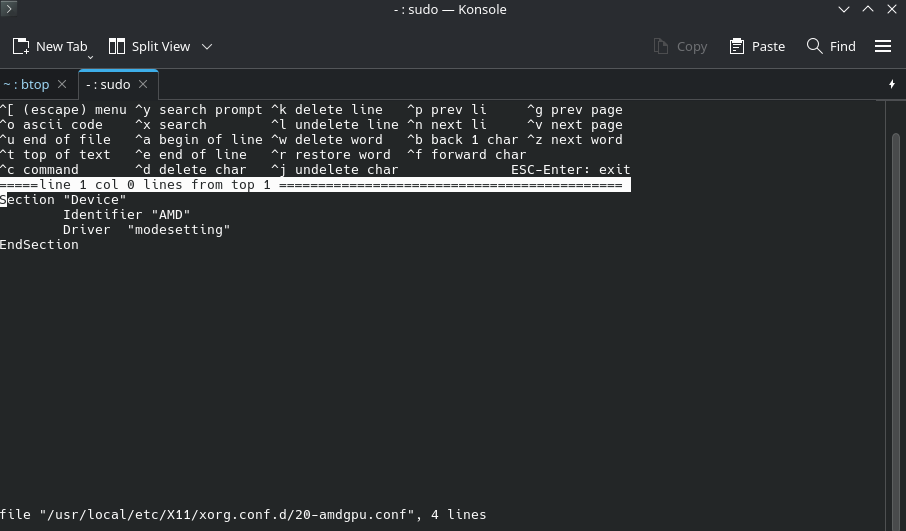
Missing Xorg configuration for GCN-based GPUs (or newer). While reinstalling the OS, I noticed that the handbook lacks an example of an Xorg configuration for GCN-series graphics cards (which use the `amdgpu` driver); it only provides a configuration for older cards that use the `radeon` driver. With the help of ChatGPT, I managed to put together a configuration that works with my graphics card (an RX 470). However, I’m not sure if this configuration is correct or if it might cause issues in the future(since I am a newcomer to FreeBSD). below is an example of a config
You are using an out of date browser. It may not display this or other websites correctly.
You should upgrade or use an alternative browser.
Missing Xorg configuration for GCN-based GPUs in Handbook
- Thread starter Sopsan
- Start date

Hi Sopsan a note about custom config files, by default xorg/xlibre will do automatic detection and will use modesetting unless a DDX driver picks up the hardware. The custom files are required if you want to force a specific driver.
The current list of supported drivers on a given install can be obtained by checking what is on the
If you install DDX drivers (i.e. the xf86-video-* packages) those may take precedence, on current hardware modesetting offers better results but for example on slighly older hardware the DDX driver maybe the way to go.
Important note for AMD users, GCN 1.0 a 1.1 cards are handled by the radeon drm driver not amdgpu unless forced (will be true until drm-74-kmod at least).
So if anyone comes here in the future and has issues:
The current list of supported drivers on a given install can be obtained by checking what is on the
/usr/local/lib/xorg/modules/drivers/ directory. For example for me:A prerequisite of using modesetting is that you have the appropriate DRM driver installed (i.e. drm-612-kmod for intel and amdgpu/radeon) and loaded, otherwise it will try the scfb (UEFI) or vesa (BIOS) drivers. Also note that modesetting uses Glamour (i.e. OpenGL rendering) which require an OpenGL ES 2.0 or OpenGL 2.1 capable device.$ ls -la /usr/local/lib/xorg/modules/drivers/
total 168
drwxr-xr-x 2 root wheel 512 19 nov 19:14 .
drwxr-xr-x 5 root wheel 512 19 nov 19:14 ..
-rwxr-xr-x 1 root wheel 112424 15 nov 06:20 modesetting_drv.so
-rwxr-xr-x 1 root wheel 19488 3 nov 01:26 scfb_drv.so
-rwxr-xr-x 1 root wheel 27096 3 nov 01:22 vesa_drv.so
If you install DDX drivers (i.e. the xf86-video-* packages) those may take precedence, on current hardware modesetting offers better results but for example on slighly older hardware the DDX driver maybe the way to go.
Important note for AMD users, GCN 1.0 a 1.1 cards are handled by the radeon drm driver not amdgpu unless forced (will be true until drm-74-kmod at least).
So if anyone comes here in the future and has issues:
- remove all
xf86-videopackages other thanvesa/scfb(BIOS/UEFI boot respectively) - install the drm package for your hardware (just
drm-[B]xyz[/B]-kmodfor intel/amd plusnvidia-drm-[B]xyz[/B]-kmodfor nvidia) - If x11 looks good you are done!
- install the
xf86-video-*package for your hardware (for examplexf86-video-intel,xf86-video-ati, etc, check withpkg search xf86-video-*) - If x11 looks good you are done!
- If you still have issues, force a driver with custom device configuration
- If x11 looks good you are done!
- If you still have issues, create a custom device configuration that uses the scfb or the vesa drivers and ask for help if needed
OP

- Thread Starter
- #3
Thank you for the response.Hi Sopsan a note about custom config files, by default xorg/xlibre will do automatic detection and will use modesetting unless a DDX driver picks up the hardware. The custom files are required if you want to force a specific driver.
The current list of supported drivers on a given install can be obtained by checking what is on the/usr/local/lib/xorg/modules/drivers/directory. For example for me:
A prerequisite of using modesetting is that you have the appropriate DRM driver installed (i.e. drm-612-kmod for intel and amdgpu/radeon) and loaded, otherwise it will try the scfb (UEFI) or vesa (BIOS) drivers. Also note that modesetting uses Glamour (i.e. OpenGL rendering) which require an OpenGL ES 2.0 or OpenGL 2.1 capable device.
If you install DDX drivers (i.e. the xf86-video-* packages) those may take precedence, on current hardware modesetting offers better results but for example on slighly older hardware the DDX driver maybe the way to go.
Important note for AMD users, GCN 1.0 a 1.1 cards are handled by the radeon drm driver not amdgpu unless forced (will be true until drm-74-kmod at least).
So if anyone comes here in the future and has issues:
- remove all
xf86-videopackages other thanvesa/scfb(BIOS/UEFI boot respectively)- install the drm package for your hardware (just
drm-[B]xyz[/B]-kmodfor intel/amd plusnvidia-drm-[B]xyz[/B]-kmodfor nvidia)- If x11 looks good you are done!
- install the
xf86-video-*package for your hardware (for examplexf86-video-intel,xf86-video-ati, etc, check withpkg search xf86-video-*)- If x11 looks good you are done!
- If you still have issues, force a driver with custom device configuration
- If x11 looks good you are done!
- If you still have issues, create a custom device configuration that uses the scfb or the vesa drivers and ask for help if needed