Show Your FreeBSD Workstation (Specs + Screenshot)

Schluppenkalle Got my Novice license in 1966. Worked my way up to the now defunct Advanced Class. Just couldn't consistently do 20wpm for Extra or cared enough to work at it. Eventually let it expire in 2010. Get an itch to do some RF work and kind of wish I still had my license.

I run into a couple of guys I knew back in the day. I also reminisce about my St Louis University days with W0FLN (Free Love Now) and Field Day out in the boondocks and my car, an old Cadillac my dad bought me, broke down on a farm country road.

73
drhowarddrfine, as I am sure you know there is no more morse code requirement. If you were Advanced it would be easy enough to pick up a license again.

73
 
Who doesn't love the clickety-clack of the other guy in the office, sitting right next to you
I don't take the risk of bringing a clicky or tacticle kb in the office, not if I want to get hit by some flying sandwich 😂
there are some linear switch mechanical kb in the office, it's not totally silent as you can still ear the key cap but seems to be an acceptable noise.
 
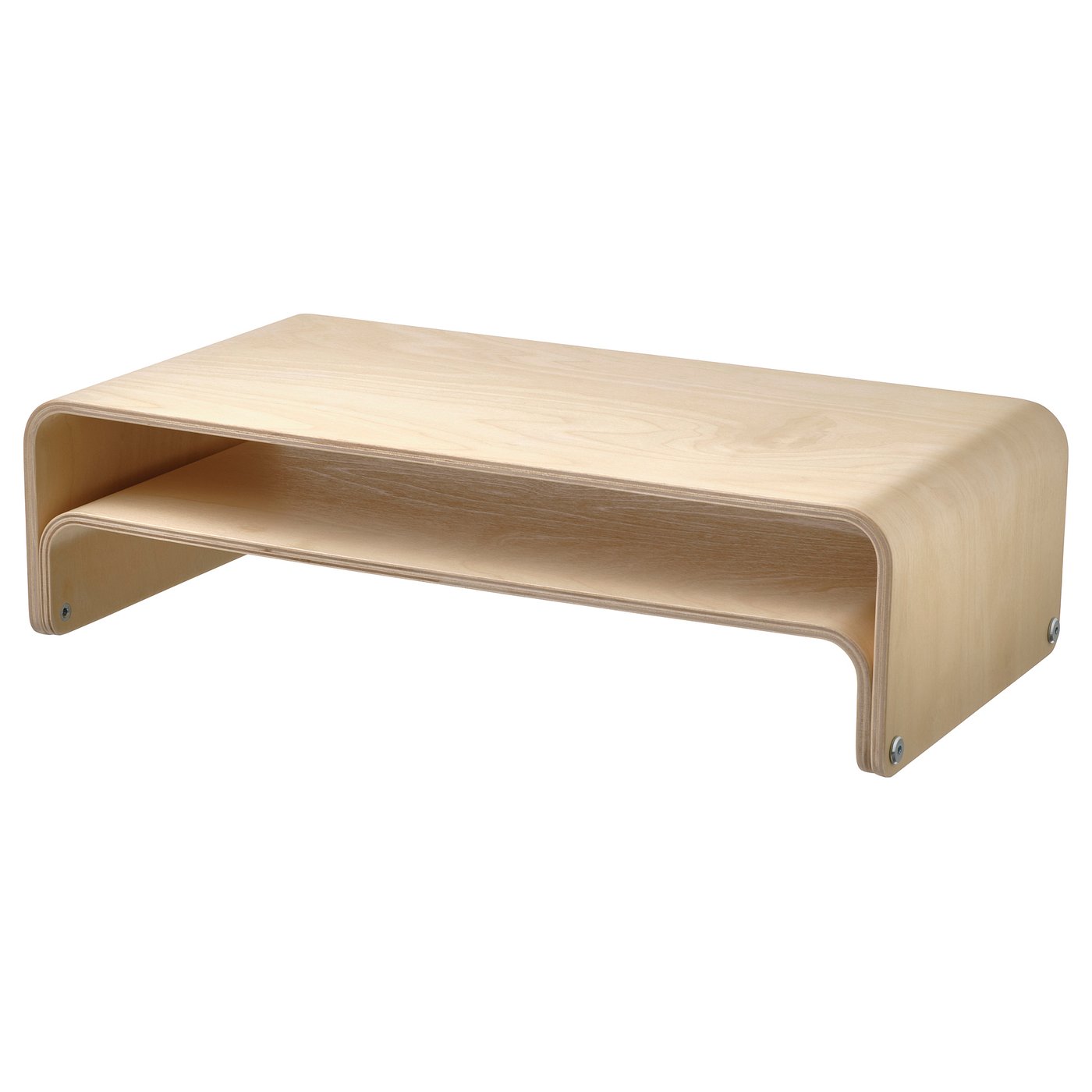
That little shelf unit is just what I need for my audio stack. Something just like that. Maybe I need to take a trip to ikea. Or ebay.
Nice radios, btw.
Thank you.

That little shelf below the Dell monitor is Ikea's "Vattenkar" monitor stand:

That's the German Ikea page, I don't know if it is available elsewhere. The stand actually has two parts which can be used in different configurations, see the product page for examples.

The big wooden box for my radios is DIY. I just took some boards (40x40 cm, 40x20 cm) and screwed them together. The upper part is held in place by some wooden dowels so I can take it apart without tools for easy access to the coax and power cables.
 
Actually, it's the one holding the radios that I was thinking of. I remember ikea used to sell self-assembly small bookshelves, but maybe still too large. I have a large IKEA store near my house. Yes, maybe I need to DIY. Thanks, anyway :-)
 
Boring stuff to see here,
test.png
 
I present to you
ENLIGHTENMENT
on XLIBRE on a HP POTATO - still usable but no compositor due to scfb driver only. But transparency is still a go.
shot-2026-09-19_20-12-08.png


e16/17 was my old love. I made my own glowing icons in Bodhi Linux. Less blue glowing in this new paradigm - shame.
It is still very easy on RAM, even with all the bells and whistles (literally).
Some quirks are still present like Windows do not accommodate the EFL content properly by default.
Conman and Blueman are nowhere to be seen but good old network manager can probably take care of network needs.
 
Used to love e16 when it came out. Rasterman did some innovative stuff.

Try setting up 'lagg' to do auto failover between cable ethernet and wifi (configure wpa_supplicant for wifi)... don't need network manager, works very nicely. See the 'lagg' section of the handbook.
 
So... ever since I learned about this thing called "Unix" I was fascinated and well, eventually landed with FreeBSD (obviously! :rolleyes:). Here's the thing though... when it comes to clients then I very much prefer Windows, but when it comes to servers... yah, I take great pride in having 2 online FreeBSD servers ("VPS") of my own: master & backup.

And when it gets to this I like nothing more than to get the best of both, at the same time. Did you know that Windows ships with OpenSSH by default? (\windows\system32\OpenSSH?). I prefer using that over PuTTY to be honest, but then... on Windows 10 I'd be 'hijacking' my PowerShell window. Well... not when you get yourself Windows terminal (even works on Windows 10!) =>

1789857950781.png


I seriously enjoy this... I fire up the terminal and end up in PowerShell, but then I can simply press a key combo like ctrl + shift + 6 (or ), resulting in a logon to either my Zefiris VPS server or my Hyper-V playground. Both running FreeBSD 15 (obviously! :cool:). (I can also right click on the pinned icon to fire up my SSH connection right away, but that's kinda offtopic, no? ;)).

Since OP asks for specs... My main server 'Zefiris' (shown above) has a nice 4 cores, 8Gb worth of memory and 100Gb SSD storage. I can actually use this to host a (modded) Minecraft server while still having enough juice left for other tasks like e-mail (Postfix FTW!), DNS ("PowerDNS") and of course Apache (+ mod_mono ;)).

But because I take 'tech' quite seriously I also keep a spare backup. "Dragoon" => 1 core, 2Gb memory and also 100Gb worth of storage. It serves as my DNS & e-mail backup, and it's also my test environment to check out source updates (I always test system updates).

The best part is that my VPS provider also supports virtual networks, in other words: my servers have a "local" network connection between them which doesn't get taxed on data consumption. The ideal way to fully take advantage of the ports collection on my main server, and then hosting the build packages over HTTP for my backup server to collect & use (powered by ports-mgmt/portmaster).

Oh the irony guys... Back in the days, the early days pre-Solaris even I kinda mocked the Linux Slackware distribution because.. what were they thinking?! Building all the packages yourself? I mean, you don't do that on Windows, right?!

Yet fast forward to here and now and I heavily rely on the ports collection myself. Because if I'm using open source I prefer to make sure that the source code actually means something.

So yah, that's my story ;)

 
I’ve looked everywhere and haven’t found any HP "potato" model, I never eared about that model, even though I’m quite a fan of HP. 😂🤣🤪
It is this vegetable
Screenshot_2026-08-23_16-53-05.png

Very useful design. I run it as Home Assistant KIOSK - basically just autologging into Linux Mint XFCE with Brave in kiosk mode.
However the fit on the shelf was very tight and cheap Android tablet does better job through Home Assistant companion app. Also it is a bit quieter and less power hungry.
And I need some laptop for tinkering with FreeBSD and like.
Enlightenment used to have TABLET mode. I wanted to try it but it seems it is long gone. Touchscreen works fine but the desktop is not exactly a match, especially when the windows need manual resizing due to some EFL mishap. And onscreen keyboard (also pain in Linux - android is way better) is lacking too.

Gotta go back to XFCE. I miss thunar and settings menu. Gonna be interesting to compare speeds. XFCE seems a bit sluggish lately. Tiling managers are no go - the screen is too small for that. Openbox is too much tinkering....and in the end you find out it hogs the same RAM as XFCE. Oh well.
 
I tried to install XFCE4.
And I even found out I can get proper (not scfb) driver for xlibre.
It swaps a little (after adding icons and fonts) but it is altogether usable.
A quirk here and there. Twice it crashed out on me with xarchiver and some image viewer.
Linux Mint XFCE was more stable but a bit more sluggish (once you rip out startup applications you don't need it is usable).
And yeah, I was lazy and actually run it under rootsie tootsie.
fyi no wallpaper, google Play font (which craps out on Brave to file manager) and Papirus dark icons.
Screenshot_2026-09-20_15-12-37.png

DYI:
pkg install xlibre
pkg install xlibre-xf86-video-intel
'ee /usr/local/etc/X11/xorg.conf.d/10-video.conf'
'''
Section "Device"
Identifier "Intel"
Driver "intel"
EndSection
'''
'~/.xinitrc'
'exec startxfce4'
startx
pkg install xfce xfce4-goodies
pkg install thunar-archive-plugin file-roller unzip

'~/local/share/icons | fonts'
 
Back
Top