Will FreeBSD 15.1 support AMD 9070XT GPUs?

matt_k thanks for testing. This appears to clear firmware as the cause of your issue.

The official drm-612 and latest versions are on ports, try to do a git pull (do git checkout -- . on the drm-latest-kmod folder if you get conflicts) and build again maybe dumbbell merged extra changes.

But as is you should open an issue on github (or bugzilla, but I would go with GitHub) with what you tried and the output of dmesg.
 
Thanks for your work, fahrenheit.
So, I also tried this: I reverted all changes, installed drm-612-kmod, it complained about missing firmware, so I installed the firmware from your post #24.
Then the same error after loading.
So I tried removing drm-612-kmod and installed drm-latest-kmod (which is 612 anyway) and tried again. The same error.

So, the next thing, when I have a little bit more time is to create an issue in the drm-kmod git repo, as you said the problem lies therein and the firmware is fine.
BTW, if you don't mind asking, who are you? Are you the gpu-firmware-amd-kmod port maintainer?
 
Thanks for your work, fahrenheit.
So, I also tried this: I reverted all changes, installed drm-612-kmod, it complained about missing firmware, so I installed the firmware from your post #24.
Then the same error after loading.
So I tried removing drm-612-kmod and installed drm-latest-kmod (which is 612 anyway) and tried again. The same error.

So, the next thing, when I have a little bit more time is to create an issue in the drm-kmod git repo, as you said the problem lies therein and the firmware is fine.
BTW, if you don't mind asking, who are you? Are you the gpu-firmware-amd-kmod port maintainer?
Just a FreeBSD user which wants to play games and generally have a good desktop experience :)

I like to help out if it's something that I can do. And the current state of graphics support on freebsd does need help :P
 
matt_k / mnd999 would you be interested in trying the live media of Alma Linux 10.2 ( https://repo.almalinux.org/almalinux/10/live/x86_64/ , take your pick of KDE/Gnome ) and check if your card boots on Linux 6.12 with the necessary firmware packages (for reference it's an heavily patched 6.12.0 kernel with a later than 202508xx firmware package)?

Q&D walk through:
  1. download relevant ISO (kde/gnome)
  2. setup a USB pen with that (I use ventoy but pick whatever boots, linux/windows/mac help here: https://wiki.almalinux.org/LiveMedia.html#how-to-download-and-write-images )
  3. start it up (testing or not the media)
  4. if you reach desktop, checking out dmesg would be great: sudo dmesg | grep drm for example on a terminal (emulator)
  5. if you reach desktop do glxinfo -B to ensure you are actually using accelerated graphics and not simpledrm with the framebuffer backend (something that would benefit freebsd)
If your GPU also does not load on Linux, that means you will have to wait a bit until dumbell ports 6.13/6.14 (6.14 is what Phoronix did use to make the 9070 review) to try again.
 
matt_k / mnd999 would you be interested in trying the live media of Alma Linux 10.2 ( https://repo.almalinux.org/almalinux/10/live/x86_64/ , take your pick of KDE/Gnome ) and check if your card boots on Linux 6.12 with the necessary firmware packages (for reference it's an heavily patched 6.12.0 kernel with a later than 202508xx firmware package)?

Q&D walk through:
  1. download relevant ISO (kde/gnome)
  2. setup a USB pen with that (I use ventoy but pick whatever boots, linux/windows/mac help here: https://wiki.almalinux.org/LiveMedia.html#how-to-download-and-write-images )
  3. start it up (testing or not the media)
  4. if you reach desktop, checking out dmesg would be great: sudo dmesg | grep drm for example on a terminal (emulator)
  5. if you reach desktop do glxinfo -B to ensure you are actually using accelerated graphics and not simpledrm with the framebuffer backend (something that would benefit freebsd)
If your GPU also does not load on Linux, that means you will have to wait a bit until dumbell ports 6.13/6.14 (6.14 is what Phoronix did use to make the 9070 review) to try again.
There is no need to do that. RDNA4 works without any issues on 6.12 kernel. Its fully accelerated as one would expect.
 
There is no need to do that. RDNA4 works without any issues on 6.12 kernel. Its fully accelerated as one would expect.
The question was not whether or not RDNA4 is full supported on 6.12 or even whether or not it should work (which should be true even for the newish 9070 GRE since AMD switched to IP block discovery and as long as the firmware is loaded and the code knows how to work with it), is whether or not their specific cards need work-arounds or fixes not present on 6.12.
Otherwise https://gitlab.freedesktop.org/drm/...=opened&search=RX 9070 XT&first_page_size=100 this page would be generally empty.
 
The question was not whether or not RDNA4 is full supported on 6.12 or even whether or not it should work (which should be true even for the newish 9070 GRE since AMD switched to IP block discovery and as long as the firmware is loaded and the code knows how to work with it), is whether or not their specific cards need work-arounds or fixes not present on 6.12.
Otherwise https://gitlab.freedesktop.org/drm/amd/-/work_items?sort=created_date&state=opened&search=RX 9070 XT&first_page_size=100 this page would be generally empty.
In that case, here is the info you requested.


Screenshot_20260604_053547.png


Screenshot_20260604_053709.png
 
matt_k / mnd999 would you be interested in trying the live media of Alma Linux 10.2 ( https://repo.almalinux.org/almalinux/10/live/x86_64/ , take your pick of KDE/Gnome ) and check if your card boots on Linux 6.12 with the necessary firmware packages (for reference it's an heavily patched 6.12.0 kernel with a later than 202508xx firmware package)?

Q&D walk through:
  1. download relevant ISO (kde/gnome)
  2. setup a USB pen with that (I use ventoy but pick whatever boots, linux/windows/mac help here: https://wiki.almalinux.org/LiveMedia.html#how-to-download-and-write-images )
  3. start it up (testing or not the media)
  4. if you reach desktop, checking out dmesg would be great: sudo dmesg | grep drm for example on a terminal (emulator)
  5. if you reach desktop do glxinfo -B to ensure you are actually using accelerated graphics and not simpledrm with the framebuffer backend (something that would benefit freebsd)
If your GPU also does not load on Linux, that means you will have to wait a bit until dumbell ports 6.13/6.14 (6.14 is what Phoronix did use to make the 9070 review) to try again.
does it have to be 6.12 kernel specifically? I'm dual booting linuxmint and it is running 6.14 successfully
dmesg | grep drm:
[ 0.366671] ACPI: bus type drm_connector registered
[ 0.373614] simple-framebuffer simple-framebuffer.0: [drm] Registered 1 planes with drm panic
[ 0.373616] [drm] Initialized simpledrm 1.0.0 for simple-framebuffer.0 on minor 0
[ 0.374145] simple-framebuffer simple-framebuffer.0: [drm] fb0: simpledrmdrmfb frame buffer device
[ 9.138674] systemd[1]: Starting modprobe@drm.service - Load Kernel Module drm...
[ 9.152349] systemd[1]: modprobe@drm.service: Deactivated successfully.
[ 9.152490] systemd[1]: Finished modprobe@drm.service - Load Kernel Module drm.
[ 13.525321] i915 0000:00:02.0: [drm] Found haswell (device ID 0412) integrated display version 7.00 stepping N/A
[ 13.526345] i915 0000:00:02.0: [drm] VT-d active for gfx access
[ 13.526425] i915 0000:00:02.0: [drm] Using Transparent Hugepages
[ 13.526429] i915 0000:00:02.0: [drm] DMAR active, disabling use of stolen memory
[ 13.538623] [drm] amdgpu kernel modesetting enabled.
[ 13.539562] [drm] initializing kernel modesetting (IP DISCOVERY 0x1002:0x7590 0x1043:0x0639 0xC0).
[ 13.539579] [drm] register mmio base: 0xF7C00000
[ 13.539581] [drm] register mmio size: 524288
[ 13.541748] [drm] Initialized i915 1.6.0 for 0000:00:02.0 on minor 1
[ 13.605620] [drm] vm size is 262144 GB, 4 levels, block size is 9-bit, fragment size is 9-bit
[ 13.605636] [drm] Detected VRAM RAM=16304M, BAR=256M
[ 13.605638] [drm] RAM width 128bits GDDR6
[ 13.605799] [drm] amdgpu: 16304M of VRAM memory ready
[ 13.605801] [drm] amdgpu: 15523M of GTT memory ready.
[ 13.605818] [drm] GART: num cpu pages 131072, num gpu pages 131072
[ 13.606814] [drm] Loading DMUB firmware via PSP: version=0x0A000400
[ 13.607152] [drm] Found VCN firmware Version ENC: 1.4 DEC: 9 VEP: 0 Revision: 1
[ 13.619908] i915 0000:00:02.0: [drm] fb0: i915drmfb frame buffer device
[ 13.863514] [drm] Display Core v3.2.316 initialized on DCN 4.0.1
[ 13.863517] [drm] DP-HDMI FRL PCON supported
[ 13.867782] [drm] DMUB hardware initialized: version=0x0A000400
[ 14.187927] [drm] ring gfx_32768.1.1 was added
[ 14.188066] [drm] ring compute_32768.2.2 was added
[ 14.188202] [drm] ring sdma_32768.3.3 was added
[ 14.188243] [drm] ring gfx_32768.1.1 ib test pass
[ 14.188305] [drm] ring compute_32768.2.2 ib test pass
[ 14.188385] [drm] ring sdma_32768.3.3 ib test pass
[ 14.191914] amdgpu 0000:03:00.0: [drm] Registered 4 planes with drm panic
[ 14.191915] [drm] Initialized amdgpu 3.61.0 for 0000:03:00.0 on minor 2
[ 14.216152] fbcon: amdgpudrmfb (fb1) is primary device
[ 14.216158] amdgpu 0000:03:00.0: [drm] fb1: amdgpudrmfb frame buffer device
[ 14.221807] [drm] pre_validate_dsc:1627 MST_DSC dsc precompute is not needed

glxinfo -B:

name of display: :0.0
display: :0 screen: 0
direct rendering: Yes
Extended renderer info (GLX_MESA_query_renderer):
Vendor: AMD (0x1002)
Device: AMD Radeon Graphics (radeonsi, gfx1200, LLVM 20.1.2, DRM 3.61, 6.14.0-37-generic) (0x7590)
Version: 25.2.8
Accelerated: yes
Video memory: 16384MB
Unified memory: no
Preferred profile: core (0x1)
Max core profile version: 4.6
Max compat profile version: 4.6
Max GLES1 profile version: 1.1
Max GLES[23] profile version: 3.2
Memory info (GL_ATI_meminfo):
VBO free memory - total: 15398 MB, largest block: 15398 MB
VBO free aux. memory - total: 15476 MB, largest block: 15476 MB
Texture free memory - total: 15398 MB, largest block: 15398 MB
Texture free aux. memory - total: 15476 MB, largest block: 15476 MB
Renderbuffer free memory - total: 15398 MB, largest block: 15398 MB
Renderbuffer free aux. memory - total: 15476 MB, largest block: 15476 MB
Memory info (GL_NVX_gpu_memory_info):
Dedicated video memory: 16384 MB
Total available memory: 31907 MB
Currently available dedicated video memory: 15398 MB
OpenGL vendor string: AMD
OpenGL renderer string: AMD Radeon Graphics (radeonsi, gfx1200, LLVM 20.1.2, DRM 3.61, 6.14.0-37-generic)
OpenGL core profile version string: 4.6 (Core Profile) Mesa 25.2.8-0ubuntu0.24.04.1
OpenGL core profile shading language version string: 4.60
OpenGL core profile context flags: (none)
OpenGL core profile profile mask: core profile

OpenGL version string: 4.6 (Compatibility Profile) Mesa 25.2.8-0ubuntu0.24.04.1
OpenGL shading language version string: 4.60
OpenGL context flags: (none)
OpenGL profile mask: compatibility profile

OpenGL ES profile version string: OpenGL ES 3.2 Mesa 25.2.8-0ubuntu0.24.04.1
OpenGL ES profile shading language version string: OpenGL ES GLSL ES 3.20

uname -a
Linux mint 6.14.0-37-generic #37~24.04.1-Ubuntu SMP PREEMPT_DYNAMIC Thu Nov 20 10:25:38 UTC 2 x86_64 x86_64 x86_64 GNU/Linux

OK nevermind, here is the output from live almalinux:
dmesg | grep drm:

[ 3.115692] ACPI: bus type drm_connector registered
[ 3.133489] [drm] Initialized simpledrm 1.0.0 for simple-framebuffer.0 on minor 0
[ 3.135969] simple-framebuffer simple-framebuffer.0: [drm] fb0: simpledrmdrmfb frame buffer device
[ 4.970869] i915 0000:00:02.0: [drm] Found haswell (device ID 0412) integrated display version 7.00 stepping N/A
[ 4.971164] i915 0000:00:02.0: [drm] *ERROR* Stolen reserved area [mem 0xcf900000-0xcf9fffff] outside stolen memory [mem 0x8fa00000-0xb19fffff]
[ 5.025313] [drm] Initialized i915 1.6.0 for 0000:00:02.0 on minor 1
[ 5.069492] i915 0000:00:02.0: [drm] fb1: i915drmfb frame buffer device
[ 7.241358] [drm] amdgpu kernel modesetting enabled.
[ 7.339621] [drm] Detected VRAM RAM=16304M, BAR=256M
[ 7.339622] [drm] RAM width 128bits GDDR6
[ 7.339803] [drm] GART: num cpu pages 131072, num gpu pages 131072
[ 7.340597] amdgpu 0000:03:00.0: amdgpu: [drm] Loading DMUB firmware via PSP: version=0x0A003500
[ 7.598708] amdgpu 0000:03:00.0: amdgpu: [drm] Display Core v3.2.351 initialized on DCN 4.0.1
[ 7.598711] amdgpu 0000:03:00.0: amdgpu: [drm] DP-HDMI FRL PCON supported
[ 7.602943] amdgpu 0000:03:00.0: amdgpu: [drm] DMUB hardware initialized: version=0x0A003500
[ 7.666700] amdgpu 0000:03:00.0: amdgpu: [drm] PSR support 0, DC PSR ver -1, sink PSR ver 0 DPCD caps 0x0 su_y_granularity 0
[ 7.822208] amdgpu 0000:03:00.0: amdgpu: [drm] PSR support 0, DC PSR ver -1, sink PSR ver 0 DPCD caps 0x0 su_y_granularity 0
[ 7.822331] amdgpu 0000:03:00.0: amdgpu: [drm] PSR support 0, DC PSR ver -1, sink PSR ver 0 DPCD caps 0x0 su_y_granularity 0
[ 7.873943] [drm] Initialized amdgpu 3.64.0 for 0000:03:00.0 on minor 2
[ 7.894658] fbcon: amdgpudrmfb (fb0) is primary device
[ 7.894691] amdgpu 0000:03:00.0: [drm] fb0: amdgpudrmfb frame buffer device
[ 7.947430] [drm] pre_validate_dsc:1667 MST_DSC dsc precompute is not needed
[ 11.297939] systemd[1]: Starting modprobe@drm.service - Load Kernel Module drm...
[ 11.370282] systemd[1]: modprobe@drm.service: Deactivated successfully.
[ 11.370480] systemd[1]: Finished modprobe@drm.service - Load Kernel Module drm.

glxinfo -B:

name of display: :0
display: :0 screen: 0
direct rendering: Yes
Extended renderer info (GLX_MESA_query_renderer):
Vendor: AMD (0x1002)
Device: AMD Radeon Graphics (radeonsi, gfx1200, LLVM 21.1.8, DRM 3.64, 6.12.0-211.7.3.el10_2.x86_64) (0x7590)
Version: 25.2.7
Accelerated: yes
Video memory: 16384MB
Unified memory: no
Preferred profile: core (0x1)
Max core profile version: 4.6
Max compat profile version: 4.6
Max GLES1 profile version: 1.1
Max GLES[23] profile version: 3.2
Memory info (GL_ATI_meminfo):
VBO free memory - total: 15450 MB, largest block: 15450 MB
VBO free aux. memory - total: 15355 MB, largest block: 15355 MB
Texture free memory - total: 15450 MB, largest block: 15450 MB
Texture free aux. memory - total: 15355 MB, largest block: 15355 MB
Renderbuffer free memory - total: 15450 MB, largest block: 15450 MB
Renderbuffer free aux. memory - total: 15355 MB, largest block: 15355 MB
Memory info (GL_NVX_gpu_memory_info):
Dedicated video memory: 16384 MB
Total available memory: 31904 MB
Currently available dedicated video memory: 15450 MB
OpenGL vendor string: AMD
OpenGL renderer string: AMD Radeon Graphics (radeonsi, gfx1200, LLVM 21.1.8, DRM 3.64, 6.12.0-211.7.3.el10_2.x86_64)
OpenGL core profile version string: 4.6 (Core Profile) Mesa 25.2.7
OpenGL core profile shading language version string: 4.60
OpenGL core profile context flags: (none)
OpenGL core profile profile mask: core profile

OpenGL version string: 4.6 (Compatibility Profile) Mesa 25.2.7
OpenGL shading language version string: 4.60
OpenGL context flags: (none)
OpenGL profile mask: compatibility profile

OpenGL ES profile version string: OpenGL ES 3.2 Mesa 25.2.7
OpenGL ES profile shading language version string: OpenGL ES GLSL ES 3.20

uname -a
Linux localhost-live 6.12.0-211.7.3.el10_2.x86_64 #1 SMP PREEMPT_DYNAMIC Tue May 19 12:46:58 EDT 2026 x86_64 GNU/Linux
 
Its a headache dealing with display managers and i still have few issues trying to run it properly but i can confirm that gpu is working

My gpu is RX 9070 XT but i understand any gpu with RDNA4 will work
Also i tested on FreeBSD 15.1-Current is working aswell before i tried on 15.1-RC2

So let's start

Fresh install of FreeBSD 15.1-Current

Code:
pkg update

Make sure u have a git

Code:
pkg install git

Make sure u have latest ports

Code:
git clone https://git.FreeBSD.org/ports.git /usr/ports

Get to the DRM-612-kmod directory

Code:
cd /usr/ports/graphics/drm-612-kmod

Compile it (i won't suggest to use -j for some reason it drop me an errors)

Code:
make install clean

After its done we need firmware from ports

Code:
cd /usr/ports/graphics/gpu-firmware-amd-kmod

Before compiling edit file Makefile and change tag version to 20250808.2

Code:
make makesum

Code:
make install clean

I added gpu already on rc (as i tested and it worked) but if ur not confident yet and don't want to get stucked on kernel panic skip this step for now

Code:
sysrc kld_list+="amdgpu"

So after this step theoretically what would happen is u get kernel panic after restarting its because some of the modules and versions are missing and are not in freebsd yet so what i done is i clone linux-firmware

go to tmp folder

Code:
cd /tmp

and get linux-firmware (depth=1) is for not getting everything, we just need latest one

Code:
git clone --depth=1 https://gitlab.com/kernel-firmware/linux-firmware.git

Create a firmware directory

Code:
mkdir -p /boot/firmware/amdgpu

and copy RDNA4 binaries
Code:
cp /tmp/linux-firmware/amdgpu/psp_14_0_3*.bin /boot/firmware/amdgpu/
cp /tmp/linux-firmware/amdgpu/smu_14_0_3*.bin /boot/firmware/amdgpu/
cp /tmp/linux-firmware/amdgpu/dcn_4_0_1*.bin /boot/firmware/amdgpu/
cp /tmp/linux-firmware/amdgpu/gc_12_0_1*.bin /boot/firmware/amdgpu/
cp /tmp/linux-firmware/amdgpu/sdma_7_0_1*.bin /boot/firmware/amdgpu/
cp /tmp/linux-firmware/amdgpu/vcn_5_0_0*.bin /boot/firmware/amdgpu/

also copy these files in /boot/modules aswell

Code:
cp /boot/firmware/amdgpu/psp_14_0_3_sos.bin /boot/modules/amdgpu_psp_14_0_3_sos.bin
cp /boot/firmware/amdgpu/smu_14_0_3.bin /boot/modules/amdgpu_smu_14_0_3.bin
cp /boot/firmware/amdgpu/dcn_4_0_1_dmcub.bin /boot/modules/amdgpu_dcn_4_0_1_dmcub.bin
cp /boot/firmware/amdgpu/gc_12_0_1_pfp.bin /boot/modules/amdgpu_gc_12_0_1_pfp.bin
cp /boot/firmware/amdgpu/gc_12_0_1_uni_mes.bin /boot/modules/amdgpu_gc_12_0_1_uni_mes.bin
cp /boot/firmware/amdgpu/sdma_7_0_1.bin /boot/modules/amdgpu_sdma_7_0_1.bin
cp /boot/firmware/amdgpu/vcn_5_0_0.bin /boot/modules/amdgpu_vcn_5_0_0.bin

and not neccesary but if you want space u can get rid off linux-firmware now

Code:
rm -rf /tmp/linux-firmware

Weird thing was before rebooting i was testing if gpu would if i load module manually without reboot i got kernel panic, however after i rebooted it started working

Like i said now i have few problems with display manager GDM (gnome) freezes for some reason after typing password, i switched to SDDM to using gnome and now its kind of working but i feels there is still a problem somewhere
 
Its a headache dealing with display managers and i still have few issues trying to run it properly but i can confirm that gpu is working

My gpu is RX 9070 XT but i understand any gpu with RDNA4 will work
Also i tested on FreeBSD 15.1-Current is working aswell before i tried on 15.1-RC2

So let's start

Fresh install of FreeBSD 15.1-Current

Code:
pkg update

Make sure u have a git

Code:
pkg install git

Make sure u have latest ports

Code:
git clone https://git.FreeBSD.org/ports.git /usr/ports

Get to the DRM-612-kmod directory

Code:
cd /usr/ports/graphics/drm-612-kmod

Compile it (i won't suggest to use -j for some reason it drop me an errors)

Code:
make install clean

After its done we need firmware from ports

Code:
cd /usr/ports/graphics/gpu-firmware-amd-kmod

Before compiling edit file Makefile and change tag version to 20250808.2

Code:
make makesum

Code:
make install clean

I added gpu already on rc (as i tested and it worked) but if ur not confident yet and don't want to get stucked on kernel panic skip this step for now

Code:
sysrc kld_list+="amdgpu"

So after this step theoretically what would happen is u get kernel panic after restarting its because some of the modules and versions are missing and are not in freebsd yet so what i done is i clone linux-firmware

go to tmp folder

Code:
cd /tmp

and get linux-firmware (depth=1) is for not getting everything, we just need latest one

Code:
git clone --depth=1 https://gitlab.com/kernel-firmware/linux-firmware.git

Create a firmware directory

Code:
mkdir -p /boot/firmware/amdgpu

and copy RDNA4 binaries
Code:
cp /tmp/linux-firmware/amdgpu/psp_14_0_3*.bin /boot/firmware/amdgpu/
cp /tmp/linux-firmware/amdgpu/smu_14_0_3*.bin /boot/firmware/amdgpu/
cp /tmp/linux-firmware/amdgpu/dcn_4_0_1*.bin /boot/firmware/amdgpu/
cp /tmp/linux-firmware/amdgpu/gc_12_0_1*.bin /boot/firmware/amdgpu/
cp /tmp/linux-firmware/amdgpu/sdma_7_0_1*.bin /boot/firmware/amdgpu/
cp /tmp/linux-firmware/amdgpu/vcn_5_0_0*.bin /boot/firmware/amdgpu/

also copy these files in /boot/modules aswell

Code:
cp /boot/firmware/amdgpu/psp_14_0_3_sos.bin /boot/modules/amdgpu_psp_14_0_3_sos.bin
cp /boot/firmware/amdgpu/smu_14_0_3.bin /boot/modules/amdgpu_smu_14_0_3.bin
cp /boot/firmware/amdgpu/dcn_4_0_1_dmcub.bin /boot/modules/amdgpu_dcn_4_0_1_dmcub.bin
cp /boot/firmware/amdgpu/gc_12_0_1_pfp.bin /boot/modules/amdgpu_gc_12_0_1_pfp.bin
cp /boot/firmware/amdgpu/gc_12_0_1_uni_mes.bin /boot/modules/amdgpu_gc_12_0_1_uni_mes.bin
cp /boot/firmware/amdgpu/sdma_7_0_1.bin /boot/modules/amdgpu_sdma_7_0_1.bin
cp /boot/firmware/amdgpu/vcn_5_0_0.bin /boot/modules/amdgpu_vcn_5_0_0.bin

and not neccesary but if you want space u can get rid off linux-firmware now

Code:
rm -rf /tmp/linux-firmware

Weird thing was before rebooting i was testing if gpu would if i load module manually without reboot i got kernel panic, however after i rebooted it started working

Like i said now i have few problems with display manager GDM (gnome) freezes for some reason after typing password, i switched to SDDM to using gnome and now its kind of working but i feels there is still a problem somewhere
Hmm, that would point to firmware version issues (i.e. like in a roulette).
MrBSD or matt_k can you check with the latest tag (20260519) and if not working with the main branch?

Thanks
 
Before compiling edit file Makefile and change tag version to 20250808.2

Code:
make makesum

Code:
make install clean
Firmware fails to build with this version. When running make makesum it reports that GHO file with 20250808.2 tag does not exist.
Hmm, that would point to firmware version issues (i.e. like in a roulette).
MrBSD or matt_k can you check with the latest tag (20260519) and if not working with the main branch?

Thanks
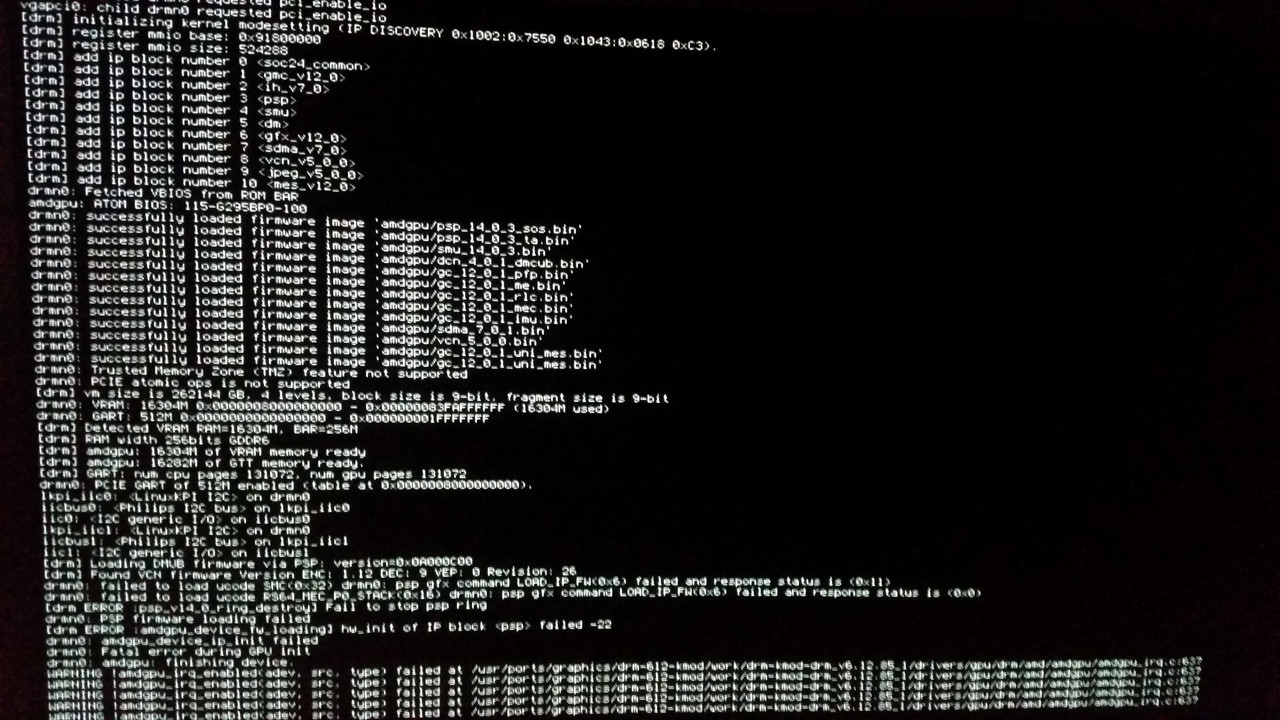
Changing 20250808.2 to 20260519 finally made the build process successful. I wasted hours trying to make 20250808 build properly because i missed your post. I was able to build every single package without any errors. All binaries have been copied to their appropriate locations. I double checked file names and its all correct. When i reboot, im greeted with this error and driver is not working
error.jpg


I apologize for very bad quality image. I dont have any ways of ssh into this machine and extract this error as text.
 
I forgot to add.

This is fresh installation of FreeBSD 15.1 RC3. Despite the error displayed, system continues to boot normally with no kernel panics. I created ZFS snapshots for each step, so i can go back and revert for testing if needed.
 
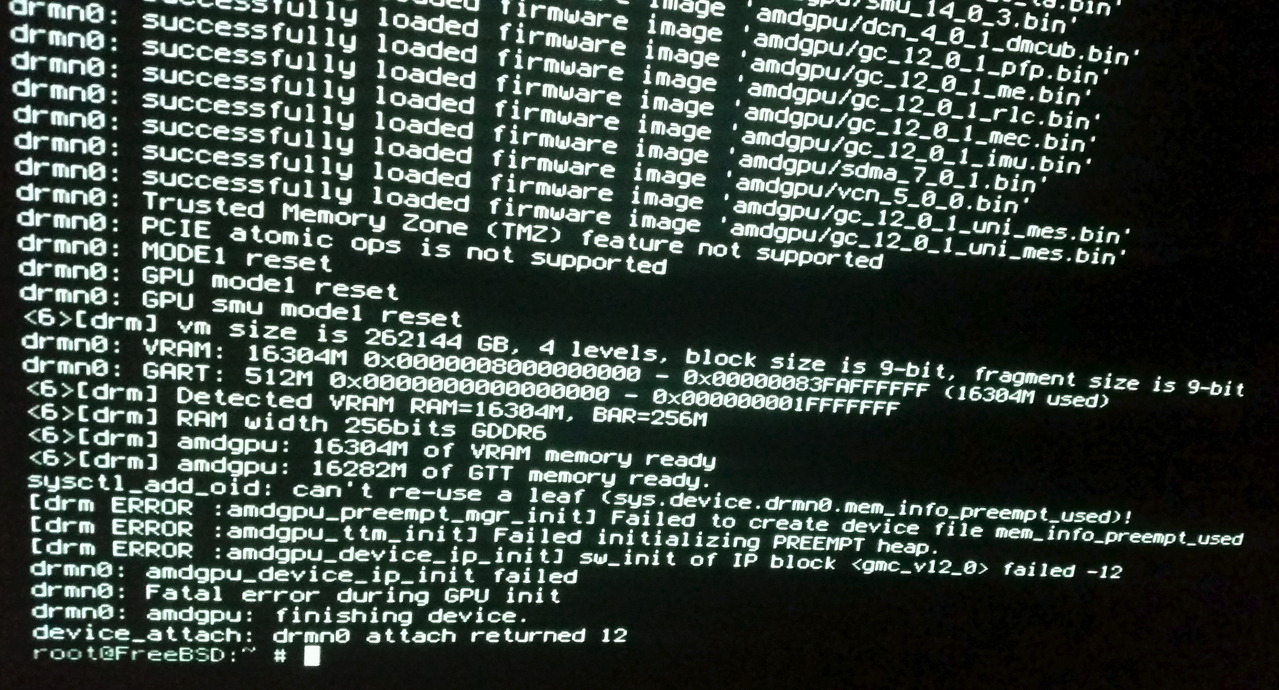
I took another screenshot. This is the result of running
Code:
kldunload amdgpu && kldload amdgpu

amdgpu.png


Code:
sysctl_add_oid: can`t re-use leaf (sys.device.drmn0.mem_info_prempt_used)!
[drm ERROR :amdgpu_preempt_mgr_init] Failed to create device file mem_info_preempt_used
[drm ERROR :amdgpu_ttm_init] Failed initializing PREEMPT heap.
[drm ERROR :amdgpu_device_ip_init] sw_init of IP block <gnc_v12_0) failed -12
drmn0: amdgpu_device_ip_init failed
drmn0: Fatal error during GPU init
drmn0: amdgpu: finishing device.
device_attach: drmn0 attach returned 12
 
Kldunload of drm drivers is broken, I think it had something to do with the driver having a wrapper.
You tried rebooting like hikiliki said?

In any case thank you for testing MrBSD . I think its safe to say that rdna 4 may work with specific encantations but in general as is, and without a drm developer (or some intrepid user) with access to hardware, it probably will not work..

hikiliki can you post the output of your dmesg | grep drm ?
 
Kldunload of drm drivers is broken, I think it had something to do with the driver having a wrapper.
You tried rebooting like hikiliki said?

In any case thank you for testing MrBSD . I think its safe to say that rdna 4 may work with specific encantations but in general as is, and without a drm developer (or some intrepid user) with access to hardware, it probably will not work..

hikiliki can you post the output of your dmesg | grep drm ?
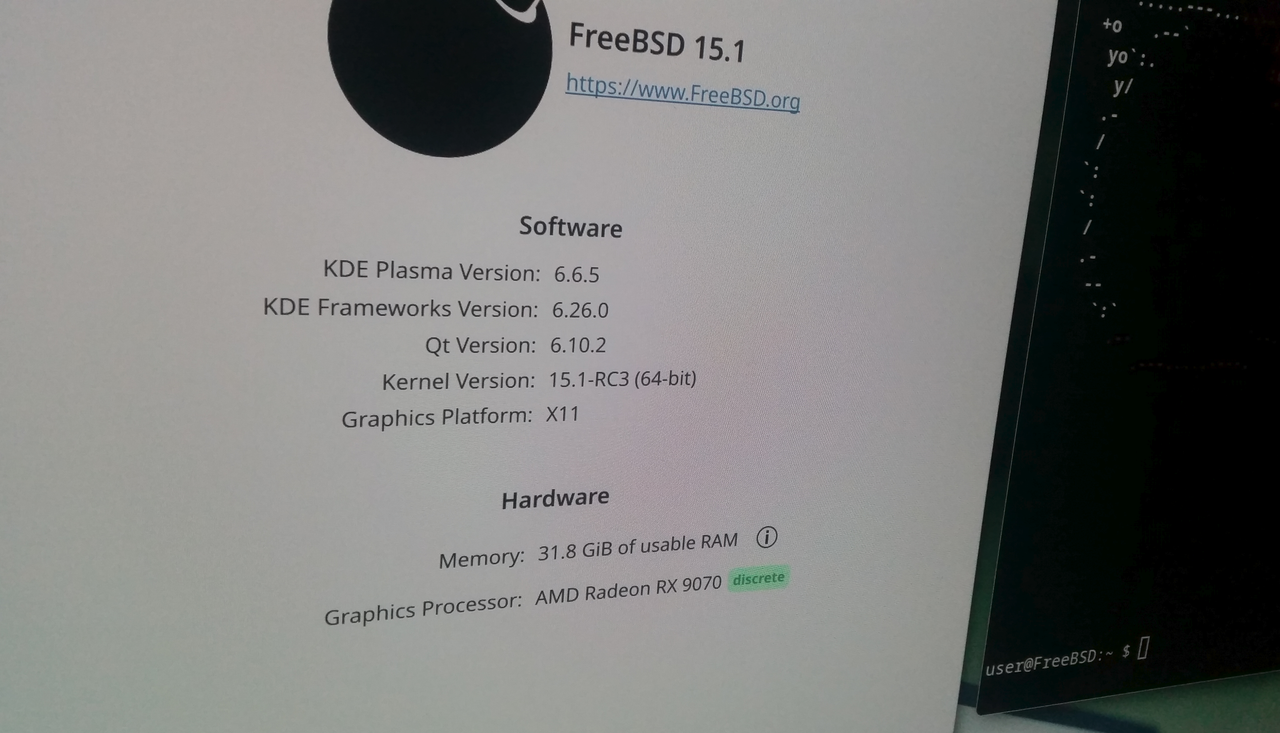
Driver is now working. The reason its was displaying that error is because my system is running in CSM mode with Resizable Bar disabled. Dont ask why. I need it disabled. I just temporarily enabled Resizable Bar in BIOS which automatically disabled CSM mode and driver loaded properly and i was able to start SDDM and Plasma6 without any issues.

kde.png

My assumption here is that some of those binary files responsible for handling Resizable Bar features are causing this issue on systems that have this feature disabled. Plasma Wayland is not working. Kldunload sort of works. It unloads the driver, i get the black screen, but i see the system is working in the background. I can blindly execute commands like reboot, and system responds as it should.
 
Kldunload of drm drivers is broken, I think it had something to do with the driver having a wrapper.
You tried rebooting like hikiliki said?

In any case thank you for testing MrBSD . I think its safe to say that rdna 4 may work with specific encantations but in general as is, and without a drm developer (or some intrepid user) with access to hardware, it probably will not work..

hikiliki can you post the output of your dmesg | grep drm ?
Probably late reply, sorry im working night shifts and sleeping in a day.


Code:
hikiliki@:~ $ dmesg | grep drm
drmn0: <drmn> on vgapci0
vgapci0: child drmn0 requested pci_enable_io
[drm] initializing kernel modesetting (IP DISCOVERY 0x1002:0x7550 0x1DA2:0xE489 0xC0).
[drm] register mmio base: 0xFCD00000
[drm] register mmio size: 524288
[drm] add ip block number 0 <soc24_common>
[drm] add ip block number 1 <gmc_v12_0>
[drm] add ip block number 2 <ih_v7_0>
[drm] add ip block number 3 <psp>
[drm] add ip block number 4 <smu>
[drm] add ip block number 5 <dm>
[drm] add ip block number 6 <gfx_v12_0>
[drm] add ip block number 7 <sdma_v7_0>
[drm] add ip block number 8 <vcn_v5_0_0>
[drm] add ip block number 9 <jpeg_v5_0_0>
[drm] add ip block number 10 <mes_v12_0>
drmn0: Fetched VBIOS from VFCT
drmn0: successfully loaded firmware image 'amdgpu/psp_14_0_3_sos.bin'
drmn0: successfully loaded firmware image 'amdgpu/psp_14_0_3_ta.bin'
drmn0: successfully loaded firmware image 'amdgpu/smu_14_0_3.bin'
drmn0: successfully loaded firmware image 'amdgpu/dcn_4_0_1_dmcub.bin'
drmn0: successfully loaded firmware image 'amdgpu/gc_12_0_1_pfp.bin'
drmn0: successfully loaded firmware image 'amdgpu/gc_12_0_1_me.bin'
drmn0: successfully loaded firmware image 'amdgpu/gc_12_0_1_rlc.bin'
drmn0: successfully loaded firmware image 'amdgpu/gc_12_0_1_mec.bin'
drmn0: successfully loaded firmware image 'amdgpu/gc_12_0_1_imu.bin'
drmn0: successfully loaded firmware image 'amdgpu/sdma_7_0_1.bin'
drmn0: successfully loaded firmware image 'amdgpu/vcn_5_0_0.bin'
drmn0: successfully loaded firmware image 'amdgpu/gc_12_0_1_uni_mes.bin'
drmn0: Trusted Memory Zone (TMZ) feature not supported
drmn0: PCIE atomic ops is not supported
[drm] vm size is 262144 GB, 4 levels, block size is 9-bit, fragment size is 9-bit
drmn0: VRAM: 16304M 0x0000008000000000 - 0x00000083FAFFFFFF (16304M used)
drmn0: GART: 512M 0x0000000000000000 - 0x000000001FFFFFFF
[drm ERROR :amdgpu_bo_init] Unable to set WC memtype for the aperture base
[drm] Detected VRAM RAM=16304M, BAR=16384M
[drm] RAM width 256bits GDDR6
[drm] amdgpu: 16304M of VRAM memory ready
[drm] amdgpu: 32705M of GTT memory ready.
[drm] GART: num cpu pages 131072, num gpu pages 131072
drmn0: PCIE GART of 512M enabled (table at 0x00000083DAB00000).
lkpi_iic0: <LinuxKPI I2C> on drmn0
lkpi_iic1: <LinuxKPI I2C> on drmn0
[drm] Loading DMUB firmware via PSP: version=0x0A000C00
[drm] Found VCN firmware Version ENC: 1.12 DEC: 9 VEP: 0 Revision: 26
drmn0: RAP: optional rap ta ucode is not available
drmn0: SECUREDISPLAY: securedisplay ta ucode is not available
drmn0: smu driver if version = 0x0000002e, smu fw if version = 0x00000033, smu fw program = 0, smu fw version = 0x00684c00 (104.76.0)
drmn0: SMU is initialized successfully!
[drm] Display Core v3.2.301 initialized on DCN 4.0.1
[drm] DP-HDMI FRL PCON supported
[drm] DMUB hardware initialized: version=0x0A000C00
drmn0: [drm] REG_WAIT timeout 1us * 150000 tries - optc401_disable_crtc line:237
lkpi_iic2: <LinuxKPI I2C> on drmn0
lkpi_iic3: <LinuxKPI I2C> on drmn0
lkpi_iic4: <LinuxKPI I2C> on drmn0
lkpi_iic5: <LinuxKPI I2C> on drmn0
drmn0: SE 4, SH per SE 2, CU per SH 8, active_cu_number 64
drmn0: ring gfx_0.0.0 uses VM inv eng 0 on hub 0
drmn0: ring comp_1.0.0 uses VM inv eng 1 on hub 0
drmn0: ring comp_1.1.0 uses VM inv eng 4 on hub 0
drmn0: ring comp_1.0.1 uses VM inv eng 7 on hub 0
drmn0: ring comp_1.1.1 uses VM inv eng 8 on hub 0
drmn0: ring sdma0 uses VM inv eng 9 on hub 0
drmn0: ring sdma1 uses VM inv eng 10 on hub 0
drmn0: ring vcn_unified_0 uses VM inv eng 0 on hub 8
drmn0: ring jpeg_dec uses VM inv eng 1 on hub 8
[drm] ring gfx_1.1.1 was added
[drm] ring compute_1.2.2 was added
[drm] ring sdma_1.3.3 was added
[drm] ring gfx_1.1.1 ib test pass
[drm] ring compute_1.2.2 ib test pass
[drm] ring sdma_1.3.3 ib test pass
vgapci0: child drmn0 requested pci_get_powerstate
drmn0: Using BACO for runtime pm
lkpi_iic6: <LinuxKPI I2C> on drm1
lkpi_iic7: <LinuxKPI I2C> on drm2
[drm] Initialized amdgpu 3.61.0 for drmn0 on minor 0
VT: Replacing driver "efifb" with new "drmfb".
[drm] pre_validate_dsc:1629 MST_DSC dsc precompute is not needed
drmn0: [drm] REG_WAIT timeout 1us * 150000 tries - optc401_disable_crtc line:237
name=drmn0 id=amdgpudrmfb flags=0x0 stride=7680

Code:
hikiliki@:~ $ kldstat | grep amdgpu
 4    1 0xffffffff83e00000   8bde18 amdgpu.ko
 
Driver is now working. The reason its was displaying that error is because my system is running in CSM mode with Resizable Bar disabled. Dont ask why. I need it disabled. I just temporarily enabled Resizable Bar in BIOS which automatically disabled CSM mode and driver loaded properly and i was able to start SDDM and Plasma6 without any issues.

kde.png

My assumption here is that some of those binary files responsible for handling Resizable Bar features are causing this issue on systems that have this feature disabled. Plasma Wayland is not working. Kldunload sort of works. It unloads the driver, i get the black screen, but i see the system is working in the background. I can blindly execute commands like reboot, and system responds as it should.
I didn't even think about Resizable Bar could be issue... i had that on all the time since i build pc.

Yes Wayland doesn't work
GDM doesn't work properly so if you're gnome lover its bad news (in theory if you run GNOME alone without GDM it works....kind of...)

Best one is using KDE

For me unfortunately WIFI and bluetooth doesn't work, too new hardware and its a big hit to me as im using bluetooth headphones... (tried to fix this but with unsuccess...)
 
I didn't even think about Resizable Bar could be issue... i had that on all the time since i build pc.
Its not an issue with Resizable Bar because all Linux distros with kernel 6.12 work without any issues with CSM enabled and Resizable Bar disabled. FreeBSD package(s) needs to have some sort of checks and disable loading the modules that depend on Resizable Bar.
Yes Wayland doesn't work
GDM doesn't work properly so if you're gnome lover its bad news (in theory if you run GNOME alone without GDM it works....kind of...)
I dont use display managers at all. I start all my desktops with startx. Display managers are bloat if you ask me.
Best one is using KDE
Nope. I hate KDE. I installed Cinnamon initially but it didnt work because i completely forgot that Cinnamon depends on Dbus which i forgot to enable in rc.conf. I use Cinnamon at the moment and everything seems to be working just fine with this driver. Im in 4K resolution with 120Hz refresh rate. Im really surprised how good it works performance wise considering the fact this is very early version.
For me unfortunately WIFI and bluetooth doesn't work, too new hardware and its a big hit to me as im using bluetooth headphones... (tried to fix this but with unsuccess...)
Wifi with Intel AX201 works on my motherboard. The only issue is the lack of WPA3 support. Speeds are fine.
 
I can now confirm that this driver is working flawlessly once you get it installed. I tested several OpenGL and Vulkan games and everything just works. Performance is amazing. Everything is smooth and fast. Since i bough this damn AMD card, i was forced to use Linux for a while, but man its sooooo good to be back on FreeBSD. For a release candidate with experimental video driver this is working damn stable and fast. Im impressed.
 
I can now confirm that this driver is working flawlessly once you get it installed. I tested several OpenGL and Vulkan games and everything just works. Performance is amazing. Everything is smooth and fast. Since i bough this damn AMD card, i was forced to use Linux for a while, but man its sooooo good to be back on FreeBSD. For a release candidate with experimental video driver this is working damn stable and fast. Im impressed.
MrBSD would you consider opening tickets for the rebar and the wayland issues (also are you trying with mesa-devel or the standard mesa package?).

In any case thank you for helping figuring out what is needed for rdna 4 support.

Ah, one other request if you have the time, can you test with the 20260309 firmware package with rebar enabled also? It would be good to know if that is working as there's already a PR open for that. If it is not I'll open the PR for 20260519.

Regards
 
Back
Top