Hardware problem?

I rebooted a FreeBSD 14.3 system after upgrading it to the latest 14.3 version and then it did not boot.
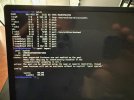
Instead it showed the following on the screen:

Consoles: EFI console
efipart_readwrite: rw=1, blk=2306 size=512 status=7
efipart_readwrite: rw=1, blk=2310 size=512 status=7

It continued to show these messages with the blk item increasing with steps of 4 (so 2314, 2318, 2322, etc.).
At first instance I thought it was a boot disk error (a PCIe NVME M.2 2280). So I ordered a new disk and created a bootable FreeBSD
installation USB disk to install FreeBSD on the new bought disk.
But with booting the created USB boot drive I got the exact same messages!
The system has multiple USB slots and the same happens regardless of which USB slot I choose for the
bootable USB disk. I also used 2 different USB drives. Used 2 different methods creating the USB boot drive (Etcher and dd on terminal). Same messages!
So, I am left with a system which does not boot.
I could not find a conclusive story online, so therefor the question: is this a system hardware problem?
I.e. a motherboard/controller problem? Or is this something else?

Any pointers are welcome!

Thanks.

Cheers,
Lars
 
Did you/can you pull out the original NVME device? I think the EFI partition is on that. According to this I think the status=7 is a device error "The physical device reported an error while attempting the operation."


Similar report from a few years ago:
 
Did you/can you pull out the original NVME device? I think the EFI partition is on that. According to this I think the status=7 is a device error "The physical device reported an error while attempting the operation."


Similar report from a few years ago:
Yes, the original NVME bootdisk is not in the system anymore. Is replaced with a new one.
Then inserted a fresh created USB FreeBSD install disk and got the same messages as booting with the original NVME bootdisk.
Used multiple USB ports of the system. Used multiple USB disks.
 
Did an additional test: created a Linux (Ubuntu) install USB disk (used previously to create FreeBSD bootdisk) and booted that. Booted just fine .... So hardware seems fine (?)
 
It would be useful to get more details of the hardware (motherboard details, other bios settings, etc..)

Sound like some edge case regression in loader.efi which would account why the usb stick is not booting either.

It's important to determine like mer said if it happens also with later vesions 14.4 and 15.0 and if so a bug should be filed in bugzilla. Any would be regression in loader.efi is of interest to all of us . Idem with regressions in storage controller handling or the like.
 
It would be useful to get more details of the hardware (motherboard details, other bios settings, etc..)

Sound like some edge case regression in loader.efi which would account why the usb stick is not booting either.

It's important to determine like mer said if it happens also with later vesions 14.4 and 15.0 and if so a bug should be filed in bugzilla. Any would be regression in loader.efi is of interest to all of us . Idem with regressions in storage controller handling or the like.
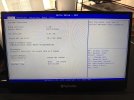
It is a Shuttle 570R6 system with AMI motherboard. See attached files for details.
Additional info: I have a second exact same system which 'survived' the latest update (to 14.3-RELEASE-p14) and is still running smoothly!
I cannot grasp what causes this behavior.
It 'seems' that the hardware is ok, but why the same behavior with USB boot disk as previously with NVME boot disk?
The only item suggested earlier which I have not done yet, is to flash the BIOS of this system. Will investigate if I can do this myself or that I need to bring the system to the store where I bought this (maybe this is the best option as they can then check the system as well).
Is the only I can think of as possible next step.

Last additional info: the NVME disk I talked about is/was just the boot disk of the system. The system has 2 additional disks which form a ZFS mirror, a separate pool (with several jails on it). So if I can't get this system going again, then as a last resort I have to move these disks to a new system.
 

Attachments

  • IMG_0414.jpeg
    IMG_0414.jpeg
    1.7 MB · Views: 15
  • IMG_0415.jpeg
    IMG_0415.jpeg
    663.1 KB · Views: 15
Makes no sense. Something is not OK with the hardware/firmare.

So basically last working/bootable system was 14.3-RELEASE-p12 and after that no more? No boot environments available I assume?

Looks like you already are on the latest published bios (https://global.shuttle.com/products/productsDownload?pn=SH570R6&c=xpc-cube) . Maybe as a last ditch experiment reflash it (information how to do that is on that site)

Confirm rest of settings first in the bios (secure boot off , check what nvram entries show up, boot order, etc...). Boot from a usb system rescue mfsbsd or similar and check out your ESP partiton ; does it even mount clean, md5sum of the BOOTX64.EFI file is OK , maybe even overwrite it with the one from the working system ; does efibootmgr tool show some entries, are those correct? You could experiment with chain loading using rEFInd (https://rodsbooks.com/refind/installing.html#efishell) .

Maybe you experienced a cosmic ray bit-flip in a component. Seem to remember a story about that and voting machines in your neck of the woods... :D
 
Reading a little the code of efi booting, it seems that at a stage it scans all the disks it can. So, it's possible that if you have a "defective" disk (one of your zfs pool for example), it dies trying to get the partitions info.

I don't believe the cause is an update of the efi loader because you probably didn't update it as it requires a manual intervention.

It's possible that the linux loader behaves differently and thus can boot anyway.

Try to remove all your disks, including the zfs mirror and boot on an FreeBSD USB key.
 
Reading a little the code of efi booting, it seems that at a stage it scans all the disks it can. So, it's possible that if you have a "defective" disk (one of your zfs pool for example), it dies trying to get the partitions info.

I don't believe the cause is an update of the efi loader because you probably didn't update it as it requires a manual intervenM
I tested this by placing the original perceived faulty boot NVME back in the system and de-attach the ZFS mirror drives. It booted flawless!
Attaching the drives again gave the initial mentioned messages again. Also with just 1 drive of the ZFS mirror attached.
This (also) clarifies the boot behavior with the USB disks.
So the ZFS mirror drives are found 'faulty' by the efi loader.
Question: can this check of the efi loader be switched off somehow?
I have SMART running on this system and I checked the logs but no logs indicating that something is wrong with these ZFS mirror drives prior to the reboot after the update to 14.3-p14.
The boot disk is also a (separate) ZFS pool with boot environments enabled. So also tested that. I booted the boot environment prior to the update (with 14.3-p13 - apologies I thought is was p12 but it was actually p13) and tested again. Same story unfortunately, boot ok with ZFS mirror not attached. No boot with the messages with ZFS mirror drives attached.
This situation is even worse as the ZFS mirror has all the goodies on it (it contains several jails - and I have no backup).
Lesson here is, even mirror drives do not protect you fully.
How can I check the ZFS mirror drives while these can't be attached during boot? And can the efi check be omitted somehow?
I will still look into flashing the BIOS of this system.
 
How did you set your zfs mirror? You took the raw disks as vdev by chance? No scheme and no partition on these disks?
I think this is an interesting set of questions. Perhaps updating the bootloader is in order. I'm not sure what the steps are for EFI update but there should be a bunch of topics on the forums that provide details.
 
Back
Top