Other Can't change display resolution away from the default 1920 x 1080

Ive been trying a bunch of different DE's over the past few days and I've had this problem in every single one. I cannot change my monitor resolution! I can find the setting no problem, and there is a list of resolutions. But, for example, if I change it to 1280x720, I get a distorted image for a few seconds before it turns back. Its a regular old 1080p monitor. I know it supports this lower resolution, I use macos on it at that resolution no problem (hardware is a 2012 mac mini).
 
Video Cable quality ,if low , usually prevents from reaching high resolutions.
usually DIsplay port 1.4 or HDMI 2.0 / 2.1 cables are usable.

second issue I have noticed, in KVM scenario , KVM needs to have the specific Computer and screen connected at computer
power-up for the screen to send the " EDID" information to the computer.
If the computer dont receive the EDID data from the screen , many wierd resoultions and blank/black screen will result.
 
Video Cable quality ,if low , usually prevents from reaching high resolutions.
usually DIsplay port 1.4 or HDMI 2.0 / 2.1 cables are usable.

second issue I have noticed, in KVM scenario , KVM needs to have the specific Computer and screen connected at computer
power-up for the screen to send the " EDID" information to the computer.
If the computer dont receive the EDID data from the screen , many wierd resoultions and blank/black screen will result.
No KVM, and the issue isn't using high resolutions, the issue is using LOWER resolutions. 1920 x 1080 is always fine, 1280 x 720 is always scrambled. and the other lower resolutions that I don't have memorized too. 1440 by whatever. etc etc
 
Alright, that looks good. Now use it to switch to 1280x720; xrandr -s 1280x720

That should work, just want to rule out issues caused by configuration settings from the various DEs you tried.
 
I'm back a month later with the same problem. I've switched from XFCE4 to KDE.

So 1080p work right every time, changing it to anything else (in the GUI does not work). I get a distorted, interlaced, unreadable image on the display. Then I hit nothing and it goes back by itself.

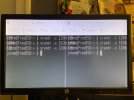
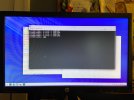
`xrandr -s 1280x720` does the same thing as selecting it in the GUI. It switches to it, my screen becomes unreadable, and I have to type mostly blind into the terminal to switch it back to 1920x1080. Any ideas? I'll include a photo of what I see just in case it has any clues.

After switching to 720p:
720p.jpg

Then switching back to 1080p:
1080p.jpg

This ALSO happened in Ubuntu when I tried that for a day. But again, in every version of macos, it works perfectly every time in any resolution I choose.
 
It seem that your screen support resolutions/frequencies as described in the Manual but Xorg can't read them (EDID).
You may need to create modeline as described in the Xorg FAQ.
Maybe something with horizontal frequency.
Some video output can read EDID (like your mac) and some other can't. In that case you need to create modeline.

Which video connector do you use on your mac and with your FreeBSD computer?

EDIT: reading the manual, there is 10 user mode that can be tweaked with on screen menu. Try reset them to factory default...
 
So I don't really understand most of what you just said. I understand "what connector do you use" though, and that would be the mini's HDMI port. The only other port is a thunderbolt 2 port, which I don't have a monitor or adapter for.
 
Yep...

Its a long file though. Is there a specific part you're looking for? Or should I delete it, try to switch resolutions once, then open it up? Something like that?
 
Nothing wrong here.
Try to reset the screen to factory settings et play with clock and clock phase, theses parameters can help.
Look from p20 of the manual.
 
Looking into the attached xorg.log.txt, there is a line below.
Code:
[    32.546] (II) modeset(0): Monitor name: HP LA2206

Searching Internet cannot find the exact model, but HP LA2206xc could be found.

Assuming yours is HP LA2206xc, looking into its spec, it has
  • Mini D-sub 15 (VGA)
  • DVI-D with HDCP support
  • DisplayPort with HDCP support
but no HDMI.

Do you have any converter (active or passive, cable-style or connector-style or external box)? I assume you have HDMI to DP converter.

In this kind of cases, the converter could have limited mode supports that cannot work fine other than 1920x1080 (including timings).

And what's confusing is that
Code:
[    31.997] (II) modeset(0): Creating default Display subsection in Screen section
    "Default Screen Section" for depth/fbbpp 24/32
[    31.997] (==) modeset(0): Depth 24, (==) framebuffer bpp 32
[    31.997] (**) modeset(0): Option "SWcursor" "on"
[    31.997] (==) modeset(0): RGB weight 888
[    31.997] (==) modeset(0): Default visual is TrueColor

lines and
Code:
[    32.546] (II) modeset(0): Supported color encodings: RGB 4:4:4 YCrCb 4:4:4
line looks mis-matching.
 
FYI: EDID hex data in xorg.log is decoded like below by sysutils/edid-decode.
Code:
edid-decode (hex):

00 ff ff ff ff ff ff 00 22 f0 47 29 01 01 01 01
33 15 01 03 80 30 1b 78 2e 95 25 a1 59 57 9f 27
0d 50 54 a1 08 00 81 c0 81 80 95 00 b3 00 d1 c0
01 01 01 01 01 01 02 3a 80 18 71 38 2d 40 58 2c
45 00 dc 0c 11 00 00 1e 00 00 00 fd 00 32 4c 18
5e 11 00 0a 20 20 20 20 20 20 00 00 00 fc 00 48
50 20 4c 41 32 32 30 36 0a 20 20 20 00 00 00 ff
00 33 43 51 31 35 31 42 47 35 50 0a 20 20 00 b7

----------------

Block 0, Base EDID:
  EDID Structure Version & Revision: 1.3
  Vendor & Product Identification:
    Manufacturer: HWP
    Model: 10567
    Serial Number: 16843009 (0x01010101)
    Made in: week 51 of 2011
  Basic Display Parameters & Features:
    Digital display
    Maximum image size: 48 cm x 27 cm
    Gamma: 2.20
    DPMS levels: Off
    RGB color display
    Default (sRGB) color space is primary color space
    First detailed timing is the preferred timing
  Color Characteristics:
    Red  : 0.6308, 0.3486
    Green: 0.3408, 0.6220
    Blue : 0.1523, 0.0527
    White: 0.3134, 0.3291
  Established Timings I & II:
    IBM     :   720x400    70.081663 Hz   9:5     31.467 kHz     28.320000 MHz
    DMT 0x04:   640x480    59.940476 Hz   4:3     31.469 kHz     25.175000 MHz
    DMT 0x09:   800x600    60.316541 Hz   4:3     37.879 kHz     40.000000 MHz
    DMT 0x10:  1024x768    60.003840 Hz   4:3     48.363 kHz     65.000000 MHz
  Standard Timings:
    DMT 0x55:  1280x720    60.000000 Hz  16:9     45.000 kHz     74.250000 MHz
    DMT 0x23:  1280x1024   60.019740 Hz   5:4     63.981 kHz    108.000000 MHz
    DMT 0x2f:  1440x900    59.887445 Hz  16:10    55.935 kHz    106.500000 MHz
    DMT 0x3a:  1680x1050   59.954250 Hz  16:10    65.290 kHz    146.250000 MHz
    DMT 0x52:  1920x1080   60.000000 Hz  16:9     67.500 kHz    148.500000 MHz
  Detailed Timing Descriptors:
    DTD 1:  1920x1080   60.000000 Hz  16:9     67.500 kHz    148.500000 MHz (476 mm x 268 mm)
                 Hfront   88 Hsync  44 Hback  148 Hpol P
                 Vfront    4 Vsync   5 Vback   36 Vpol P
    Display Range Limits:
      Monitor ranges (GTF): 50-76 Hz V, 24-94 kHz H, max dotclock 170 MHz
    Display Product Name: 'HP LA2206'
    Display Product Serial Number: '3CQ151BG5P'
Checksum: 0xb7

 
maybe specifying sync rates. Not all resolution of your video card or monitor can be available. sync rate & resolution must be supported by & video card & monitor. And as previous said cable connection can also be limiting.
 
I have an apple hdmi to dvi dongle, and a DVI cable connecting to the monitor. No Displayport. And the adapter does work fine under macossssss so I wouldn't think it is the problem. Some day when I have time ill move the machine to the living room and try straight hdmi to the tv.
 
Back
Top