
Getting stuck at boot

I had a working system (14.2-RELEASE) until today. The only root command I remember executing in the past days was to update Rust to 1.85.

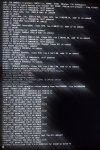
Not sure what exactly caused it but now I can no longer boot up the machine. It is getting stuck here:

I remember updating my graphics drivers long time ago because of the transition issues from 14.0 to 14.2, but that problem had been solved successfully and I had no issues since.

Any help is appreciated
 

Attachments

  • ResizedImage_2025-03-02_21-24-38_1775.jpg
    ResizedImage_2025-03-02_21-24-38_1775.jpg
    800.3 KB · Views: 409
I found out that it may be the i915 module. Changing my rc.conf and not loading it helps. It boots into the login prompt.

Problem is that I really need that module. I run FreeBSD as a desktop with Xorg and all that jazz.

I tried to deinstall and reinstall the drm-kms package from the latest ports, it it the same I had and it still gets stuck there.
 
I found out that it may be the i915 module. Changing my rc.conf and not loading it helps. It boots into the login prompt.

Problem is that I really need that module. I run FreeBSD as a desktop with Xorg and all that jazz.

I tried to deinstall and reinstall the drm-kms package from the latest ports, it it the same I had and it still gets stuck there.
Try building DRM kmod from ports.
 
I did not express myself precisely in my second post. I think that's exactly what I did. My ports collection is tracking latest. I went to /usr/ports/graphics/drm-kmod and did:

make deinslall
make install clean

It installed drm-kmod-20220907_3

I also did that with gpu-firmware-intel-kmod

When I include the i915kms in kld_list, the boot sequence gets stuck there.
 
I did not express myself precisely in my second post. I think that's exactly what I did. My ports collection is tracking latest. I went to /usr/ports/graphics/drm-kmod and did:

make deinslall
make install clean

It installed drm-kmod-20220907_3

I also did that with gpu-firmware-intel-kmod

When I include the i915kms in kld_list, the boot sequence gets stuck there.
It should be one of graphics/drm-515-kmod or graphics/drm-61-kmod. graphics/drm-kmod is a meta-port so it installs one of them but i suspect you still may have inappropriate DRM kmod. Can you post output of pkg info -x -g \*kmod. Thanks.

For example, I am on 14.2-R and i have the right DRM kmod matching my OSVERSION.
Rich (BB code):
% pkg info -x -g \*kmod
drm-515-kmod-5.15.160.1402000_3
% uname -K
1402000
 
Hah, indeed, I don't know why it happened, but my custom config file /usr/local/etc/pkg/repos/FreeBSD.conf where I had the URL for kmods_latest_${VERSION_MINOR} got changes to "enabled: no".

Maybe that's why it installed the old driver at some point, I guess.

I fixed it, installed the drm-61-kmod from the ports and now
pkg info -x -g \*kmod
says
drm-61-kmod-6.1.128.1402000_1

I don't know how I get the 1402000_3, though.

But at least I can now boot into the login prompt again.
 
I fixed it, installed the drm-61-kmod from the ports and now
pkg info -x -g \*kmod
says
drm-61-kmod-6.1.128.1402000_1

I don't know how I get the 1402000_3, though.
I use graphics/drm-515-kmod and it does have the 3rd port revision number but you use graphics/drm-61-kmod and it's latest port revision is just 1, so there isn't a problem.
Hah, indeed, I don't know why it happened, but my custom config file /usr/local/etc/pkg/repos/FreeBSD.conf where I had the URL for kmods_latest_${VERSION_MINOR} got changes to "enabled: no".

Maybe that's why it installed the old driver at some point, I guess.
Yes, you can use the kmod repository too instead of building from ports.

But at least I can now boot into the login prompt again.
Good.
 
Back
Top